
canvas小图123
1 绘制扇形图
<!DOCTYPE html>

<html>

<head>

<meta charset="utf-8">

    <title></title>

    <style type="text/css">

        *{

            margin: 0;

            padding: 0;

        }

        div{

            width: 600px;

            height: 600px;

            margin:30px auto;

            border:1px solid orange;

        }

    </style>

</head>

<body>

    <div>

        <canvas id="canvas"></canvas>

    </div>

<script type="text/javascript">

    var canvas = document.getElementById("canvas");

    var ctx = canvas.getContext("2d");

    canvas.width = 600;

    canvas.height = 600;

    var data = [

        {

            value:0.6,

            color:"lightcoral",

            text:"记者"

        },{

            value:0.1,

            color:"lightblue",

            text:"naive"

        },{

            value:0.1,

            color:"lightgreen",

            text:"simple"

        },{

            value:0.2,

            color:"darkgray",

            text:"跑得快"

        }

    ];

    //先画一个扇形

    //圆心就是300  300

    //半径就是200

    //start = 0 ,end = Math.PI*2*0.2

    //我们的文字放置位置

    //x=300+200*Math.cos(0.1*Math.PI*2)

    //y=300+200*Math.sin(0.1*Math.PI*2)

    // ctx.textAlign ="left";

    // ctx.textBaseLine = "top";

    var start=0;

    var end = 0;

    var text = 0;

    var r = 200;

    for(var i=0;i<data.length;i++){

        ctx.beginPath();

        ctx.moveTo(300,300);

        end = start+data[i].value*2*Math.PI;

        ctx.arc(300,300,r,start,end);

        ctx.closePath();

        ctx.fillStyle=data[i].color;

        ctx.fill();

        ctx.stroke();

        // ctx.font="16px 微软雅黑";

        text = start + data[i].value/2*2*Math.PI;

        var x = 300+r*Math.cos(text);

        var y = 300+r*Math.sin(text);

        if(x>300){

            ctx.textAlign="start";

            // x=x+10;

        }else{

            ctx.textAlign="end";

            // x=x-10;

        }

        if(y>300){

            ctx.textBaseLine = "top";

            y=y+10;

        }else{

            ctx.textBaseLine = "bottom";

            // y=y-10

        }

        ctx.fillText(data[i].text,x,y);

        start = end;

    }

</script>

</body>

</html>
//动图版

  var start = 0;

    var end = 0;

    var p = Math.PI*2;

    var i=0;

    function animate(){

        ctx.beginPath();

        var flag = 0;

        canvas.timer = setInterval(function(){

            flag++;

            ctx.moveTo(300,300);

            end = start+ flag/100*p;

            ctx.arc(300,300,200,start,end);

            ctx.fillStyle=data[i].color;

            ctx.fill();

            if(flag==data[i].value*100){

                clearInterval(canvas.timer);

                ctx.closePath();

                start = end;

                i++;

                if(i<data.length){

                    animate();

                }

            }

        },1000/60)

    }

    animate()

2 小光点
<!DOCTYPE html>

<html>

<head>

    <meta charset="utf-8">

    <title>绘制彩色光点</title>

</head>

<body>

<canvas id="canvas">

</canvas>

<script type="text/javascript">

    var canvas = document.getElementById("canvas");//获得画布

    var ctx = canvas.getContext("2d");//得到canvas的上下文对象(获得画布控制权)

    canvas.width = 500;

    canvas.height= 500;

    canvas.style.background = "white";

    canvas.style.border = "1px solid darkgray";

    canvas.style.position="relative";

    canvas.style.left="400px";

    canvas.onmousedown=function(e){

        var x = e.clientX;

        var y = e.clientY+this.offsetTop;

            canvas.onmousemove=function(e){

                var moveX = e.clientX;

                var moveY = e.clientY+this.offsetTop;

                ctx.beginPath();

                ctx.arc(x-this.offsetLeft,y,moveX-x,2*Math.PI,false);

                ctx.closePath();

                var color = "rgba("+Math.ceil(Math.random()*255)+","+Math.ceil(Math.random()*255)+","+Math.ceil(Math.random()*255)+",1)";

                ctx.fillStyle = color;

                ctx.fill();

            }

            canvas.onmouseup=function(){

                canvas.onmousemove =null;

            }

    }

</script>

</body>

</html>
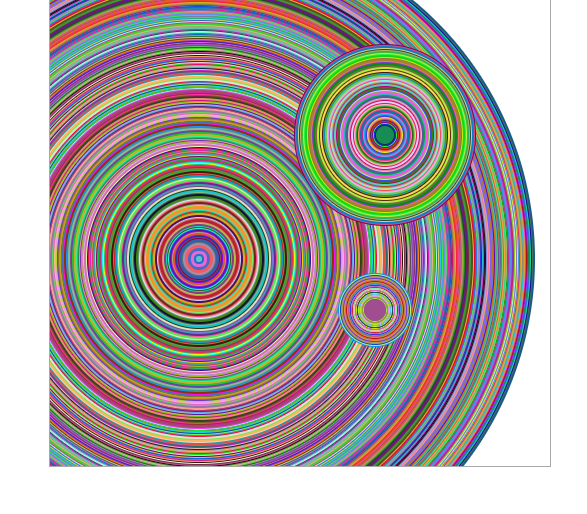
3 刮奖功能
刮出一个谢就可以,何必要把谢谢惠顾四个字都刮出来才肯放手呢

<!DOCTYPE html>

<html>

<head>

    <meta charset="utf-8">

    <title>擦除效果</title>

    <style type="text/css">

        *{

            margin: 0;

            padding: 0;

        }

        div{

            width: 500px;

            margin:50px auto;

            /*border:1px solid #ccc;*/

           background-image: url(img/starks.jpg);

        }

    </style>

</head>

<body>

<div>

    <canvas id="canvas">

    </canvas>

</div>

<script type="text/javascript">

    var canvas = document.getElementById("canvas");

    var ctx = canvas.getContext("2d");

    canvas.width = 500;

    canvas.height= 500;

    ctx.fillRect(0, 0, 500, 500)

    //擦除功能:手动(通过鼠标拖放)绘制一个矩形,绘制出的矩形里面的内容被清除

    canvas.onmousedown=function(e){

        var e = e ||window.event;

        // console.log(e);

        if(e.button==0){

            var startX = e.clientX - canvas.offsetLeft;

            var startY = e.clientY - canvas.offsetTop;

            // console.log(canvas.offsetTop)

            canvas.onmousemove=function(e){

                var e = e ||window.event;

                var endX = e.clientX - canvas.offsetLeft;

                var endY = e.clientY - canvas.offsetTop;

                var width = endX- startX;

                var height = endY - startY ;

                ctx.clearRect(startX,startY,width,height);

            }

            canvas.onmouseup=function(){

                if(e.button==0){

                    canvas.onmousemove=null;

                }

            }

        }

    }

</script>

</body>

</html>
canvas小图123的更多相关文章
- [原]Wpf应用Path路径绘制圆弧
1. 移动指令:Move Command(M):M 起始点 或者:m 起始点比如:M 100,240或m 100,240使用大写M时,表示绝对值; 使用小写m时; 表示相对于前一点的值,如果前一点没 ...
- modernizr.js
1.判断浏览器是否支持 h5 if(Modernizr.canvas){ alert(123); }else{ alert(321); } 2.判断浏览器是否支持 canvas function su ...
- WPF图片浏览器(显示大图、小图等)
原文:WPF图片浏览器(显示大图.小图等) 版权声明:本文为博主原创文章,未经博主允许不得转载. https://blog.csdn.net/wangshubo1989/article/details ...
- 伙伴们休息啦canvas绘图夜空小屋
HTML5 canvas绘图夜空小屋 伙伴们园友们,夜深了,休息啦,好人好梦... 查看效果:http://hovertree.com/texiao/html5/28/ 效果图如下: 代码如下: &l ...
- canvas简介
一.canvas简介 1.1 什么是canvas?(了解) 是HTML5提供的一种新标签 <canvas></canvas> 英 ['kænvəs] 美 ['kænvəs] 帆 ...
- 用HTML5 CANVAS做自定义路径的动态效果图片!
最近对HTML5开始感兴趣了,实现的效果如下图,大家可以从代码里换掉图片 我用的是canvas里面的2d绘图,其中上图的路径是网上在线绘制的,我太懒了,哈哈 下面是网址: http://www.vic ...
- 使用javascript和canvas画月半弯
使用javascript和canvas画月半弯,月半弯好浪漫!浏览器须支持html5 查看效果:http://keleyi.com/a/bjad/8xqdm0r2.htm 以下是代码: <!do ...
- 踩个猴尾不容易啊 Canvas画个猴子
踩个猴尾不容易啊 Canvas画个猴子 <!DOCTYPE html> <html> <head> <meta charset="UTF-8&qu ...
- canvas转盘抽奖
1 <!DOCTYPE html> 2 <html> 3 <head> 4 <meta http-equiv="Content-Type" ...
随机推荐
- 第三篇、Swift基础学习
1.常量与变量 什么是常量和变量 在Swift中规定:在定义一个标识符时必须明确说明该标识符是一个常量还是变量 使用let来定义常量,定义之后不可以修改 使用var来定义变量,定义之后可以修改 变量的 ...
- 自定义配置Webpack和Babel配置
在使用ant-design-vue的包时样式是可以生效的但是如果我需要用到less文件时会报一个异常 当然这个异常其实很清晰的说明了什么问题看错误信息里面有issues地址,看来问题不止我们遇见了可以 ...
- JavaScript获取时间戳与时间戳转化
第一种方法(精确到秒): var timestamp1 = Date.parse( new Date()); 第二种方法(精确到毫秒): var timestamp2 = ( new Date()). ...
- Steamroller-freecodecamp算法题目
Steamroller 1.要求 对嵌套的数组进行扁平化处理.你必须考虑到不同层级的嵌套. 2.思路 设定结果数组res 用for循环遍历arr的元素,判断是否为数组,是,则用res=res.conc ...
- 垂直居中一个img
{ display:table-cell; text-align:center; vertical-align:middle; }
- mysql 绿色版 安装
1.下载mysql的绿色版压缩包.(自行百度) 2.自行规划目录解压 3.安装 注意:我遇到的两种版本的安装方法(暂时按照解压后的目录中是否含有data目录来区分) 3.1 无data目录(我用到的的 ...
- 微信小程序js学习心得体会
微信小程序js学习心得体会 页面控制的bindtap和catchtap 用法,区别 <button id='123' data-userDate='100' bindtap='tabMessag ...
- LigerUI 快速开发UI框架 链接
LigerUI 快速开发UI框架 http://www.ligerui.com/ jQuery ligerUI 中文官方网站 http://www.ligerui.com/demo.html
- 利用DOM的方式点击切换图片及修改文字
本案例主要学习理解,用到的几个DOM方法 01.getAttribute()方法,获取元素的属性值 02.setAttribute('src',source) 方法,用后边的值修改前边这个元素的属性值 ...
- rest_framework序列化
1.序列化 1)拿到queryset 2)将queryset 给序列化类 serializer = IdcSerializer(idc) #单个对象 serializer = IdcSerial ...