
Android 解析JSON
上次讲了XML格式数据的解析方式,这次要说的是如何解析JSON数据格式,相对与XML,JSON解析数据的方式在于它的体积更小,在网络上传输可以更省流量。
这次在网上找到一个中国天气json数据的API接口,这就更便于我们直接去解析别人弄好的数据拿来使用,下面这是从网上下载json文件,当然也可以自己简单的编辑:
{"desc":"OK","status":1000,"data":{"wendu":"25","ganmao":"相对于今天将会出现大幅度降温,风力较大,易发生感冒,请注意适当增加衣服。","forecast":[{"fengxiang":"无持续风向","fengli":"微风级","high":"高温 26℃","type":"多云","low":"低温 17℃","date":"2日星期二"},{"fengxiang":"无持续风向","fengli":"5-6级","high":"高温 22℃","type":"大雨","low":"低温 17℃","date":"3日星期三"},{"fengxiang":"无持续风向","fengli":"微风级","high":"高温 25℃","type":"晴","low":"低温 15℃","date":"4日星期四"},{"fengxiang":"无持续风向","fengli":"微风级","high":"高温 27℃","type":"晴","low":"低温 16℃","date":"5日星期五"},{"fengxiang":"无持续风向","fengli":"微风级","high":"高温 23℃","type":"阴","low":"低温 16℃","date":"6日星期六"}],"yesterday":{"fl":"微风","fx":"东风","high":"高温 23℃","type":"中雨","low":"低温 15℃","date":"1日星期一"},"aqi":"79","city":"武汉"}}
 package com.example.weather;

 import java.io.BufferedReader;

 import java.io.InputStream;

 import java.io.InputStreamReader;

 import java.net.HttpURLConnection;

 import java.net.URL;

 import java.net.URLEncoder;

 import org.json.JSONArray;

 import org.json.JSONException;

 import org.json.JSONObject;

 import android.app.Activity;

 import android.content.pm.ApplicationInfo;

 import android.content.pm.PackageInfo;

 import android.os.Bundle;

 import android.os.Handler;

 import android.os.Message;

 import android.text.TextUtils;

 import android.view.View;

 import android.widget.EditText;

 import android.widget.TextView;

 import android.widget.Toast;

 import com.example.weather.util.ReadStrean;

 public class MainActivity extends Activity {

     protected static final int SUCCESS = 0;

     protected static final int ERROR =1;

     protected static final int FAILL = 2;

     private EditText et_city;

     private TextView tv_one,tv_two,tv_three;

     private String version;

     private Handler handler=new Handler(){

         public void handleMessage(android.os.Message msg) {

             switch (msg.what) {

             case SUCCESS:

                 JSONArray array = (JSONArray)msg.obj;

                 try {

                     tv_one.setText(array.getString(0).toString());

                     tv_two.setText(array.getString(1).toString());

                     tv_three.setText(array.getString(2).toString());

                 } catch (JSONException e) {

                     e.printStackTrace();

                 }

                 break;

             case ERROR:

                 Toast.makeText(MainActivity.this,"请输入正确的城市名称" , 0).show();

                 break;

             case FAILL:

                 Toast.makeText(MainActivity.this,"网络是否连接!" , 0).show();

                 break;

             }

         };

     };

     @Override

     protected void onCreate(Bundle savedInstanceState) {

         super.onCreate(savedInstanceState);

         setContentView(R.layout.activity_main);

         initView();

 //        initDate();

     }

 //    private void initDate() {

 //        try {

 //            PackageInfo info = getApplicationContext().getPackageManager().getPackageInfo(getApplicationContext().getPackageName(), 0);

 //            version= info.versionName;

 //

 //            new Thread(){

 //                public void run() {

 //                    try {

 //                        URL url=new URL("http://192.168.1.113:8080/version.json");

 //                        //打开网络连接

 //                        HttpURLConnection conn= (HttpURLConnection) url.openConnection();

 //                        //设置连接方式"GET"

 //                        conn.setRequestMethod("GET");

 //                        //设置http网络连接时间

 //                        conn.setConnectTimeout(5000);

 //                        //请求服务器得到一个返回码

 //                        int code= conn.getResponseCode();

 //                        if(code == 200){

 //                            //getInputStream方法得到输入流其实就是从服务器端发回的数据

 //                            InputStream is=conn.getInputStream();

 //                            StringBuilder builder=new StringBuilder();

 //                            int len;

 //                            String line;

 //                            BufferedReader read=new BufferedReader(new InputStreamReader(is));

 //                            while ((line = read.readLine())!=null) {

 //                                builder.append(line);

 //                            }

 //                            is.close();

 //                            read.close();

 //                            String json = builder.toString();

 //                            System.out.println(json+"123456");

 //                            JSONObject object=new JSONObject(json);

 //                            String appversion = object.getString("version");

 //                            if(version.equals(appversion)){

 //                                runOnUiThread(new  Runnable() {

 //                                    public void run() {

 //                                        Toast.makeText(MainActivity.this, "暂无新版本", 0).show();

 //                                    }

 //                                });

 //                            }else {

 //

 //                            }

 //                        }

 //                        else {

 //                            System.out.println("nononono");

 //                        }

 //                    } catch (Exception e) {

 //                        // TODO Auto-generated catch block

 //                        e.printStackTrace();

 //                    }

 //                };

 //            }.start();

 //        } catch (Exception e) {

 //            // TODO Auto-generated catch block

 //            e.printStackTrace();

 //        }

 //    }

     private void initView() {

         et_city=(EditText) findViewById(R.id.et_city);

         tv_one=(TextView) findViewById(R.id.tv_one);

         tv_two=(TextView) findViewById(R.id.tv_two);

         tv_three=(TextView) findViewById(R.id.tv_three);

     }

     public void onclick (View v){

         final String city = et_city.getText().toString().trim();

         if(TextUtils.isEmpty(city)){

             Toast.makeText(this, "请输入城市名称", 0).show();

             return;

         }

         new Thread(){

             public void run() {

                 try {

                     String path="http://wthrcdn.etouch.cn/weather_mini?city="+URLEncoder.encode(city, "utf-8");

                     URL url = new URL(path);

                     //打开网络连接

                     HttpURLConnection conn = (HttpURLConnection)url.openConnection();

                     //设置连接方式"GET"

                     conn.setRequestMethod("GET");

                     //设置http网络连接时间

                     conn.setConnectTimeout(5000);

                     //请求服务器得到一个返回码

                     int code = conn.getResponseCode();

                     if(code== 200){

                         //getInputStream方法得到输入流其实就是从服务器端发回的数据

                         InputStream is= conn.getInputStream();

                         String json = ReadStrean.readstreanUtil(is);

                         is.close();

                         //创建一个JSONObject对象

                         JSONObject object= new JSONObject(json);

                         //取得json数据格式的第一个键,也是解析json数据的入口

                         String desc = object.getString("desc");

                         if("OK".equals(desc)){

                             //开始解析json

                             JSONObject data = object.getJSONObject("data");

                             JSONArray array= data.getJSONArray("forecast");

                             Message msg=new Message();

                             msg.what=SUCCESS;

                             msg.obj=array;

                             handler.sendMessage(msg);

                         }

                     }else {

                         Message msg=new Message();

                         msg.what=FAILL;

                         handler.sendMessage(msg);

                     }

                 } catch (Exception e) {

                     e.printStackTrace();

                     Message msg=new Message();

                     msg.what=ERROR;

                     handler.sendMessage(msg);

                 }

             };

         }.start();

     }

 }
自定义读取流的工具类:
package com.example.weather.util;

import java.io.ByteArrayOutputStream;

import java.io.IOException;

import java.io.InputStream;

public class ReadStrean {

    public static String readstreanUtil(InputStream is) throws IOException{

        ByteArrayOutputStream bos = new ByteArrayOutputStream();

        int len;

        byte [] arr=new byte[1024];

        while((len=is.read(arr))!=-1){

            bos.write(arr, 0, len);

        }

        is.close();

        bos.close();

        return bos.toString("utf-8");

    }

}
xml布局:
 <LinearLayout xmlns:android="http://schemas.android.com/apk/res/android"

     xmlns:tools="http://schemas.android.com/tools"

     android:layout_width="match_parent"

     android:layout_height="match_parent"

     android:orientation="vertical"

     tools:context="${relativePackage}.${activityClass}" >

     <EditText

         android:id="@+id/et_city"

         android:layout_width="match_parent"

         android:layout_height="wrap_content"

         android:hint="请输入城市名称:" />

     <Button

         android:id="@+id/btn_see"

         android:onClick="onclick"

         android:layout_width="match_parent"

         android:layout_height="wrap_content"

         android:text="查      看" />

     <TextView

         android:id="@+id/tv_one"

         android:layout_width="match_parent"

         android:layout_height="0dip"

         android:layout_weight="1"

         android:text="今天"

         android:textColor="#FF1493" />

     <TextView

         android:layout_width="match_parent"

         android:layout_height="1dp"

         android:background="@android:color/darker_gray" />

     <TextView

         android:id="@+id/tv_two"

         android:layout_width="match_parent"

         android:layout_height="0dip"

         android:layout_weight="1"

         android:text="明天"

         android:textColor="#DC143C" />

     <TextView

         android:layout_width="match_parent"

         android:layout_height="1dp"

         android:background="@android:color/darker_gray" />

     <TextView

         android:id="@+id/tv_three"

         android:layout_width="match_parent"

         android:layout_height="0dip"

         android:layout_weight="1"

         android:text="后天"

         android:textColor="#BC8F8F" />

 </LinearLayout>
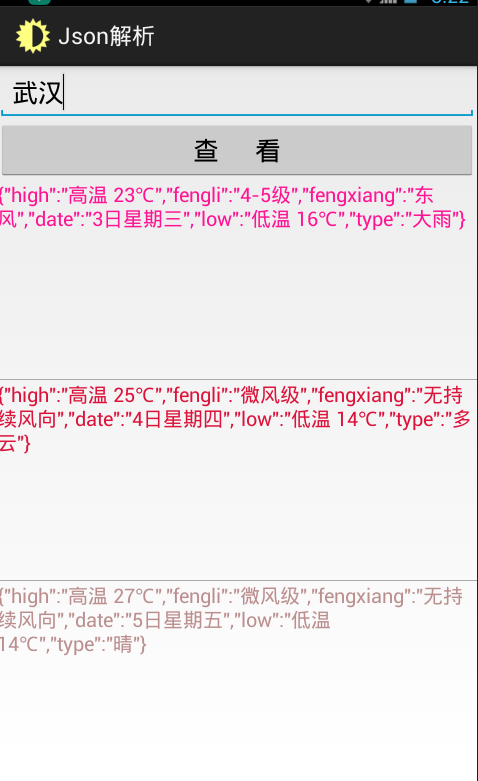
最终解析显示图:
添加访问网络权限:<uses-permission android:name="android.permission.INTERNET"/>
源码下载地址:http://pan.baidu.com/s/1qXVGyZU
Android 解析JSON的更多相关文章
- android解析json
android2.3提供的json解析类 android的json解析部分都在包org.json下,主要有以下几个类: JSONObject:可以看作是一个json对象 JSONStringer:js ...
- 第十七章:android解析JSON
一.解析JSON数据: 首先引入包import org.json.JSONObject;(android sdk 14以后应该自带了 ) Android端的程序解析JSON和JSON数组: packa ...
- Android解析Json速度最快的库:json-smart
场景描写叙述: 本文仅验证了在安卓环境下使用Json的Key作为反序列化条件的解析速度.结论是解析速度最快的不是阿里的fastjson,也不是Google的Gson,而是json-smart. And ...
- 在android解析json
1.采用一般方式解释json为对象 package com.heimazyh.testjson; import org.json.JSONException; import org.json.JSON ...
- Android解析Json数据之Gson解析
Gson是谷歌官方提供的解析json数据的工具类.json数据的解析能够使用JSONObject和JSONArray配合使用解析数据,可是这样的原始的方法对于小数据的解析还是有作用的,可是陪到了复杂数 ...
- Android 解析JSON格式数据
比起XML,JSON主要优势在于它的体积更小,在网络上传输的时候可以更省流量.但缺点在于,它的语义性较差,显示不如XML直观. JSON格式 : { "name_A" : &qu ...
- Android解析json数据
Json数据 [{"code":"110000","sheng":"11","di":"0 ...
- [转]Android解析json数据
1.json格式 2.json解析 3.gson解析 4.fastjson解析 一.Json格式 json一种轻量级的数据交换格式.在网络上传输交换数据一般用xml, json. 两种结构: 1)对象 ...
- android解析json包(接口)
package com.http.test; 02 03 04 import org.apache.http.HttpResponse; 05 import org.apache.http ...
随机推荐
- 20170622-编译Uboot错误
参照:http://docs.widora.io/zh/uboot编译 Assembler messages:Error: unknown architecture `4kc' Error: unre ...
- 一个电商项目的Web服务化改造6:单元测试4步走,构造数据、执行操作、断言、回滚
最近一直在做一个电商项目,需要把原有单系统架构的项目,改造成基于服务的架构,SOA. 有点挑战,做完了,会有很大进步. 单元测试,在很早之前的文章已经介绍过. 可以在这里看到相关的 ...
- 【hdu 2036】改革春风吹满地
[题目链接]:http://acm.hdu.edu.cn/showproblem.php?pid=2036 [题意] 中文题 [题解] 这里用的是叉积对应的求三角形的面积; 即 A×B=A*B*sin ...
- windows下swoole安装教程
1)下载安装cygwin(根据操作系统选择32位或者64位): https://cygwin.com/install.html 选择在windows中虚拟环境的root目录 选择下载安装的网络节点,如 ...
- Java多线程之如何确定线程数
关于多线程的线程数的确定,最近研读过几篇paper,在此做一下笔记,方便使用时翻看. 1.<Java 虚拟机并发编程>中介绍 就是说:线程数 = CPU的核心数 * (1 - 阻塞系数) ...
- Verilog堵塞赋值与非堵塞赋值
verilog设计进阶 时间:2014年5月6日星期二 主要收获: 1.堵塞赋值与非堵塞赋值: 2.代码測试: 3.组合逻辑电路和时序逻辑电路. 堵塞赋值与非堵塞赋值: 1.堵塞赋值"=&q ...
- 设计模式学习–Decorator
What Decorator:动态地给一个对象加入一些额外的职责. 就添加功能来说.Decorator模式相比生成子类更加灵活. Why Decorator模式适用于能够动态的给对象增删职责.比方qq ...
- oc30--id
// // Person.h #import <Foundation/Foundation.h> @interface Person : NSObject - (void)sleep; @ ...
- Android系统Recovery工作原理之使用update.zip升级过程分析(八)---解析并执行升级脚本updater-script【转】
本文转载自:http://blog.csdn.net/mu0206mu/article/details/7465551 Android系统Recovery工作原理之使用update.zip升级过程分 ...
- Android WiFi/WiFi热点开发总结
首先看一下WiFi的自我介绍: Wi-Fi是一种允许电子设备连接到一个无线局域网(WLAN)的技术,通常使用2.4G UHF或5G SHF ISM 射频频段.连接到无线局域网通常是有密码保护的:但也可 ...