
MapReduce编程之倒排索引
任务要求:
//输入文件格式
18661629496 110
13107702446 110
1234567 120
2345678 120
987654 110
2897839274 18661629496
//输出文件格式格式
11018661629496|13107702446|987654|18661629496|13107702446|987654|
1201234567|2345678|1234567|2345678|
186616294962897839274|2897839274|
mapreduce程序编写:
|
1
2
3
4
5
6
7
8
9
10
11
12
13
14
15
16
17
18
19
20
21
22
23
24
25
26
27
28
29
30
31
32
33
34
35
36
37
38
39
40
41
42
43
44
45
46
47
48
49
50
51
52
53
54
55
56
57
58
59
60
61
62
63
64
65
66
67
68
69
70
71
72
73
74
75
76
77
78
79
80
81
82
83
84
85
86
|
import java.io.IOException;import java.util.StringTokenizer;import org.apache.hadoop.conf.Configuration;import org.apache.hadoop.fs.Path;import org.apache.hadoop.io.IntWritable;import org.apache.hadoop.io.LongWritable;import org.apache.hadoop.io.Text;import org.apache.hadoop.mapreduce.Job;import org.apache.hadoop.mapreduce.Mapper;import org.apache.hadoop.mapreduce.Reducer;import org.apache.hadoop.mapreduce.lib.input.FileInputFormat;import org.apache.hadoop.mapreduce.lib.output.FileOutputFormat;public class Test2 { enum Counter { LINESKIP,//记录出错的行 } public static class Map extends Mapper<LongWritable, Text, Text, Text>{ public void map(LongWritable key, Text value, Context context) throws IOException, InterruptedException { String line = value.toString();//读取源数据 try { //数据处理 String [] lineSplit = line.split(" ");//18661629496,110 String anum = lineSplit[0]; String bnum = lineSplit[1]; //输出格式:110,18661629496 context.write(new Text(bnum), new Text(anum)); } catch(ArrayIndexOutOfBoundsException e) { context.getCounter(Counter.LINESKIP).increment(1);//出错时计数器+1 return; } } } public static class Reduce extends Reducer<Text, Text, Text, Text> { public void reduce(Text key, Iterable<Text> values, Context context) throws IOException, InterruptedException { String valueString; String out=""; for(Text value:values) { valueString=value.toString(); out+=valueString+"|"; } context.write(key, new Text(out)); } } public static void main(String[] args) throws Exception { Configuration conf = new Configuration(); if (args.length != 2) { System.err.println("请配置输入输出路径 "); System.exit(2); } //各种配置 Job job = new Job(conf, "telephone ");//作业名称配置 //类配置 job.setJarByClass(Test2.class); job.setMapperClass(Map.class); job.setReducerClass(Reduce.class); //map输出格式配置 job.setMapOutputKeyClass(Text.class); job.setMapOutputValueClass(Text.class); //作业输出格式配置 job.setOutputKeyClass(Text.class); job.setOutputValueClass(Text.class); //添加输入输出路径 FileInputFormat.addInputPath(job, new Path(args[0])); FileOutputFormat.setOutputPath(job, new Path(args[1])); //任务完毕时退出 System.exit(job.waitForCompletion(true) ? 0 : 1); }} |
将mapreduce程序打包为jar文件:
1.右键项目名称->Export->java->jar file
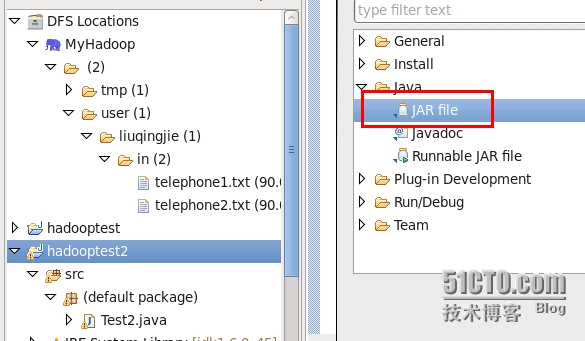
2.配置jar文件存储位置
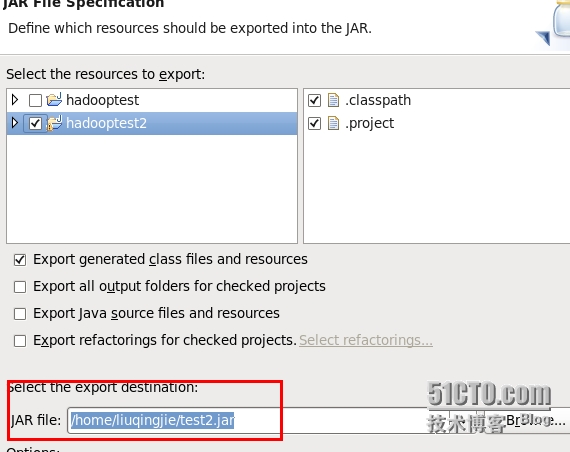
3.选择main calss
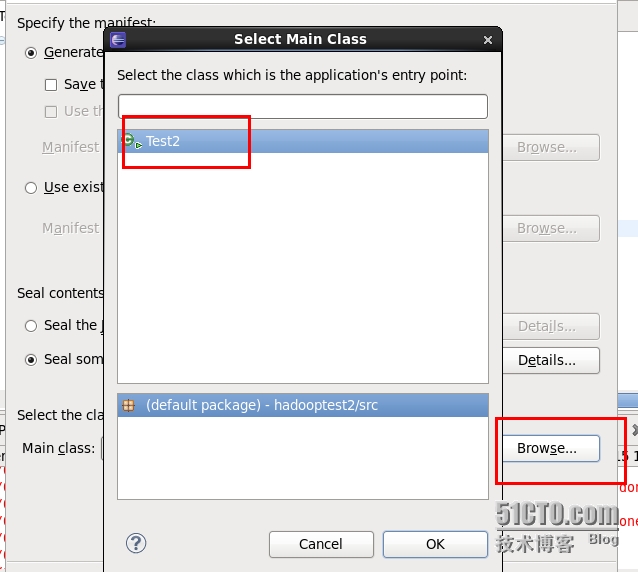
4.执行jar文件
[liuqingjie@master hadoop-0.20.2]$ bin/hadoop jar /home/liuqingjie/test2.jar /user/liuqingjie/in /user/liuqingjie/out
15/05/14 01:46:47 WARN mapred.JobClient: Use GenericOptionsParser for parsing the arguments. Applications should implement Tool for the same.
15/05/14 01:46:47 INFO input.FileInputFormat: Total input paths to process : 2
15/05/14 01:46:48 INFO mapred.JobClient: Running job: job_201505132004_0005
15/05/14 01:46:49 INFO mapred.JobClient: map 0% reduce 0%
15/05/14 01:46:57 INFO mapred.JobClient: map 100% reduce 0%
15/05/14 01:47:09 INFO mapred.JobClient: map 100% reduce 100%
……………………………………………………………………………………
查看结果
[liuqingjie@master hadoop-0.20.2]$ bin/hadoop dfs -cat ./out/*
cat: Source must be a file.
110 18661629496|13107702446|987654|18661629496|13107702446|987654|
120 1234567|2345678|1234567|2345678|
18661629496 2897839274|2897839274|
MapReduce编程之倒排索引的更多相关文章
- [置顶] MapReduce 编程之 倒排索引
本文调试环境: ubuntu 10.04 , hadoop-1.0.2 hadoop装的是伪分布模式,就是只有一个节点,集namenode, datanode, jobtracker, tasktra ...
- MapReduce编程(七) 倒排索引构建
一.倒排索引简单介绍 倒排索引(英语:Inverted index),也常被称为反向索引.置入档案或反向档案,是一种索引方法,被用来存储在全文搜索下某个单词在一个文档或者一组文档中的存储位置的映射. ...
- Hadoop MapReduce编程学习
一直在搞spark,也没时间弄hadoop,不过Hadoop基本的编程我觉得我还是要会吧,看到一篇不错的文章,不过应该应用于hadoop2.0以前,因为代码中有 conf.set("map ...
- hadoop2.2编程:使用MapReduce编程实例(转)
原文链接:http://www.cnblogs.com/xia520pi/archive/2012/06/04/2534533.html 从网上搜到的一篇hadoop的编程实例,对于初学者真是帮助太大 ...
- 三、MapReduce编程实例
前文 一.CentOS7 hadoop3.3.1安装(单机分布式.伪分布式.分布式 二.JAVA API实现HDFS MapReduce编程实例 @ 目录 前文 MapReduce编程实例 前言 注意 ...
- Hadoop MapReduce编程 API入门系列之压缩和计数器(三十)
不多说,直接上代码. Hadoop MapReduce编程 API入门系列之小文件合并(二十九) 生成的结果,作为输入源. 代码 package zhouls.bigdata.myMapReduce. ...
- [Hadoop入门] - 1 Ubuntu系统 Hadoop介绍 MapReduce编程思想
Ubuntu系统 (我用到版本号是140.4) ubuntu系统是一个以桌面应用为主的Linux操作系统,Ubuntu基于Debian发行版和GNOME桌面环境.Ubuntu的目标在于为一般用户提供一 ...
- mapreduce编程模型你知道多少?
上次新霸哥给大家介绍了一些hadoop的相关知识,发现大家对hadoop有了一定的了解,但是还有很多的朋友对mapreduce很模糊,下面新霸哥将带你共同学习mapreduce编程模型. mapred ...
- 《Data-Intensive Text Processing with mapReduce》读书笔记之二:mapreduce编程、框架及运行
搜狐视频的屌丝男士第二季大结局了,惊现波多野老师,怀揣着无比鸡冻的心情啊,可惜随着剧情的推进发展,并没有出现期待中的屌丝奇遇,大鹏还是没敢冲破尺度的界线.想百度些种子吧,又不想让电脑留下污点证据,要知 ...
随机推荐
- sublime的一些快捷键
Sublime Text 3非常实用,但是想要用好,一些快捷键不可或缺,所以转了这个快捷键汇总. 用惯了vim,有些快捷键也懒得用了,尤其是在win下面,还有图形界面,所以个人觉得最有用的还是搜索类, ...
- Mybatis中resultMap的作用-解决实体类属性名和数据库字段不一致
解决实体类属性名和数据库字段不一致
- Oracle表的种类及定义
1表的类型 1)堆组织表(heap organized tables). 当增加数据时,将使用在段中找到的第一个适合数据大小的空闲空间.当数据从表中删除时,留下的空间允许随后的insert和updat ...
- hdu4009 Transfer water 最小树形图
每一户人家水的来源有两种打井和从别家接水,每户人家都可能向外输送水. 打井和接水两种的付出代价都接边.设一个超级源点,每家每户打井的代价就是从该点(0)到该户人家(1~n)的边的权值.接水有两种可能, ...
- [ Java ] String 轉型 ArrayList
Lambda 對我而言一很像天書 這個行 Java code 讓我開始有點些微有 Lambda 感覺 https://stackoverflow.com/questions/10706721/conv ...
- jq+mui 阻止事件冒泡
<!DOCTYPE html> <html> <head> <meta charset="UTF-8"> <meta name ...
- 关于编译PCL1.71
最近在编译PCL1.71时总会出现错误, 编译的时候就出现无法生成pcl_io_debug.lib 由于无法生成pcl_io_debug.lib,. 借鉴PCL中国的经验: (1):把io\inclu ...
- (转) RabbitMQ学习之发布/订阅(java)
http://blog.csdn.net/zhu_tianwei/article/details/40887733 参考:http://blog.csdn.NET/lmj623565791/artic ...
- .NET 请求和接收FormData的值
<body> <div> <!-- 上传单个文件---> <form action="/Home/UpdateFile2" enctype ...
- jquery选择器的一些处理
本文不讨论用jquery选择器具体怎么选择页面元素,而讨论选择元素后后的一些处理 jquery的选择器选择元素的时候,即使没有选择到指定的对象,页面并不会报错,例子: <!doctype htm ...