
【WPF】UI虚拟化之------自定义VirtualizingWrapPanel
原文:【WPF】UI虚拟化之------自定义VirtualizingWrapPanel
前言
前几天QA报了一个关于OOM的bug,在排查的过程中发现,ListBox控件中被塞入了过多的Item,而ListBox又定义了两种样式的ItemsPanelTemplate。一种用的是虚拟化的VirtualizingStackPanel,另一种没有考虑虚拟化用的是WrapPanel。所以当ListBox切换到第二种Template,而且有很多Item的时候,内存就爆掉然后直接挂了。
然后就想着有没有现成的VirtualizingWrapPanel可以直接拿来用用,可惜微软并没有直接给我们提供这种panel,但是提供了VirtualizingPanel这个抽象类。没办法只能自己动手做了,借助于VirtualizingPanel和IScrollInfo。IScrollInfo主要是用来滚动效果,而VirtualizingPanel则提供了虚拟化过程中,child的移除和添加操作。其实虚拟化的本质不就是把需要显示到UI上的item画上去,把已经画上去但不需要再显示的撤下来嘛!
因为改bug的时候又来了个新的需求,就是要把WrapPanel中每一行的item之间的距离设置为等间距的,所以这次的UI虚拟化之旅确切来说应该是自定义一个VirtualizingUniformGridWrapPanel。
实现
1. 新建类VirtualizingWrapPanel,继承VirtualizingPanel并实现IScrollInfo
public class VirtualizingWrapPanel : VirtualizingPanel, IScrollInfo

{

}
然后添加一个TranslateTransform字段,这主要是滚动时需要用到。
private TranslateTransform trans = new TranslateTransform();接下来添加几个依赖属性,设置内部Child的宽、高和鼠标滚动一次的偏移量。
public static readonly DependencyProperty ChildWidthProperty = DependencyProperty.RegisterAttached("ChildWidth", typeof(double), typeof(VirtualizingWrapPanel), new FrameworkPropertyMetadata(200.0, FrameworkPropertyMetadataOptions.AffectsMeasure | FrameworkPropertyMetadataOptions.AffectsArrange));

public static readonly DependencyProperty ChildHeightProperty = DependencyProperty.RegisterAttached("ChildHeight", typeof(double), typeof(VirtualizingWrapPanel), new FrameworkPropertyMetadata(200.0, FrameworkPropertyMetadataOptions.AffectsMeasure | FrameworkPropertyMetadataOptions.AffectsArrange));

//鼠标每一次滚动 UI上的偏移

public static readonly DependencyProperty ScrollOffsetProperty = DependencyProperty.RegisterAttached("ScrollOffset", typeof(int), typeof(VirtualizingWrapPanel), new PropertyMetadata(10));

public int ScrollOffset

{

     get { return Convert.ToInt32(GetValue(ScrollOffsetProperty)); }

     set { SetValue(ScrollOffsetProperty, value); }

}

public double ChildWidth

{

     get => Convert.ToDouble(GetValue(ChildWidthProperty));

     set => SetValue(ChildWidthProperty, value);

}

public double ChildHeight

{

     get => Convert.ToDouble(GetValue(ChildHeightProperty));

     set => SetValue(ChildHeightProperty, value);

}
2. 理解WPF中的布局定位流程
WPF中布局定位的计算是通过Measure和Arrange方法构成的。以VirtualizingWrapPanel为例(以下简称VWP),VWP的父layout调用自身的Measure(Size availableSize) 方法,告诉VWP你有availableSize的大小可以使用,然后MeasureCore会根据一定的测量逻辑,告诉VWP的protected override Size MeasureOverride(Size availableSize) 方法,你有availableSize的大小可以用,在这里VWP调用其子元素的Measure方法,告诉子元素有多大的Size可以用(此例,因为我们子child的大小都是通过依赖属性设置好的,所以直接传入即可,子child的DesiredSize也不考虑)。子child都Measure完之后,返回一个Size,这个Size是VMP自身需要的Size,父layout会通过VWP.DesiredSize属性拿到这个值。然后ArrangeCore又会根据一定的逻辑,分配一个finalSize给VWP。VWP通过protected override Size ArrangeOverride(Size finalSize)方法就收到了这个值,然后在给定的finalSize里划分不同的区域,调用子child的Arrange方法,告诉每个child应该在哪个区域。
 /// <summary>

        /// scroll/availableSize/添加删除元素 改变都会触发  edit元素不会改变

        /// </summary>

        /// <param name="availableSize"></param>

        /// <returns></returns>

        protected override Size MeasureOverride(Size availableSize)

        {

            this.UpdateScrollInfo(availableSize);//availableSize更新后,更新滚动条

            int firstVisiableIndex = 0, lastVisiableIndex = 0;

            //availableSize更新后,获取当前viewport内可放置的item的开始和结束索引,

            //firstIdnex-lastIndex之间的item可能部分在viewport中也可能都不在viewport中。

            GetVisiableRange(ref firstVisiableIndex, ref lastVisiableIndex);

            //因为配置了虚拟化,所以children的个数一直是viewport区域内的个数,

            //如果没有虚拟化则是ItemSource的整个的个数

            UIElementCollection children = this.InternalChildren;

            IItemContainerGenerator generator = this.ItemContainerGenerator;

            //获得第一个可被显示的item的位置

            GeneratorPosition startPosi = generator.GeneratorPositionFromIndex(firstVisiableIndex);

            int childIndex = (startPosi.Offset == 0) ? startPosi.Index : startPosi.Index + 1;//startPosi在chilren中的索引

            using (generator.StartAt(startPosi, GeneratorDirection.Forward, true))

            {

                int itemIndex = firstVisiableIndex;

                //生成lastVisiableIndex-firstVisiableIndex个item

                while (itemIndex <= lastVisiableIndex)

                {

                    bool newlyRealized = false;

                    var child = generator.GenerateNext(out newlyRealized) as UIElement;

                    if (newlyRealized)

                    {

                        if (childIndex >= children.Count)

                            base.AddInternalChild(child);

                        else

                        {

                            base.InsertInternalChild(childIndex, child);

                        }

                        generator.PrepareItemContainer(child);

                    }

                    else

                    {

                        if (!child.Equals(children[childIndex]))

                        {

                            base.RemoveInternalChildRange(childIndex, 1);

                        }

                    }

                    child.Measure(new Size(this.ChildWidth, this.ChildHeight));

                    //child.DesiredSize//child想要的size

                    itemIndex++;

                    childIndex++;

                }

            }

            CleanUpItems(firstVisiableIndex, lastVisiableIndex);

            return new Size(double.IsInfinity(availableSize.Width) ? 0 : availableSize.Width, double.IsInfinity(availableSize.Height) ? 0 : availableSize.Height);//自身想要的size

        }

        protected override Size ArrangeOverride(Size finalSize)

        {

            Debug.WriteLine("----ArrangeOverride");

            var generator = this.ItemContainerGenerator;

            UpdateScrollInfo(finalSize);

            int childPerRow = CalculateChildrenPerRow(finalSize);

            double availableItemWidth = finalSize.Width / childPerRow;

            for (int i = 0; i <= this.Children.Count - 1; i++)

            {

                var child = this.Children[i];

                int itemIndex = generator.IndexFromGeneratorPosition(new GeneratorPosition(i, 0));

                int row = itemIndex / childPerRow;//current row

                int column = itemIndex % childPerRow;

                double xCorrdForItem = 0;

                xCorrdForItem = column * availableItemWidth + (availableItemWidth - this.ChildWidth) / 2;

                Rect rec = new Rect(xCorrdForItem, row * this.ChildHeight, this.ChildWidth, this.ChildHeight);

                child.Arrange(rec);

            }

            return finalSize;

        }
3. 什么时候应该刷新UI
MSDN文档 告诉我们,当ScrollViewer的offset, extent, or viewport 这三个属性发生变化时,应该当调用ScrollViewer的InvalidateScrollInfo方法,然后ScrollView就会自动更新滚动条长短和位置。此时也应该调用InvalidateMeasure方法,然后会重新Measure布局。
offset,extent和viewport的表示区域如下图:
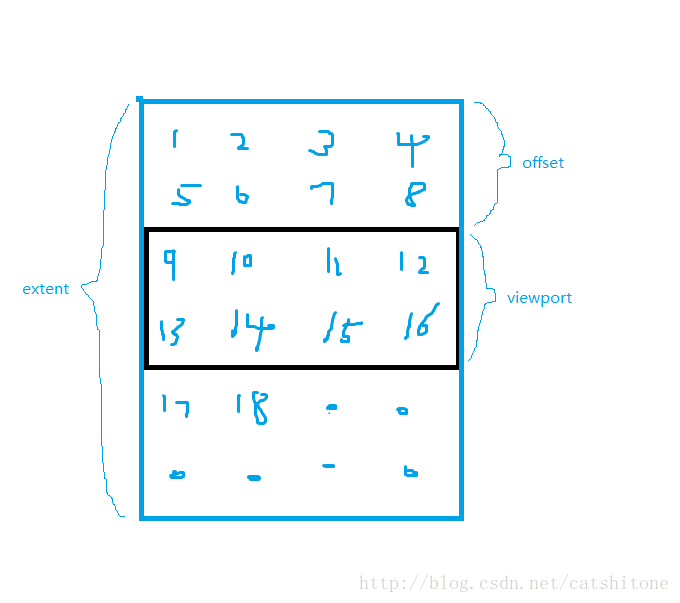
黑色的表示实际显示到界面上的内容。如果不虚拟化则24个item都会在wrappanel中,虚拟化后只有需要显示的那部分(9-16)会在wrappanel中,其他的都删除了。
更新UI操作:
public void SetVerticalOffset(double offset)

        {

            if (offset < 0 || this.viewPort.Height >= this.extent.Height)

                offset = 0;

            else

                if (offset + this.viewPort.Height >= this.extent.Height)

                offset = this.extent.Height - this.viewPort.Height;

            this.offset.Y = offset;

            this.ScrollOwner?.InvalidateScrollInfo();//Scroll信息已过期

            this.trans.Y = -offset;

            this.InvalidateMeasure();//Measure信息已过期

            //接下来会触发MeasureOverride()

        }
4. 虚拟化操作
操作的第一步是获取当前VWP中已加载的所有的child和ListBox的数据源中所有的child。
VWP中children的获取可通过this.InternalChildren拿到。
数据源中children包含在this.ItemContainerGenerator 里面。
这里sdk有个bug,如果你不先调用this.InternalChildren,直接用ItemContainerGenerator后续生成child操作会返回null。
第二步,获取到应该显示到viewport区域内的第一个child和最后一个child的索引,此时viewport的大小可能已经是变化后的。(因为你可能滚动了鼠标,或者更改了VWP的宽高)
        /// <summary>

        /// 获取所有item,在可视区域内第一个item和最后一个item的索引

        /// </summary>

        /// <param name="firstIndex"></param>

        /// <param name="lastIndex"></param>

        void GetVisiableRange(ref int firstIndex, ref int lastIndex)

        {

            int childPerRow = CalculateChildrenPerRow(this.extent);

            firstIndex = Convert.ToInt32(Math.Floor(this.offset.Y / this.ChildHeight)) * childPerRow;

            lastIndex = Convert.ToInt32(Math.Ceiling((this.offset.Y + this.viewPort.Height) / this.ChildHeight)) * childPerRow - 1;

            int itemsCount = GetItemCount(this);

            if (lastIndex >= itemsCount)

                lastIndex = itemsCount - 1;

}第三、通过Generator生成从firstIndex到lastIndex的项,并添加到ListBox(等ItemsControl中)。
在开始之前先看几个定义和工作流程:
- 定义:在这里我们把你绑定到ItemsControl上的数据称作DataItems,其子项称为DataItem。
- 定义:把在UI上的Itemscontrol空间内的item称为UIItem,UIItem放到不同的control里有不同的名字,如
ListViewItem、TreeViewItem等。 - 获取generatorPostition流程:对应的是
generator.GeneratorPositionFromIndex(dataItemIndex)方法,根据dataItemIndex从DataItems里找到对应的DataItem,然后再根据DataItem获取到它在generator里的索引。 - GeneratorPosition类:有两个属性index和offset。当offset==0时,表示此DataItem被
Realized过,即存在对应的UIItem,index就是UIItem在generator中的位置索引。当offset!=0时,表示此DataItem是Virtualized的,没有被Realized过,此时index是-1。(不知道理解是否有误) - 生成流程:
generator负责把DataItem加工成UIItem并显示(添加)到ItemsControl上。对应的是generator.GenerateNext()方法,返回值是一个UIElement(也就是UIItem),并把它添加/插入到Children中,并为它准备好容器PrepareItemContainer。 - 其他:listBox.ItemContainerGenerator几个方法的对比:
ListBox.ItemContainerGenerator.ContainerFromIndex():通过DataItem在DataItems里的index,查到在ItemContainerGenerator中对应的UIItem。ListBox.ItemContainerGenerator.ContainerFromItem(): 通过DataItem,查找在ItemContainerGenerator中对应的Item。generator.GeneratorPositionFromIndex():通过DataItem在DataItems里的index,获取它在generator里的位置。
 GeneratorPosition startPosi = generator.GeneratorPositionFromIndex(firstVisiableIndex);

            int childIndex = (startPosi.Offset == 0) ? startPosi.Index : startPosi.Index + 1;

            using (generator.StartAt(startPosi, GeneratorDirection.Forward, true))

            {

                int itemIndex = firstVisiableIndex;

                while (itemIndex <= lastVisiableIndex)

                {

                    bool newlyRealized = false;

                    //不断的从DataItems中获取DataItem并生成UIItem

                    var child = generator.GenerateNext(out newlyRealized) as UIElement;

                    if (newlyRealized)

                    {

                        if (childIndex >= children.Count)

                        {

                            base.AddInternalChild(child);

                        }

                        else

                        {

                            base.InsertInternalChild(childIndex, child);

                        }

                        generator.PrepareItemContainer(child);

                    }

                    else

                    {//generator里已经有了

                        if (!child.Equals(children[childIndex]))

                        {

                        //不相等表示children[childIndex]对应的DataItem已经不在DataItems里了,所以在Children里也要删除。

                            base.RemoveInternalChildRange(childIndex, 1);

                        }

                    }

                    child.Measure(new Size(this.ChildWidth, this.ChildHeight));

                    itemIndex++;

                    childIndex++;

                }

            }
第四、将VWP中已不需在viewport内显示的child从children和generator的container中移除。(generator里的子项个数就是children里的子项个数。)
        /// <summary>

        /// 将不在可视区域内的item 移除

        /// </summary>

        /// <param name="startIndex">可视区域开始索引</param>

        /// <param name="endIndex">可视区域结束索引</param>

        void CleanUpItems(int startIndex, int endIndex)

        {

            var children = this.InternalChildren;

            var generator = this.ItemContainerGenerator;

            for (int i = children.Count - 1; i >= 0; i--)

            {

                var childGeneratorPosi = new GeneratorPosition(i, 0);

                int itemIndex = generator.IndexFromGeneratorPosition(childGeneratorPosi);

                if (itemIndex < startIndex || itemIndex > endIndex)

                {

                    generator.Remove(childGeneratorPosi, 1);

                    RemoveInternalChildRange(i, 1);

                }

            }

        }
这里虽然调用了generator.Remove方法,将不需要显示的进行移除,但是我发现移除后generator中元素的个数与ListBox绑定的数据源中元素的个数始终是一致的。所以我觉得可能是将次child从generator的container中移除了。因为你从上面的MeasureOverride方法中也看到了,新加时是调用generator的PrepareItemContainer方法。
5. UniformGrid效果的WrapPanel该怎么给child Arrange
其实就在上面的ArrangeOverride方法里,很简单:
xCorrdForItem = column * availableItemWidth + (availableItemWidth - this.ChildWidth) / 2;6. 存在的Bug或者问题
第一个bug你已经在上面的第4步看过了。
还有个bug是VMP的ScrollOwner报null reference的异常,本质是找不到包裹它的ScrollViewer,其原因可能有两个:
1. 为你的ListBox设置ItemsPanlTempalte是通过Bind的方式,会引发这个异常。如果你尝试着给它Bind一个scrollviewer,那么接下来你可能还会面临着滚动页面出现空白,但是明明新的child已经生成了,就是不会显示的UI上的问题。正确的解决方式是CodeBind,用C#代码为这个ListBox设置ItemsPanlTemplate。
2. 自定义了Control的Tempalte,就像下面这个代码一样:
<ControlTemplate TargetType="{x:Type ListView}">

        <ScrollViewer HorizontalScrollBarVisibility="Disabled" VerticalScrollBarVisibility="Visible">

            <Border Margin="10">

                  <ItemsPresenter   />

            </Border>

        </ScrollViewer>

</ControlTemplate>相当于你定义ControlTempate的时候重新设置了ScrollViewer,然后VMP就找不到了。所以看能不能找到不定义Tempalte的方法吧。
7. 使用方法
<ListBox Margin="0,50,0,0" Name="listB">

            <ListBox.ItemTemplate>

                <DataTemplate>

                    <TextBlock Text="{Binding}" Width="70" Height="70"/>

                </DataTemplate>

            </ListBox.ItemTemplate>

            <ListBox.ItemsPanel>

                <ItemsPanelTemplate>

                    <local:VirtualizingWrapPanel ScrollOffset="50" ChildHeight="70" ChildWidth="70"/>

                </ItemsPanelTemplate>

            </ListBox.ItemsPanel>

        </ListBox>
8. 完整代码:
using System;

using System.Collections.Generic;

using System.Diagnostics;

using System.Linq;

using System.Text;

using System.Threading.Tasks;

using System.Windows;

using System.Windows.Controls;

using System.Windows.Controls.Primitives;

using System.Windows.Media;

namespace VirtualizingPPanel

{

    public class VirtualizingWrapPanel : VirtualizingPanel, IScrollInfo

    {

        private TranslateTransform trans = new TranslateTransform();

        public VirtualizingWrapPanel()

        {

            this.RenderTransform = trans;

        }

        #region DependencyProperties

        public static readonly DependencyProperty ChildWidthProperty = DependencyProperty.RegisterAttached("ChildWidth", typeof(double), typeof(VirtualizingWrapPanel), new FrameworkPropertyMetadata(200.0, FrameworkPropertyMetadataOptions.AffectsMeasure | FrameworkPropertyMetadataOptions.AffectsArrange));

        public static readonly DependencyProperty ChildHeightProperty = DependencyProperty.RegisterAttached("ChildHeight", typeof(double), typeof(VirtualizingWrapPanel), new FrameworkPropertyMetadata(200.0, FrameworkPropertyMetadataOptions.AffectsMeasure | FrameworkPropertyMetadataOptions.AffectsArrange));

        //鼠标每一次滚动 UI上的偏移

        public static readonly DependencyProperty ScrollOffsetProperty = DependencyProperty.RegisterAttached("ScrollOffset", typeof(int), typeof(VirtualizingWrapPanel), new PropertyMetadata(10));

        public int ScrollOffset

        {

            get { return Convert.ToInt32(GetValue(ScrollOffsetProperty)); }

            set { SetValue(ScrollOffsetProperty, value); }

        }

        public double ChildWidth

        {

            get => Convert.ToDouble(GetValue(ChildWidthProperty));

            set => SetValue(ChildWidthProperty, value);

        }

        public double ChildHeight

        {

            get => Convert.ToDouble(GetValue(ChildHeightProperty));

            set => SetValue(ChildHeightProperty, value);

        }

        #endregion

        int GetItemCount(DependencyObject element)

        {

            var itemsControl = ItemsControl.GetItemsOwner(element);

            return itemsControl.HasItems ? itemsControl.Items.Count : 0;

        }

        int CalculateChildrenPerRow(Size availableSize)

        {

            int childPerRow = 0;

            if (availableSize.Width == double.PositiveInfinity)

                childPerRow = this.Children.Count;

            else

                childPerRow = Math.Max(1, Convert.ToInt32(Math.Floor(availableSize.Width / this.ChildWidth)));

            return childPerRow;

        }

        /// <summary>

        /// width不超过availableSize的情况下,自身实际需要的Size(高度可能会超出availableSize)

        /// </summary>

        /// <param name="availableSize"></param>

        /// <param name="itemsCount"></param>

        /// <returns></returns>

        Size CalculateExtent(Size availableSize, int itemsCount)

        {

            int childPerRow = CalculateChildrenPerRow(availableSize);//现有宽度下 一行可以最多容纳多少个

            return new Size(childPerRow * this.ChildWidth, this.ChildHeight * Math.Ceiling(Convert.ToDouble(itemsCount) / childPerRow));

        }

        /// <summary>

        /// 更新滚动条

        /// </summary>

        /// <param name="availableSize"></param>

        void UpdateScrollInfo(Size availableSize)

        {

            var extent = CalculateExtent(availableSize, GetItemCount(this));//extent 自己实际需要

            if (extent != this.extent)

            {

                this.extent = extent;

                this.ScrollOwner.InvalidateScrollInfo();

            }

            if (availableSize != this.viewPort)

            {

                this.viewPort = availableSize;

                this.ScrollOwner.InvalidateScrollInfo();

            }

        }

        /// <summary>

        /// 获取所有item,在可视区域内第一个item和最后一个item的索引

        /// </summary>

        /// <param name="firstIndex"></param>

        /// <param name="lastIndex"></param>

        void GetVisiableRange(ref int firstIndex, ref int lastIndex)

        {

            int childPerRow = CalculateChildrenPerRow(this.extent);

            firstIndex = Convert.ToInt32(Math.Floor(this.offset.Y / this.ChildHeight)) * childPerRow;

            lastIndex = Convert.ToInt32(Math.Ceiling((this.offset.Y + this.viewPort.Height) / this.ChildHeight)) * childPerRow - 1;

            int itemsCount = GetItemCount(this);

            if (lastIndex >= itemsCount)

                lastIndex = itemsCount - 1;

        }

        /// <summary>

        /// 将不在可视区域内的item 移除

        /// </summary>

        /// <param name="startIndex">可视区域开始索引</param>

        /// <param name="endIndex">可视区域结束索引</param>

        void CleanUpItems(int startIndex, int endIndex)

        {

            var children = this.InternalChildren;

            var generator = this.ItemContainerGenerator;

            for (int i = children.Count - 1; i >= 0; i--)

            {

                var childGeneratorPosi = new GeneratorPosition(i, 0);

                int itemIndex = generator.IndexFromGeneratorPosition(childGeneratorPosi);

                if (itemIndex < startIndex || itemIndex > endIndex)

                {

                    generator.Remove(childGeneratorPosi, 1);

                    RemoveInternalChildRange(i, 1);

                }

            }

        }

        /// <summary>

        /// scroll/availableSize/添加删除元素 改变都会触发  edit元素不会改变

        /// </summary>

        /// <param name="availableSize"></param>

        /// <returns></returns>

        protected override Size MeasureOverride(Size availableSize)

        {

            this.UpdateScrollInfo(availableSize);//availableSize更新后,更新滚动条

            int firstVisiableIndex = 0, lastVisiableIndex = 0;

            GetVisiableRange(ref firstVisiableIndex, ref lastVisiableIndex);//availableSize更新后,获取当前viewport内可放置的item的开始和结束索引  firstIdnex-lastIndex之间的item可能部分在viewport中也可能都不在viewport中。

            UIElementCollection children = this.InternalChildren;//因为配置了虚拟化,所以children的个数一直是viewport区域内的个数,如果没有虚拟化则是ItemSource的整个的个数

            IItemContainerGenerator generator = this.ItemContainerGenerator;

            //获得第一个可被显示的item的位置

            GeneratorPosition startPosi = generator.GeneratorPositionFromIndex(firstVisiableIndex);

            int childIndex = (startPosi.Offset == 0) ? startPosi.Index : startPosi.Index + 1;//startPosi在chilren中的索引

            using (generator.StartAt(startPosi, GeneratorDirection.Forward, true))

            {

                int itemIndex = firstVisiableIndex;

                while (itemIndex <= lastVisiableIndex)//生成lastVisiableIndex-firstVisiableIndex个item

                {

                    bool newlyRealized = false;

                    var child = generator.GenerateNext(out newlyRealized) as UIElement;

                    if (newlyRealized)

                    {

                        if (childIndex >= children.Count)

                            base.AddInternalChild(child);

                        else

                        {

                            base.InsertInternalChild(childIndex, child);

                        }

                        generator.PrepareItemContainer(child);

                    }

                    else

                    {

                        //处理 正在显示的child被移除了这种情况

                        if (!child.Equals(children[childIndex]))

                        {

                            base.RemoveInternalChildRange(childIndex, 1);

                        }

                    }

                    child.Measure(new Size(this.ChildWidth, this.ChildHeight));

                    //child.DesiredSize//child想要的size

                    itemIndex++;

                    childIndex++;

                }

            }

            CleanUpItems(firstVisiableIndex, lastVisiableIndex);

            return new Size(double.IsInfinity(availableSize.Width) ? 0 : availableSize.Width, double.IsInfinity(availableSize.Height) ? 0 : availableSize.Height);//自身想要的size

        }

        protected override Size ArrangeOverride(Size finalSize)

        {

            Debug.WriteLine("----ArrangeOverride");

            var generator = this.ItemContainerGenerator;

            UpdateScrollInfo(finalSize);

            int childPerRow = CalculateChildrenPerRow(finalSize);

            double availableItemWidth = finalSize.Width / childPerRow;

            for (int i = 0; i <= this.Children.Count - 1; i++)

            {

                var child = this.Children[i];

                int itemIndex = generator.IndexFromGeneratorPosition(new GeneratorPosition(i, 0));

                int row = itemIndex / childPerRow;//current row

                int column = itemIndex % childPerRow;

                double xCorrdForItem = 0;

                xCorrdForItem = column * availableItemWidth + (availableItemWidth - this.ChildWidth) / 2;

                Rect rec = new Rect(xCorrdForItem, row * this.ChildHeight, this.ChildWidth, this.ChildHeight);

                child.Arrange(rec);

            }

            return finalSize;

        }

        protected override void OnRenderSizeChanged(SizeChangedInfo sizeInfo)

        {

            base.OnRenderSizeChanged(sizeInfo);

            this.SetVerticalOffset(this.VerticalOffset);

        }

        protected override void OnClearChildren()

        {

            base.OnClearChildren();

            this.SetVerticalOffset(0);

        }

        protected override void BringIndexIntoView(int index)

        {

            if (index < 0 || index >= Children.Count)

                throw new ArgumentOutOfRangeException();

            int row = index / CalculateChildrenPerRow(RenderSize);

            SetVerticalOffset(row * this.ChildHeight);

        }

        #region IScrollInfo Interface

        public bool CanVerticallyScroll { get; set; }

        public bool CanHorizontallyScroll { get; set; }

        private Size extent = new Size(0, 0);

        public double ExtentWidth => this.extent.Width;

        public double ExtentHeight => this.extent.Height;

        private Size viewPort = new Size(0, 0);

        public double ViewportWidth => this.viewPort.Width;

        public double ViewportHeight => this.viewPort.Height;

        private Point offset;

        public double HorizontalOffset => this.offset.X;

        public double VerticalOffset => this.offset.Y;

        public ScrollViewer ScrollOwner { get; set; }

        public void LineDown()

        {

            this.SetVerticalOffset(this.VerticalOffset + this.ScrollOffset);

        }

        public void LineLeft()

        {

            throw new NotImplementedException();

        }

        public void LineRight()

        {

            throw new NotImplementedException();

        }

        public void LineUp()

        {

            this.SetVerticalOffset(this.VerticalOffset - this.ScrollOffset);

        }

        public Rect MakeVisible(Visual visual, Rect rectangle)

        {

            return new Rect();

        }

        public void MouseWheelDown()

        {

            this.SetVerticalOffset(this.VerticalOffset + this.ScrollOffset);

        }

        public void MouseWheelLeft()

        {

            throw new NotImplementedException();

        }

        public void MouseWheelRight()

        {

            throw new NotImplementedException();

        }

        public void MouseWheelUp()

        {

            this.SetVerticalOffset(this.VerticalOffset - this.ScrollOffset);

        }

        public void PageDown()

        {

            this.SetVerticalOffset(this.VerticalOffset + this.viewPort.Height);

        }

        public void PageLeft()

        {

            throw new NotImplementedException();

        }

        public void PageRight()

        {

            throw new NotImplementedException();

        }

        public void PageUp()

        {

            this.SetVerticalOffset(this.VerticalOffset - this.viewPort.Height);

        }

        public void SetHorizontalOffset(double offset)

        {

            throw new NotImplementedException();

        }

        public void SetVerticalOffset(double offset)

        {

            if (offset < 0 || this.viewPort.Height >= this.extent.Height)

                offset = 0;

            else

                if (offset + this.viewPort.Height >= this.extent.Height)

                offset = this.extent.Height - this.viewPort.Height;

            this.offset.Y = offset;

            this.ScrollOwner?.InvalidateScrollInfo();

            this.trans.Y = -offset;

            this.InvalidateMeasure();

            //接下来会触发MeasureOverride()

        }

        #endregion

    }

}
9. Demo下载
最终效果:
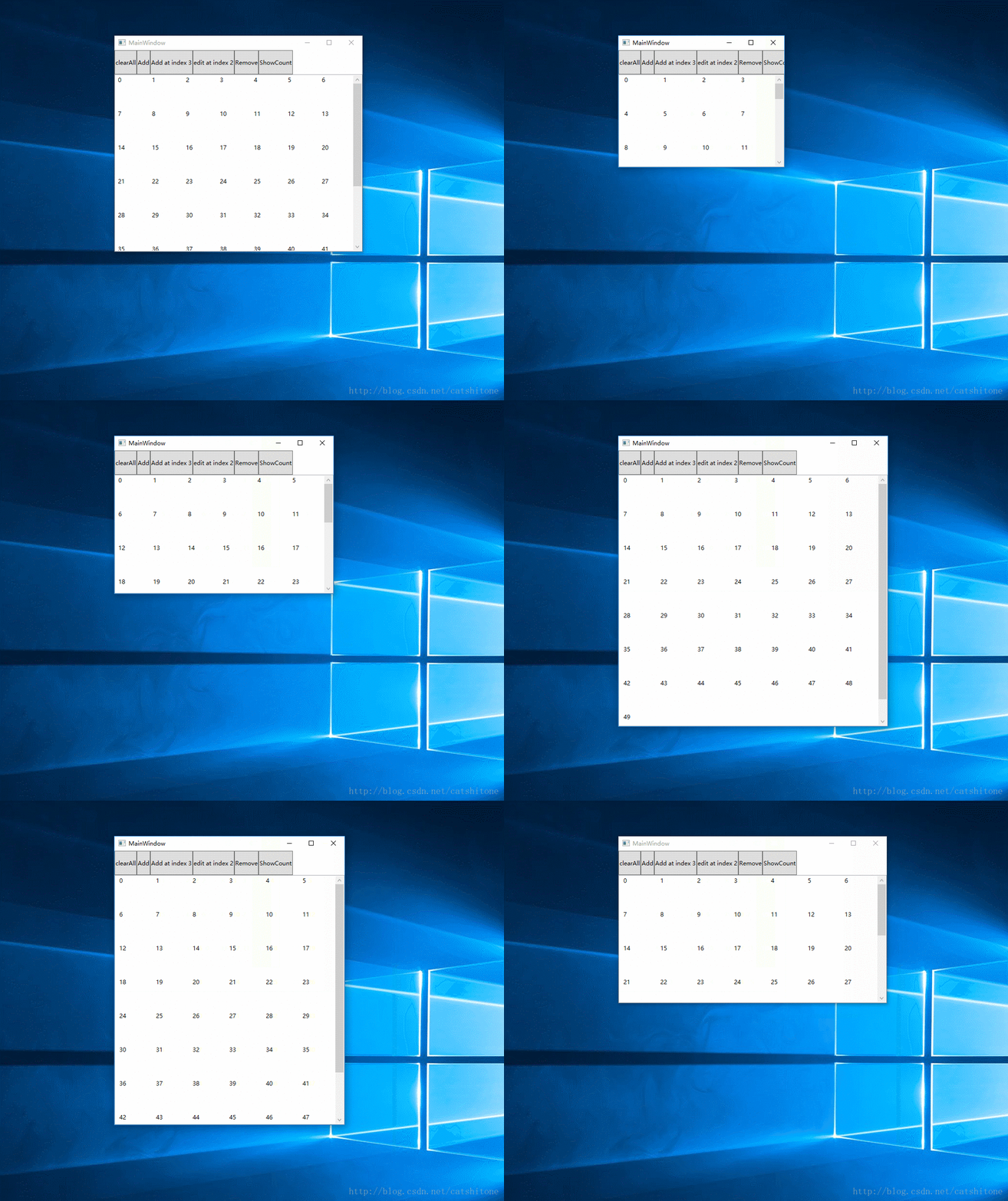
下载:
链接: https://pan.baidu.com/s/1jHMBFM2 密码: 4csp
参考
1. Magentaize!——正确实现 WPF 中的 UI 虚拟化
2. GitHub - digimezzo/WPFControls: WPF Controls
3.WPF布局
4.Implementing a VirtualizingPanel part 3: MeasureCore
【WPF】UI虚拟化之------自定义VirtualizingWrapPanel的更多相关文章
- WPF UI虚拟化
ComboBox
- wpf 客户端【JDAgent桌面助手】开发详解(三) 瀑布流效果实现与UI虚拟化优化大数据显示
目录区域: 业余开发的wpf 客户端终于完工了..晒晒截图 wpf 客户端[JDAgent桌面助手]开发详解-开篇 wpf 客户端[JDAgent桌面助手]详解(一)主窗口 圆形菜单... wpf 客 ...
- WPF之UI虚拟化
在WPF应用程序开发过程中,大数据量的数据展现通常都要考虑性能问题.有下面一种常见的情况:原始数据源数据量很大,但是某一时刻数据容器中的可见元素个数是有限的,剩余大多数元素都处于不可见状态,如果一次性 ...
- WPF的UI虚拟化
许多时候,我们的界面上会呈现大量的数据,如包含数千条记录的表格或包含数百张照片的相册.由于呈现UI是一件开销比较大的动作,一次性呈现数百张照片就目前的电脑性能来说是需要占用大量内存和时间的.因此需要对 ...
- WPF listbox UI虚拟化
ListBox 默认是UI虚拟化的. 1. 原生使用 <ListBox VirtualizingPanel.IsVirtualizing="True" Virtualiz ...
- 精通 WPF UI Virtualization (提升 OEA 框架中 TreeGrid 控件的性能)
原文:精通 WPF UI Virtualization (提升 OEA 框架中 TreeGrid 控件的性能) 本篇博客主要说明如何使用 UI Virtualization(以下简称为 UIV) 来提 ...
- OpenExpressApp:精通 WPF UI Virtualization
原文:OpenExpressApp:精通 WPF UI Virtualization 本篇博客主要说明如何使用 UI Virtualization(以下简称为 UIV) 来提升 OEA 框架中 Tre ...
- WPF之路——实现自定义虚拟容器(实现VirtualizingPanel)
原文:WPF之路--实现自定义虚拟容器(实现VirtualizingPanel) 源码下载地址: http://download.csdn.net/detail/qianshen88/6618033 ...
- windowsphone 瀑布流&ui虚拟化
瀑布流已经有点年代了吧,不过wp上还真是挺少资料的.今天抽空把自己之前搞过的东西写出来,避免大家重复劳动. 一.简单的瀑布流排版加入ui虚拟化. 最近看了 段博琼 ui虚拟化的一篇博文,链接:htt ...
随机推荐
- ant使用ssh和linux交互 如:上传文件
http://jiajun.iteye.com/blog/741001 http://blog.csdn.net/xymyeah/article/details/4098073 http://blog ...
- 【Linux】Linux下配置apache - 安装文件夹具体解释
一,apache安装路径解释 默认安装路径 /var/apache2 # /etc/apache2/ # |-- apache2.conf # | `-- ports.conf # |-- mo ...
- [Typescript] What is a Function Type ? Function Types and Interfaces - Are They Related ?
Function Type: type messageFn = (name: string) => string; function sayHello(name: string): string ...
- Android中获取当前位置的使用步骤
在Android中得到当前位置的步骤 1.在AndroidManifest.xml中声明权限 android.permission.ACCESS_FINE_LOCATION(或者android.per ...
- [转]Redis 与Mysql通信
http://blog.csdn.net/hpb21/article/details/7852934 找了点资料看了下.学习心得如下: 1 Mysql更新Redis Mysql更新Redis借鉴mem ...
- java中<T> T和T的区别?
如果你希望 getMax 方法的返回值类型为 T,就要这样去定义getMax方法: public T getMax() 如果你希望 getMax 方法返回值的类型由调用者决定,那么就这么去定义 get ...
- SQL基础问题整理
在程序中,数据库操作是必不可少的部分,所以我们要备足数据库相关知识才能去应付程序中出现的种种问题.基于此,我特地在国外网站.博客上整理了一些问题,并附带了答案和解释.参考.为了保证“原汁原味”,我就保 ...
- hdu 2037 这个夏天不AC
这个夏天不AC Time Limit: 2000/1000 MS (Java/Others) Memory Limit: 65536/32768 K (Java/Others) Total Su ...
- oracle的number的浅析
author:skate time:2011-02-14 oracle的number的浅析 从例如以下几个方面来认识number 1.表示的数值范围 2.占用的存储空间 3.number的性能 ...
- VC命令行编译中出现Invalid switch错误的解决办法
作者:朱金灿 来源:http://blog.csdn.net/clever101 使用makefile编译gdal库出现一个错误: cd .. if exist./gdal19_i_D.lib del ...