
Beginner’s Tutorial: 3D Line and Border Effects in XAML
This mini-tutorial might be for you if you’re having troubles finding the right line colors to achieve simple 3D effects like these:
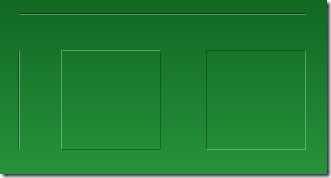
The solution to this very problem is actually pretty simple, and it always takes the same three ingredients:
- A white line
- A black line
- Reduced opacity
Basically, to get an edged line on a green background, you don’t need to fiddle with different shades of green. Just use white and black lines and play with the opacity. Here’s the settings in Blend for one of the white lines in the above screenshot:
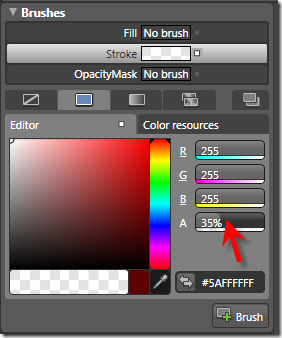
…and this is the corresponding XAML for the two vertical lines:
<Grid Background="Green">

  <Path Stretch="Fill" Stroke="#5A000000" Margin="25,62,0,0"

        Width="1" Height="100" Data="M130,176 L130,303.03543"/>

  <Path Stretch="Fill" Stroke="#5AFFFFFF" Margin="26,62,0,0"

        Width="1" Height="100" Data="M130,176 L130,303.03543"/>

</Grid>
Tip: Hiding Blend’s Handles
If you’re trying to format a line, Blend’s handles don’t help much, as the basically hide the whole content:
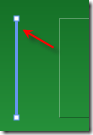
However – you can easily hide / show them by pressing the F9 button.
Tutorial: Creating a 3D Toggle Button Style
Another usage of white and black lines is a 3D effect for borders. Let’s put this to action and create a reusable style that can be applied to a ToggleButton control:
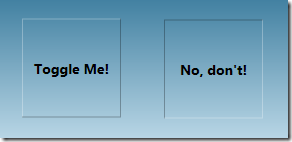
Rather than joining four lines for each button state, I’ll use two Border controls with the same dimensions for each state, taking advantage that the BorderThickness property can be set independently for every edge. Here’s the borders for the unchecked state:
<Grid x:Name="uncheckedState">

  <Border BorderBrush="#49FFFFFF" BorderThickness="1,1,0,0"/>

  <Border BorderBrush="#49000000" BorderThickness="0,0,1,1"/>

</Grid>
…and here’s the borders for the checked state. Note that its Visibility property of the surrounding grid is set to Collapsed in order to hide the borders:
<Grid x:Name="checkedState" Visibility="Collapsed">

  <Border BorderBrush="#49000000" BorderThickness="1,1,0,0"/>

  <Border BorderBrush="#49FFFFFF" BorderThickness="0,0,1,1"/>

</Grid>
I put these borders together in a simple style, which uses a trigger to switch the visibility of the two borders as soon as the IsChecked property of the ToggleButton changes:
<Style TargetType="{x:Type ToggleButton}">

  <Setter Property="Template">

    <Setter.Value>

      <ControlTemplate TargetType="{x:Type ToggleButton}">

        <Grid x:Name="mainGrid" Margin="0,0,1,1">

          <Grid x:Name="uncheckedState">

            <Border BorderBrush="#49FFFFFF" BorderThickness="1,1,0,0"/>

            <Border BorderBrush="#49000000" BorderThickness="0,0,1,1"/>

          </Grid>

          <Grid x:Name="checkedState" Visibility="Collapsed">

            <Border BorderBrush="#49000000" BorderThickness="1,1,0,0"/>

            <Border BorderBrush="#49FFFFFF" BorderThickness="0,0,1,1"/>

          </Grid>

          <!--

            WPF needs a background to toggle IsChecked

            if the ContentPresenter does not fill the whole area

          -->

          <Border Background="#00000000" />

          <ContentPresenter VerticalAlignment="Center"

                            HorizontalAlignment="Center" />

        </Grid>

        <!-- triggers toggle visual appearance -->

        <ControlTemplate.Triggers>

          <Trigger Property="IsChecked" Value="True">

            <Setter TargetName="checkedState"

                    Property="Visibility"

                    Value="Visible" />

            <Setter TargetName="uncheckedState"

                    Property="Visibility"

                    Value="Collapsed" />

            <Setter TargetName="mainGrid"

                    Property="Margin"

                    Value="1,1,0,0"/>

          </Trigger>

        </ControlTemplate.Triggers>

      </ControlTemplate>

    </Setter.Value>

  </Setter>

</Style>
With the style in place, you can easily declare a ToggleButton like this:
<ToggleButton Width="100" Height="24" Content="hello world" />
Beginner’s Tutorial: 3D Line and Border Effects in XAML的更多相关文章
- 国外60个专业3D模型网站
原始链接:http://blog.sina.com.cn/s/blog_4ba3c7950100jxkh.html Today, 3D models are used in a wide variet ...
- win10 uwp 使用 Matrix3DProjection 进行 3d 投影
原文:win10 uwp 使用 Matrix3DProjection 进行 3d 投影 版权声明:博客已迁移到 http://lindexi.gitee.io 欢迎访问.如果当前博客图片看不到,请到 ...
- 3D分析之3D要素工具箱(转)
来自:http://blog.csdn.net/kikitamoon/article/details/8193764 整理有关 ArcGIS 10.1 3D分析工具箱中,3D Feature 工具箱中 ...
- 3D分析之Functional Surface工具箱(转)
来自:http://blog.csdn.net/kikitamoon/article/details/8195797 1. Add Surface Information(添加表面信息) 向点.线或面 ...
- 论文阅读: Building a 3-D Line-Based Map Using Stereo SLAM
Abstract 一个把直线用作feature的SLAM系统. 跟点相比, 直线对于环境的结构提供了更丰富的信息, 也让其鞥有可能推断地图的空间语义. 使用了Plucker line coordian ...
- Python画各种 3D 图形Matplotlib库
回顾 2D 作图 用赛贝尔曲线作 2d 图.此图是用基于 Matplotlib 的 Path 通过赛贝尔曲线实现的,有对赛贝尔曲线感兴趣的朋友们可以去学习学习,在 matplotlib 中,figur ...
- 3D视觉 之 线激光3D相机
1 3D 视觉 常见的三维视觉技术,包含双目.ToF.激光三角.结构光等,如下图: 1)毫米级 双目.ToF.结构光(散斑)的精度为 mm 级,多见于消费领域,如:导航避障,VR/AR,刷脸 ...
- WPF 3D编程介绍
原文:WPF 3D编程介绍 上一篇文章简单的介绍了WPF编程的相关的内容,也推荐了本书.今天要来讲一下在WPF如何开展3D编程. 使用的xmal 和C#开发的时候:需要使用如下的关键要素: 1:摄像机 ...
- arcmap Command
The information in this document is useful if you are trying to programmatically find a built-in com ...
随机推荐
- 三大主流ETL工具选型 分类: H2_ORACLE 2013-08-23 11:17 426人阅读 评论(0) 收藏
ETL(extract, transform and load)产品乍看起来似乎并不起眼,单就此项技术本身而言,几乎也没什么特别深奥之处,但是在实际项目中,却常常在这个环节耗费太多的人力,而在后续的维 ...
- Android MediaScanner使用简单介绍
1. 运行扫描 仅仅有系统开机的时候才会运行MediaScanner,其他情景下须要手动运行扫描(拍摄,下载等). 手动运行扫描的方法是发送MediaScanner广播: 1.1 扫描指定文件: In ...
- https://github.com/zhangxianyi/Source-Insight-Plugin
https://github.com/zhangxianyi/Source-Insight-Plugin
- [Angular] Angular CLI
Create an app with routing config: ng new mynewapp --routing If you want to generate a new module wi ...
- php自带加密解密函数
php自带加密解密函数 一.总结 一句话总结:可逆和不可逆函数. 二.php自带加密解密函数 1.不可逆的加密函数为:md5().crypt() md5() 用来计算 MD5 哈稀.语法为:strin ...
- XMPP之ios即时通讯客户端开发-配置XMPP基本信息(四)
前文已经有配置open fire,接下来要通过XMPP框架链接到open fire的服务器: 1.首先要在系统偏好设置里面打开open fire的服务器 2.代码中设置xmpp的myJID 有几个名词 ...
- BFKit:对常用 UIButton,UIColor,UIDevice,UIFont ,UIImage 等开发类进行了扩展
BFKit对常用于开发的类进行了扩展,整合了多个常用的控件和开发所需要的功能,是一个通用性的类库.集成后可以帮助更快的App开发.有兴趣的同学可以看看哦. http://code4app.com/io ...
- Python 标准库 —— zipfile(读取 zip 文件)
Python模块学习:zipfile zip文件操作 Python 学习入门(16)-- zipfile 0. 解压 with zipfile.ZipFile('../data/jaychou_lyr ...
- java-工具代码
格式化输出 //d:是输出整数 //10;表示输出10位整数 //0:表示如果不够10位的话,用0来占位,也可以用写成空格,用空格来占位 String a = String.format(" ...
- linux 命令学习 —— 硬件外设管理(dmesg、lsusb)
dmesg:print or control the kernel ring buffer dmesg命令设备故障的诊断是非常重要的.在dmesg命令的帮助下进行硬件的连接或断开连接操作时,我们可以看 ...