
JAVA Web项目获取src和WebContent目录下的配置文件
一,获取src下面的配置文件信息
1,结构图如下:
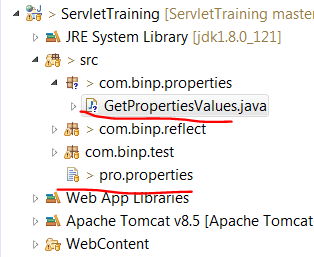
package com.binp.properties;

import java.io.FileInputStream;

import java.io.InputStream;

import java.util.Properties;

import java.util.ResourceBundle;

public class GetPropertiesValues {

    public static void main(String[] args) throws Exception {

        //1,第一种方法(如果配置文件放在包下面,就需要在路径中把包的路径加上去)

        String path = GetPropertiesValues.class.getResource("/").getPath();

        System.out.println(path);

        FileInputStream fInputStream = new FileInputStream(path+"pro.properties");

        Properties properties = new Properties();

        properties.load(fInputStream);

        System.out.println(properties.getProperty("className"));

        //2,第二种方法(如果配置文件放在包下面,就需要在路径中把包的路径加上去)

        InputStream iStream = GetPropertiesValues.class.getResourceAsStream("/pro.properties");

        properties.load(iStream);

        iStream.close();

        System.out.println(properties.getProperty("method"));

        //3,第三种方法(此方法只能将配置文件放置在src目录下,不能放在包中)

        String value = ResourceBundle.getBundle("pro").getString("admin");

        System.out.println(value);

    }

}
二,获取WebContent目录下的配置文件
1,前提条件:是在tomcat启动的情况下:
@WebServlet("/testEvery")

public class testEveryServlet extends HttpServlet {

    private static final long serialVersionUID = 1L;

    /**

     * @see HttpServlet#HttpServlet()

     */

    public testEveryServlet() {

        super();

        // TODO Auto-generated constructor stub

    }

    /**

     * 访问url:http://localhost:8080/demoProj/testEveryServlet

     */

    /**

     * @see HttpServlet#doGet(HttpServletRequest request, HttpServletResponse response)

     */

    protected void doGet(HttpServletRequest request, HttpServletResponse response) throws ServletException, IOException {

        // TODO Auto-generated method stub

        response.getWriter().append("Served at: ").append(request.getContextPath());

        String path = request.getSession().getServletContext().getRealPath("/config/sysconfig.properties");

        System.out.println("doGet读取到的/WEB-INF/config/sysconfig.properties:path:"+path);

        String url = request.getSession().getServletContext().getRealPath("/WEB-INF/config/config.properties");

        System.out.println("doGet读取到的/WEB-INF/config/config.properties:url:"+url);

        /**

         * 结果:

         * doGet:path:D:\tomcat7\wtpwebapps\demoProj\config\sysconfig.properties

         * doGet:url:D:\tomcat7\wtpwebapps\demoProj\WEB-INF\config\config.properties

         */

        //只能获取src下面的

         InputStream in = this.getServletContext().getResourceAsStream("/WEB-INF/classes/config/test.properties");

            Properties prop = new Properties();  //map

            prop.load(in);

            String url1 = prop.getProperty("url");

            System.out.println("获取到的url1:"+url1);//获取到的url1:www.baidu.com

            //不可获取

            InputStream in2 = this.getServletContext().getResourceAsStream("/WEB-INF/config.properties");

            Properties prop2 = new Properties();  //map

            prop.load(in2);

            String url2 = prop2.getProperty("url");

            System.out.println("获取到的url2:"+url2);//获取到的url2:null

          //不可获取

            InputStream in3 = this.getServletContext().getResourceAsStream("/webcontent.properties");

            Properties prop3 = new Properties();  //map

            prop.load(in3);

            String url3 = prop3.getProperty("url");

            System.out.println("获取到的url3:"+url3);//获取到的url3:null

          //不可获取

            InputStream in4 = this.getServletContext().getResourceAsStream("/config/wcc.properties");

            Properties prop4 = new Properties();  //map

            prop.load(in4);

            String url4 = prop4.getProperty("url");

            System.out.println("获取到的url4:"+url4);//获取到的url4:null

        // 读取src下config包中的testJava.java

//      InputStream in = ReadFile.class.getResourceAsStream("/config/testJava.java");//in为null

//      byte[] a=new byte[100];

//      in.read(a, 0, 900);

//      System.out.println("读取src下config包中的testJava.java的输入流in的内容toString:"+in.toString());

//      System.out.println("读取到的a:"+a);

        String fileName3 = ReadFile.class.getResource("/config/test.properties").getFile();

        System.out.println("读取src下config包中的test.properties:"+fileName3);

//输出:读取src下config包中的test.properties:/D:/tomcat7/wtpwebapps/demoProj/WEB-INF/classes/config/test.properties

//      in.close();

        // 读取src下 基名为myproperties的properties文件,获取其中name配置值

        String value = ResourceBundle.getBundle("myproperties").getString("name");

        System.out.println("获取到的myproperties.properties的值value:"+value);

//输出:获取到的myproperties.properties的值value:myname

        // 读取src下myproperties.properties

        InputStream in1 = ReadFile.class.getResourceAsStream("/myproperties.properties");

        Properties properties = new Properties();

        properties.load(in1);

        String value2 = properties.getProperty("name"); // 获得name属性

        System.out.println("获取到的myproperties.properties的值value2:"+value2);

//获取到的myproperties.properties的值value2:myname

        //读取src下的

        String sensitiveWordsServerPath1 = SysConfig.getSysParam("sensitiveWords_server_path1");

        System.out.println("获取的sensitiveWordsServerPath1:"+sensitiveWordsServerPath1);

        //获取的sensitiveWordsServerPath1:/datacms/htdocs/html/cctv/sensitiveWords/sws.xlsx

        //读取src下的

        String pp = prop("sensitiveWords_server_path1");

        System.out.println("pp:"+pp);//pp:/datacms/htdocs/html/cctv/sensitiveWords/sws.xlsx

    }

    public String prop(String url){

        InputStream inputStream = this.getClass().getClassLoader().getResourceAsStream("config/sysconfig.properties");

        Properties p  =   new  Properties();

        try {

            p.load(inputStream);

        } catch (Exception e) {

            e.printStackTrace();

        }

        System.out.println("p:"+p);

        return p.getProperty(url);

    }

    /**

     * @see HttpServlet#doPost(HttpServletRequest request, HttpServletResponse response)

     */

    protected void doPost(HttpServletRequest request, HttpServletResponse response) throws ServletException, IOException {

        // TODO Auto-generated method stub

        doGet(request, response);

        String path = request.getSession().getServletContext().getRealPath("/config/sysconfig.properties");

        System.out.println("doPost:path:"+path);

    }

}
参考文档:https://blog.csdn.net/superit401/article/details/78206877
JAVA Web项目获取src和WebContent目录下的配置文件的更多相关文章
- 【转】Java Web 项目获取运行时路径 classpath
Java Web 项目获取运行时路径 classpath 假设资源文件放在maven工程的 src/main/resources 资源文件夹下,源码文件放在 src/main/java/下, 那么ja ...
- Maven项目中读取src/main/resources目录下的配置文件
在Maven项目的开发中,当需要读取src/下的配置文件时,该怎么做? 我们假设Resources下有一个文件名为kafka.properties的配置文件(为什么用kafka.properties, ...
- SpringJUnit4加载类目录下(src)和WEF-INF目录下的配置文件
路径说明: 一.加载类目录下的配置文件 @RunWith(SpringJUnit4ClassRunner.class) @ContextConfiguration("classpath:ap ...
- java web项目获取各种路径
1.可以在servlet的init方法里 String path = getServletContext().getRealPath("/"); 这将获取web项目的全路径 例如 ...
- Java web项目搭建系列之二 Jetty下运行项目
在项目pom.xml文件中添加Jetty运行配置 在pom.xml文件project节点下插入如下代码: <build> <plugins> <plugin> &l ...
- SpringJUnit4加载类目录下(src)和WEF-INF目录下的配置文件二--获取注入的bean的二种方式
前言: spring容器以xml的形式注入bean,然后可以在类中获取,获取的形式主要有二种:第一种最简单--采用@Resource 或@Autowired关键字在加载spring文件时将bean注入 ...
- web项目部署以及放到ROOT目录下
最近度过了一个国庆长假,好几天都没有写博客了! 发布这篇案例也是希望能帮助到像我一样的菜鸟o(* ̄︶ ̄*)o,百度上面的资料都不怎么全.也没有人说明注意事项.总是这篇说一点.那个人也说补一点,最后自己 ...
- java web项目获取项目路径
注意:有时获取到的项目路径后再+“自定义路径后” 路径不可用,这时要看下项目里自定义路径是不是空文件夹,如果是空文件夹则调试和运行时文件夹不会编译到部署文件里. 1.方法一 调试时只能获取eclips ...
- Java Web 项目获取运行时路径 classpath
假设资源文件放在maven工程的 src/main/resources 资源文件夹下,源码文件放在 src/main/java/下, 那么java文件夹和resources文件夹在运行时就是class ...
随机推荐
- 使用highcharts动态绘制折线图——so easy
之前学习highcharts发现网上的教程大部分是对highcharts数据的注释,如何动态绘制数据大部分一笔带过,让那些初涉开发的小白云里雾里,所以我就写了一篇这样的博客. <html> ...
- js(Mandango:壮汉专用,电影院划位工具)
Mandango:壮汉专用,电影院划位工具 <body onload="initSeats();"> <div style="margin-top:75 ...
- hive用mysql作元数据代替默认derby的hive-site.xml配置
<property> <name>javax.jdo.option.ConnectionURL</name> <value>jdbc:mysql://s ...
- JavaScript 的对象继承方式,有几种写法?
JavaScript 的对象继承方式,有几种写法? 一.对象冒充 其原理如下:构造函数使用 this 关键字给所有属性和方法赋值(即采用类声明的构造函数方式).因为构造函数只是一个函数,所以可使 Pa ...
- 【Codeforces Round #476 (Div. 2) [Thanks, Telegram!] A】Paper Airplanes
[链接] 我是链接,点我呀:) [题意] 在这里输入题意 [题解] 统计每个人需要的sheet个数. 乘上k 然后除p就是需要的pack个数了 [代码] #include <bits/stdc+ ...
- Linux 上安装 Zookeepr
一.下载Zookeeper 百度网盘:https://pan.baidu.com/s/1BHV6vHcHIuj7lalvvR7w_g 密码:csvk 二.解压缩包 tar -zxvf zookeepe ...
- [terry笔记]python内置函数
总结一下内置函数,Build-in Function. 一.数学运算类 abs(x) 求绝对值 complex([real[, imag]]) 创建一个复数 divmod(a, b) 分别取商和余数注 ...
- 洛谷 P2393 yyy loves Maths II
P2393 yyy loves Maths II 题目背景 上次蒟蒻redbag可把yyy气坏了,yyy说他只是小学生,蒟蒻redbag这次不坑他了. 题目描述 redbag给了yyy很多个数,要yy ...
- skimage的安装,scikit-image
在mac上面的安装: pip install -U scikit-image
- JAVA学习之 异常处理机制
今天就来说说java的异常处理机制,异常处理不是第一接触,尤其是写过非常多c#的代码,基本都会写到异常处理的代码,事实上c#的异常处理与java的异常处理基本都是一样的,仅仅是在一些细节上不是非常一样 ...