
Mybatis中<resultMap>用法(主要用于一对多去重)
一、创建部门表和员工表:
创建部门信息表`t_department`,其中包括`id`, `name`
CREATE TABLE t_department (
id INT AUTO_INCREMENT,
name VARCHAR(20) UNIQUE NOT NULL,
PRIMARY KEY(id)
) DEFAULT CHARSET=UTF8;
往部门表中插入数据:
INSERT INTO t_department (name) VALUES
('UI'), ('RD'), ('TEST');
创建员工信息表t_user
CREATE TABLE t_user(
id INT PRIMARY KEY AUTO_INCREMENT,
username VARCHAR(20) ,
password VARCHAR(20) ,
age int ,
phone VARCHAR(20) ,
email VARCHAR(20) ,
is_Delete int
)DEFAULT CHARSET=UTF8;
往员工表中插入数据:
INSERT
INTO t_user
VALUES(null,'张三','123456',23,'110','11111@qq.com',1),(null,'历史','123456',23,'110','11111@qq.com',1),(null,'孙悟空','123456',23,'110','11111@qq.com',2),(null,'李白','123456',23,'110','11111@qq.com',2),(null,'八戒','123456',23,'110','11111@qq.com',2);
插入数据错误:
https://www.cnblogs.com/package-java/p/10494380.html
在查询时,`<select>`节点必须指定结果的类型,可以通过`resultType`属性来指定,也可以通过`resultMap`属性来指定。
当有直接对应的查询结果时,可以使用`resultType`,取值一般是实体类的类型,或VO类的类型。
某些查询可能需要将查询结果进行特殊的封装,例如查询时存在1对多、多对多、多对1等关系,则需要使用`resultMap`来配置封装的方式。
二、创建实体类:
1、Vo类的实体类,因为部门只有三个,三个部门里面可能有很多员工,所以把员工封装到List集合中,由于将多条信息明细存储到了list中,因此查询后将不再出现重复数据,达到了去重的效果
package cn.tedu.mybatis.vo;

import java.io.Serializable;

import java.util.List;

import cn.tedu.mybatis.entity.User;

public class DepartmentVO implements Serializable {

    private static final long serialVersionUID = -6442405812964981459L;

    private Integer did;

    private String name;

    private List<User> users;

    public Integer getDid() {

        return did;

    }

    public void setDid(Integer did) {

        this.did = did;

    }

    public String getName() {

        return name;

    }

    public void setName(String name) {

        this.name = name;

    }

    public List<User> getUsers() {

        return users;

    }

    public void setUsers(List<User> users) {

        this.users = users;

    }

    @Override

    public String toString() {

        return "DepartmentVO [did=" + did + ", name=" + name + ", users=" + users + "]";

    }

}
2、员工类:
package cn.tedu.mybatis.entity;

import java.io.Serializable;

public class User implements Serializable {

    private static final long serialVersionUID = 7323921614984096421L;

    private Integer id;

    private String username;

    private String password;

    private Integer age;

    private String phone;

    private String email;

    private Integer isDelete;

    private Integer did;

    public Integer getId() {

        return id;

    }

    public void setId(Integer id) {

        this.id = id;

    }

    public String getUsername() {

        return username;

    }

    public void setUsername(String username) {

        this.username = username;

    }

    public String getPassword() {

        return password;

    }

    public void setPassword(String password) {

        this.password = password;

    }

    public Integer getAge() {

        return age;

    }

    public void setAge(Integer age) {

        this.age = age;

    }

    public String getPhone() {

        return phone;

    }

    public void setPhone(String phone) {

        this.phone = phone;

    }

    public String getEmail() {

        return email;

    }

    public void setEmail(String email) {

        this.email = email;

    }

    public Integer getIsDelete() {

        return isDelete;

    }

    public void setIsDelete(Integer isDelete) {

        this.isDelete = isDelete;

    }

    public Integer getDid() {

        return did;

    }

    public void setDid(Integer did) {

        this.did = did;

    }

    @Override

    public String toString() {

        return "User [id=" + id + ", username=" + username + ", password=" + password + ", age=" + age + ", phone="

                + phone + ", email=" + email + ", isDelete=" + isDelete + ", did=" + did + "]";

    }

}
三、创建接口和抽象方法:
package cn.tedu.mybatis.mapper;

import cn.tedu.mybatis.vo.DepartmentVO;

public interface DepartmentMapper {

    DepartmentVO findById(Integer id);

}
四、SQL语句的映射:
<?xml version="1.0" encoding="UTF-8" ?>

<!DOCTYPE mapper PUBLIC "-//ibatis.apache.org//DTD Mapper 3.0//EN"

    "http://ibatis.apache.org/dtd/ibatis-3-mapper.dtd">

<mapper namespace="cn.tedu.mybatis.mapper.DepartmentMapper">

<!-- namespace:抽象类绝对路径 -->

    <resultMap id="Department_VO_Map"

        type="cn.tedu.mybatis.vo.DepartmentVO">
     <!-- id节点:配置主键 -->

        <!-- type:实体类绝对路径 -->

        <!-- column:查询结果中的列名 -->

        <!-- property:以上type属性对应的数据类型中的属性名(类里面的属性) -->

        <id column="did" property="did"/>

        <!-- result节点:配置普通字段 -->

        <result column="name" property="name"/>

        <!-- collection节点:配置List集合类型的属性,用于1对多的查询 -->

        <!-- ofType:在List里放的是什么类型 -->

        <collection property="users"

            ofType="cn.tedu.mybatis.entity.User">

            <id column="uid" property="id"/>

            <result column="username" property="username"/>

            <result column="password" property="password"/>

            <result column="age" property="age"/>

            <result column="phone" property="phone"/>

            <result column="email" property="email"/>

            <result column="isDelete" property="isDelete"/>

        </collection>

    </resultMap>

    <select id="findById"

        resultMap="Department_VO_Map">

        SELECT

            t_department.id AS did,

            name,

            t_user.id AS uid,

            username,

            password,

            age,

            phone,

            email,

            is_delete

        FROM

            t_department

        INNER JOIN

            t_user

        ON

            t_user.did=t_department.id

        WHERE

            t_department.id=#{id}

    </select>

</mapper>
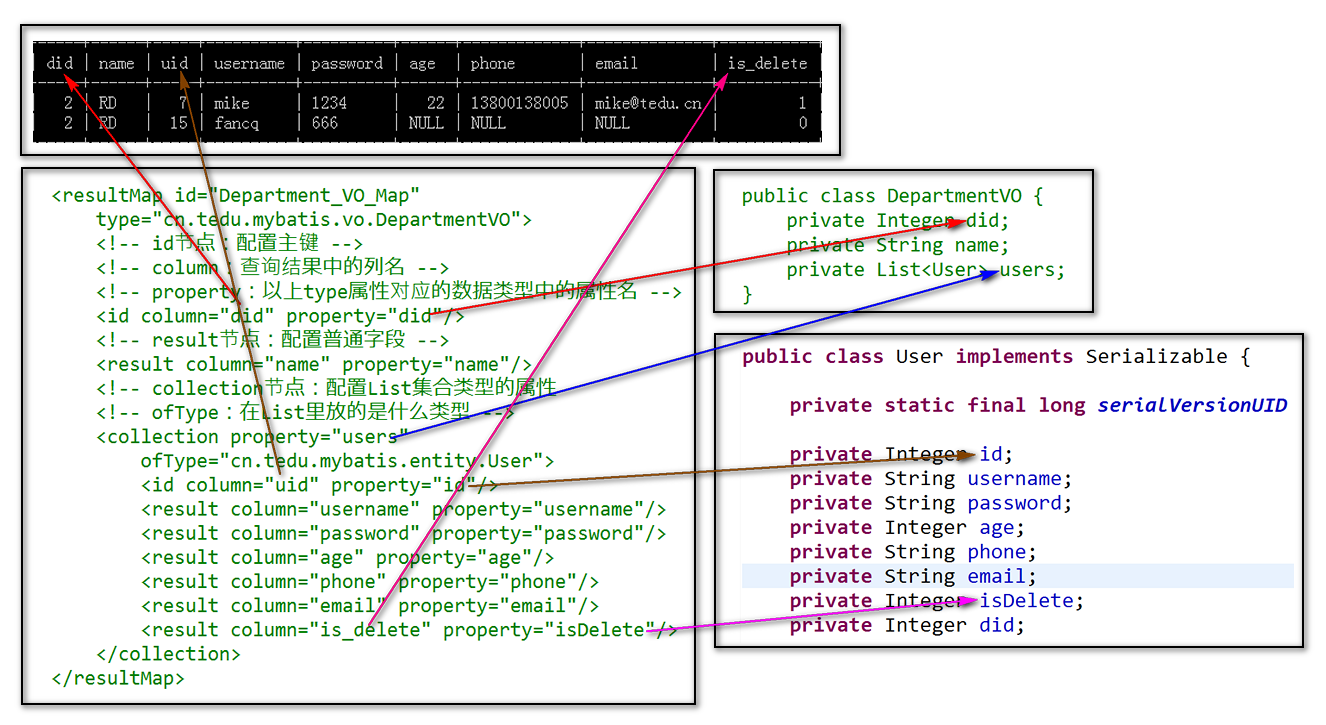
> 以上代码中,自定义别名是因为需要区分查询结果中的列的名称,并不是因为需要与数据类型中的属性对应,关于查询结果的列名与数据类型的属性名的对应,可以通过`<resultMap>`中的配置来完成!
五、测试:
package cn.tedu.mybatis.mapper;

import org.junit.After;

import org.junit.Before;

import org.junit.Test;

import org.springframework.context.support.AbstractApplicationContext;

import org.springframework.context.support.ClassPathXmlApplicationContext;

import cn.tedu.mybatis.vo.DepartmentVO;

public class DepartmentMapperTestCase {

    AbstractApplicationContext ac;

    DepartmentMapper mapper;

    @Before

    public void doBefore() {

        ac = new ClassPathXmlApplicationContext("spring-dao.xml");

        mapper = ac.getBean("departmentMapper", DepartmentMapper.class);

    }

    @After

    public void doAfter() {

        ac.close();

    }

    @Test

    public void findById() {

        Integer id = 2;

        DepartmentVO data

            = mapper.findById(id);

        System.out.println(data);

    }

}
Mybatis中<resultMap>用法(主要用于一对多去重)的更多相关文章
- mybatis中resultMap配置细则
resultMap算是mybatis映射器中最复杂的一个节点了,能够配置的属性较多,我们在mybatis映射器配置细则这篇博客中已经简单介绍过resultMap的配置了,当时我们介绍了resultMa ...
- Mybatis中resultMap的基础配置
一.概述 resultMap 元素是 MyBatis 中最重要最强大的元素.它就是让你远离 90%的需要从结果集中取出数据的 JDBC 代码的那个东西,而且在一些情形下允许你做一些 JDBC 不支持的 ...
- mybatis中resultMap的使用
在mybatis中,使用<select>标签,必须要设置resultType属性 或 resultMap属性 否则会报错! resultType一般是返回简单类型的查询结果,涉及一张表 可 ...
- 在mybatis中resultMap与resultType的区别
MyBatis中在查询进行select映射的时候,返回类型可以用resultType,也可以用resultMapresultType是直接表示返回类型的,而resultMap则是对外部ResultMa ...
- Mybatis中resultMap与resultType区别
MyBatis中在查询进行select映射的时候,返回类型可以用resultType,也可以用resultMap,resultType是直接表示返回类型的,而resultMap则是对外部ResultM ...
- mybatis中resultMap引发的吐血bug
简单的讲: 问题背景:如果在写mybatis中的resultMap时,不下心将resultMapde id写成映射接口的名字,会发生什么? 结论:单元测试进度条卡住但不报错, Tomcat运行不报错, ...
- MyBatis 中 resultMap 详解
resultMap 是 Mybatis 最强大的元素之一,它可以将查询到的复杂数据(比如查询到几个表中数据)映射到一个结果集当中.如在实际应用中,有一个表为(用户角色表),通过查询用户表信息展示页面, ...
- mybatis中实现一对一,一对多查询
在实际的开发中我们经常用到的是一对一查询和一对多查询.而多对多的实现是通过中间来实现,这里就没有给出来了 比如: 订单和用户是一对一的关系(一个订单只能对应一个用户) 订单和订单明细是一对多的关系(一 ...
- MyBatis中collection (一对一,一对多)
MyBatis学习:http://www.mybatis.org/mybatis-3/zh/index.html 大对象InsuranceDetailsVO: com.quicksure.mobile ...
随机推荐
- javascript中client()兼容性封装
function client() { var clientWidth = window.innerWidth || document.documentElement.clientWidth || d ...
- [ OS ][ Linux ] [ SA ] root 帳號名稱修改
1. 背景: 由於 Linux 中預設最高權限的使用者一律為 root, 存在安全性的疑慮. 所以比較安全的作法要將 root 帳號改名為其他名稱,讓要入侵的人需要同時破解出帳號和密碼才可以進入主機, ...
- 从EntityFramework转换EntityFrameworkCore的正确姿势(DBFirst)
今天有一个小任务:要把一个数据的数据搬运到另一个数据库(两个数据库的数据结构很不一样). 决定用.net core console app来跑,并且采用entityframework 去做数据CRU ...
- Could not Open Install.Log File解决方法
很多时候我们使用控制面板卸载软件会遇到could not open install.log file的报错,最近我也遇到了一次.之前遇到这样的问题,很多人都会选择直接删除软件安装目录和快捷方式等等.这 ...
- Python多线程原理与实现
Date: 2019-06-04 Author: Sun Python多线程原理与实战 目的: (1)了解python线程执行原理 (2)掌握多线程编程与线程同步 (3)了解线程池的使用 1 线程基本 ...
- mongodb主从搭建
#tigergao 官网进行下包,可以下载源码包或者二进制包,本次下载的为二进制包,进行试验. 主服务器搭建: mkdir mongomaster cp mongodb-linux-x86_64-rh ...
- vue封装http请求
import axios from 'axios' import isObject from 'lodash/isObject' const http = function (api, data = ...
- Java之Object类
0 引言 Object类是类层次结构的根,Java中所有的类从根本上都继承自这个类.Object类是Java中唯一没有父类的类. 其他所有的类,包括标准容器类,比如数组,都继承了Object类中的方法 ...
- python之类与对象的属性
类相关的知识 在python2中的区分: 经典类: class School: pass 新式类: class School(object): pass 在python3中以上两种均为新式类 属性: ...
- 在centos系统中增、删交换分区
Swap介绍: Linux 将物理内存分为内存段,叫做页面.交换是指内存页面被复制到预先设定好的硬盘空间(叫做交换空间)的过程,目的是释放对于页面的内存.物理内存和交换空间的总大小是可用的虚拟内存的总 ...