
ios开发级联菜单(利用父子控制器--两个菜单封装为两个子控制器来实现)
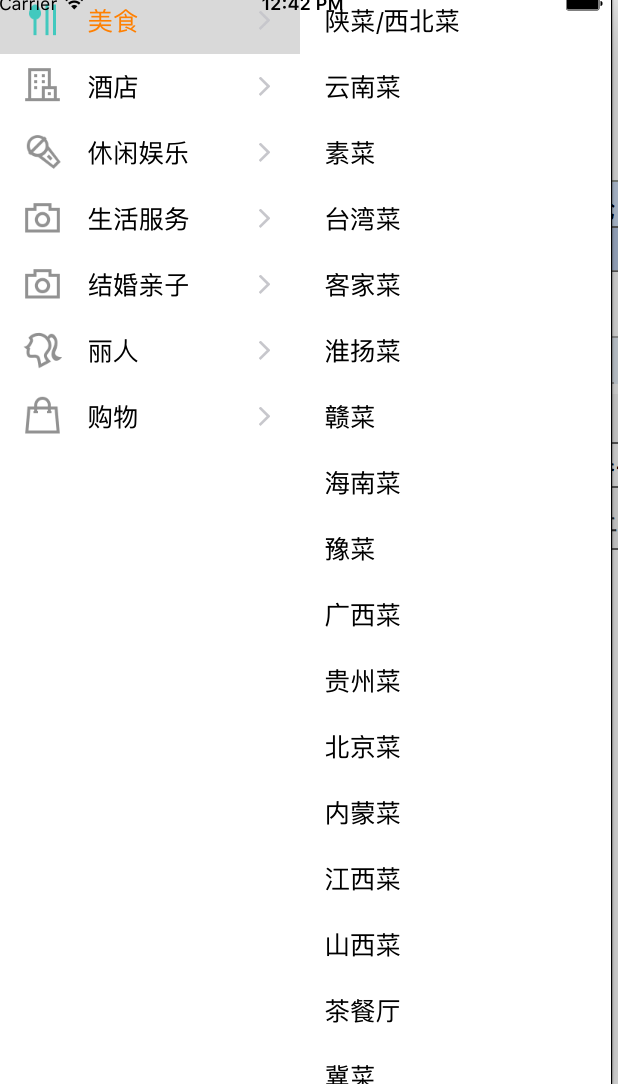
一:1:级联菜单可以使用两个tableView来实现,也可以利用父子控制器,两个控制器来实现,根视图控制器作为两个控制器的父控制器,来管理两个子控制器。2:将左右菜单分别交给两个控制器去管理,对于一些复杂的业务逻辑,涉及大量回调操作,业务逻辑也要相对复杂,则不建议采取封装成view去处理,最好还是利用一个控制器去管理其内部复杂的业务逻辑,具体做法就是:利用父子控制器,将子控制器交由父控制器去管理,将子控制器的view添加到父控制器的view上。效果如图:
二:代码
1:根控制器代码:添加两个子控制器到,并将子view添加到根视图控制器的view上
 #import "ViewController.h"

 #import "RHCategoryViewController.h"

 #import "RHSubCategoryViewController.h"

 @interface ViewController ()

 @end

 @implementation ViewController

 - (void)viewDidLoad {

     [super viewDidLoad];

     CGFloat width = self.view.frame.size.width *0.5;

     CGFloat height = self.view.frame.size.height;

     //右侧菜单

     RHSubCategoryViewController *sub = [[RHSubCategoryViewController alloc]init];

     sub.view.frame = CGRectMake(width, , width, height);

     [self addChildViewController:sub];

     [self.view addSubview:sub.view];

     //左侧菜单

     RHCategoryViewController *category = [[RHCategoryViewController alloc]init];

     category.view.frame = CGRectMake(, , width, height);

     category.delegate = sub;

     [self.view addSubview:category.view];

     [self addChildViewController:category];

 }

 @end
2:左侧菜单控制器
 //左侧菜单:

 #import <UIKit/UIKit.h>

 @class RHCategoryViewController;

 @protocol RHCategoryViewControllerDelegate <NSObject>

 @optional

 - (void)categoryViewController:(RHCategoryViewController*)controller didSelectRowWithData:(NSArray*)dataArr;

 @end

 @interface RHCategoryViewController : UITableViewController

 @property (nonatomic,weak)id <RHCategoryViewControllerDelegate>delegate;

 @end
 #import "RHCategoryViewController.h"

 #import "RHCategoryModel.h"

 static NSString *const cellID = @"cellID";

 @interface RHCategoryViewController ()

 /*数据源*/

 @property (nonatomic ,strong)NSMutableArray *dataArr;;

 @end

 @implementation RHCategoryViewController

 - (NSMutableArray*)dataArr {

     if (!_dataArr) {

         NSString *filePath = [[NSBundle mainBundle]pathForResource:@"categories" ofType:@"plist"];

         NSArray *data = [NSArray arrayWithContentsOfFile:filePath];

         NSMutableArray *dataArray = [NSMutableArray array];

         for (NSDictionary *dic in data) {

             RHCategoryModel *model = [RHCategoryModel categoryModelWithDic:dic];

             [dataArray addObject:model];

         }

         /*

          1:此时的数组可以自己初始化,或是将其他的数组赋值给没初始化的数组 2:在懒加载还可以调用set方法为数组赋值,也就是,self.dataArr = dataArray;

          */

         _dataArr = dataArray;

     }

     return _dataArr;

 }

 - (void)viewDidLoad {

     [super viewDidLoad];

     //1:注册表格

     [self.tableView registerClass:[UITableViewCell class] forCellReuseIdentifier:cellID];

     /*

      注: 1:写在viewDidLoad此处不会默认选中第一行,应该在viewWillAppear:(BOOL)animated,或是viewDidAppear:(BOOL)animated方法中设置默认选中第一行时,才会选中

          2:控制器的view是懒加载的,当在根控制器中设置view的frame时,vc.view.frame,vc.view调用的是vc中view的get方法,此时会加载view,执行viewDidload方法,加载view,但是此时view的UI,tableView还没有加载,先调用viewWillAppear:(BOOL)animated,在调用数据源代理方法,在调用viewDidAppear:(BOOL)animated

      //2:默认第0行被选中

      //     [self.tableView selectRowAtIndexPath:[NSIndexPath indexPathForRow:0 inSection:0] animated:NO scrollPosition:UITableViewScrollPositionTop];

      */

 }

 - (NSInteger)tableView:(UITableView *)tableView numberOfRowsInSection:(NSInteger)section {

     return self.dataArr.count;

 }

 - (UITableViewCell*)tableView:(UITableView *)tableView cellForRowAtIndexPath:(NSIndexPath *)indexPath {

     /*

      1:当cell被选中的时候,cell上的子控件都会显示高亮行为,所以可以设置cell上子控件高亮时的状态,来显示cell被选中时的状态。 cell.textLabel.highlightedTextColor,cell.imageView.highlightedImage

      */

     UITableViewCell *cell = [tableView dequeueReusableCellWithIdentifier:cellID];

     RHCategoryModel *model = self.dataArr[indexPath.row];

     cell.textLabel.text = model.name;

     cell.textLabel.highlightedTextColor = [UIColor orangeColor];

     cell.imageView.image = [UIImage imageNamed:model.icon];

     cell.imageView.highlightedImage = [UIImage imageNamed:model.highlighted_icon];

     cell.accessoryType = UITableViewCellAccessoryDisclosureIndicator;

     return cell;

 }

 - (void)tableView:(UITableView *)tableView didSelectRowAtIndexPath:(NSIndexPath *)indexPath {

     if (self.delegate && [self.delegate respondsToSelector:@selector(categoryViewController:didSelectRowWithData:)]) {

         RHCategoryModel *model = self.dataArr[indexPath.row];

         [self.delegate categoryViewController:self didSelectRowWithData:model.subcategories];

     }

 }

 - (void)setDelegate:(id<RHCategoryViewControllerDelegate>)delegate {

     _delegate = delegate;

     /*

      1:默认表格的某一行被选中,不会调用didSelectRowAtIndexPath方法,只是设置cell的选中的一个状态

      2:获得tableView选中的某一行的indexpath:self.tableView.indexPathForSelectedRow

      */

     [self tableView:self.tableView didSelectRowAtIndexPath:[NSIndexPath indexPathForRow: inSection:]];

 }

 /*

  1:两方法分别是:视图即将出现的时候调用,视图已经出现的时候调用

  2:当某个控制器被压入栈里,或是被moda的控制器遮住的时候,返回到此控制器,则两个方法依然会被调用

  */

 - (void)viewWillAppear:(BOOL)animated {

     [super viewWillAppear:animated];

 //     [self.tableView selectRowAtIndexPath:[NSIndexPath indexPathForRow:0 inSection:0] animated:NO scrollPosition:UITableViewScrollPositionTop];

 }

 - (void)viewDidAppear:(BOOL)animated {

     [super viewDidAppear:animated];

     [self.tableView selectRowAtIndexPath:[NSIndexPath indexPathForRow: inSection:] animated:NO scrollPosition:UITableViewScrollPositionTop];

 }

 @end
3:右侧菜单控制器
 #import <UIKit/UIKit.h>

 #import "RHCategoryViewController.h"

 @interface RHSubCategoryViewController : UITableViewController<RHCategoryViewControllerDelegate>

 @end
 #import "RHSubCategoryViewController.h"

 #import "RHCategoryViewController.h"

 static NSString *const cellID = @"cellID";

 @interface RHSubCategoryViewController ()

 /*数据源*/

 @property (nonatomic ,strong)NSArray *dataArr;

 @end

 @implementation RHSubCategoryViewController

 - (void)viewDidLoad {

     [super viewDidLoad];

     [self.tableView registerClass:[UITableViewCell class] forCellReuseIdentifier:cellID];

 }

 - (void)categoryViewController:(RHCategoryViewController *)controller didSelectRowWithData:(NSArray *)dataArr {

     self.dataArr = dataArr;

     [self.tableView reloadData];

 }

 - (NSInteger)tableView:(UITableView *)tableView numberOfRowsInSection:(NSInteger)section {

     return self.dataArr.count;

 }

 - (UITableViewCell*)tableView:(UITableView *)tableView cellForRowAtIndexPath:(NSIndexPath *)indexPath {

     UITableViewCell *cell = [tableView dequeueReusableCellWithIdentifier:cellID];

     cell.textLabel.text = self.dataArr[indexPath.row];

     return cell;

 }

 @end
5:数据模型model
 #import <Foundation/Foundation.h>

 @interface RHCategoryModel : NSObject

 /*高亮图片*/

 @property (nonatomic,copy)NSString *highlighted_icon;

 /*icon*/

 @property (nonatomic,copy)NSString *icon;

 /*名字*/

 @property (nonatomic,copy)NSString *name;

 /*分类数组*/

 @property (nonatomic ,strong)NSArray *subcategories;

 +(instancetype)categoryModelWithDic:(NSDictionary*)dic;

 @end
 #import "RHCategoryModel.h"

 @implementation RHCategoryModel

 +(instancetype)categoryModelWithDic:(NSDictionary*)dic {

     RHCategoryModel *model = [[self alloc]init];

     [model setValuesForKeysWithDictionary:dic];

     return model;

 }

 @end
三:知识点总结
1:从plist中读取数据:1:先加载plist的路径: NSString *filePath = [[NSBundle mainBundle]pathForResource:@"categories" ofType:@"plist"]; 2:在查看pilist文件中根节点是数组还是字典,从而将plist数据读出: NSArray *data = [NSArray arrayWithContentsOfFile:filePath];
2:懒加载:属性修饰必须用strong,若用weak则刚创建完对象就会被销毁。在懒加载中,懒加载数组或是其他变量时,1:若没初始化,可以将一个已经初始化的变量直接赋值 2:若已经初始化,则可以返回 3:只要是属性定义的变量,就会生成下划线的变量,set方法,get方法,所以在懒加载时,除了可以用带下划线的成员变量,也可以用self.data = dataArray;左侧调用的是set方法,右侧调用的是get方法 4:若是系统或是自定的属性,调用完set方法赋值后,若想在其他方法中获得所赋的值,则可直接调用其get方法,例如titleLable.font,从父控制器数组中取出子控制器,直接调用title的get方法,直接获得title,不用再讲title放在数组中再去赋值。5:若外部向获得在.m中声明的成员属性,则该变量可以再.h中提供自身的get方法供外部调用
3:1:[self.tableView selectRowAtIndexPath:[NSIndexPath indexPathForRow:0 inSection:0] animated:NO scrollPosition:UITableViewScrollPositionTop];tableView的默认选中某一行 1:默认表格的某一行被选中,不会调用didSelectRowAtIndexPath方法,只是设置cell的选中的一个状态 2:获得tableView选中的某一行的indexpath:self.tableView.indexPathForSelectedRow 2:1:写在viewDidLoad此处不会默认选中第一行,应该在viewWillAppear:(BOOL)animated,或是viewDidAppear:(BOOL)animated方法中设置默认选中第一行时,才会选中 2:控制器的view是懒加载的,当在根控制器中设置view的frame时,vc.view.frame,vc.view调用的是vc中view的get方法,此时会加载view,执行viewDidload方法,加载view完毕,但是此时view的UI视图并没有去加载,tableView还没有加载,先调用viewWillAppear:(BOOL)animated,在去绘制视图UI,完毕后在调用viewDidAppear:(BOOL)animated。3:只有当整个表格绘制完毕或是即将绘制时,设置selectRowAtIndexPath才会起作用
4:当cell被选中的时候,cell上的子控件都会显示高亮行为,所以可以设置cell上子控件高亮时的状态,来显示cell被选中时的状态。 cell.textLabel.highlightedTextColor,cell.imageView.highlightedImage
5:重写setDelegate方法:因为在viewDidload里如果调用didselecrow方法,默认选中,则不会执行,是因为此时还没有设置代理,代理为空,self.delegate对象为空值,所以重写setDelegate方法,在设置代理成功后,再调用didselecrow,来设置默认选中
6:- (void)viewWillAppear:(BOOL)animated ,- (void)viewDidAppear:(BOOL)animated。 1:两方法分别是:视图即将出现的时候调用,视图已经出现的时候调用 2:当某个控制器被压入栈里,或是被moda的控制器遮住的时候,返回到此控制器,则两个方法依然会被调用
7: [self.tableView registerClass:[UITableViewCell class] forCellReuseIdentifier:cellID];self.tableView注册完cell后,就不用在其数据源方法中判断cell是否存在了,直接从缓存池中取出cell,就可以了
8:用类方法快速获得数据模型的对象:+(instancetype)categoryModelWithDic:(NSDictionary*)dic;在实现方法中,创建出对象后,利用对象调用kvc方法快速为属性赋值,并将模型对象返回。self在类方法中指的是当前类,在对象方法中指的是当前的对象,所以在类方法中不能用self调用对象方法
ios开发级联菜单(利用父子控制器--两个菜单封装为两个子控制器来实现)的更多相关文章
- 【iOS开发-79】利用Modal方式实现控制器之间的跳转
利用Modal方法.事实上就是以下两个方法的运用. Modal方式的切换效果是从底部呈现. -(void)clickModal{ WPViewController *wp=[[WPViewContro ...
- iOS开发小技巧--利用MJExtension解决数据结构复杂的模型转换
一.开发中难免会遇到,系统返回的数据中字典套集合,集合里面又套一层字典,然后字典里面还有字典或者集合等等的复杂结构的数据...MJExtension轻松搞定这类问题 1.解决方法一: 例:百思项目中帖 ...
- ios开发之手势动作状态细分state,同一视图加入两个手势
1.比方拖拽一个视图.形成类似scrollView的翻页形式 在拖拽的方法里推断拖拽的状态state属性,依据状态不同运行自己须要的效果. 2.同一视图加入两个手势,须要使用手势的代理方法.同意此操作 ...
- iOS开发小技巧--利用运行时得到隐藏的成员变量
一.关于运行时,已经从网络上摘抄了一片文章,这里只有项目中自己的简单使用 -- 查找隐藏的成员变量 导入头文件 可以获得隐藏的成员变量,方法,属性等 代码: 打印效果图:
- iOS开发小技巧--利用苹果官方API播放视频(方法已经过时,了解一下)
- 【iOS 开发】Objective - C 面向对象 - 方法 | 成员变量 | 隐藏封装 | KVC | KVO | 初始化 | 多态
一. Objective-C 方法详解 1. 方法属性 (1) OC 方法传参机制 Object-C 方法传参机制 : OC 中得参数传递都是值传递, 传入参数的是参数的副本; -- 基本类型 (值传 ...
- iOS开发--Swift 基于AFNetworking 3.0的网络请求封装
Swift和OC基于AFNetworking的网络请求流程相同, 就是语法不同, 对于Swift语法不是很清楚的同学, 建议多看看API文档, 自己多多尝试. 写过OC的应该都明白每句话做什么的, 就 ...
- IOS开发-表视图LV3导航控制器
学到这里感觉有点难了,其实这篇文章再草稿箱里放了好久了~ 最近对于学习的热情下降了.这不行-抓紧学习走起! 在这一章节的学习中主要针对导航控制器及表视图来建立多视图的应用, 首先要了解一些概念-- 1 ...
- 文顶顶iOS开发博客链接整理及部分项目源代码下载
文顶顶iOS开发博客链接整理及部分项目源代码下载 网上的iOS开发的教程很多,但是像cnblogs博主文顶顶的博客这样内容图文并茂,代码齐全,示例经典,原理也有阐述,覆盖面宽广,自成系统的系列教程 ...
随机推荐
- 错误 make: Nothing to be done for 'default'
Makefile书写格式非常严格,all:<TAB缩进>make -C $(KDIR) M=$(PWD) $(EXTRA_CFLAGS) modulesdefault:<TAB缩进& ...
- Vue router的query对象里的值的问题
在使用 $router.push() 时,如果使用了query,则可以在跳转后从query中获取到对应的参数.如果传的是字符串自然没问题,但是如果传的其他类型的数据,在跳转之后是正常的,而跳转之后再刷 ...
- 03002_MySQL数据库的安装和配置
1.MySQL的安装 (1)下载mysql-5.5.49-win32.msi, 链接:MySQL安装包下载 密码:geqh : (2)打开下载的MySQL安装文件mysql-5.5.27-win32. ...
- 1.13 Python基础知识 - 字典和集合
一.字典 字典是一组键-值对的数据结构.每个键对应一个值.在字典中,键不能重复.根据键可以查询到值.字典是键和值的映射关系 字典的定义: 字典通过花括号中用逗号分隔的元素(键-值.键-值对使用冒号分隔 ...
- C# C++ 字符串传递
C# C++ 字符串传递 标签: c#c++bytestring测试c 2012-06-14 17:425707人阅读评论(3)收藏举报 分类: C#(11) 作者同类文章X C++(112) 作 ...
- VC 常见问题百问
http://www.cnblogs.com/cy163/archive/2006/06/19/429796.html 经典Vc书 Charles Petzold 的<Programming W ...
- [D3] Animate with the General Update Pattern in D3 v4
In D3, the General Update Pattern is the name given to what happens when a data join is followed by ...
- Traveler Nobita (zoj 3456 最小生成树)
Traveler Nobita Time Limit: 2 Seconds Memory Limit: 65536 KB One day, Nobita used a time machin ...
- spark算子(二)
1.collect算子 *使用foreachACTION操作 ,collect在远程集群中遍历RDD的元素 *使用collect操作,将分布式在远程集群中的数据拉取到本地 *这种方式不建议使用,如果数 ...
- js的AJAX请求有关知识总结
什么是AJAX?AJAX作用是什么? async javascript and xml(异步的javascript和xml) 作用:实现局部刷新 async:我们真实项目中一般使用AJAX从服务器端获 ...