
[.NET Core 32]升级vs code之后,vs code无法调试net core web项目
错误提示&处理方法
参考链接:https://github.com/OmniSharp/omnisharp-vscode/issues/1742
错误:The .NET Core debugger cannot be installed. The debugger requires macOS 10.12 (Sierra) or newer
方法:You can set the option to disable auto extension updates in VS Code, and then manually install v1.11.0from the .vsix file using these instructions. Though the one problem with this is that you will also miss out on new language service features. But this is certainly a great option if you can't upgrade your OS yet, but it is a point-in-time problem.
详细步骤:
参考链接:https://github.com/OmniSharp/omnisharp-vscode/wiki/Installing-Beta-Releases
安装下载:https://github.com/OmniSharp/omnisharp-vscode/releases/tag/v1.11.0
A new release of the C# extension is generally shipped every month or so. During development, interim(临时) beta releases are made available as VSIXs here: https://github.com/OmniSharp/omnisharp-vscode/releases. If you wish to install a beta release, please follow these steps:
Uninstalling a previously-installed C# extension
When installing a beta release, it's a good idea to remove any previous versions of the extension. You can do this like so:
Open Visual Studio Code and select View->Extensions from the menu to display the Extensions pane.
In the Extensions pane, locate the C# extension and click the little 'gear' icon next to it. From the drop-down menu, select 'Uninstall'.
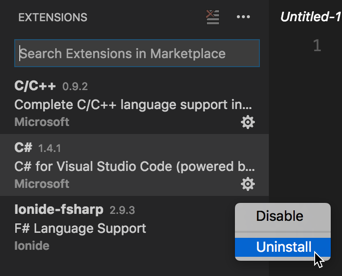
Visual Studio Code will ask if you are sure that you want to uninstall the extension. Click "OK" on this prompt.
In the Extensions pane, a button will appear next to the C# extension that reads, "Reload". Click this to cause Visual Studio Code to reload without the C# extension installed. Visual Studio Code will ask you whether you are certain whether you wish to reload. Click "OK" to confirm.
Installing a beta release of the C# extension
First, find the release that you wish to install at https://github.com/OmniSharp/omnisharp-vscode/releases (https://github.com/OmniSharp/omnisharp-vscode/releases/tag/v1.11.0) Then, download the .vsix file for that release to your machine. Use the following steps to install the .vsix into Visual Studio Code.
Open Visual Studio Code and select View->Extensions from the menu to display the Extensions pane.
Click the
...at the top-right corner of the Extensions pane and select "Install from VSIX..." on the menu that appears.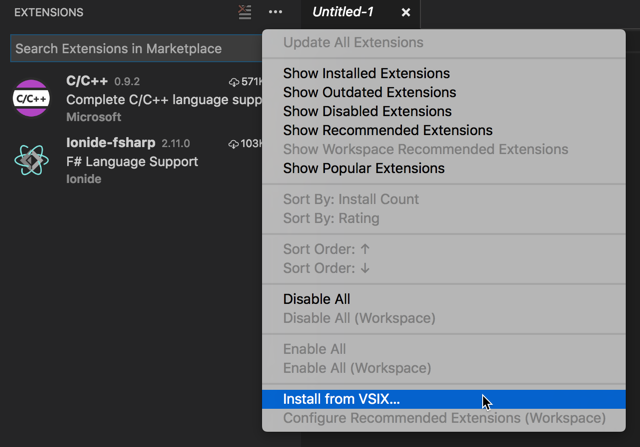
Locate the
.vsixfile you download and click "Open".Visual Studio Code will prompt you to restart to enable the extension. Click "Restart" to confirm.
提示
重新安装C#扩展之后,vs code会更新C#依赖
[.NET Core 32]升级vs code之后,vs code无法调试net core web项目的更多相关文章
- 将 ASP.NET Core 2.1 升级到最新的长期支持版本ASP.NET Core 3.1
目录 前言 Microsoft.AspNetCore.Mvc.ViewFeatures.Internal 消失了 升级到 ASP.NET Core 3.1 项目文件(.csproj) Program. ...
- .Net Core 2.1 升级3.1 问题整理
随着技术的不断拓展更新,我们所使用的技术也在不断地升级优化,项目的框架也在不断地升级,本次讲解 .net core 2.1 升级到3.1所需要注意的事项: 当项目框架升级后,所有的Nuget引用也会 ...
- 使用VS Code从零开始开发调试.NET Core 1.0
使用VS Code 从零开始开发调试.NET Core 1.0. .NET Core 是一个开源的.跨平台的 .NET 实现. VS Code 全称是 Visual Studio Code,Visua ...
- 在Mac上使用Visual Studio Code开发/调试.NET Core代码
.Net Core 1.0终于发布了,Core的一大卖点就是跨平台.这个跨平台不只是跨平台运行,而且可以跨平台开发.今天抽空研究了下在Mac下如何使用VS Code来开发.NET Core程序,并且调 ...
- 使用VS Code开发调试.NET Core 多项目
使用Visual Studio Code(VS Code)开发调试.NET Core和ASP.NET Core 多项目multiple project. 之前讲解过如果使用Visual Studio ...
- 使用VS Code开发 调试.NET Core 应用程序
使用VS Code开发 调试.NET Core RC2应用程序,由于.NET Core 目前还处于预览版. 本文使用微软提供的示例进行开发及调试. https://github.com/aspnet/ ...
- 使用VS Code 从零开始开发并调试.NET Core 应用程序
最新文章:http://www.cnblogs.com/linezero/p/VSCodeNETCore.html 使用VS Code 从零开始开发并调试.NET Core 应用程序,C#调试. 上一 ...
- 解决VS Code调试.NET Core应用遇到的坑
为什么会有”坑“ 博客园里有好多介绍怎么使用VS Code以及调试.NET Core的文章,但是都是基于直接构建Asp.Net Core Mvc单项目的,有什么区别呢! (1).我们这次遇到的坑是在多 ...
- [saiku] 源码整合[普通WEB项目]
saiku源码的整合分为[普通web项目整合]和[maven整合]两种 本节主要是讲解如何整合为普通的web项目 转载自:http://blog.csdn.net/gsying1474/article ...
随机推荐
- IntelliJ IDEA 2018 Community(社区版)创建J2EE项目+Tomcat9部署
博主打算开始系统地自学JAVA,首要问题就是解决IDE的问题, 以前用过像VS.Android Studio.Eclipse,知道Eclipse是JAVA最传统的IDE, 用过VS和AS的朋友都知道, ...
- Linux 进程通信之管道
管道是单向的.先进先出的,它把一个进程的输出和还有一个进程的输入连接在一起.一个进程(写进程)在管道的尾部写入数据,还有一个进程(读进程)从管道的头部读出数据.数据被一个进程读出后,将被从管道中删除, ...
- BZOJ 4555 [Tjoi2016&Heoi2016]求和 (多项式求逆)
题目链接: https://www.lydsy.com/JudgeOnline/problem.php?id=4555 题目大意: 给定 \(S(n,m)\) 表示第二类斯特林数,定义函数 \(f(n ...
- Myeclipse的默认工作区间怎么恢复提示框?
好久一直使用默认工作空间.现在,回过头来想让那个提示框回来. 该如何做呢? 1.找到我们的myeclipse安装目录下的 2.false是关闭. 3.改成true 4.同时,新增新的工作区间和之前旧的 ...
- 修改shm,oracle11g需要扩大共享内存
作者:david_zhang@sh [转载时请以超链接形式标明文章] 链接:http://www.cnblogs.com/david-zhang-index/archive/2012/04/26/24 ...
- ACCESS数据库改名asp或asa
到把mdb改为asp或asa ACCESS数据库:把数据库后缀名改成ASP是防止ACCESS数据库被下载
- GO语言学习(一)Windows 平台下 Go 语言的安装和环境变量设置
1. Go 语言 SDK 安装包下载和安装 GO语言安装包下载地址:https://www.golangtc.com/download 下载 go1.9.2.windows-amd64 2. Go 语 ...
- Android 蓝牙扫描代码
/** * Created by rbq on 2016/11/1. */ import android.bluetooth.BluetoothAdapter; import android.blue ...
- PHP的工作原理和生命周期
版权声明:本文为博主原创文章,未经博主允许不得转载. https://blog.csdn.net/u013778883/article/details/79831035 php是一门适用于web开 ...
- 【例题5-8 UVA - 400】Unix ls
[链接] 我是链接,点我呀:) [题意] 在这里输入题意 [题解] 设n个字符串中出现的最长的为len; 最后一列能容纳len个字符,然后前面的列能容纳len+2个字符. 每行最多60个字符. 按照这 ...