
IAR KEIL ECLIPSE使用JlinkScript文件进行调试
转载自:https://wiki.segger.com/Using_J-Link_Script_Files
Using J-Link Script Files
Contents
[hide]
In some IDEs, the J-Link script file can be configured directly (e.g. in the project file). If the IDE does not offer a native J-Link script file configuration option, there are some alternative options which can be used to use J-Link script files anyhow. For further information regarding this, please refer to Using J-Link Script Files#Generic.
Please note that there are two different kind of script files:
- Plaintext script files (*.JLinkScriptFile)
- Pre-compiled script files (*.pex)
Both script file types are accepted by the DLL.
Embedded Studio
To use a .JLinkScript file in Embedded Studio simply go to the project settings Project->Edit Options... and set the J-Link script file path under Debug->J-Link->Script File
The absolute path on the drive must be used. Note that macros can be used (e.g. "$(ProjectDir)/MyScript.JLinkScript").
Ozone
To use a .JLinkScript file in Ozone first a Ozone project needs to be created. Next the .jdebug file needs to be edited. To set the J-Link script file function Project.SetJLinkScript(); needs to be used.
e.g. Project.SetJLinkScript("./Example.JLinkScript");
Either the absolute path on the drive or the relative path in regards to the .jdebug file can be used.
This function can be called in any of the Ozone project functions. More information can be found in the Ozone user manual.
IAR EWARM
https://wiki.segger.com/IAR_EWARM#Using_J-Link_script_files
Keil MDK
https://wiki.segger.com/Keil_MDK#Using_J-Link_Script_Files
Eclipse
https://wiki.segger.com/Eclipse#Using_J-Link_script_files
Generic
If no J-Link settings file is present, "Default.JLinkScript" is loaded if present in the same directory as the J-Link DLL.
If a J-Link J-Link settings file is present, but no script file is specified inside of the script file, "<Name of the J-Link settings file>.JLinkScript" is loaded if present in the same directory as the J-Link settings file.
Alternatively, a J-Link script file can be specified by using one of the following ways:
- Via J-Link settings file:
- Add or edit the line
"ScriptFile="<path to script file""
- (e.g. ScriptFile="C:\Work\Test.jlinkscript") to the [CPU] section of the J-Link settings file
- Via J-Link command strings
- Execute the command string
"ScriptFile = <path>"
- e.g. ScriptFile = C:\Work\Test.jlinkscript
- Via the J-Link control panel
- Specify the path to the J-Link script file in the tab Settings of the J-Link control panel
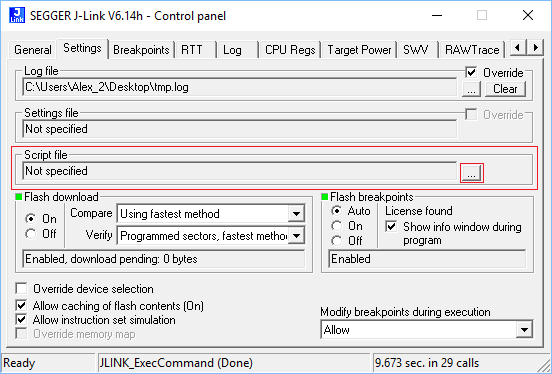
- Specify the path to the J-Link script file in the tab Settings of the J-Link control panel
Navigation menu
- This page was last modified on 17 October 2018, at 15:17.
IAR KEIL ECLIPSE使用JlinkScript文件进行调试的更多相关文章
- Eclipse快速入门:远程调试Java应用
Eclipse快速入门:远程调试Java应用 2012年03月27日00:00 it168网站原创 作者:皮丽华 编辑:皮丽华 我要评论(0) 标签: Eclipse , Java , Java框架, ...
- 使用Eclipse对weblogic进行远程调试
一.环境说明 weblogic12c,linux centOS 6.5,eclipse mars. 二.步骤 1.找到weblogic根目录下user_projects/domains/域名/bin/ ...
- eclipse查看class文件的源码
eclipse查看class文件的源码: 1.网上下载jadClipse的jar包和执行文件jad.exe和 net.sf.jadclipse_3.3.0.jar. 2.把上面下载的jar包放在ecp ...
- myeclipse,eclipse打开当前文件所在文件夹
方法一: eclipse打开当前文件所在文件夹的插件Run-->External Tools-->External Tools Configurations...new 一个 progra ...
- MyEclipse/Eclipse中XML文件的格式化配置
Eclipse中XML文件的格式化配置 MyEclipse: 这一步的配置是使格式化的效果为控件的每个属性配置占一行.进入 Window/Preferences,展开到 XML/XML Resourc ...
- IAR 1.3 for STM8 ST-Link无法调试 无法仿真 the debugging session could not be started
IAR 1.3 for STM8 ST-Link无法调试 the debugging session could not be started CPU型号是:STM8F103F3 首先要用ST Vis ...
- 使用Eclipse把java文件打包成jar 含有第三方jar库的jar包
使用Eclipse把java文件打包成jar 含有第三方jar库的jar包 网上打包说用eclipse安装fat jar插件,但是貌似现在都不能用了,所以我只能按照eclipse自带的方法打包了. ...
- MyEclipse右键new菜单项的设置 及 Eclipse中各种文件不能保存中文的问题
有时候,myeclipse右键new的时候经常出现一些ejb等文件你懂的,很是恶心~~ Window --> Customize Perspective --> Submenus --&g ...
- How to:如何在调用外部文件时调试文件路径(常见于使用LaunchAppAndWait和LaunchApp函数)
原文:How to:如何在调用外部文件时调试文件路径(常见于使用LaunchAppAndWait和LaunchApp函数) IS里调用外部文件的时候,一般都是用LaunchAppAndWait函数,比 ...
随机推荐
- 在 Ali Kubernetes 系统中,我们这样实践混沌工程
在传统的软件测试中,我们通常通过一个给定的条件来判断系统的反馈,通过断言来判断是否符合预期,测试条件和结果通常比较明确和固定.而混沌工程,是通过注入一些“不确定”因素,象放进了一群淘气的猴子,在系统资 ...
- 搭建gulp脚手架
前段时间刚好在开发公司的首页,使用的是gulp工作流,gulp相对于webpack而言,配置简单,也更加直观(很符合直觉),日常开发一些静态页面.html5专题也足够,这里把遇到的坑与实践经验记录一下 ...
- Luogu 1970 NOIP2013 花匠 (贪心)
Luogu 1970 NOIP2013 花匠 (贪心) Description 花匠栋栋种了一排花,每株花都有自己的高度.花儿越长越大,也越来越挤.栋栋决定把这排中的一部分花移走,将剩下的留在原地,使 ...
- 「THUPC2018」赛艇 / Citing
https://loj.ac/problem/6388 矩形匹配,小地图经过位置为1,和大地图匹配不能同时存在一个1的位置,就可以是一个当前位置 1.bitset压位,....O(n^2m^2/64) ...
- 关于打包测试环境,百度地图报 Bmap not undefined
https的网站使用百度地图,如果你引用的地址没写对的话,加载不出来百度地图,被认为是不安全的JS内容. https://api.map.baidu.com/api?+你的秘钥+&s=1 应该 ...
- IDEA进行远程调试
biz-test本地调用测试环境01机器上面的needle项目,卡在查询数据库的地方(Jade停住不走了) 首先配置 相关项目 的服务器端部署jvm参数: 在needle的config.pp.temp ...
- 原生js操作option
<script type="text/javascript"> // 1.动态创建select function createSelect() { var mySele ...
- How the Bitcoin protocol actually works
sklearn实战-乳腺癌细胞数据挖掘(博客主亲自录制视频教程) https://study.163.com/course/introduction.htm?courseId=1005269003&a ...
- Nginx核心配置文件常用参数详解
Nginx核心配置文件常用参数详解 作者:尹正杰 版权声明:原创作品,谢绝转载!否则将追究法律责任. 关于Nginx权威文档的话童鞋们可以参考Nginx官方文档介绍:http://nginx.org/ ...
- Ansible拷贝文件遇到的问题
ansible报错Aborting, target uses selinux but python bindings (libselinux-python) aren't installed 报错内容 ...