
ssm,dubbo框架搭建得配置文件
在建立了parent,common,manager(pojo,mapper,sercie,web)的maven工程后,开始导入添加配置文件:
pojo,mapper 最终会打成jar包,service和web会被打成war包。所以配置文件放在service和web的resource目录下。
1.service只要负责dao和service层的配置文件:链接,操作数据库的相关配置文件
配置分为三层:mybastis,spring,propertis
(1)mybatis:里面放置SqlMapConfig.xml。(主要是放mybatis全局的一些文件)
<?xml version="1.0" encoding="UTF-8" ?>
<!DOCTYPE configuration
PUBLIC "-//mybatis.org//DTD Config 3.0//EN"
"http://mybatis.org/dtd/mybatis-3-config.dtd">
<configuration>
<!-- 配置分页插件 -->
<plugins>
<plugin interceptor="com.github.pagehelper.PageHelper">
<!-- 配置数据库的方言 -->
<!-- 设置数据库类型 Oracle,Mysql,MariaDB,SQLite,Hsqldb,PostgreSQL六种数据库-->
<property name="dialect" value="mysql"/>
</plugin>
</plugins>
</configuration>
(2)spring:放置操作数据库相关的配置文件。连接数据的,控制事物的,以及service自身相关的配置。所以将他分为三个配置文件。
applicationContext-dao.xml:放置连接数据的以及和mybatis集成的。
<?xml version="1.0" encoding="UTF-8"?>
<beans xmlns="http://www.springframework.org/schema/beans"
xmlns:context="http://www.springframework.org/schema/context" xmlns:p="http://www.springframework.org/schema/p"
xmlns:aop="http://www.springframework.org/schema/aop" xmlns:tx="http://www.springframework.org/schema/tx"
xmlns:xsi="http://www.w3.org/2001/XMLSchema-instance"
xsi:schemaLocation="http://www.springframework.org/schema/beans http://www.springframework.org/schema/beans/spring-beans-4.2.xsd
http://www.springframework.org/schema/context http://www.springframework.org/schema/context/spring-context-4.2.xsd
http://www.springframework.org/schema/aop http://www.springframework.org/schema/aop/spring-aop-4.2.xsd http://www.springframework.org/schema/tx http://www.springframework.org/schema/tx/spring-tx-4.2.xsd
http://www.springframework.org/schema/util http://www.springframework.org/schema/util/spring-util-4.2.xsd">
<!-- 配置数据库连接池 -->
<!-- 加载配置文件 -->
<context:property-placeholder location="classpath:properties/db.properties" />
<!-- 数据库连接池 -->
<bean id="dataSource" class="com.alibaba.druid.pool.DruidDataSource"
destroy-method="close">
<property name="url" value="${jdbc.url}" />
<property name="username" value="${jdbc.username}" />
<property name="password" value="${jdbc.password}" />
<property name="driverClassName" value="${jdbc.driver}" />
<property name="maxActive" value="10" />
<property name="minIdle" value="5" />
</bean>
<!-- SqlSessionFactory -->
<!-- 让spring管理sqlsessionfactory 使用mybatis和spring整合包中的 -->
<bean id="sqlSessionFactory" class="org.mybatis.spring.SqlSessionFactoryBean">
<!-- 数据库连接池 -->
<property name="dataSource" ref="dataSource" />
<!-- 加载mybatis的全局配置文件 -->
<property name="configLocation" value="classpath:mybatis/SqlMapConfig.xml" />
</bean>
<!-- Mapper映射文件的包扫描器 -->
<bean class="org.mybatis.spring.mapper.MapperScannerConfigurer">
<property name="basePackage" value="com.taotao.mapper" />
</bean>
</beans>
applicationContext-service.xml:放置服务层的相关配置,以及集成dubbo
<?xml version="1.0" encoding="UTF-8"?>
<beans xmlns="http://www.springframework.org/schema/beans"
xmlns:context="http://www.springframework.org/schema/context" xmlns:p="http://www.springframework.org/schema/p"
xmlns:aop="http://www.springframework.org/schema/aop" xmlns:tx="http://www.springframework.org/schema/tx"
xmlns:dubbo="http://code.alibabatech.com/schema/dubbo"
xmlns:xsi="http://www.w3.org/2001/XMLSchema-instance"
xsi:schemaLocation="http://www.springframework.org/schema/beans http://www.springframework.org/schema/beans/spring-beans-4.2.xsd
http://www.springframework.org/schema/context http://www.springframework.org/schema/context/spring-context-4.2.xsd
http://www.springframework.org/schema/aop http://www.springframework.org/schema/aop/spring-aop-4.2.xsd http://www.springframework.org/schema/tx http://www.springframework.org/schema/tx/spring-tx-4.2.xsd
http://code.alibabatech.com/schema/dubbo http://code.alibabatech.com/schema/dubbo/dubbo.xsd
http://www.springframework.org/schema/util http://www.springframework.org/schema/util/spring-util-4.2.xsd">
<!-- 配置包扫描器,扫描所有带@Service注解的类 -->
<context:component-scan base-package="com.taotao.service"/>
<!-- 发布dubbo服务 -->
<!-- 提供方应用信息,用于计算依赖关系 -->
<dubbo:application name="taotao-manager" />
<!-- 注册中心的地址 -->
<dubbo:registry protocol="zookeeper" address="192.168.25.167:2181" />
<!-- 用dubbo协议在20880端口暴露服务 -->
<dubbo:protocol name="dubbo" port="20880" />
<!-- 声明需要暴露的服务接口 -->
<dubbo:service interface="com.taotao.service.ItemService" ref="itemServiceImpl" timeout="300000"/>
</beans>
applicationContext-trans.xml:放置控制事物的,的配置文件。
<?xml version="1.0" encoding="UTF-8"?>
<beans xmlns="http://www.springframework.org/schema/beans"
xmlns:context="http://www.springframework.org/schema/context" xmlns:p="http://www.springframework.org/schema/p"
xmlns:aop="http://www.springframework.org/schema/aop" xmlns:tx="http://www.springframework.org/schema/tx"
xmlns:xsi="http://www.w3.org/2001/XMLSchema-instance"
xsi:schemaLocation="http://www.springframework.org/schema/beans http://www.springframework.org/schema/beans/spring-beans-4.2.xsd
http://www.springframework.org/schema/context http://www.springframework.org/schema/context/spring-context-4.2.xsd
http://www.springframework.org/schema/aop http://www.springframework.org/schema/aop/spring-aop-4.2.xsd http://www.springframework.org/schema/tx http://www.springframework.org/schema/tx/spring-tx-4.2.xsd
http://www.springframework.org/schema/util http://www.springframework.org/schema/util/spring-util-4.2.xsd">
<!-- 事务管理器 -->
<bean id="transactionManager"
class="org.springframework.jdbc.datasource.DataSourceTransactionManager">
<!-- 数据源 -->
<property name="dataSource" ref="dataSource" />
</bean>
<!-- 通知 -->
<tx:advice id="txAdvice" transaction-manager="transactionManager">
<tx:attributes>
<!-- 传播行为 -->
<tx:method name="save*" propagation="REQUIRED" />
<tx:method name="insert*" propagation="REQUIRED" />
<tx:method name="add*" propagation="REQUIRED" />
<tx:method name="create*" propagation="REQUIRED" />
<tx:method name="delete*" propagation="REQUIRED" />
<tx:method name="update*" propagation="REQUIRED" />
<tx:method name="find*" propagation="SUPPORTS" read-only="true" />
<tx:method name="select*" propagation="SUPPORTS" read-only="true" />
<tx:method name="get*" propagation="SUPPORTS" read-only="true" />
</tx:attributes>
</tx:advice>
<!-- 切面 -->
<aop:config>
<aop:advisor advice-ref="txAdvice"
pointcut="execution(* com.taotao.service.*.*(..))" />
</aop:config>
</beans>
3)属性文件:properties
jdbc.driver=com.mysql.jdbc.Driver
jdbc.url=jdbc:mysql://localhost:3306/taotao?characterEncoding=utf-8
jdbc.username=root
jdbc.password=root
二.整体配置文件截图:
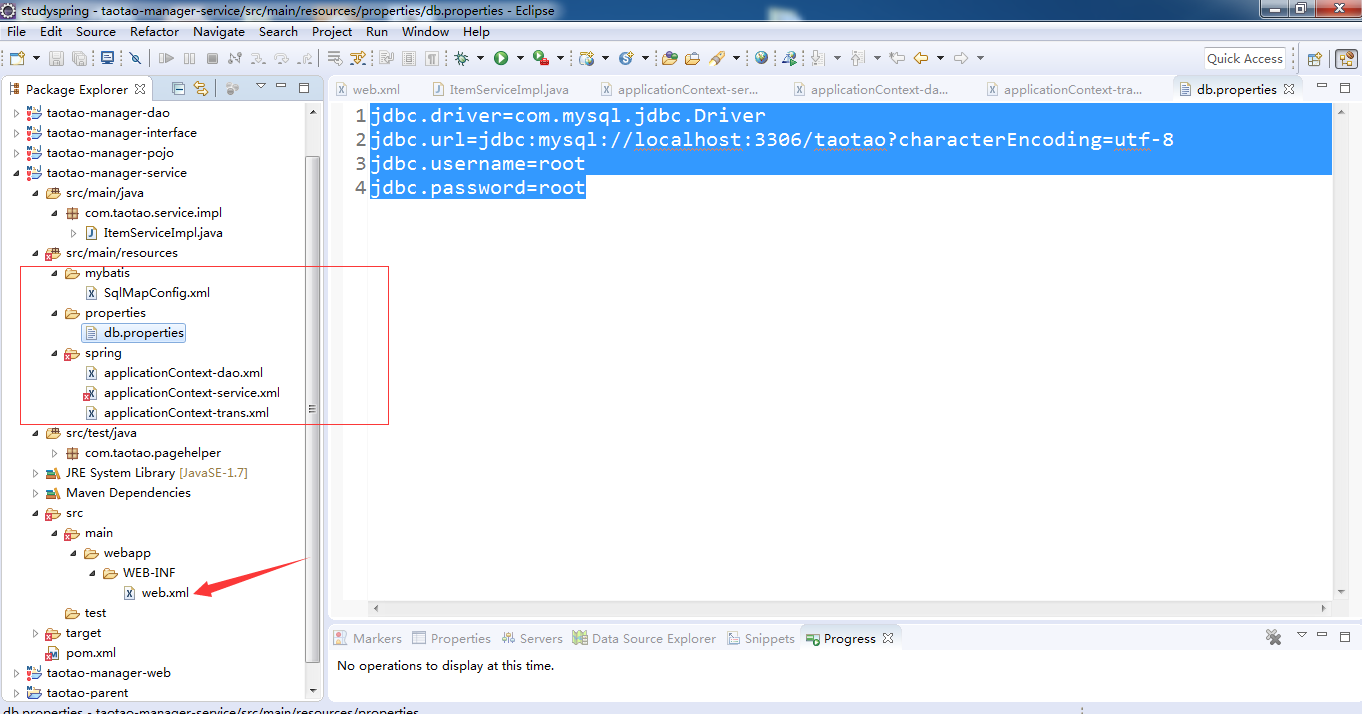
ssm,dubbo框架搭建得配置文件的更多相关文章
- ssm项目框架搭建(增删改查案例实现)——(SpringMVC+Spring+mybatis项目整合)
Spring 常用注解 内容 一.基本概念 1. Spring 2. SpringMVC 3. MyBatis 二.开发环境搭建 1. 创建 maven 项目 2. SSM整合 2.1 项目结构图 2 ...
- SSH2框架搭建 和 配置文件详解
-----------补充说明----------- 文章中所列出的struts2的2.2jar包已经不是最新的了,这个版本有严重漏洞, 现在最新版本为2.3.15,所以.你懂的http://stru ...
- Flask--(项目准备)--框架搭建,配置文件抽取,业务逻辑抽取
抽取配置文件: import logging from redis import StrictRedis class Config(object): """项目的配置&q ...
- maven集成SSM项目,Tomcat部署运行——SSM整合框架搭建(二)之问题
问题一.当放开controller中的方法,出现如下问题 ### Error querying database. Cause: org.springframework.jdbc.CannotGetJ ...
- 品优购项目 单表过程 乒乓过程 入口 MyBatis逆向工程 dubbo框架搭建 品牌表CRUD bug集锦
- 搭建ssm项目框架
[声明]转载注明链接,源码联系公众号:aandb7获取 [此处组织名groupId:com.dayuanit,可替换公司域名:项目名artifactid:...] 此处第二个配置文件选择maven安装 ...
- 实习小结(二)--- SSM框架搭建
SSM项目框架搭建 前几天做了一个学生信息管理的项目,使用纯控制台输入,查询数据库,将信息在控制台中打印,功能完善得差不多之后,老师让将这个项目移植到Web中,使用Spring+SpringMVC+M ...
- 基于SSM的租赁管理系统1.0_20161225_框架搭建
搭建SSM底层框架 1. 利用mybatis反向工程generatorSqlmapCustom完成对数据库十表的映射 generatorConfig.xml <?xml version=&quo ...
- SSM框架搭建web服务器实现登录功能(Spring+SpringMVC+Mybatis)
初学java EE,虽然知道使用框架会使开发更加便捷高效,但是对于初学者来说,感到使用框架比较迷惑,尤其是各种jar包的引用.各种框架的配置.注解的使用等等. 最好的学习方法就是实践,于是下载了一个现 ...
随机推荐
- mariadb(MySql)设置远程访问权限
[问题]mariadb(MySql)安装之后,本地连接mysql是可以的,但是远程的机器不能连接和访问. [解决]修改mysql远程连接的ip限制配置. [步骤]1.本地mysql客户端连接mysql ...
- [k8s]zookeeper集群在k8s的搭建(statefulset模式)-pod的调度
之前一直docker-compose跑zk集群,现在把它挪到k8s集群里. docker-compose跑zk集群 zk集群in k8s部署 参考: https://github.com/kubern ...
- 对于移动端 App,虚拟机注册或类似作弊行为有何应对良策?
1.APP攻击大致策略 对APP进行攻击的一般思路包括反编译APP代码.破解APP通讯协议.安装虚拟机自动化模拟: a.首先看能否反编译APP代码(例如Android APP),如果能够反编译,从代码 ...
- Swift 4迁移总结:喜忧参半,新的起点
Swift 4迁移总结:喜忧参半,新的起点 每日一篇优秀博文 这次Swift 3 到 4 的迁移代码要改动的地方比较少,花了一个下午的时间就完成了迁移.Swift 把原来 4.0 的目标从 ABI 稳 ...
- python学习笔记(23)——python压缩bin包
说明(2017-12-25 10:43:20): 1. CZ写的压缩bin包代码,记下来以后好抄. # coding:utf-8 ''' Created on 2014年8月14日 @author: ...
- MAC OS查看端口占用情况及杀死进程
终端命令 sudo lsof -i :9000 COMMAND PID USER FD TYPE DEVICE ...
- java InputStream和OutputStream
InputStream类型 类 功能 构造器参数 如何使用 ByteArrayInputStream 允许将内存的缓冲区当做InputStreams使用 缓冲区,字节将从中取出 作为一种数据源:将其与 ...
- openCV函数
1.cvInitFont ,, ); font 被初始化的字体结构体. font_face 字体名称标识符.只是Hershey 字体集( http://sources.isc.org/utils/mi ...
- SpringMVC Jsp include 错误404 不显示页面
一.问题描述: 1. 新建了taglibs.jsp存放jstl标签库和 jsp建站基本变量ctx 和basPath 如下 (位置WEB-INF\common) <%@ page import= ...
- java-信息安全(六)-基于RSA理解数字签名示例
概述 java-信息安全(四)-数据签名.数字证书 java-信息安全(五)-非对称加密算法RSA RSA工具类 使用java-信息安全(五)-非对称加密算法RSA项目中RSACoder 数字签名理解 ...