
数据分析常用的python工具和SQL语句
select symbol, "price.*" from stocks :使用正则表达式来指定列查询
select count(*), avg(salary) from emplyee: 聚合函数
select count(distinct col) from stocks:去重后的数目
嵌套查询:
from(select upper(name), salary,deductions["Federal Taxes"] as fed_taxes,round(salary*(1-deductions["Federal Taxes"])) as salary_minus from employees) e select e.name, e.salary_mines,where e.salary_minus>70000;
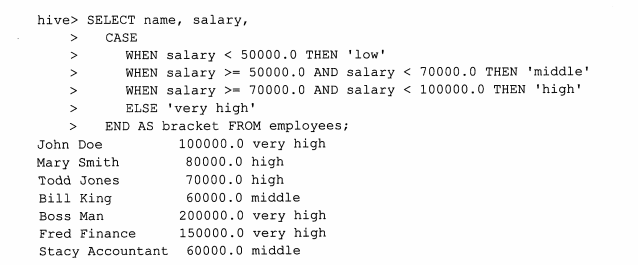
case...when...then...查询
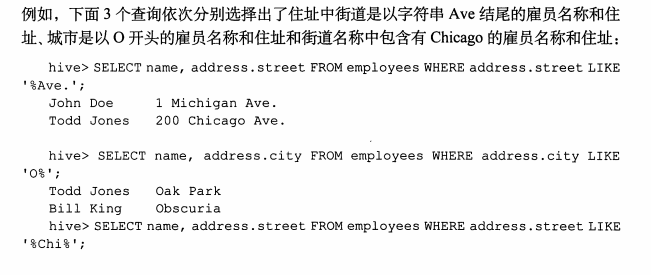
like语句查询:
Rlike语句

group by 语句
group by 语句通常会和聚合函数一块使用,按照一个或者多个列对结果进行分组,然后对每个分组进行聚合操作。

Hive中的order by 和sort by 的区别:
order by执行的是一个全局排序,也就是说也就是说所有的数据都是通过一个Reducer来排序的,对于大数据集来说,话费很长世间,而sort by是局部排序,在每个Reducer中对数据进行排序,也就是说在每个Reducer中是有序的,但是所有Reducer合起来,就是局部有序。

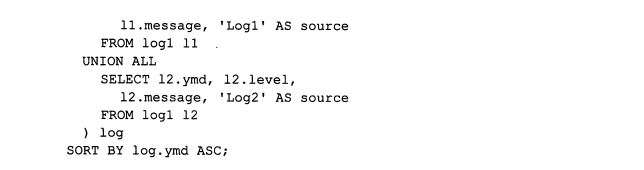
Union all
Union all 可以将2个或者多个表进行合并。但是每一个Union 子查询必须有相同的列,而且每个字段的类型必须是一样的。

下面是hive当中的一些常用函数:
数据函数,集合函数,类型转化函数,日期函数,,条件函数,字符函数,聚合函数,表生成函数。
from_unixtime(bigint unixtime[, string format]):将时间秒值转化为Format格式的时间
例如:from_unixtime(1250111000,"yyyy-MM-dd") 得到2009-03-12
unix_timestamp(string date, string pattern):将format格式的时间字符串转化为时间戳:
例如:unix_timestamp('2009-03-20 11:30:01') = 1237573801
python工具:
数据预览:
df.head(n); df.info(); df.describe(); df.tail()
df.columns:行名
df.index:列名
train.shape
train.dtypes
pd.concat([train, test],ignore_index=True)
only_western_europe_10 = (reprot_2016_df['地区'] == 'Western Europe') & (reprot_2016_df['排名'] > 10)
df.set_index(['Region', 'Country']):设置层级索引
数据清洗
log_data.isnull():是否缺失
log_data[log_data['volume'].notnull()]:取出volume不为空的数据
log_data.fillna(0):填充缺失数据为0
log_data.dropna():去掉有缺失数据的记录
log_data.ffill():以前面的数据填充
log_data.bfill():以后面的数据填充
data.duplicated():判断是否重复
data.drop_duplicates():去除重复数据
map:使用
meat_to_animal = {
'bacon': 'pig',
'pulled pork': 'pig',
'pastrami': 'cow',
'corned beef': 'cow',
'honey ham': 'pig',
'nova lox': 'salmon'
}
lowercased = data['food'].str.lower()
data['animal'] = lowercased.map(meat_to_animal)
或者:
data['food'].map(lambda x: meat_to_animal[x.lower()])
# 将-999替换为空值
data.replace([-999, -1000], np.nan):将列表里的数替换为nan
split_df = data.str.split('@', expand=True):str各种函数
pd.merge(staff_df, student_df, how='outer', on='姓名'):合并df,可选择左右内外连接
staff_df['员工姓名'].apply(lambda x: x[0]):apply的使用
report_data.groupby('Region')grouped['Happiness Score'].mean():后面的聚合函数是对每个分组进行操作的
# 迭代groupby对象
for group, frame in grouped:
mean_score = frame['Happiness Score'].mean()
max_score = frame['Happiness Score'].max()
min_score = frame['Happiness Score'].min()
grouped.agg({'Happiness Score': np.mean, 'Happiness Rank': np.max}):分组的聚合函数
grouped['Happiness Score'].agg([mean, amax, amin, std]):分组的聚合函数
绘图:matplotlib 和 seaborn工具:
%matplotlib notebook:魔法命令
plt.style.available:可用的绘图样式
plt.style.use('seaborn-colorblind'):设置绘图样式
df.plot():分别以每一列为纵轴,索引为横轴,画曲线图,并以图例区别开来
df.plot('A', 'B', kind='scatter'):指定A为横轴,B为纵轴
df.plot(kind='box'):kind可以为hist,kde
pd.plotting.scatter_matrix(iris):散点距阵,查看各个特征之间的相关性
sns.pairplot(iris, hue='Name', diag_kind='kde'):查看各个特征之间的相关性
特征工程:
归一化:
scaler = MinMaxScaler()
X_train_scaled = scaler.fit_transform(X_train)
X_test_scaled = scaler.transform(X_test)
标签编码和独热编码:
首先训练集:
# 在训练集上进行编码操作
label_enc1 = LabelEncoder() # 首先将male, female用数字编码
one_hot_enc = OneHotEncoder() # 将数字编码转换为独热编码
label_enc2 = LabelEncoder() # 将low, middle, high用数字编码
tr_feat1_tmp = label_enc1.fit_transform(X_train[:, 0]).reshape(-1, 1) # reshape(-1, 1)保证为一维列向量
tr_feat1 = one_hot_enc.fit_transform(tr_feat1_tmp)
tr_feat1 = tr_feat1.todense()
tr_feat2 = label_enc2.fit_transform(X_train[:, 1]).reshape(-1, 1)
X_train_enc = np.hstack((tr_feat1, tr_feat2))
然后再测试集上:
te_feat1_tmp = label_enc1.transform(X_test[:, 0]).reshape(-1, 1) # reshape(-1, 1)保证为一维列向量
te_feat1 = one_hot_enc.transform(te_feat1_tmp)
te_feat1 = te_feat1.todense()
te_feat2 = label_enc2.transform(X_test[:, 1]).reshape(-1, 1)
X_test_enc = np.hstack((te_feat1, te_feat2))
模型持久化:
# 保存模型到硬盘
model_path2 = './trained_model2.pkl'
joblib.dump(best_model, model_path2)
model = joblib.load(model_path2)
日期特征处理:
train['created'] = pd.to_datetime(train['created'])
train['date'] = train['created'].dt.date
train["year"] = train["created"].dt.year
train['month'] = train['created'].dt.month
train['day'] = train['created'].dt.day
data[v].value_counts():列举不同的取值,以及每种取值的次数
data.drop(['Loan_Amount_Submitted','Loan_Tenure_Submitted'],axis=1,inplace=True):删除某列
df_train_origin[['temp','weather','windspeed','day', 'month', 'hour','count']].corr():相关性
pd.get_dummies(all_df['MSSubClass'], prefix='MSSubClass'):独热编码一键搞定
all_dummy_df.isnull().sum().sort_values(ascending=False):统计各个字段的空值数目
all_dummy_df.isnull().sum().sum():各个字段的总空值数
合并之后的数据重新分开:
dummy_train_df = all_dummy_df.loc[train_df.index]
dummy_test_df = all_dummy_df.loc[test_df.index]
df.unstack() 行索引→列索引
df.stack() 列索引→行索引
数据分析常用的python工具和SQL语句的更多相关文章
- Python 数据分析:让你像写 Sql 语句一样,使用 Pandas 做数据分析
Python 数据分析:让你像写 Sql 语句一样,使用 Pandas 做数据分析 一.加载数据 import pandas as pd import numpy as np url = ('http ...
- MySQL05-- 客户端工具及SQL语句
目录 MySQL客户端工具及SQL语句 一.客户端命令介绍 二.接收用户的SQL语句 三.字符集定义 四.字符集设置 五.select的高级用法(扩展) MySQL客户端工具及SQL语句 一.客户端命 ...
- 50个常用的笔试、面试sql语句
50个常用的笔试.面试sql语句 2009-12-17 15:05 Student(S#,Sname,Sage,Ssex) 学生表Course(C#,Cname,T#) 课程表SC(S#,C#,s ...
- 微软官方提供的用于监控MS SQL Server运行状况的工具及SQL语句
Microsoft SQL Server 2005 提供了一些工具来监控数据库.方法之一是动态管理视图.动态管理视图 (DMV) 和动态管理函数 (DMF) 返回的服务器状态信息可用于监控服务器实例的 ...
- sql server 数据分析优化实战(一)——SQL语句优化
前言 在我们进行数据分析的时候,首要的目标是根据业务逻辑,通过编写SQL代码得到我们想要的结果,这是毋庸置疑的.一般情况下,由于我们分析的数据量比较少,体会不出SQL语句各种写法的性能优劣,对SQL代 ...
- mysql详解常用命令操作,利用SQL语句创建数据表—增删改查
关系型数据库的核心内容是 关系 即 二维表 MYSQL的启动和连接show variables; [所有的变量] 1服务端启动 查看服务状态 sudo /etc/init.d/mysql status ...
- 【python】提取sql语句中的表名
前言 最近刚学python,写一个小工具时需要提取sql语句中表名,查询一番后找到一篇文章挺不错的,mark一下 PS.那篇文章是转载的,且没有标注转载自哪里 正文 import ply.lex as ...
- python快速导出sql语句(mssql)的查询结果到Excel,解决SSMS无法加载大字段的问题
遇到一个尴尬的问题,SSMS的GridView对于大字段的(varchar(max),text之类的),支持不太友好的,超过8000个长度之外的字符,SSMS的表格是显示不出来的(当然也就看不到了), ...
- MySql数据库转设计文档(mysql-font工具和sql语句导出)
一.工具导出 1.使用的是MySQL-Front工具,这个工具使用非常方便,尤其是导出数据的时候,几百万的数据一两分钟就导完了,推荐使用. MySQL-Front下载(只有3.93M):http:// ...
随机推荐
- android--------自定义控件 之 组合控件篇
上篇介绍了自定义控件的自定义属性篇,地址:http://www.cnblogs.com/zhangqie/p/8969163.html 这篇博文主要来说说 自定义控件的组合控件来提高布局的复用 使用自 ...
- file 文件处理
python文件处理 #写文件 >>> f=open("test.log","w") #"w"写入模式 >>& ...
- fiddler 显示server ip
Fiddler显示服务器ip地址列(方便查看host是否生效) 2016年08月31日 15:40:10 阅读数:5801 1.点击菜单栏rules——customize rules... 2.ctr ...
- git中.gitignore文件不起作用的解决
git rm -r --cached . git add . git commit -m 'update .gitignore'
- 时间选择控件YearPicker(基于React,antd)
不知道为什么蚂蚁金服团队没有在ant design的DatePicker中单独给出选择年份的组件,这给我们这种懒人造成了很大的痛苦,自己手造轮子是很麻烦的.毕竟只是一个伸手党,emmmmm..... ...
- 【LeetCode】Permutation全排列
1. Next Permutation 实现C++的std::next_permutation函数,重新排列范围内的元素,返回按照 字典序 排列的下一个值较大的组合.若其已经是最大排列,则返回最小排列 ...
- redisObject
typedef struct redisObject { unsigned type:4; unsigned encoding:4; unsigned lru:REDIS_LRU_B ...
- windows配置教程
1.卸载预装软件 2.卸载非安装的预装软件 有些软件被改成了“绿色版”软件不能通过软件列表卸载,一般在C:\Program Files (x86)目录下 可以直接删除其文件夹,如果提示文件夹无法删除则 ...
- 剑指 offer 面试题31 连续子数组的最大和(动态规划)
求连续子数组的最大和 题目描述 给定一个整形数组,有正数也有负数,数组中连续一个或多个组成一个子数组,求所有子数组的和的最大值,要求时间复杂度为O(n); 测试用例 给定数组 {1,-2,3,10,- ...
- pl/sql 如何将Excel文件数据导入oracle的数据表?
1.准备导入数据的excel文件 注意:excel列名和数据表列名必须相同,excel文件sheet2和sheet3可以删除 1)excel文件格式 2)数据表格式 2.打开pl/sql ,找到工具- ...