apache 的httpd.conf常用配置说明
# ServerRoot: The top of the directory tree under which the server's
# configuration, error, and log files are kept.
#
# Do not add a slash at the end of the directory path. If you point
# ServerRoot at a non-local disk, be sure to specify a local disk on the
# Mutex directive, if file-based mutexes are used. If you wish to share the
# same ServerRoot for multiple httpd daemons, you will need to change at
# least PidFile.
#
ServerRoot "/usr/local/httpd"
# Listen: Allows you to bind Apache to specific IP addresses and/or
# ports, instead of the default. See also the <VirtualHost>
# directive.
#
# Change this to Listen on specific IP addresses as shown below to
# prevent Apache from glomming onto all bound IP addresses.
#
#Listen 12.34.56.78:80
Listen 80 (此处可以加其他的全局apache端口如 Listen 8080, 也可以在<VirtualHost> 之外添加某一个虚拟配置的监听端口)
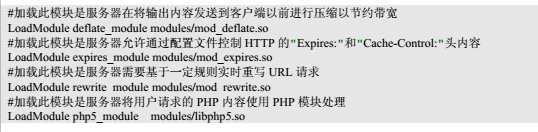
LoadModule deflate_module modules/mod_deflate.so 启用压缩的模块
LoadModule expires_module modules/mod_expires.so 过期模块
LoadModule ssl_module modules/mod_ssl.so (https服务所需要的模块)
LoadModule vhost_alias_module modules/mod_vhost_alias.so (虚拟配置重命名所需模块)
LoadModule alias_module modules/mod_alias.so (启用多域名所需模块)
LoadModule rewrite_module modules/mod_rewrite.so(重定向所需模块)
LoadModule php5_module modules/libphp5.so (解析php文件所需模块)
<Directory />
AllowOverride none
Require all denied
</Directory>
这个配置改为以下配置比较通用
<Directory />
DirectoryIndex index.php
Options Indexes FollowSymLinks
AllowOverride All
Require all granted
</Directory>
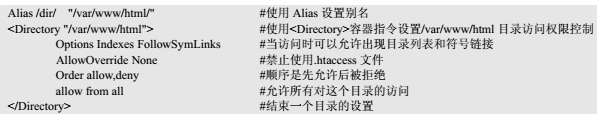
DocumentRoot "/var/www/html"(默认文件根路径)
<Directory "/var/www/html">
#
# Possible values for the Options directive are "None", "All",
# or any combination of:
# Indexes Includes FollowSymLinks SymLinksifOwnerMatch ExecCGI MultiViews
#
# Note that "MultiViews" must be named *explicitly* --- "Options All"
# doesn't give it to you.
#
# The Options directive is both complicated and important. Please see
# http://httpd.apache.org/docs/2.4/mod/core.html#options
# for more information.
#
Options Indexes FollowSymLinks
#
# AllowOverride controls what directives may be placed in .htaccess files.
# It can be "All", "None", or any combination of the keywords:
# AllowOverride FileInfo AuthConfig Limit
#
AllowOverride None
#
# Controls who can get stuff from this server.
#
Require all granted
</Directory>
Directory 配置中建议改为
DirectoryIndex index.php
Options Indexes FollowSymLinks
AllowOverride All
Require all granted
比较通用
<IfModule dir_module>(默认路径的首次解析文件)
DirectoryIndex index.php index.html
</IfModule>
AddType application/x-compress .Z
AddType application/x-gzip .gz .tgz
以下两行为解析php所需添加的配置
AddType application/x-httpd-php .php
AddType application/x-httpd-php-sourece .phps
Include /etc/httpd/extra/httpd-vhosts.conf 引进虚拟配置文件
Include /etc/httpd/conf.d/*.conf 引进conf.d目录下的配置文件如ssl.conf文件
//设置过期时间的文件和gzip压缩相关参数
<IfModule mod_deflate.c>
DeflateCompressionLevel 5
SetOutputFilter DEFLATE
AddOutputFilterByType DEFLATE text/html text/plain text/xml text/css text/javascript application/x-javascript application/javascript application/json
SetEnvIfNoCase Request_URI .(?:gif|jpe?g|png)$ no-gzip dont-vary
SetEnvIfNoCase Request_URI .(?:exe|t?gz|zip|bz2|sit|rar)$ no-gzip dont-vary
SetEnvIfNoCase Request_URI .(?:pdf|mov|avi|mp3|mp4|rm)$ no-gzip dont-vary
AddOutputFilterByType DEFLATE text/*
AddOutputFilterByType DEFLATE application/ms* application/vnd* application/postscript application/javascript application/x-javascript
AddOutputFilterByType DEFLATE application/x-httpd-php application/x-httpd-fastphp
BrowserMatch ^Mozilla/4 gzip-only-text/html
BrowserMatch ^Mozilla/4.0[678] no-gzip
BrowserMatch \bMSIE !no-gzip !gzip-only-text/html
</IfModule>
<IfModule mod_expires.c>
ExpiresActive On
ExpiresDefault A0
<FilesMatch "\.(flv|ico|pdf|avi|mov|ppt|doc|mp3|wmv|wav)$">
ExpiresDefault A9030400
</FilesMatch>
<FilesMatch "\.(jpg|jpeg|png|gif|swf|js|css)$">
ExpiresDefault A604800
</FilesMatch>
</IfModule>
虚拟配置文件:
Listen 8080(添加某一个配置的监听端口)
<VirtualHost *:8080>
ServerAdmin webmaster@dummy-host.example.com
DocumentRoot "/var/www/html/wtsdata/app/web"
ServerName test.wts.199.com
ServerAlias alais.wts.test.199.com
<Directory "/var/www/html/wtsdata/app/web">
DirectoryIndex index.php
Options Indexes FollowSymLinks
AllowOverride All
Require all granted
</Directory>
ErrorLog "logs/199-error_log"
CustomLog "logs/199-access_log" common
</VirtualHost>
.png)
.png)
.png)
- ssh 配置文件讲解大全 ssh调试模式 sftp scp strace进行调试 特权分离
ssh 配置文件讲解大全 ssh调试模式 sftp scp strace进行调试 特权分离 http://blog.chinaunix.net/uid-16728139-id-3265394.h ...
- Linux学习之路--常用命令讲解
Linux常用命令讲解 1.命令格式:命令 [-选项] [参数] 超级用户的提示符是# 一般用户的提示符是$ 如:ls -la /usr说明: 大部分命令遵从该格式多个选项时,可以一起写 eg:ls ...
- Mac中Apache常用命令
Apache常用命令记录,还是记一下吧,总是忘记. Apache常用命令: # sudo apachectl start // 启动Apache服务 # sudo apachectl stop // ...
- apache常用工作模式的区别
apache常用工作模式有两种 worker模式1.线程模式2.占用资源少3.稳定性略差4.并发大 prefork模式1.进程模式2.占用资源多3.稳定4.并发一般 来自为知笔记(Wiz)
- 通过修改 Apache 的配置文件 htaccess 文件实现自定义404页面
最近在学习使用Apache服务器的配置,做一个记录. Apache下有个.htaccess文件,是Apache的一个特殊的配置文件.这个配置文件默认是没有的,要手动在各自的项目的根目录编写才行. 要实 ...
- SpringBoot2.x配置文件讲解
SpringBoot2.x配置文件讲解 简介:SpringBoot2.x常见的配置文件 xml.yml.properties的区别和使用 xml.properties.json.yaml 1.常见的配 ...
- Navicat Premium 常用功能讲解
https://www.linuxidc.com/Linux/2016-04/130159.htm Navicat Premium 常用功能讲解 1.快捷键 1.1. F8 快速回到当前对象列表 1. ...
- Oracle网络相关概念与常用配置文件
监听器(Listener) 监听器是Oracle基于服务端的一种网络服务,主要用于监听客户端向数据库服务器提出的链接请求. 本地服务名(Tnsname) Oracle客户端与服务器端的链接是通过客户端 ...
- Apache检查配置文件语法
Windows环境:httpd -t或者: httpd.exe -w -t -f "C:\Apache2.2\conf\httpd.conf" -d "C:\Apache ...
随机推荐
- Android: android studio配置生成自定义apk名称
1.Android Studio 3.0之前: 在build.gradled 的 android {} 内添加如下代码: android.applicationVariants.all { varia ...
- Windows下安装Tensorflow报错 “DLL load failed:找不到指定的模块"
Windows下安装完tensorflow后,在cmd下运行python后import tensorflow出现如下错误: Traceback (most recent call last): Fi ...
- ssm使用双数据源
工作中需要接入其他公司业务系统的数据进行分析,于是接入它们的db. 使用双数据源配置感觉如下: database.sessionFactory.扫描器.事务管理器等双份. 听说如果两个数据源需要一起使 ...
- adb devices连接不上设备
1.端口被占用 解决办法:netstat -aon|findstr "5037",找到占用5037这个端口的进程,然后根据pid在任务管理器里面找到进程然后结束 2.插拔usb数据 ...
- leetcode31题:下一个排列
实现获取下一个排列的函数,算法需要将给定数字序列重新排列成字典序中下一个更大的排列. 如果不存在下一个更大的排列,则将数字重新排列成最小的排列(即升序排列). 必须原地修改,只允许使用额外常数空间. ...
- js 自执行匿名函数(转载)
自执行匿名函数: 常见格式:(function() { /* code */ })(); 解释:包围函数(function(){})的第一对括号向脚本返回未命名的函数,随后一对空括号立即执行返回的未命 ...
- 第二十六课 典型问题分析(Bugfix)
问题1: glibc中的strdup实现如下: 没有对参数s进行空指针判断. 我们的Exception.cpp中应做改进: 在第12行进行判断空指针操作. 问题2: t1在析构时会抛出异常,我们在re ...
- 文件系统--fs(读)--fs.read
var fs = require('fs');var buf=new Buffer(1024);//fs.open(); //fs.open(path,flags,mode,callback);/* ...
- BT原理分析
BT全名為BitTorrent,是一個p2p軟件,你在下載download的同時,也在為其他用戶提供上傳upload,因為大家是「互相幫助」,所以不會隨著用戶數的增加而降低下載速度. 其實跟ED也十分 ...
- Ubuntu关闭进入screensaver模式
/********************************************************************************* * Ubuntu关闭进入scree ...

.png)