
Python pip 常用命令
使用了这么就pip命令,但是一直是简单使用,很多命令都是用了查,查了用,今天把常用的命令汇总一下,方便使用。
命令:
pip
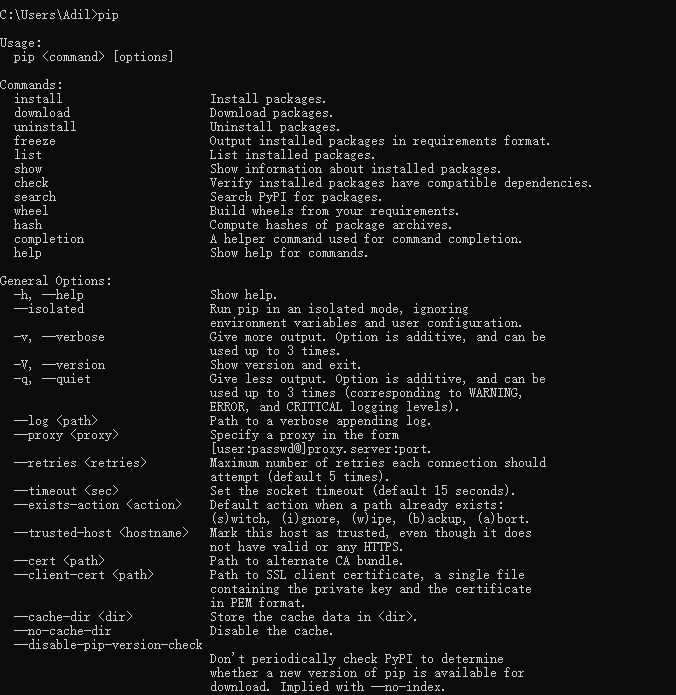
由上图可以看到 pip 支持一下命令
Commands:

  install                     Install packages.

  download                    Download packages.

  uninstall                   Uninstall packages.

  freeze                      Output installed packages in requirements format.

  list                        List installed packages.

  show                        Show information about installed packages.

  check                       Verify installed packages have compatible dependencies.

  search                      Search PyPI for packages.

  wheel                       Build wheels from your requirements.

  hash                        Compute hashes of package archives.

  completion                  A helper command used for command completion.

  help                        Show help for commands.
General Options:

  -h, --help                  Show help.

  --isolated                  Run pip in an isolated mode, ignoring

                              environment variables and user configuration.

  -v, --verbose               Give more output. Option is additive, and can be

                              used up to 3 times.

  -V, --version               Show version and exit.

  -q, --quiet                 Give less output. Option is additive, and can be

                              used up to 3 times (corresponding to WARNING,

                              ERROR, and CRITICAL logging levels).

  --log <path>                Path to a verbose appending log.

  --proxy <proxy>             Specify a proxy in the form

                              [user:passwd@]proxy.server:port.

  --retries <retries>         Maximum number of retries each connection should

                              attempt (default 5 times).

  --timeout <sec>             Set the socket timeout (default 15 seconds).

  --exists-action <action>    Default action when a path already exists:

                              (s)witch, (i)gnore, (w)ipe, (b)ackup, (a)bort.

  --trusted-host <hostname>   Mark this host as trusted, even though it does

                              not have valid or any HTTPS.

  --cert <path>               Path to alternate CA bundle.

  --client-cert <path>        Path to SSL client certificate, a single file

                              containing the private key and the certificate

                              in PEM format.

  --cache-dir <dir>           Store the cache data in <dir>.

  --no-cache-dir              Disable the cache.

  --disable-pip-version-check

                              Don't periodically check PyPI to determine

                              whether a new version of pip is available for

                              download. Implied with --no-index.
1、install
pip install

You must give at least one requirement to install (see "pip help install")
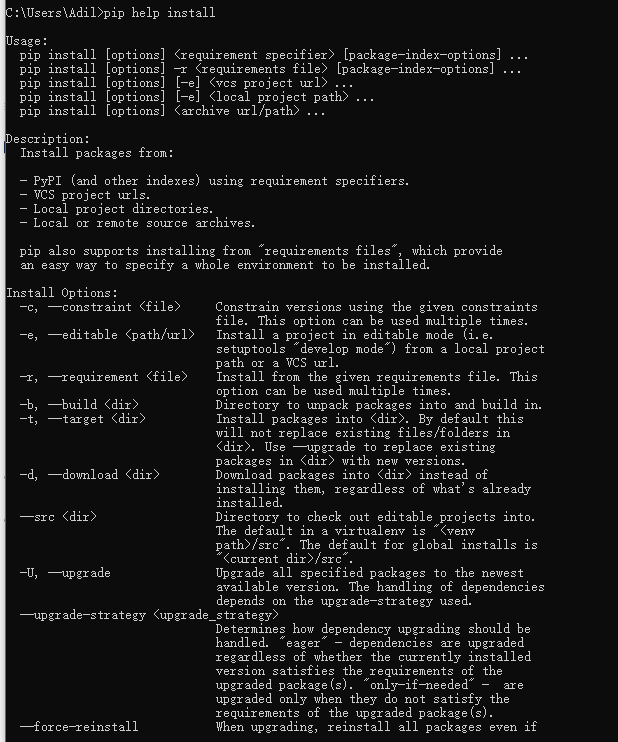
所以这里可以直接使用一下命令实现在线安装
pip install <包名>或pip install -r requirements.txt
通过使用== >= <= > <来指定版本,不写则安装最新版

requirements.txt内容格式为:

APScheduler==2.1.2

Django==1.5.4

MySQL-Connector-Python==2.0.1

MySQL-python==1.2.3

PIL==1.1.7

South==1.0.2

django-grappelli==2.6.3

django-pagination==1.0.7
安装本地安装包
pip install <目录>/<文件名> 或 pip install --use-wheel --no-index --find-links=wheelhouse/ <包名>
2、uninstall
卸载安装包
pip uninstall <包名> 或 pip uninstall -r requirements.txt
升级包
pip install -U <包名>

或:pip install <包名> --upgrade
升级pip
pip install -U pip
或
使用pip安装插件的时候报错:

You are using pip version 8.1.1, however version 9.0.1 is available.

You should consider upgrading via the 'python -m pip install --upgrade pip' command.

升级命令: python -m pip install --upgrade pip
3、freeze
pip freeze,查看已经安装的包及版本信息。
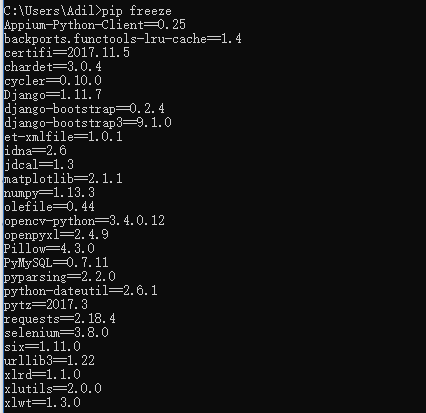
导出到指定文件中,如图,注意 “ > ”,文件名称随意。常见按第二种写法。

4、list
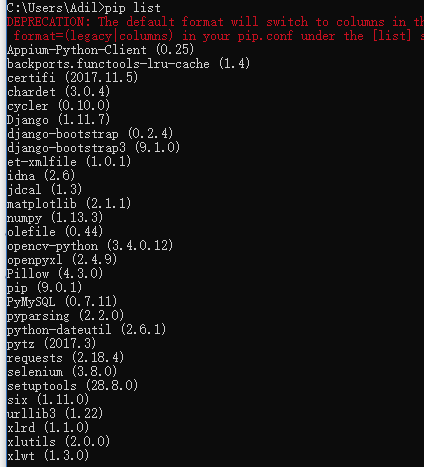
查询可升级的包
pip list -o

5、show
显示包所在目录及信息

6、search
搜索包
pip search <搜索关键字>
Python pip 常用命令的更多相关文章
- python pip常用命令
pip安装命令: pip install packagename pip显示模块版本号: pip show packagename pip卸载模块: pip uninstall packagename ...
- [python]pip常用命令(转载)
用阿里云服务器,使用pip安装第三方库的时候卡的要死.所以我就想pip能不能安装本地的包. 找到了这篇博客: http://me.iblogc.com/2015/01/01/pip%E5%B8%B8% ...
- Windows下python 3 pip程序升级异常问题及pip常用命令
最近在学习,Selenium+Python自动化,在安装selenium包的时候,出现无法安装的情况,并提示Pip有新的版本,我的版本太低了.然后安装系统提示操作,pip升级也出现异常,报错timeo ...
- ubuntu源与常用python配置pip源(win)、pip常用命令
pip常用命令 ubuntu更新系统源 首先备份/etc/apt/sources.list mv /etc/apt/sources.list /etc/apt/sources.list.bak 然后下 ...
- pip 常用命令小结
pip 常用命令小结 pip这个工具我们经常会用到,毕竟python 是一门以第三方库庞大而著名的编程语言,所以我们总会用pip 安装一些依赖库,当然这只是pip 最常用的一个命令,下面就来介绍一下 ...
- PDB调试python代码常用命令
常用命令 where(w) 找出当前代码运行位置 list(l) 显示当前代码的部分上下文 list n(line number) 显示指定行的上下文 list m, n(line number) 显 ...
- 解决多版本共存时,python/pip等命令失效
问题呈现: Windows环境下,多版本Python解释器共存时,由于未配置环境变量或者反复卸载重装解释器等原因,CMD交互下输入Python或者pip等命令时失效 解决方式: 1)配置各个解释器的环 ...
- [Python] 安装 & 常用命令
安装 http://www.xue51.com/soft/2301.html 常用命令 #查看pip版本$ pip --version#安装pip$ sudo apt install python3- ...
- virtualenv的使用及pip常用命令
一.virtualenv 1.用途: virtualenv------用来建立一个虚拟的python环境,一个专属于项目的python环境.用virtualenv 来保持一个干净的环境非常有用. 例如 ...
随机推荐
- 升级到0.9 log4jmongodb(mongo-java-driver 3.x)后,报No server chosen by WritableServerSelector from cluster description ClusterDescription
接上一篇http://www.cnblogs.com/zhjh256/p/6690003.html. 17-04-11 13:47:54.676 INFO cluster-ClusterId{valu ...
- windows 7/10 安装u盘制作
今天,在拷贝数据时,发现那台丢在那两三年的pc密码忘了,故计划重装,因为从来都是公司信息中心管这事,至少都七八年没有自己装机了,故整理过程如下: 1.从itellyou.cn下载原版镜像: 2.准备一 ...
- android 文本框不获取焦点的两种方式
当进入一个页面以后,我们不希望EditText获取焦点自动弹出软键盘,占据大半个屏幕. 方法一 让LinearLayout率先获取焦点,代码如下: <LinearLayout android:f ...
- BZOJ 1232 安慰奶牛题解
题目传送门:BZOJ 1232 这是一个边权和点权结合在一起的题,但是因为要从当前点出发并回到原点,所以每个边都被经过了两次,节点至少被经过一次,所以我们将边权重新赋值,所以推出 那么遍历之后,并不是 ...
- centos7之安装wordpress
wordpress安装教程如下: mysql安装可以参考我的博客园Centos构建Java环境:https://www.cnblogs.com/youcong/p/9118753.html 1.安装a ...
- Oracle使用——Oracle表空间处理
创建表空间 查看表空间信息(名称.大小) select t1.name tablespace_name ,t2.name file_local ,t2.bytes / (1024 * 1024) f ...
- Bootstrap3基础 bg-danger/info... 辅助类样式 背景文本颜色
内容 参数 OS Windows 10 x64 browser Firefox 65.0.2 framework Bootstrap 3.3.7 editor ...
- tp框架中的一些疑点知识-3
rewrite就是伪静态, 伪静态就是 rewirte, 可以把入口地址隐藏掉. 兼容模式就是 普通模式 和 pathinfo模式的 结合, 前面是普通模式 ?s= , 后面的 模块/控制器/操作和参 ...
- golang解析json配置文件
安装 go get github.com/akkuman/parseConfig 使用说明 环境假设 . ├── config.go ├── config.json config.json内容 { & ...
- 160CrackMe练手 001
peid判断无壳,打开输入伪码注册,根据报错od查找字符串 接下来定位到字符串周边代码 0042FA15 |. 8D55 F0 lea edx,[local.4] 0042FA18 |. 8B83 D ...