
026 使用大数据对网站基本指标PV案例的分析
案例:
使用电商网站的用户行为日志进行统计分析
一:准备
1.指标
PV:网页流浪量
UV:独立访客数
VV:访客的访问数,session次数
IP:独立的IP数
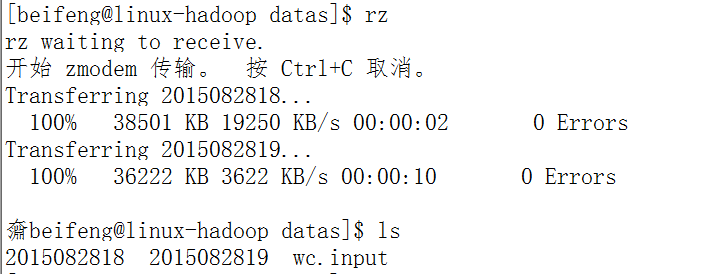
2.上传测试数据
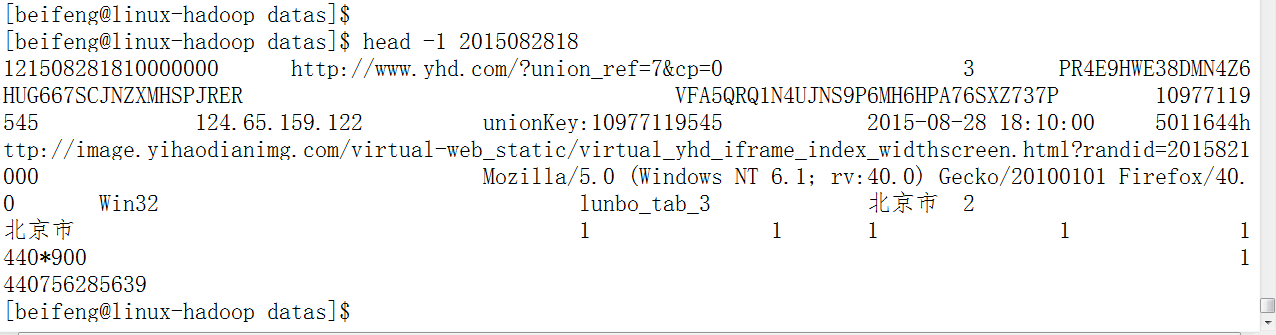
3.查看第一条记录
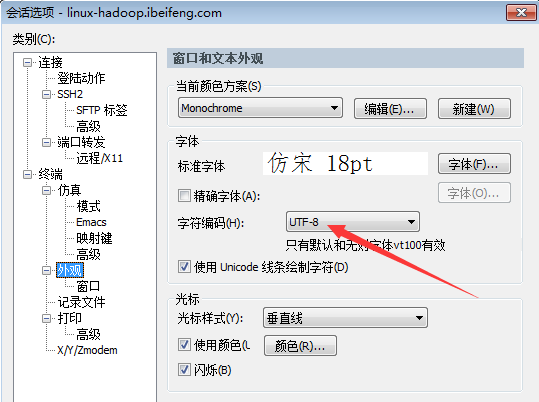
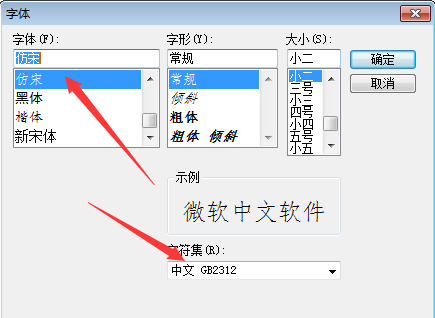
注意点(字符显示):
二:程序
1.分析
省份ID-》key
value-》1
-》 <proviced,list(1,1,1)>
2.数据类型
key:Text
value:IntWritable
3.map 端的业务
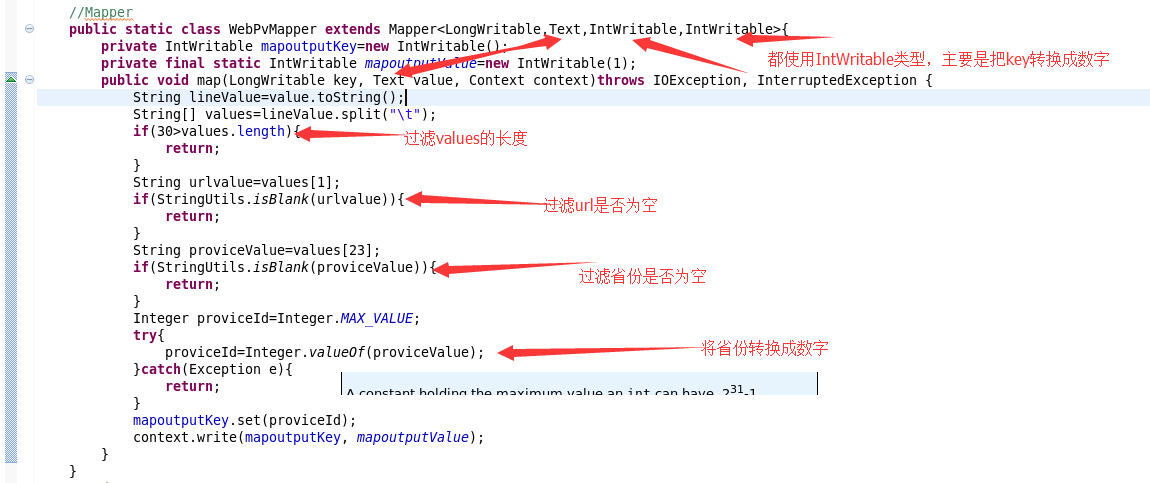
4.reduce端的业务

5.整合运行
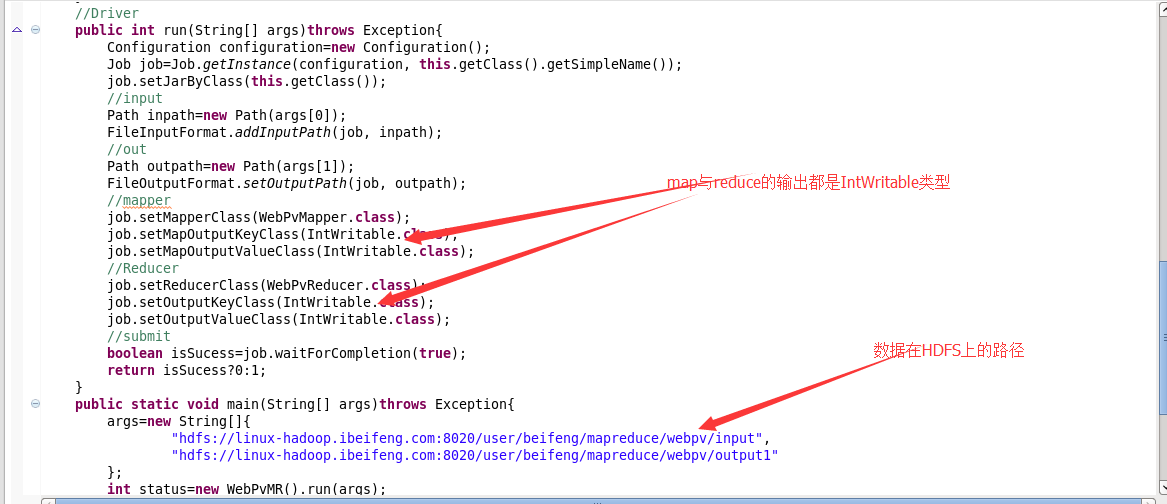
6.结果
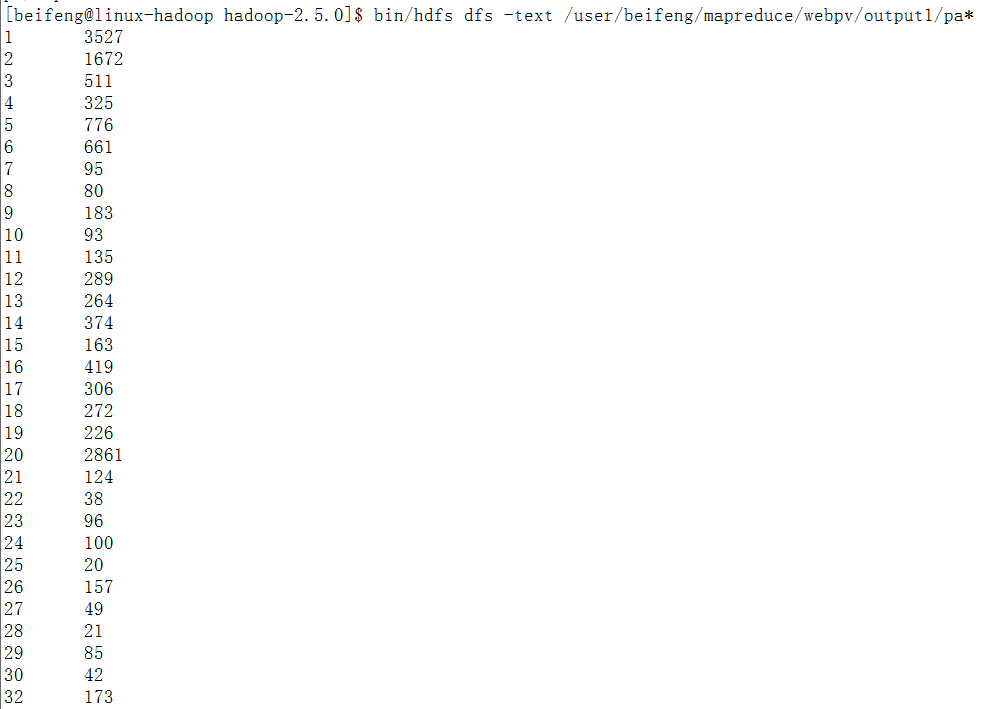
三:计数器
1.程序
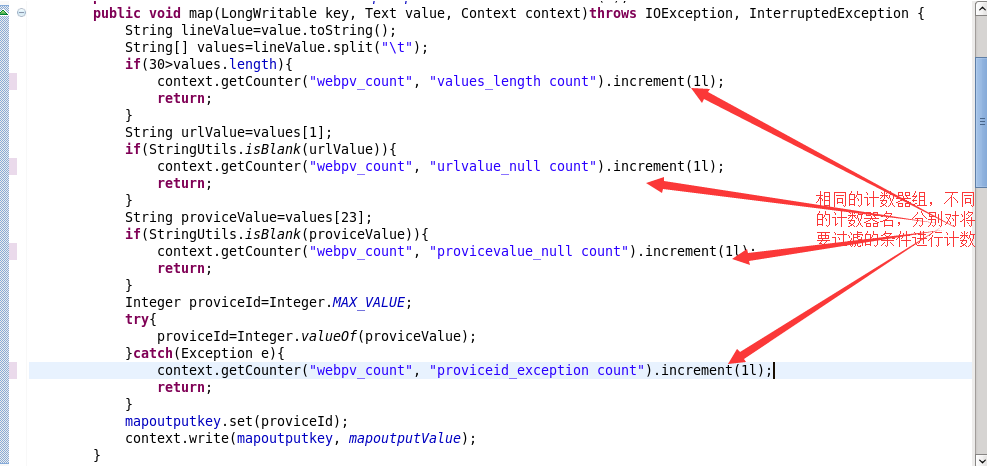
2.结果


结果完全吻合。
四:完整程序
1.PV程序
 package com.senior.network;

 import java.io.IOException;

 import org.apache.commons.lang.StringUtils;

 import org.apache.hadoop.conf.Configuration;

 import org.apache.hadoop.conf.Configured;

 import org.apache.hadoop.fs.Path;

 import org.apache.hadoop.io.IntWritable;

 import org.apache.hadoop.io.LongWritable;

 import org.apache.hadoop.io.Text;

 import org.apache.hadoop.mapreduce.Job;

 import org.apache.hadoop.mapreduce.Mapper;

 import org.apache.hadoop.mapreduce.Mapper.Context;

 import org.apache.hadoop.mapreduce.Reducer;

 import org.apache.hadoop.mapreduce.lib.input.FileInputFormat;

 import org.apache.hadoop.mapreduce.lib.output.FileOutputFormat;

 import org.apache.hadoop.util.Tool;

 import org.apache.hadoop.util.ToolRunner;

 public class WebPvCount extends Configured implements Tool{

     //Mapper

     public static class WebPvCountMapper extends Mapper<LongWritable,Text,IntWritable,IntWritable>{

         private IntWritable mapoutputkey=new IntWritable();

         private static final IntWritable mapoutputvalue=new IntWritable(1);

         @Override

         protected void cleanup(Context context) throws IOException,InterruptedException {

         }

         @Override

         protected void setup(Context context) throws IOException,InterruptedException {

         }

         @Override

         protected void map(LongWritable key, Text value, Context context)throws IOException, InterruptedException {

             String lineValue=value.toString();

             String[] strs=lineValue.split("\t");

             if(30>strs.length){

                 return;

             }

             String priviceIdValue=strs[23];

             String urlValue=strs[1];

             if(StringUtils.isBlank(priviceIdValue)){

                 return;

             }

             if(StringUtils.isBlank(urlValue)){

                 return;

             }

             Integer priviceId=Integer.MAX_VALUE;

             try{

                 priviceId=Integer.valueOf(priviceIdValue);

             }catch(Exception e){

                 e.printStackTrace();

             }

             mapoutputkey.set(priviceId);

             context.write(mapoutputkey, mapoutputvalue);

         }

     }

     //Reducer

     public static class WebPvCountReducer extends Reducer<IntWritable,IntWritable,IntWritable,IntWritable>{

         private IntWritable outputvalue=new IntWritable();

         @Override

         protected void reduce(IntWritable key, Iterable<IntWritable> values,Context context)throws IOException, InterruptedException {

             int sum=0;

             for(IntWritable value : values){

                 sum+=value.get();

             }

             outputvalue.set(sum);

             context.write(key, outputvalue);

         }

     }

     //Driver

     public int run(String[] args)throws Exception{

         Configuration conf=this.getConf();

         Job job=Job.getInstance(conf,this.getClass().getSimpleName());

         job.setJarByClass(WebPvCount.class);

         //input

         Path inpath=new Path(args[0]);

         FileInputFormat.addInputPath(job, inpath);

         //output

         Path outpath=new Path(args[1]);

         FileOutputFormat.setOutputPath(job, outpath);

         //map

         job.setMapperClass(WebPvCountMapper.class);

         job.setMapOutputKeyClass(IntWritable.class);

         job.setMapOutputValueClass(IntWritable.class);

         //shuffle

         //reduce

         job.setReducerClass(WebPvCountReducer.class);

         job.setOutputKeyClass(IntWritable.class);

         job.setOutputValueClass(IntWritable.class);

         //submit

         boolean isSucess=job.waitForCompletion(true);

         return isSucess?0:1;

     }

     //main

     public static void main(String[] args)throws Exception{

         Configuration conf=new Configuration();

         //compress

         conf.set("mapreduce.map.output.compress", "true");

         conf.set("mapreduce.map.output.compress.codec", "org.apache.hadoop.io.compress.SnappyCodec");

         args=new String[]{

                 "hdfs://linux-hadoop01.ibeifeng.com:8020/user/beifeng/mapreduce/wordcount/inputWebData",

                 "hdfs://linux-hadoop01.ibeifeng.com:8020/user/beifeng/mapreduce/wordcount/outputWebData1"

         };

         int status=ToolRunner.run(new WebPvCount(), args);

         System.exit(status);

     }

 }
2.计数器
这个计数器集中在mapper端。
 package com.senior.network;

 import java.io.IOException;

 import org.apache.commons.lang.StringUtils;

 import org.apache.hadoop.conf.Configuration;

 import org.apache.hadoop.conf.Configured;

 import org.apache.hadoop.fs.Path;

 import org.apache.hadoop.io.IntWritable;

 import org.apache.hadoop.io.LongWritable;

 import org.apache.hadoop.io.Text;

 import org.apache.hadoop.mapreduce.Job;

 import org.apache.hadoop.mapreduce.Mapper;

 import org.apache.hadoop.mapreduce.Mapper.Context;

 import org.apache.hadoop.mapreduce.Reducer;

 import org.apache.hadoop.mapreduce.lib.input.FileInputFormat;

 import org.apache.hadoop.mapreduce.lib.output.FileOutputFormat;

 import org.apache.hadoop.util.Tool;

 import org.apache.hadoop.util.ToolRunner;

 public class WebPvCount extends Configured implements Tool{

     //Mapper

     public static class WebPvCountMapper extends Mapper<LongWritable,Text,IntWritable,IntWritable>{

         private IntWritable mapoutputkey=new IntWritable();

         private static final IntWritable mapoutputvalue=new IntWritable(1);

         @Override

         protected void cleanup(Context context) throws IOException,InterruptedException {

         }

         @Override

         protected void setup(Context context) throws IOException,InterruptedException {

         }

         @Override

         protected void map(LongWritable key, Text value, Context context)throws IOException, InterruptedException {

             String lineValue=value.toString();

             String[] strs=lineValue.split("\t");

             if(30>strs.length){

                 context.getCounter("webPvMapper_counter", "length_LT_30").increment(1L);

                 return;

             }

             String priviceIdValue=strs[23];

             String urlValue=strs[1];

             if(StringUtils.isBlank(priviceIdValue)){

                 context.getCounter("webPvMapper_counter", "priviceIdValue_null").increment(1L);

                 return;

             }

             if(StringUtils.isBlank(urlValue)){

                 context.getCounter("webPvMapper_counter", "url_null").increment(1L);

                 return;

             }

             Integer priviceId=Integer.MAX_VALUE;

             try{

                 priviceId=Integer.valueOf(priviceIdValue);

             }catch(Exception e){

                 context.getCounter("webPvMapper_counter", "switch_fail").increment(1L);

                 e.printStackTrace();

             }

             mapoutputkey.set(priviceId);

             context.write(mapoutputkey, mapoutputvalue);

         }

     }

     //Reducer

     public static class WebPvCountReducer extends Reducer<IntWritable,IntWritable,IntWritable,IntWritable>{

         private IntWritable outputvalue=new IntWritable();

         @Override

         protected void reduce(IntWritable key, Iterable<IntWritable> values,Context context)throws IOException, InterruptedException {

             int sum=0;

             for(IntWritable value : values){

                 sum+=value.get();

             }

             outputvalue.set(sum);

             context.write(key, outputvalue);

         }

     }

     //Driver

     public int run(String[] args)throws Exception{

         Configuration conf=this.getConf();

         Job job=Job.getInstance(conf,this.getClass().getSimpleName());

         job.setJarByClass(WebPvCount.class);

         //input

         Path inpath=new Path(args[0]);

         FileInputFormat.addInputPath(job, inpath);

         //output

         Path outpath=new Path(args[1]);

         FileOutputFormat.setOutputPath(job, outpath);

         //map

         job.setMapperClass(WebPvCountMapper.class);

         job.setMapOutputKeyClass(IntWritable.class);

         job.setMapOutputValueClass(IntWritable.class);

         //shuffle

         //reduce

         job.setReducerClass(WebPvCountReducer.class);

         job.setOutputKeyClass(IntWritable.class);

         job.setOutputValueClass(IntWritable.class);

         //submit

         boolean isSucess=job.waitForCompletion(true);

         return isSucess?0:1;

     }

     //main

     public static void main(String[] args)throws Exception{

         Configuration conf=new Configuration();

         //compress

         conf.set("mapreduce.map.output.compress", "true");

         conf.set("mapreduce.map.output.compress.codec", "org.apache.hadoop.io.compress.SnappyCodec");

         args=new String[]{

                 "hdfs://linux-hadoop01.ibeifeng.com:8020/user/beifeng/mapreduce/wordcount/inputWebData",

                 "hdfs://linux-hadoop01.ibeifeng.com:8020/user/beifeng/mapreduce/wordcount/outputWebData2"

         };

         int status=ToolRunner.run(new WebPvCount(), args);

         System.exit(status);

     }

 }
026 使用大数据对网站基本指标PV案例的分析的更多相关文章
- 数据科学中的R和Python: 30个免费数据资源网站
1 政府数据 Data.gov:这是美国政府收集的数据资源.声称有多达40万个数据集,包括了原始数据和地理空间格式数据.使用这些数据集需要注意的是:你要进行必要的清理工作,因为许多数据是字符型的或是有 ...
- 网站流量分析指标-PV/UV/PR/ip分析及区别
1.什么是pv? PV(page view),即页面浏览量,或点击量;通常是衡量一个网络新闻频道或网站甚至一条网络新闻的主要指标. 高手对pv的解释是,一个访问者在24小时(0点到24点)内到底看了你 ...
- 网站性能测试指标(QPS,TPS,吞吐量,响应时间)详解
转载:http://www.51testing.com/html/16/n-3723016.html 常用的网站性能测试指标有:吞吐量.并发数.响应时间.性能计数器等. 并发数 并发数是指系统同时 ...
- 70路小报:用PV和UV作为网站衡量指标已经过时
方法]投资人呼吁:PV和UV不应该再作为产品衡量指标 风险投资机构Andreessen Horowitz近日一直反对再用传统的网站衡量指标去评价互联网产品,比如PV和UV,甚至包括应用的下载量. 他们 ...
- UC打通高德POI数据,用大数据描绘周边热点地图
UC打通高德POI数据,用大数据描绘周边热点地图 2016-10-25 11:13 来源:互联网 我来投稿 我要评论 在北京工作的小李最近很苦恼,房东因小区周边规划了大型商场而坚持涨价. ...
- Delphi使用大图标编译程序
在Windows Vista. Windows7以上Windows系统中可以支持大图标显示了,但是Delphi编译出来的程序却只能显示32x32的图标,这使Delphi编译的程序看起来很不专业.下面就 ...
- Saiku多用户使用时数据同步刷新(十七)
Saiku多用户使用时数据同步刷新 这里我们需要了解一下关于saiku的刷新主要有两种数据需要刷新: >1 刷新数据库的表中的数据,得到最新的表数据进行展示. >2 刷新cube信息,得到 ...
- 超级好用的解析JSON数据的网站
超级好用的解析JSON数据的网站 网址 http://json.parser.online.fr/beta/ 效果图 测试数据 {,},,,,,,},{,,,,},{,,,,},{,,,,,,,,,, ...
- GIS专业书籍、文档、数据、网站、工具等干货
整理.分享一些个人整理的GIS专业书籍.文档.数据.网站.工具等.也希望大家将自己的心得也分享出来,一起交流,共同进步. 如果下载链接失效,请到这里去:地信网 一.原理应用类 GIS基础类 01.地理 ...
随机推荐
- pyqt5的安装
第一步:需要安装:pip3 install pyqt5 安装工具:pip3 install pyqt5-tools 第二步:打开Pycharm,进入设置,添加外部工具 file-->sett ...
- luogu P2726 [SHOI2005]树的双中心
传送门 强行安利->巨佬题解 如果只有一个点贡献答案,那么答案显然是这棵树的带权重心,这个是可以\(O(n)\)求的.一个\(O(n^2)\)暴力是枚举两个集合之间的分界边,然后对这两个集合分别 ...
- SVN备份还原
本文是对SVN备份还原的一个简单记录 /*千万不能用VisualSVN Server PowerShell,否则在还原Load的时候会发生错误E140001,具体参考http://stackoverf ...
- 2018-2019 前期任务(一):资料阅读&Python入门
2018-2019 前期任务(一):资料阅读&Python入门 资料原文地址:Dumbcoin - An educational python implementation of a bitc ...
- JSON的理解
官方解释: JSON的全称是”JavaScript Object Notation”,单单从字面上的理解就是JavaScript对象表示法,它是一种基于文本,独立于语言的轻量级数据交换格式. 理解: ...
- 【逆向工具】IDA使用6-签名文件制作
0x1 签名文件制作的方法: 找到静态编译的程序库 使用IDA中的fair工具包,对静态库操作,生成特征库(IDA6.8 是flair68.zip) 0x2 步骤 第一步:使用pcf生成对应静态库的p ...
- 超级wifi
超级wifi (super wi-fi)是相对于现有的wifi提出的改进版,执行响应的 802.11af标准. 802.11af 标准是2014年2月提出的,它的主要特点是"建议在电视频率之 ...
- nagios系列(一)centos6.5环境部署nagios服务端
nagios软件安装包存放目录:/home/oldboy/tools nagios服务安装目录:/usr/local/nagios 1.配置yum源 echo "------ step 1: ...
- 通达OA在centos系统中快速部署文档(web和数据库)
通达OA2008从windows环境移植到linux中(centos5.5及以上版本) 如果安装好了,还是无法访问,则需要清空浏览器缓存即可 1.安装lamp环境,这里用的是xampp集成安装包xam ...
- Fiddler模拟post四种请求数据
前言: Fiddler是一个简单的http协议调试代理工具,它界面友好,易于操作,是模拟http请求的利器之一. 在接口测试中,接口通常是get请求或者post请求.get请求的测试一般较为简单,只需 ...