
Android简易项目--傻瓜式阿拉伯语输入法(Dummy Arabic Input)
一、应用名称
Android简易项目--傻瓜式阿拉伯语输入法(Dummy Arabic Input)
二、应用图标

三、应用说明
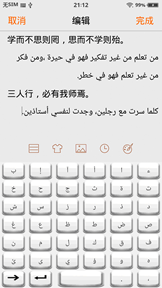
现在通行的阿拉伯语键盘布局并无规律可循,阿拉伯语使用者需要花费较多时间才能掌握指法。这款傻瓜式阿拉伯语输入法依照阿语字母排序,可满足基本的阿语输入需求;使用者无需学习,可立即上手。
四、项目结构
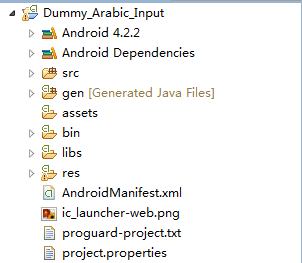
五、主要代码
src/com.example.dummy_arabic_input/DummyArabicInputService.java
 package com.example.dummy_arabic_input;

 import android.inputmethodservice.InputMethodService;

 import android.util.Log;

 import android.view.View;

 import android.view.View.OnClickListener;

 import android.view.inputmethod.EditorInfo;

 import android.view.inputmethod.InputConnection;

 import android.widget.Button;

 public class DummyArabicInputService extends InputMethodService implements

         OnClickListener

 {

     @Override

     public void onCreate()//不用写(Bundle savedInstanceState)

     //因为这里没有Activity界面

     {

         super.onCreate();

         Log.d("dummy_arabic_input_onCreate", "invoked");

     }

     @Override

     public View onCreateInputView()

     {

         View view = getLayoutInflater().inflate(R.layout.arabic_keyboard, null);

         //LayoutInflater is a class used to instantiate layout XML

         //file into its corresponding View objects.

         //inflate(int resource, ViewGroup root)

         view.findViewById(R.id.btn1).setOnClickListener(this);

         view.findViewById(R.id.btn2).setOnClickListener(this);

         view.findViewById(R.id.btn3).setOnClickListener(this);

         view.findViewById(R.id.btn4).setOnClickListener(this);

         view.findViewById(R.id.btn5).setOnClickListener(this);

         view.findViewById(R.id.btn6).setOnClickListener(this);

         view.findViewById(R.id.btn7).setOnClickListener(this);

         view.findViewById(R.id.btn8).setOnClickListener(this);

         view.findViewById(R.id.btn9).setOnClickListener(this);

         view.findViewById(R.id.btn10).setOnClickListener(this);

         view.findViewById(R.id.btn11).setOnClickListener(this);

         view.findViewById(R.id.btn12).setOnClickListener(this);

         view.findViewById(R.id.btn13).setOnClickListener(this);

         view.findViewById(R.id.btn14).setOnClickListener(this);

         view.findViewById(R.id.btn15).setOnClickListener(this);

         view.findViewById(R.id.btn16).setOnClickListener(this);

         view.findViewById(R.id.btn17).setOnClickListener(this);

         view.findViewById(R.id.btn18).setOnClickListener(this);

         view.findViewById(R.id.btn19).setOnClickListener(this);

         view.findViewById(R.id.btn20).setOnClickListener(this);

         view.findViewById(R.id.btn21).setOnClickListener(this);

         view.findViewById(R.id.btn22).setOnClickListener(this);

         view.findViewById(R.id.btn23).setOnClickListener(this);

         view.findViewById(R.id.btn24).setOnClickListener(this);

         view.findViewById(R.id.btn25).setOnClickListener(this);

         view.findViewById(R.id.btn26).setOnClickListener(this);

         view.findViewById(R.id.btn27).setOnClickListener(this);

         view.findViewById(R.id.btn28).setOnClickListener(this);

         view.findViewById(R.id.btn29).setOnClickListener(this);

         view.findViewById(R.id.btn30).setOnClickListener(this);

         view.findViewById(R.id.btn31).setOnClickListener(this);

         view.findViewById(R.id.btn32).setOnClickListener(this);

         view.findViewById(R.id.btn33).setOnClickListener(this);

         view.findViewById(R.id.btn34).setOnClickListener(this);

         view.findViewById(R.id.btn35).setOnClickListener(this);

         view.findViewById(R.id.btn36).setOnClickListener(this);

         view.findViewById(R.id.btn37).setOnClickListener(this);

         view.findViewById(R.id.btn38).setOnClickListener(this);

         view.findViewById(R.id.btn39).setOnClickListener(this);

         view.findViewById(R.id.btn40).setOnClickListener(this);

         view.findViewById(R.id.btn41).setOnClickListener(this);

         Log.d("dummy_arabic_input_onCreateInputView", "invoked");

         return view;

     }

     @Override

     public View onCreateCandidatesView()

     //Create and return the view hierarchy used to show candidates.

     /* view hierarchy是用来说明在window中的view之间的关系的。

     可以把view hierarchy认为是一棵翻转的tree structure,

     而window就是这棵树的最上面的节点(根节点)。

     树的下面就是父子view之间的关系。

     从视觉上来看,view hierarchy就是一个封闭的结构,

     就是一个view包含一个或多个view,而window包含所有的view。*/

     {

         //下面的View.Gone是View类的静态成员,

         //GONE: This view is invisible,

         //and it doesn't take any space for layout purposes.

         //我们的智能输入法界面最上面一般会有一栏候选项(CandidatesView),

         //但我们这里创造的输入法不是智能输入法,不需要显示候选项,

         //所以这里将CandidatesView设为GONE,即不可见

         View view = getLayoutInflater().inflate(R.layout.arabic_keyboard, null);

         view.findViewById(R.id.btn1).setVisibility(View.GONE);

         view.findViewById(R.id.btn2).setVisibility(View.GONE);

         view.findViewById(R.id.btn3).setVisibility(View.GONE);

         view.findViewById(R.id.btn4).setVisibility(View.GONE);

         view.findViewById(R.id.btn5).setVisibility(View.GONE);

         view.findViewById(R.id.btn6).setVisibility(View.GONE);

         view.findViewById(R.id.btn7).setVisibility(View.GONE);

         view.findViewById(R.id.btn8).setVisibility(View.GONE);

         view.findViewById(R.id.btn9).setVisibility(View.GONE);

         view.findViewById(R.id.btn10).setVisibility(View.GONE);

         view.findViewById(R.id.btn11).setVisibility(View.GONE);

         view.findViewById(R.id.btn12).setVisibility(View.GONE);

         view.findViewById(R.id.btn13).setVisibility(View.GONE);

         view.findViewById(R.id.btn14).setVisibility(View.GONE);

         view.findViewById(R.id.btn15).setVisibility(View.GONE);

         view.findViewById(R.id.btn16).setVisibility(View.GONE);

         view.findViewById(R.id.btn17).setVisibility(View.GONE);

         view.findViewById(R.id.btn18).setVisibility(View.GONE);

         view.findViewById(R.id.btn19).setVisibility(View.GONE);

         view.findViewById(R.id.btn20).setVisibility(View.GONE);

         view.findViewById(R.id.btn21).setVisibility(View.GONE);

         view.findViewById(R.id.btn22).setVisibility(View.GONE);

         view.findViewById(R.id.btn23).setVisibility(View.GONE);

         view.findViewById(R.id.btn24).setVisibility(View.GONE);

         view.findViewById(R.id.btn25).setVisibility(View.GONE);

         view.findViewById(R.id.btn26).setVisibility(View.GONE);

         view.findViewById(R.id.btn27).setVisibility(View.GONE);

         view.findViewById(R.id.btn28).setVisibility(View.GONE);

         view.findViewById(R.id.btn29).setVisibility(View.GONE);

         view.findViewById(R.id.btn30).setVisibility(View.GONE);

         view.findViewById(R.id.btn31).setVisibility(View.GONE);

         view.findViewById(R.id.btn32).setVisibility(View.GONE);

         view.findViewById(R.id.btn33).setVisibility(View.GONE);

         view.findViewById(R.id.btn34).setVisibility(View.GONE);

         view.findViewById(R.id.btn35).setVisibility(View.GONE);

         view.findViewById(R.id.btn36).setVisibility(View.GONE);

         view.findViewById(R.id.btn37).setVisibility(View.GONE);

         view.findViewById(R.id.btn38).setVisibility(View.GONE);

         view.findViewById(R.id.btn39).setVisibility(View.GONE);

         view.findViewById(R.id.btn40).setVisibility(View.GONE);

         view.findViewById(R.id.btn41).setVisibility(View.GONE);

         Log.d("dummy_arabic_input_onCreateCandidatesView", "invoked");

         return view;

     }

     @Override

     public void onStartInputView(EditorInfo info, boolean restarting)

     {

         Log.d("dummy_arabic_input_onStartInputView", "invoked");

         super.onStartInputView(info, restarting);

     }

     @Override

     public void onFinishInput()

     {

         Log.d("dummy_arabic_input_onFinishInput", "invoked");

         super.onFinishInput();

     }

     @Override

     public void onDestroy()

     {

         Log.d("dummy_arabic_input_onDestroy", "invoked");

         super.onDestroy();

     }

     @Override

     public void onClick(View view)

     {

         if (view.getId() == R.id.btn37)

         {

             getCurrentInputConnection().deleteSurroundingText(1, 0);

             //InputConnection接口是用来给Activity传数据的渠道(channel)

         }

         else

         {

             Button button = (Button) view;

             InputConnection inputConnection = getCurrentInputConnection();

             if (button.getId() != R.id.btn37)

             {

                 inputConnection.commitText(button.getText(), 1);

             }

         }

     }

 }
src/com.example.dummy_arabic_input/InputSetting.java
InputSetting.java
res/layout/input_setting.xml
 <?xml version="1.0" encoding="utf-8"?>

 <LinearLayout xmlns:android="http://schemas.android.com/apk/res/android"

     android:layout_width="fill_parent"

     android:layout_height="fill_parent"

     android:orientation="horizontal" >

     <TextView

         android:id="@+id/textview"

         android:layout_width="wrap_content"

         android:layout_height="wrap_content"

         android:text="输入法设置窗口" />

 </LinearLayout>
res/layout/arabic_keyboard.xml
 <?xml version="1.0" encoding="utf-8"?>

 <LinearLayout xmlns:android="http://schemas.android.com/apk/res/android"

     android:layout_width="fill_parent"

     android:layout_height="wrap_content"

     android:background="#F2F2F2"

     android:gravity="bottom"

     android:orientation="vertical" >

     <LinearLayout

         android:layout_width="fill_parent"

         android:layout_height="40.0dip"

         android:orientation="horizontal" >

         <Button

             android:id="@+id/btn1"

             android:layout_width="fill_parent"

             android:layout_height="fill_parent"

             android:layout_weight="1.0"

             android:background="@drawable/blank"

             android:text="ب" />

         <Button

             android:id="@+id/btn2"

             android:layout_width="fill_parent"

             android:layout_height="fill_parent"

             android:layout_weight="1.0"

             android:background="@drawable/blank"

             android:text="إ" />

         <Button

             android:id="@+id/btn3"

             android:layout_width="fill_parent"

             android:layout_height="fill_parent"

             android:layout_weight="1.0"

             android:background="@drawable/blank"

             android:text="آ" />

         <Button

             android:id="@+id/btn4"

             android:layout_width="fill_parent"

             android:layout_height="fill_parent"

             android:layout_weight="1.0"

             android:background="@drawable/blank"

             android:text="أ" />

         <Button

             android:id="@+id/btn5"

             android:layout_width="fill_parent"

             android:layout_height="fill_parent"

             android:layout_weight="1.0"

             android:background="@drawable/blank"

             android:text="ا" />

         <Button

             android:id="@+id/btn6"

             android:layout_width="fill_parent"

             android:layout_height="fill_parent"

             android:layout_weight="1.0"

             android:background="@drawable/blank"

             android:text="ء" />

     </LinearLayout>

     <LinearLayout

         android:layout_width="fill_parent"

         android:layout_height="40.0dip"

         android:orientation="horizontal" >

         <Button

             android:id="@+id/btn7"

             android:layout_width="fill_parent"

             android:layout_height="fill_parent"

             android:layout_weight="1.0"

             android:background="@drawable/blank"

             android:text="خ" />

         <Button

             android:id="@+id/btn8"

             android:layout_width="fill_parent"

             android:layout_height="fill_parent"

             android:layout_weight="1.0"

             android:background="@drawable/blank"

             android:text="ح" />

         <Button

             android:id="@+id/btn9"

             android:layout_width="fill_parent"

             android:layout_height="fill_parent"

             android:layout_weight="1.0"

             android:background="@drawable/blank"

             android:text="ج" />

         <Button

             android:id="@+id/btn10"

             android:layout_width="fill_parent"

             android:layout_height="fill_parent"

             android:layout_weight="1.0"

             android:background="@drawable/blank"

             android:text="ث" />

         <Button

             android:id="@+id/btn11"

             android:layout_width="fill_parent"

             android:layout_height="fill_parent"

             android:layout_weight="1.0"

             android:background="@drawable/blank"

             android:text="ة" />

         <Button

             android:id="@+id/btn12"

             android:layout_width="fill_parent"

             android:layout_height="fill_parent"

             android:layout_weight="1.0"

             android:background="@drawable/blank"

             android:text="ت" />

     </LinearLayout>

     <LinearLayout

         android:layout_width="fill_parent"

         android:layout_height="40.0dip"

         android:orientation="horizontal" >

         <Button

             android:id="@+id/btn13"

             android:layout_width="fill_parent"

             android:layout_height="fill_parent"

             android:layout_weight="1.0"

             android:background="@drawable/blank"

             android:text="ش" />

         <Button

             android:id="@+id/btn14"

             android:layout_width="fill_parent"

             android:layout_height="fill_parent"

             android:layout_weight="1.0"

             android:background="@drawable/blank"

             android:text="س" />

         <Button

             android:id="@+id/btn15"

             android:layout_width="fill_parent"

             android:layout_height="fill_parent"

             android:layout_weight="1.0"

             android:background="@drawable/blank"

             android:text="ز" />

         <Button

             android:id="@+id/btn16"

             android:layout_width="fill_parent"

             android:layout_height="fill_parent"

             android:layout_weight="1.0"

             android:background="@drawable/blank"

             android:text="ر" />

         <Button

             android:id="@+id/btn17"

             android:layout_width="fill_parent"

             android:layout_height="fill_parent"

             android:layout_weight="1.0"

             android:background="@drawable/blank"

             android:text="ذ" />

         <Button

             android:id="@+id/btn18"

             android:layout_width="fill_parent"

             android:layout_height="fill_parent"

             android:layout_weight="1.0"

             android:background="@drawable/blank"

             android:text="د" />

     </LinearLayout>

     <LinearLayout

         android:layout_width="fill_parent"

         android:layout_height="40.0dip"

         android:orientation="horizontal" >

         <Button

             android:id="@+id/btn19"

             android:layout_width="fill_parent"

             android:layout_height="fill_parent"

             android:layout_weight="1.0"

             android:background="@drawable/blank"

             android:text="غ" />

         <Button

             android:id="@+id/btn20"

             android:layout_width="fill_parent"

             android:layout_height="fill_parent"

             android:layout_weight="1.0"

             android:background="@drawable/blank"

             android:text="ع" />

         <Button

             android:id="@+id/btn21"

             android:layout_width="fill_parent"

             android:layout_height="fill_parent"

             android:layout_weight="1.0"

             android:background="@drawable/blank"

             android:text="ظ" />

         <Button

             android:id="@+id/btn22"

             android:layout_width="fill_parent"

             android:layout_height="fill_parent"

             android:layout_weight="1.0"

             android:background="@drawable/blank"

             android:text="ط" />

         <Button

             android:id="@+id/btn23"

             android:layout_width="fill_parent"

             android:layout_height="fill_parent"

             android:layout_weight="1.0"

             android:background="@drawable/blank"

             android:text="ض" />

         <Button

             android:id="@+id/btn24"

             android:layout_width="fill_parent"

             android:layout_height="fill_parent"

             android:layout_weight="1.0"

             android:background="@drawable/blank"

             android:text="ص" />

     </LinearLayout>

     <LinearLayout

         android:layout_width="fill_parent"

         android:layout_height="40.0dip"

         android:orientation="horizontal" >

         <Button

             android:id="@+id/btn25"

             android:layout_width="fill_parent"

             android:layout_height="fill_parent"

             android:layout_weight="1.0"

             android:background="@drawable/blank"

             android:text="ن" />

         <Button

             android:id="@+id/btn26"

             android:layout_width="fill_parent"

             android:layout_height="fill_parent"

             android:layout_weight="1.0"

             android:background="@drawable/blank"

             android:text="م" />

         <Button

             android:id="@+id/btn27"

             android:layout_width="fill_parent"

             android:layout_height="fill_parent"

             android:layout_weight="1.0"

             android:background="@drawable/blank"

             android:text="ل" />

         <Button

             android:id="@+id/btn28"

             android:layout_width="fill_parent"

             android:layout_height="fill_parent"

             android:layout_weight="1.0"

             android:background="@drawable/blank"

             android:text="ك" />

         <Button

             android:id="@+id/btn29"

             android:layout_width="fill_parent"

             android:layout_height="fill_parent"

             android:layout_weight="1.0"

             android:background="@drawable/blank"

             android:text="ق" />

         <Button

             android:id="@+id/btn30"

             android:layout_width="fill_parent"

             android:layout_height="fill_parent"

             android:layout_weight="1.0"

             android:background="@drawable/blank"

             android:text="ف" />

     </LinearLayout>

     <LinearLayout

         android:layout_width="fill_parent"

         android:layout_height="40.0dip"

         android:orientation="horizontal" >

         <Button

             android:id="@+id/btn31"

             android:layout_width="fill_parent"

             android:layout_height="fill_parent"

             android:layout_weight="1.0"

             android:background="@drawable/blank"

             android:text="ئ" />

         <Button

             android:id="@+id/btn32"

             android:layout_width="fill_parent"

             android:layout_height="fill_parent"

             android:layout_weight="1.0"

             android:background="@drawable/blank"

             android:text="ى" />

         <Button

             android:id="@+id/btn33"

             android:layout_width="fill_parent"

             android:layout_height="fill_parent"

             android:layout_weight="1.0"

             android:background="@drawable/blank"

             android:text="ي" />

         <Button

             android:id="@+id/btn34"

             android:layout_width="fill_parent"

             android:layout_height="fill_parent"

             android:layout_weight="1.0"

             android:background="@drawable/blank"

             android:text="ؤ" />

         <Button

             android:id="@+id/btn35"

             android:layout_width="fill_parent"

             android:layout_height="fill_parent"

             android:layout_weight="1.0"

             android:background="@drawable/blank"

             android:text="و" />

         <Button

             android:id="@+id/btn36"

             android:layout_width="fill_parent"

             android:layout_height="fill_parent"

             android:layout_weight="1.0"

             android:background="@drawable/blank"

             android:text="ه" />

     </LinearLayout>

     <LinearLayout

         android:layout_width="fill_parent"

         android:layout_height="40.0dip"

         android:orientation="horizontal" >

         <Button

             android:id="@+id/btn37"

             android:layout_width="0dp"

             android:layout_height="fill_parent"

             android:layout_weight="1.0"

             android:background="@drawable/delete" />

         <Button

             android:id="@+id/btn38"

             android:layout_width="0dp"

             android:layout_height="fill_parent"

             android:layout_weight="1.0"

             android:background="@drawable/enter"

             android:text="\n" />

         <Button

             android:id="@+id/btn39"

             android:layout_width="0dp"

             android:layout_height="fill_parent"

             android:layout_weight="2.0"

             android:background="@drawable/blank"

             android:text=" " />

         <Button

             android:id="@+id/btn40"

             android:layout_width="0dp"

             android:layout_height="fill_parent"

             android:layout_weight="1.0"

             android:background="@drawable/blank"

             android:text="." />

         <Button

             android:id="@+id/btn41"

             android:layout_width="0dp"

             android:layout_height="fill_parent"

             android:layout_weight="1.0"

             android:background="@drawable/blank"

             android:text="،" />

     </LinearLayout>

 </LinearLayout>
六、效果显示
Android简易项目--傻瓜式阿拉伯语输入法(Dummy Arabic Input)的更多相关文章
- android设计的布局在阿拉伯语下界面错乱的解决方法
(1)正在AndroidManifest.xml声明文件的application元素中,增加” android:supportsRtl=true” (2)建] androidの设计的布局在阿拉伯语下界 ...
- NOSDK--关于android傻瓜式的分包设想
一直以来,我总是以“够用就好”为理由,很少再维护过自己的一键打包的项目.最近接触了棱镜的sdk,感觉将apk包上传到棱镜服务器,后台来进行分包这种简单的方式很招人待见. 原理似乎不难,apk即zip压 ...
- M-Renamer方法名修改器,iOS项目方法名重构,Objective-C/Swift,代码模型预判,减少误改的机率,替换速度更快,可视化操作,傻瓜式操作,一键操作,引用处自动修改,马甲包的福音
M-Renamer M-Renamer(Method-Name-Renamer)类方法名修改器,采用链式解析头文件,代码模型预判,减少误改的机率,替换速度更快:可以解析整个项目大多数类的方法,可视化操 ...
- 59.Android开源项目及库 (转)
转载 : https://github.com/Tim9Liu9/TimLiu-Android?hmsr=toutiao.io&utm_medium=toutiao.io&utm_so ...
- Android开源项目及库搜集
TimLiu-Android 自己总结的Android开源项目及库. github排名 https://github.com/trending,github搜索:https://github.com/ ...
- Android 开源项目及库汇总(2)
Android 开源项目及库汇总(2) ListenToCode 2.7 2018.10.10 15:43 字数 8527 阅读 1001评论 0喜欢 29 地图 百度地图– Android百度地图 ...
- 最火的Android开源项目整理
一.代码库 1.from 代码家 整理比较好的源码连接 ******************************************************************* ...
- 最新最全的 Android 开源项目合集
原文链接:https://github.com/opendigg/awesome-github-android-ui 在 Github 上做了一个很新的 Android 开发相关开源项目汇总,涉及到 ...
- Android基础——项目的文件结构(二)
Android基础--项目的文件结构(二) AndroidManifest.xml文件分析 [注]此项目文件结构仅限于Android Studio下的Android项目!!! 在一个Android项目 ...
随机推荐
- Oracle:如何创建一个只有查看权限的用户
因为工作中测试环境和开发环境是分开的,所以开发有时处理bug时需要连接测试数据库,这样出现一个问题是有些开发会为了验证某些问题任意改动数据库的表和字段,对测试库造成污染.为了能够让开发连接测试环境,同 ...
- ThinkPHP3.2.3中使用smarty模板引擎循环
- 51Nod-1441 士兵的数字游戏
题目要求是求出a!/b!(a>=b)的结果,让其不断做除法,最多能做多少次.这个问题首先可以转化为求a!中所有质因子个数-b!中所有质因子个数.以前做过一道快速求某个阶乘对一个素数的因子个数的题 ...
- android--------性能优化之Allocation Tracker
Allocation Tracker 能做什么? 追踪内存分配信息,按顺序排列,这样我们就能清晰看出来某一个操作的内存是如何一步一步分配出来的.比如在有内存抖动的可疑点,我们可以通过查看其内存分配轨迹 ...
- Problem F. Grab The Tree HDU - 6324
题意:给出一棵n个节点的树,每个节点有一个权值,Q和T玩游戏,Q先选一些不相邻的节点,T选剩下的节点,每个人的分数是所选节点的权值的异或和,权值大的胜出,问胜出的是谁. 题解: 话说,这题后面的边跟解 ...
- HashMap的两种排序方式
Map<String, Integer> map = new HashMap<String, Integer>();map.put("d", 2);map. ...
- 【Java】【7】枚举类
用处:规范了参数的形式,更简洁易懂 实例: //消息类型 public enum MessageTypeEnum { AdminReward(1, "官方消息"), StoreRe ...
- ireport表单制作
关于ireport的表单制作,可参考http://blog.csdn.net/wlwlwlwl015/article/details/51312853 这里主要讲解下如何在表单中加入table,如何让 ...
- hdu-5889-最短路+网络流/最小割
Barricade Time Limit: 3000/1000 MS (Java/Others) Memory Limit: 65536/65536 K (Java/Others)Total S ...
- TSFDEVTY
TSFDEVTY 用BAPI_OUTB_DELIVERY_CONFIRM_DEC做的发货过账,会VL09无法冲销需要UPDATE LIKP-VLSTK为空UPDATE likp SET vlstk = ...