
05章项目: QuickHit快速击键
一、项目分析
根据输入速率和正确率将玩家分为不同等级,级别越高,一次显示的字符数越多,玩家正确输入一次的得分也越高。如果玩家在规定时间内完成规定次数的输入,正确率达到规定要求,则玩家升级。玩家最高级别为6级,初始级别一律为一级!
二、掌握的技能点
①面向对象设计的思想
②使用类图理解类的关系
③类的封装
④构造方法的使用
⑤this和static关键字的使用
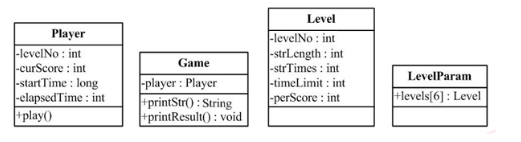
类的属性:
①玩家(Player)类的属性:当前级别号levelNo、当前级别积分currScore、当前级别开始时间startTime和当前级别已用时间elapsedTime
②级别(Level)类的属性:各级别编号levelNo、各级别一次输出字符串的长度strLength、各级别输出字符串的次数strTime、各级别闯关的时间限制timeLimit和各级别正确输入一次得分
类的方法:
游戏Game类的主要方法有2个:输出字符串、返回字符串用于和玩家的输入进行比较[String printStr]确认玩家输入是否正确[void printResult(String out,String in)],比较游戏输出out和玩家输入in
玩家Player类的方法:玩游戏play()
LevelParam类:定义一个长度为6的Level数组,用来存放各级别的具体参数信息
关键代码:
Player类:
package cn.happy;

import java.util.Scanner;

public class Player {

    public int levelNo;  //级别号

    public int curScore;  //积分

    public long startTime; //开始时间

    public int elapsedTime; //已用时间

    public int getLevelNo() {

        return levelNo;

    }

    public void setLevelNo(int levelNo) {

        this.levelNo = levelNo;

    }

    public int getCurScore() {

        return curScore;

    }

    public void setCurScore(int curScore) {

        this.curScore = curScore;

    }

    public long getStartTime() {

        return startTime;

    }

    public void setStartTime(long startTime) {

        this.startTime = startTime;

    }

    public int getElapsedTime() {

        return elapsedTime;

    }

    public void setElapsedTime(int elapsedTime) {

        this.elapsedTime = elapsedTime;

    }

    public Player()

    {}

    public Player(int levelNo,int curScore,long startTime,int elapsedTime)

    {

        this.levelNo=levelNo;

        this.curScore=curScore;

        this.startTime=startTime;

        this.elapsedTime=elapsedTime;

    }

    //玩游戏的方法

    public  void play()

    {

        Game game=new Game(this);

        Scanner input=new Scanner(System.in);

        //外层循环,循环一次级别晋一级

        for (int i = 0; i < LevelParam.levels.length; i++) {

            //晋级

            this.levelNo+=1;

            //晋级后计时清零,积分清零

            this.startTime=System.currentTimeMillis();

            this.curScore=0;

            //内层循环 循环一次完成一次字符串的输入,输出,比较

            for (int j = 0; j < LevelParam.levels[levelNo-1].getStrTimes(); j++) {

                //游戏输出字符串

                String outstr=game.printStr();

                //接收用户输入

                String instr=input.next();

                //游戏判断玩家输入的是否正确

                game.printResult(outstr,instr);

            }

        }

    }

}
Level类:
package cn.happy;

public class Level {

    public int levelNo; //各级别编号

    public int strLength;// 各级别一次输出字符串的长度

    public int strTimes;// 各级别输出字符串的次数

    public int timeLimit;// 各级别闯关的时间限制

    public int perScore;// 各级别正确输入一次的得分

    public int getLevelNo() {

        return levelNo;

    }

    public void setLevelNo(int levelNo) {

        this.levelNo = levelNo;

    }

    public int getStrLength() {

        return strLength;

    }

    public void setStrLength(int strLength) {

        this.strLength = strLength;

    }

    public int getStrTimes() {

        return strTimes;

    }

    public void setStrTimes(int strTimes) {

        this.strTimes = strTimes;

    }

    public int getTimeLimit() {

        return timeLimit;

    }

    public void setTimeLimit(int timeLimit) {

        this.timeLimit = timeLimit;

    }

    public int getPerScore() {

        return perScore;

    }

    public void setPerScore(int perScore) {

        this.perScore = perScore;

    }

    public Level()

    {}

    public Level(int levelNo,int strLength,int strTimes,int timeLimit,int perScore)

    {

        this.levelNo=levelNo;

        this.strLength = strLength;

        this.strTimes = strTimes;

        this.timeLimit = timeLimit;

        this.perScore = perScore;

    }

}
LevelParam类
package cn.happy;

public class LevelParam {

    //级别参数类,配置各个级别参数

    //对应6个级别

    public final static Level levels[]=new Level[6];

    static{

        levels[0]=new Level(1,2,10,30,1);

        levels[1]=new Level(2,3,9,26,2);

        levels[2]=new Level(3,4,8,22,5);

        levels[3]=new Level(4,5,7,18,8);

        levels[4]=new Level(5,6,6,15,10);

        levels[5]=new Level(6,7,5,12,15);

    }

}
Game类:
package cn.happy;

import java.util.Random;

public class Game {

    //玩家

    private Player player;

    public Game()

    {}

    public Game(Player player)

    {

        this.player=player;

    }

    public String printStr()

    {

        // 获取级别对应的要输出字符串的长度

        int strLength = LevelParam.levels[player.getLevelNo() -1].getStrLength();

        StringBuffer buffer=new StringBuffer();

        Random random=new Random();

        //通过循环生成要输出的字符串

        for (int i = 0; i < strLength; i++) {

            //产生随机数

            int rand=random.nextInt(strLength);

            //根据随机数拼接字符串

            switch(rand)

            {

            case 0:

                buffer.append(">");

                break;

            case 1:

                buffer.append("<");

                break;

            case 2:

                buffer.append("*");

                break;

            case 3:

                buffer.append("$");

                break;

            case 4:

                buffer.append("%");

                break;

            case 5:

                buffer.append("#");

                break;

            }

        }

         // 输出字符串

        System.out.println(buffer);

        // 返回该字符串的值,用于和用户输入字符串的值作比较

        return buffer.toString();

    }

    //判断玩家输入的是否正确,并输出相应的结果

    public String printResult(String outstr,String instr)

    {

        boolean flag=false;

        if(outstr.equals(instr))

        {

            flag=true;

        }

        else

        {

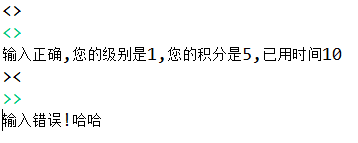
            System.out.println("输入错误!哈哈");

            System.exit(0);

        }

        if(flag)

        {

            long currentTime=System.currentTimeMillis();

            //如果超时

            if((currentTime-player.getStartTime())/100>LevelParam.levels[player.getLevelNo()-1].getTimeLimit())

                    {

                System.out.println("你输入的太慢了,已经超时,退出!");

                System.exit(1);

                    }

            //计算玩家当前积分

            player.setCurScore(player.getCurScore()+LevelParam.levels[player.getLevelNo()-1].getPerScore());

            //计算玩家已用时间

            player.setElapsedTime((int)(currentTime-player.getStartTime())/1000);

            //输出玩家当前级别,当前积分,当前时间

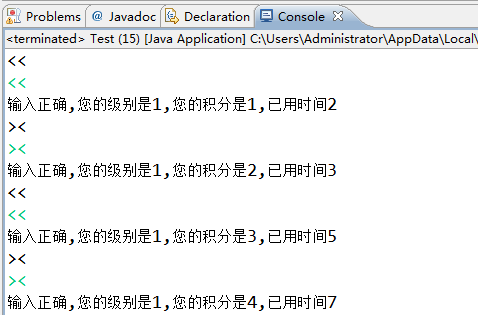
            System.out.println("输入正确,您的级别是"+player.levelNo+",您的积分是"+player.curScore+",已用时间"+player.elapsedTime+"");

        }

        return "hh";

    }

}
测试Test类:
package cn.happy;

public class Test {

    /**

     * @param args

     */

    public static void main(String[] args) {

        Player player=new Player();

        player.play();

    }

}

05章项目: QuickHit快速击键的更多相关文章
- QuickHit快速击键小程序 --S2.4.5
我们现在要做一个项目 一个小小的程序 叫做快速击键 很明了的目的 就是在规定时间内,每次出现一组字母的组合,这个字母只能在DFJK中生成 然后输入相应的文字,按回车 自动判断输入的是否正确 在规定时间 ...
- Quickhit快速击键
一.项目分析 根据输入速率和正确率将玩家分为不同等级,级别越高,一次显示的字符数越多,玩家正确输入一次的得分也越高.如果玩家在规定时间内完成规定次数的输入,正确率达到规定要求,则玩家升级.玩家最高级别 ...
- 快速击键(MyEclipse编写的QuickHit项目)
public class Level { private int levelNo;// 各级别编号 private int strLength;// 各级别一次输出字符串的长度 private int ...
- net core体系-web应用程序-4asp.net core2.0 项目实战(CMS)-第二章 入门篇-快速入门ASP.NET Core看这篇就够了
.NET Core实战项目之CMS 第二章 入门篇-快速入门ASP.NET Core看这篇就够了 原文链接:https://www.cnblogs.com/yilezhu/p/9985451.ht ...
- 2019-11-29-VisualStudio-使用新项目格式快速打出-Nuget-包
title author date CreateTime categories VisualStudio 使用新项目格式快速打出 Nuget 包 lindexi 2019-11-29 10:15:25 ...
- 2018-12-17-VisualStudio-使用新项目格式快速打出-Nuget-包
title author date CreateTime categories VisualStudio 使用新项目格式快速打出 Nuget 包 lindexi 2018-12-17 14:11:50 ...
- xdotool模拟击键和鼠标移动
最近双十一抢红包的活动比较火,我也就去玩了一下,在一个小活动里,需要不停的点击左箭头和右箭头,让红包不停的跑,但自己点的比较慢,老是出现下面的图片 看到提示还有n多公里才跑完,感觉极度不爽,一怒之下, ...
- Unity实现相似于安卓原生项目的点击安卓返回button回到前一页的功能
本章博主和大家一起讨论下Unity怎么实现类似安卓原生项目,点击安卓返回button实现返回到前一个页面的功能. 1.定义一个泛型用于响应安卓的返回button public static List& ...
- Winform开发框架之图表报表在线设计器2-图表-SNF.EasyQuery项目--SNF快速开发平台3.3-Spring.Net.Framework
上一篇讲到,如何快速创建报表程序了.这篇教大家如何快速制作图表报表. 继上一篇,Winform开发框架之图表报表在线设计器-报表 上一篇讲到如何了创建数据源,这里就不在介绍了.那我们就直接从图表设计器 ...
随机推荐
- CSS3 学习笔记
border-radius 圆角是做网页永远绕不过的话题,以前基本是通过背景图片做的,有了 CSS3 以后通过属性就 能够搞定,我们可以通过 border-radius 设置元素的圆角半径. bord ...
- Eclipse开发STM32出现找不到函数的情况的解决方法
问题表现: 在明明引用了头文件的情况下,出现“undefined reference to `…'”的情况,例如下图: 解决方法: 在左边的数据目录定位到“system\src\stm32f0-st ...
- C语言堆栈入门——堆和栈的区别
来看一个网上很流行的经典例子: main.cpp int a = 0; 全局初始化区 char *p1; 全局未初始化区 main() { int b; 栈 char s[] = "abc& ...
- CoreDataManager-Swift版-兼容iOS10以前的版本
import UIKit import CoreData // coredata管理器 class CoreDataManager: NSObject { // 单例 static let share ...
- Android 手机卫士--home界面布局
本文实现当从splash界面进入hone界面的时候,产生一种渐进淡入的动画效果,在onCreate中调用一个方法initAnimation(),代码如下: /** * 添加淡入的动画效果 */ pri ...
- iOS关于启动页自定义特殊处理
平常开发中对于启动页可能会有一些特别的要求,比如在启动页加动画或加一些按键可以响应事件等,最近项目中要在启动页增加版本号,因为版本号是不断的改变,所以要动态实现把它加到启动页上:在XCode上面配置的 ...
- DragLayout: QQ5.0侧拉菜单的新特效
一.项目概要 1.1 项目效果如图: 1.2 需要使用到的技术 ViewDragHelper: 要实现和QQ5.0侧滑的特效,需要借助谷歌在2013年I/O大会上发布的ViewDragHelper ...
- Xcode cannot launch because the device is locked.
When you plug in your iPhone, it will ask you to trust the computer. If you already trust and unlock ...
- 【读书笔记】iOS-程序进入到后台
当一个iOS应用被送到后台,它的主线程会被暂停.你用NSThread的detachNewThreadSelector:toTar get:withObject:类方法创建的线程也被挂起了.如果你想在后 ...
- iOS--归档和解档(Archiver)、(UnArchiver)
一.已有类型的归档和解档 首先来看一个简单的例子: //第一方式:归档对象 //对象-->文件 NSArray *array = [NSArray arrayWithObjects:@" ...