
【转载】PHP使用1个crontab管理多个crontab任务
转载来自: http://www.cnblogs.com/showker/archive/2013/09/01/3294279.html
http://www.binarytides.com/php-manage-multiple-cronjobs-with-a-single-crontab-entry/
In many php applications there are multiple tasks that need to be run via cron at different times. In a typical application you may be doing the following tasks via cronjobs :
1. Backup database.
2. Send out email to subscribers.
3. Clear temporary files.
4. Fetch xml feeds from some source and store them in database.
So if you had separate php files doing these tasks , and had a cronjob entry for each , your cronjob could look like this :
0 0 * * * /var/www/my_app/backup_database.php
12 2 * * * /var/www/my_app/email_to_subscribers.php
10 5 * * * /var/www/my_app/clear_temp_files.php
10 7 * * * /var/www/my_app/fetch_xml_feeds.php
The above is the simplest approach to manage multiple cronjobs for your php application. However this approach has many drawbacks :
1. Multiple entries in crontabs means more time and effort needed to edit the crontab and maintain it.
- Since this approach involves writing each task separately in the cron list , it becomes difficult to maintain.
2. The crontab command has to be used everytime a change is to be made.
- You need to either manually do a `crontab -t` in the shell prompt or make your php application do it , everytime there is a change in either the tasks or their timing.
3. If the script name changes then have to edit the crontab file again.
4. A log email would be generated for every cron run, creating multiple log emails.
- Every task that is running would generate a cronlog and email itself to the email specified
5. Inefficient when there are 10s or 100s of tasks to be run via cron.
- Do you think it is a good idea if you had many many tasks to do.
An alternative solution
How about having only 1 entry in the cronjobs, and that 1 cronjob manages the rest of the cronjobs.
1. Add only 1 task to the crontab rule say :
* * * * * php /path/to/cronjob.php
The cronjob.php file would run all the tasks that need to be run via cron. Its important to note that this cronjob.php will run every minute and forever. Do not be worried about it eating too much of system resources. It is a faily light thing and does not load your CPU or RAM with anything heavy.(注意这个cronjob.php会每分钟执行一次,而且一直会一直这样。不必担心这会消耗太多系统资源,这是一个非常轻量级的东西,它不会额外占用你的CPU和内存)
Now the next thing would be to make sure cronjob.php can run all the tasks at the right time.
2. Now we need to have different tasks have a different cron schedule. Lets say there are 3 different tasks to run at 3 different times :
0 5 1,15 * * monthly_sales_report
0 10 15 02 * purchase_report
The cronjob.php that runs every minute should have an array like this :
 $cronjobs = array();

 $cronjobs['database_backup'] = '0 5 * * *';

 $cronjobs['monthly_sales_report'] = '0 5 1,15 * *';

 $cronjobs['purchase_report'] = '0 10 15 02 *';
Now we test each job/task for the timestamp and run it like this :
 foreach($cronjobs as $method => $cron)

 {

     $time = time();

         if( is_time_cron($time , $cron) )

     {

         $result = $method();

         echo $result;

     }

 }
is_time_cron checks if the current timestamp matches the cron schedule or not. If it matches , then the task is executed. Theis_time_cron method can be found in the previous post here.
In this approach the benefits are :
1. Only 1 crontab entry.
The crontab list is clean and your application does not overload it.
2. Easy to maintain , does not need any modification unless the script path/name changes.
The crontab once created does not need any change unless the name or path of 'cronjob.php' changes. Meanwhile the jobs inside cronjob.php can change their names , schedules and anything very easily.
3. To add/edit/remove tasks or change their time schedules only the cronjob.php needs to be changed.
This means easier modification , maintenance and the application can provide simple user interface to make changes anytime without the need to use crontab commands or anything as such.
The above mentioned approach can be applied to any language , not just php.
附加:判断当前时间蹉是否符合某个cronjob
http://www.binarytides.com/php-check-if-a-timestamp-matches-a-given-cron-schedule/
PHP check if a timestamp matches a given cron schedule
 desktop:~$ php -a

 Interactive shell

 php > echo time();

 1319362432

 php >
Above is an example of a given timestamp.
And a cron schedule can look like this 0 5 * * * - which means run everyday at 5 hours and 0 minutes.
Now in a php application you may need to test if a given timestamp , say 1319362432 matches a given cron schedule like 0 5 * * *.
Here is a quick php function that can do this task.
 /**

     Test if a timestamp matches a cron format or not

     //$cron = '5 0 * * *';

 */

 function is_time_cron($time , $cron)

 {

     $cron_parts = explode(' ' , $cron);

     if(count($cron_parts) != 5)

     {

         return false;

     }

     list($min , $hour , $day , $mon , $week) = explode(' ' , $cron);

     $to_check = array('min' => 'i' , 'hour' => 'G' , 'day' => 'j' , 'mon' => 'n' , 'week' => 'w');

     $ranges = array(

         'min' => '0-59' ,

         'hour' => '0-23' ,

         'day' => '1-31' ,

         'mon' => '1-12' ,

         'week' => '0-6' ,

     );

     foreach($to_check as $part => $c)

     {

         $val = $$part;

         $values = array();

         /*

             For patters like 0-23/2

         */

         if(strpos($val , '/') !== false)

         {

             //Get the range and step

             list($range , $steps) = explode('/' , $val);

             //Now get the start and stop

             if($range == '*')

             {

                 $range = $ranges[$part];

             }

             list($start , $stop) = explode('-' , $range);

             for($i = $start ; $i <= $stop ; $i = $i + $steps)

             {

                 $values[] = $i;

             }

         }

         /*

             For patters like :

             2

             2,5,8

             2-23

         */

         else

         {

             $k = explode(',' , $val);

             foreach($k as $v)

             {

                 if(strpos($v , '-') !== false)

                 {

                     list($start , $stop) = explode('-' , $v);

                     for($i = $start ; $i <= $stop ; $i++)

                     {

                         $values[] = $i;

                     }

                 }

                 else

                 {

                     $values[] = $v;

                 }

             }

         }

         if ( !in_array( date($c , $time) , $values ) and (strval($val) != '*') )

         {

             return false;

         }

     }

     return true;

 }

 var_dump(time() , '0 5 * * *');  //true or false
How does it work
The above code uses the date format specifiers as follows :
'min' => 'i' ,
'hour' => 'G' ,
'day' => 'j' ,
'mon' => 'n' ,
'week' => 'w'
over the timestamp to extract the minute , hour , day , month and week of a timestamp
Then it checks the cron format by splitting it into parts like 0 , 5 , * , * , * and then tests each part for the corresponding value from timestamp.
效果:
crontab命令:
* * * * * php /home/wwwroot/crontabs/cronjob.php
查看:
crontab -l
编辑:
crontab -e
参数:
     5       *       *       *     *     ls             指定每小时的第5分钟执行一次ls命令

     30     5       *        *     *     ls             指定每天的 5:30 执行ls命令

     30     7       8        *     *     ls             指定每月8号的7:30分执行ls命令

     30     5       8        6     *     ls             指定每年的6月8日5:30执行ls命令

     30     6       *        *     0     ls             指定每星期日的6:30执行ls命令[注:0表示星期天,1表示星期1, 以此类推,也可以用英文来表示,sun表示星期天,mon表示星期一等。]

     30     3     10,20      *     *     ls     每月10号及20号的3:30执行ls命令[注:“,”用来连接多个不连续的时段]

     25     8-11     *       *     *     ls       每天8-11点的第25分钟执行ls命令[注:“-”用来连接连续的时段]

     */15   *       *        *     *     ls         每15分钟执行一次ls命令 [即每个小时的第0 15 30 45 60分钟执行ls命令 ]

     30     6     */10       *     *     ls       每个月中,每隔10天6:30执行一次ls命令[即每月的1、11、21、31日是的6:30执行一次ls 命令。 ]

     50     7       *        *     *     root     run-parts     /etc/cron.daily   每天7:50以root 身份执行/etc/cron.daily目录中的所有可执行文件[ 注:run-parts参数表示,执行后面目录中的所有可执行文件。 ]
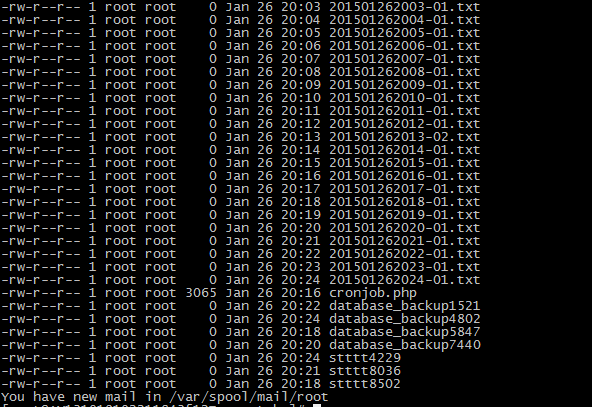
 $time = date('YmdHi-s', time());

 $filename = $time . '.txt';

 //$fp = fopen("/home/wwwroot/crontabs/{$filename}", "w+"); //打开文件指针,创建文件

 //file_get_contents($fp,'sssss');

 ######################################################################

 $cronjobs = array();

 $cronjobs['database_backup'] = '*/2 * * * *';

 $cronjobs['stttt'] = '*/3 * * * *';

 $cronjobs['monthly_sales_report'] = '0 5 1,15 * *';

 $cronjobs['purchase_report'] = '0 10 15 02 *';

 function database_backup(){

     $r=  rand(200, 9000);

     $fp = fopen("/home/wwwroot/crontabs/database_backup{$r}", "w+"); //打开文件指针,创建文件

 }

 function stttt(){

     $r=  rand(200, 9000);

     $fp = fopen("/home/wwwroot/crontabs/stttt{$r}", "w+"); //打开文件指针,创建文件

 }
【转载】PHP使用1个crontab管理多个crontab任务的更多相关文章
- PHP使用1个crontab管理多个crontab任务
http://www.binarytides.com/php-manage-multiple-cronjobs-with-a-single-crontab-entry/ In many php app ...
- centos7 crontab管理
crontab -l 当前用户的任务 crontab -e 编辑任务列表 crontab -r 删除当前用户的任务
- cron和crontab命令详解 crontab 每分钟、每小时、每天、每周、每月、每年定时执行 crontab每5分钟执行一次
cron机制 cron可以让系统在指定的时间,去执行某个指定的工作,我们可以使用crontab指令来管理cron机制 crontab参数 -u:这个参数可以让我们去编辑其他 ...
- crontab -e 和/etc/crontab的区别
/etc/crontab文件和crontab -e命令区别/etc/crontab文件和crontab -e命令区别 1.格式不同 前者 # For details see man 4 crontab ...
- Linux命令之Crontab定时任务,利用Crontab定时执行spark任务
Linux命令之Crontab定时任务,利用Crontab定时执行spark任务 一.Linux命令之Crontab定时任务 1.1 常见Crontab任务 1.1.1 安装crontab 1.1.2 ...
- linux crontab -r 导致no crontab for root的原因及解决方案
使用方式 : crontab file [-u user]-用指定的文件替代目前的crontab. crontab-[-u user]-用标准输入替代目前的crontab. crontab-1[use ...
- crontab的安装及crontab命令介绍
前一天学习了 at 命令是针对仅运行一次的任务,循环运行的例行性计划任务,linux系统则是由 cron (crond) 这个系统服务来控制的.Linux 系统上面原本就有非常多的计划性工作,因此这个 ...
- crontab表达式执行时间计算,crontab在线测试
熟悉Unix和Linux的朋友都知道Crontab表达式,通过crontab指令可以周期性调用或执行某个程序. 但是大家写完crontab表达式后,心里总是担心表达式写的不对,可以又没法去验证.比 ...
- Linux定时任务Crontab使用 提示no crontab for root
使用命令查询crontab 任务时,一直提示:no crontab for root .查看了一些资料,说是crontab在初始时,设置了一次编辑方式,所以试了一下crontab -e的方式编辑,即在 ...
随机推荐
- Opencv角点检测
#include "stdafx.h" #define max_corners 20 int main() { int cornerNum = max_corners; vecto ...
- PHP中为位运算符(几乎很少用)
PHP语言里的位运算符&.|.^ .~.〈〈 .〉〉 "&" 按位与运算 按位与运算符"&"是双目运算符.其功能是参与运算的两数各对应的 ...
- 调用pyxmpp库PyQt编程打包成exe文件出错
pyxmpp库内resolver.py内getaddrinfo获取Openfire服务器地址出错
- Genymotion自动化启动
一.启动方式 命令行: player.exe --vm-name [模拟器名称] 例子: "D:\Program files\Genymobile\Genymotion\player ...
- rpm包制作(待实验)
作者:firefoxbug 时间:July 18, 2014 rpm包命名规范 对于rpm包的命名符合如下规范. %{NAME}-%{VERSION}-%{RELEASE}.%{ARCH}.rpm N ...
- jquery实现input输入框实时输入触发事件代码 ---jQuery 中bind(),live(),delegate(),on() 区别
复制代码 代码如下: <input id="productName" name="productName" value="" /> ...
- ASP.NET MVC 如何解决“上下文的模型已在数据库创建后发生更改”问题
问题描述:支持"XXContext"(泛指之类的数据库上下文模型)上下文的模型已在数据库创建后发生更改.请考虑使用 Code First 迁移更新数据库. 问题解决:坑爹的MVC会 ...
- 【leetcode】Recover Binary Search Tree
Recover Binary Search Tree Two elements of a binary search tree (BST) are swapped by mistake. Recove ...
- 使用Servlet和jdbc创建用户登录验证
首先创建一个用户表,用来保存用户名 密码,并插入几条数据 mysql> desc user;+----------+-------------+------+-----+---------+-- ...
- ACM/ICPC 之 数据结构-邻接表+BFS(TSH OJ-无线广播Broadcast)
这道题中若能够构成互不干扰的区域,其构成的图其实就是汉密尔顿路(Hamilton road),因此如果能够观察出来可以直接转化为汉密尔顿路的存在性证明,即便不能观察,我相信ACMer也能转化为BFS问 ...