
ASP.NET Web Api 安全性(转载)
转载地址:http://www.cnblogs.com/fzrain/p/3552423.html
在Web Api中强制使用Https
我们可以在IIS级别配置整个Web Api来强制使用Https,但是在某些情况下你可能只需要对某一个action强制使用Https,而其他的方法仍使用http。
为了实现这一点,我们将使用Web Api中的filters——filter(过滤器)的主要作用就是可以在我们执行方法之前执行一段代码。没接触过得可以通过下图简单理解下,大神跳过:
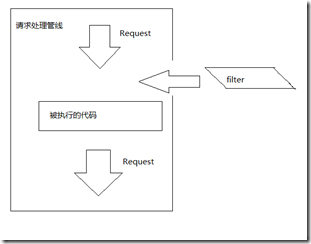
我们新创建的filter将用来检测是否是安全的,如果不是安全的,filter将终止请求并返回相应:请求必须是https。
具体做法:创建一个filter继承自AuthorizationFilterAttribute,重写OnAuthorization来实现我们的需求。
在网站根目录下创建“Filters”文件夹,新建一个类“ForceHttpsAttribute”继承自“System.Web.Http.Filters.AuthorizationFilterAttribute”,下面上代码:

public class ForceHttpsAttribute : AuthorizationFilterAttribute

    {

        public override void OnAuthorization(System.Web.Http.Controllers.HttpActionContext actionContext)

        {

            var request = actionContext.Request;

            if (request.RequestUri.Scheme != Uri.UriSchemeHttps)

            {

                var html = "<p>Https is required</p>";

                if (request.Method.Method == "GET")

                {

                    actionContext.Response = request.CreateResponse(HttpStatusCode.Found);

                    actionContext.Response.Content = new StringContent(html, Encoding.UTF8, "text/html");

                    UriBuilder httpsNewUri = new UriBuilder(request.RequestUri);

                    httpsNewUri.Scheme = Uri.UriSchemeHttps;

                    httpsNewUri.Port = 443;//HTTPS(securely transferring web pages)服务器,默认的端口号为443/tcp 443/udp;

                    actionContext.Response.Headers.Location = httpsNewUri.Uri;

                }

                else

                {

                    actionContext.Response = request.CreateResponse(HttpStatusCode.NotFound);

                    actionContext.Response.Content = new StringContent(html, Encoding.UTF8, "text/html");

                }

            }

        }

    }
在上面代码中,我们通过actionContext参数拿到request和response对象,我们判断客户端的请求:如果不是https,那么直接响应客户端应该使用https。
在这里,我们需要区分请求是Get还是其他(Post,Delete,Put),因为对于使用了Http的Get请求来访问资源,我们将使用https创建一个连接并添加在响应Header的Location中。这样做了之后客户端就会自动使用https来发送Get请求了。
对于非Get请求,直接返回404,并通知客户端必须使用https来请求
如果我们打算在整个项目中使用,那么在“WebAPIConfig”类中做如下设置:
public static void Register(HttpConfiguration config)

   {

       config.Filters.Add(new ForceHttpsAttribute());

   }
如果我们相对具体的Controller或Action设置时,可以做如下设置:
//对于整个Controller强制使用Https
[Learning.Web.Filters.ForceHttps()]

    public class CoursesController : BaseApiController

    {

    //仅对这个方法强制使用Https
        [Learning.Web.Filters.ForceHttps()]

            public HttpResponseMessage Post([FromBody] CourseModel courseModel)

            {

        }

}
使用Basic Authentication验证用户
到目前为止,我们提供的所有Api都是公开的,任何人都能访问。但在真是场景中却是不可取的,对于某些数据,只有通过认证的用户才能访问,我们这里有两个地方恰好说明这一点:
1.当客户端发送Get请求道“http://{your_port}/api/students/{userName}“的时候.例如:通过上述URI访问userNme为“TaiseerJoudeh”的信息时,我们必须让客户端提供TaiseerJoudeh相应的用户名和密码,对于没有提供验证信息的用户我们就不让访问,因为学生信息包含一些重要的私人信息(email,birthday等)。
2.当客户端发送Post请求到“http://{your_port}/api/courses/2/students/{userName}“的时候,这意味着给学生选课,我们可以想一下,这里如果不做验证,那么所有人都能随便给某个学生选课,那么不就乱了么。
对于上面的场景,我们使用Basic Authentication来进行身份验证,主要思路是使用filter从请求header部分获取身份信息,校验验证类型是否为“basic”,然后校验内容,正确就放行,否则返回401 (Unauthorized)状态码。
在上代码前,解释一下下basic authentication:
什么是basic authentication?
它意味着在正式处理Http请求之前对请求者身份的校验,这可以防止服务器受到DoS攻击(Denial of service attacks)。原理是:客户端在发送Http请求的时候在Header部分提供一个基于Base64编码的用户名和密码,形式为“username:password”,消息接收者(服务器)进行验证,通过后继续处理请求。
由于用户名和密码仅适用base64编码,因此为了保证安全性,basic authentication通常是基于SSL连接(https)
为了在我们的api中使用,创建一个类“LearningAuthorizeAttribute”继承自System.Web.Http.Filters.AuthorizationFilterAttribute
public class LearningAuthorizeAttribute : AuthorizationFilterAttribute

    {

        [Inject]

        public LearningRepository TheRepository { get; set; }

        public override void OnAuthorization(System.Web.Http.Controllers.HttpActionContext actionContext)

        {

            //forms authentication Case that user is authenticated using forms authentication
//so no need to check header for basic authentication.

            if (Thread.CurrentPrincipal.Identity.IsAuthenticated)

            {

                return;

            }

            var authHeader = actionContext.Request.Headers.Authorization;

            if (authHeader != null)

            {

                if (authHeader.Scheme.Equals("basic", StringComparison.OrdinalIgnoreCase) &&

                    !String.IsNullOrWhiteSpace(authHeader.Parameter))

                {

                    var credArray = GetCredentials(authHeader);

                    var userName = credArray[0];

                    var password = credArray[1];

                    if (IsResourceOwner(userName, actionContext))

                    {

                        //You can use Websecurity or asp.net memebrship provider to login, for

                        //for he sake of keeping example simple, we used out own login functionality

                        if (TheRepository.LoginStudent(userName, password))

                        {

                            var currentPrincipal = new GenericPrincipal(new GenericIdentity(userName), null);

                            Thread.CurrentPrincipal = currentPrincipal;

                            return;

                        }

                    }

                }

            }

            HandleUnauthorizedRequest(actionContext);

        }

        private string[] GetCredentials(System.Net.Http.Headers.AuthenticationHeaderValue authHeader)

        {

            //Base 64 encoded string

            var rawCred = authHeader.Parameter;

            var encoding = Encoding.GetEncoding("iso-8859-1");

            var cred = encoding.GetString(Convert.FromBase64String(rawCred));

            var credArray = cred.Split(':');

            return credArray;

        }

        private bool IsResourceOwner(string userName, System.Web.Http.Controllers.HttpActionContext actionContext)

        {

            var routeData = actionContext.Request.GetRouteData();

            var resourceUserName = routeData.Values["userName"] as string;

            if (resourceUserName == userName)

            {

                return true;

            }

            return false;

        }

        private void HandleUnauthorizedRequest(System.Web.Http.Controllers.HttpActionContext actionContext)

        {

            actionContext.Response = actionContext.Request.CreateResponse(HttpStatusCode.Unauthorized);

            actionContext.Response.Headers.Add("WWW-Authenticate",

                                               "Basic Scheme='eLearning' location='http://localhost:8323/account/login'");

        }

    }
我们重写了“OnAuthorization”,实现如下功能:
1.从请求Header中获取校验数据
2.判断验证信息类型为“basic”并包含base64编码
3.将base64编码转化为string,并提取用户名和密码
4.校验提供的验证信息是否与访问的资源信息相同(学生的详细信息只能由他自己访问)
5.去数据库校验用户名及密码
6.如果校验通过,则设置Thread的CurrentPrincipal,使本次接下来的请求都是通过校验的。
7.校验没通过,返回401(Unauthorized)并添加一个WWW-Authenticate响应头,根据这个请求,客户端可以添加相应的验证信息
在代码中实现起来就很简单了,上两个Attribute就完了:
public class StudentsController : BaseApiController

    {

        [LearningAuthorizeAttribute]

        public HttpResponseMessage Get(string userName)

            {

            }

    }
public class EnrollmentsController : BaseApiController

    {

        [LearningAuthorizeAttribute]

        public HttpResponseMessage Post(int courseId, [FromUri]string userName, [FromBody]Enrollment enrollment)

            {

            }

    }
测试成果
使用测试工具发送如下请求:

由于没有提供身份验证,于是得到如下响应:
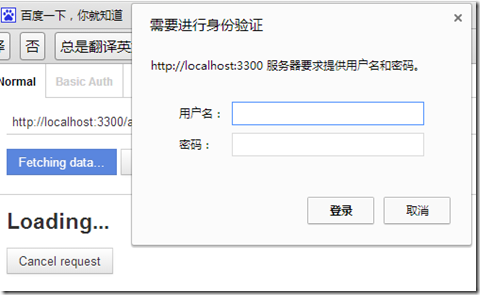
取消:

去数据库找到对应的用户名和密码输入,得到如下结果:

总结
因为 Base Authentication 的安全性较差,但对于无 Cookie 的 Web Api 来说,应用上非常的简单和方便。
Base Authentication 最大的缺点是凭据会被浏览器缓存——直到你关闭浏览器为止。如果你已经对某个URI获得了授权,浏览器就会在授权头发送相应的凭据,这使其更容易受到跨站点请求伪造(CSRF)攻击
Base Authentication 通常需要使用HTTPS方式进行加密处理。
ASP.NET Web Api 安全性(转载)的更多相关文章
- CORS support for ASP.NET Web API (转载)
CORS support for ASP.NET Web API Overview Cross-origin resource sharing (CORS) is a standard that al ...
- 为 ASP.NET Web API 创建帮助页面(转载)
转载地址:http://www.asp.net/web-api/overview/creating-web-apis/creating-api-help-pages 当创建web API 时,经常要创 ...
- ASP.NET Web Api 服务器端变了,客户端该如何修改请求(转载)
转载地址:http://www.cnblogs.com/fzrain/p/3558765.html 前言 一旦我们将API发布之后,消费者就会开始使用并和其他的一些数据混在一起.然而,当新的需求出现时 ...
- ASP.NET Web API 中的异常处理(转载)
转载地址:ASP.NET Web API 中的异常处理
- ASP.NET Web API 2 中的属性路由使用(转载)
转载地址:ASP.NET Web API 2 中的属性路由使用
- 通过扩展让ASP.NET Web API支持W3C的CORS规范(转载)
转载地址:http://www.cnblogs.com/artech/p/cors-4-asp-net-web-api-04.html CORS(Cross-Origin Resource Shari ...
- 转载 ASP.NET Web API 学习
转载关于ASP.NET Web API 的学习网址 http://www.cnblogs.com/aehyok/p/3432158.html http://www.mashangpiao.net/Ar ...
- 使用ASP.NET Web API自带的类库实现对CORS的支持(在开发中使用这种方式)(转载)
在<通过扩展让ASP.NET Web API支持W3C的CORS规范>中我们通过自定义的HttpMessageHandler为ASP.NET Web API赋予了跨域资源共享的能力,具体来 ...
- [转载]8 种提升 ASP.NET Web API 性能的方法
http://www.oschina.net/translate/8-ways-improve-asp-net-web-api-performance 英文原文:8 ways to improve A ...
随机推荐
- 一颗躁动的心---下决心从SLAM开始,不钻研嵌入式底层了
在写这个随笔时,北京的外面正在下2016的第一场雪.夜深人尽之时总会考虑一下自己的未来在何方. 长这么大了,我发现我这人始终不能坚定不移的朝着一个方向努力,总是朝三暮四,对学习更是朝令夕改,这造成了我 ...
- Mysql中索引的 创建,查看,删除,修改
创建索引 MySQL创建索引的语法如下: ? 1 2 3 CREATE [UNIQUE|FULLTEXT|SPATIAL] INDEX index_name [USING index_type] ON ...
- Kali Linux渗透基础知识整理(一):信息搜集
写在前面的废话:最近要给一些新人做培训,整理些东西,算不上什么太高端的内容,只是简单的整理下了,我觉得对于小白的话也还算是干货.在乌云水了几年,算不上什么大神水平,最近生活费紧张,现在打算在FreeB ...
- java抓取快递100信息接口
package zeze; import java.io.IOException; import org.json.JSONArray; import org.json.JSONException; ...
- py代码模糊工具
https://github.com/astrand/pyobfuscate 使用方法,调用下图文件即可,方法 python pyobfuscate.py your_code.py 即可输出在cmd ...
- OC block的简单使用
http://blog.csdn.net/itpeng523/article/details/23965147 一.先用Xcode创建一个空工程 学习block之前先用弄懂c语言的函数指针 看代码: ...
- JustMock Lite (Free Mocking Framework For .net)
通过 Nuget 安装 2. 官网下载(官网不行点这里) 3. 帮助文档 商业版和免费版区别概览 MockingContainer 测试类准备:一般来说也是业务类 public class C ...
- 如何准确高效的获取数据库新插入数据的主键id
例如我们新建了一张表UserInformation,字段如下Id,为主键,自增,其它字段Name,Pwd,Email 然后我们来执行一个新增插入操作: insert into UserInformat ...
- 开始学习C++
这里突然想起来当初学习java和C# 总是会有个demo : hello world. 这里我记得我曾经看过一个笑话.说有个程序员,想学习书法,买了笔墨,都准备好了,但是不知道写什么好.最后,他大 ...
- ios nsdataformatter奇怪的问题
用nsdataformatter在中文格式下测试, a 标识的是上午,下午,不是AM,pm. 我在24小时格式的机器上测试,存入了一个 时间,却解析不出来了! static NSString *Hom ...