
使用pandas处理数据并绘图的例子
import sys

import os

import re

import datetime

import csv

def get_datetime(record):

    request_time = ""

    p = re.compile(r"(?P<time>\d{4}-\d{2}-\d{2} \d{2}:\d{2}:\d{2},\d+)")

    # p = re.compile(r"(?P<time>[\d.]+)ms")

    m = p.search(record)

    if m:

        request_time = m.group("time")

    dt = datetime.datetime.strptime(request_time, '%Y-%m-%d %H:%M:%S,%f')

    return dt

def parse(log_file_name, result_csv_name):

    start = 0

    end = 0

    start_time = ''

    end_time = ''

    md5crc32 = ''

    csv_writer = csv.writer(open(result_csv_name, 'wb'),

                            delimiter = ',')

    with open(log_file_name, 'rb') as log_file:

        for i, line in enumerate(log_file):

            line = line.strip()

            if 'folderProcessing()  INFO download from' in line:

                start = i

                start_time = get_datetime(line)

            elif 'DownLoadFile()  INFO download to' in line:

                end = i

                end_time = get_datetime(line)

                # got one download action

                if end -  start == 1:

                    # parse hash

                    md5crc32 = line.rsplit('/', 1)[1]

                    print md5crc32, (end_time - start_time).total_seconds()

                    csv_writer.writerow((md5crc32, (end_time - start_time).total_seconds()))

                    # assert False

def do_statistics(file_name):

    import pandas as pd

    import numpy as np

    import matplotlib.pyplot as plt

    df = pd.read_csv(file_name, header = None, names= ['hash', 'time'], dtype = {'time': np.float64},

                    # nrows = 10000

                    )

    time_series = df.time

    print time_series.describe()

    plt.figure()

    # fig = time_series.hist().get_figure()

    # define range

    ranges = (0.0, 0.1, 0.2, 0.3, 0.4, 0.5, 0.6, 0.7, 0.8, 0.9, 1.0, 2.0, 3.0, 4.0, 10.0, 10000)

    bins = zip(ranges[:-1], ranges[1:])

    labels = ['%s-%s'%(begin, end) for i ,(begin, end) in enumerate(bins) ]

    print labels

    #print bins

    #fig = time_series.plot(kind='bar', xticks = ranges)

    results = [0] * len(bins)

    for i in time_series:

        for j , (begin, end) in enumerate(bins):

            if i > begin and i <= end:

                results[j] += 1

    print results

    mu = time_series.mean()

    median = np.median(time_series)

    sigma = time_series.std()

    ax = pd.Series(results).plot(kind='bar', logy = True, figsize=(25, 13.5))

    # dpi = ax.figure.get_dpi()

    # print 'dpi = ', dpi

    # plt.gcf().set_size_inches(25, 13.5)

    ax.set_ylabel('Count')

    ax.set_xlabel('Time in seconds')

    # print dir(fig)

    ax.set_xticklabels(labels, rotation = 45)

    ax.set_title('MDSS download statistics')

    textstr = 'count=%s\nmin=%.2f\nmax=%.2f\n$\mu=%.2f$\n$\mathrm{median}=%.2f$\n$\sigma=%.2f$'%(time_series.count(),time_series.min(), time_series.max(),mu, median, sigma)

    # these are matplotlib.patch.Patch properties

    props = dict(boxstyle='round', facecolor='wheat', alpha=0.5)

    # place a text box in upper right in axes coords

    ax.text(0.90, 0.95, textstr, transform=ax.transAxes, fontsize=14,

            verticalalignment='top', bbox=props)

    ax.figure.show()

    #

    ax.figure.set_size_inches(25, 13.5, forward = True)

    print ax.figure.get_size_inches()

    ax.figure.savefig('result.png', format='png',)

    input('asdfasd')

if __name__ == "__main__":

   # print  get_datetime("2014-10-23 09:19:34,251 pid=27850")

   # parse('inpri_p_antiy.log', 'result.csv')

   do_statistics('result.csv')
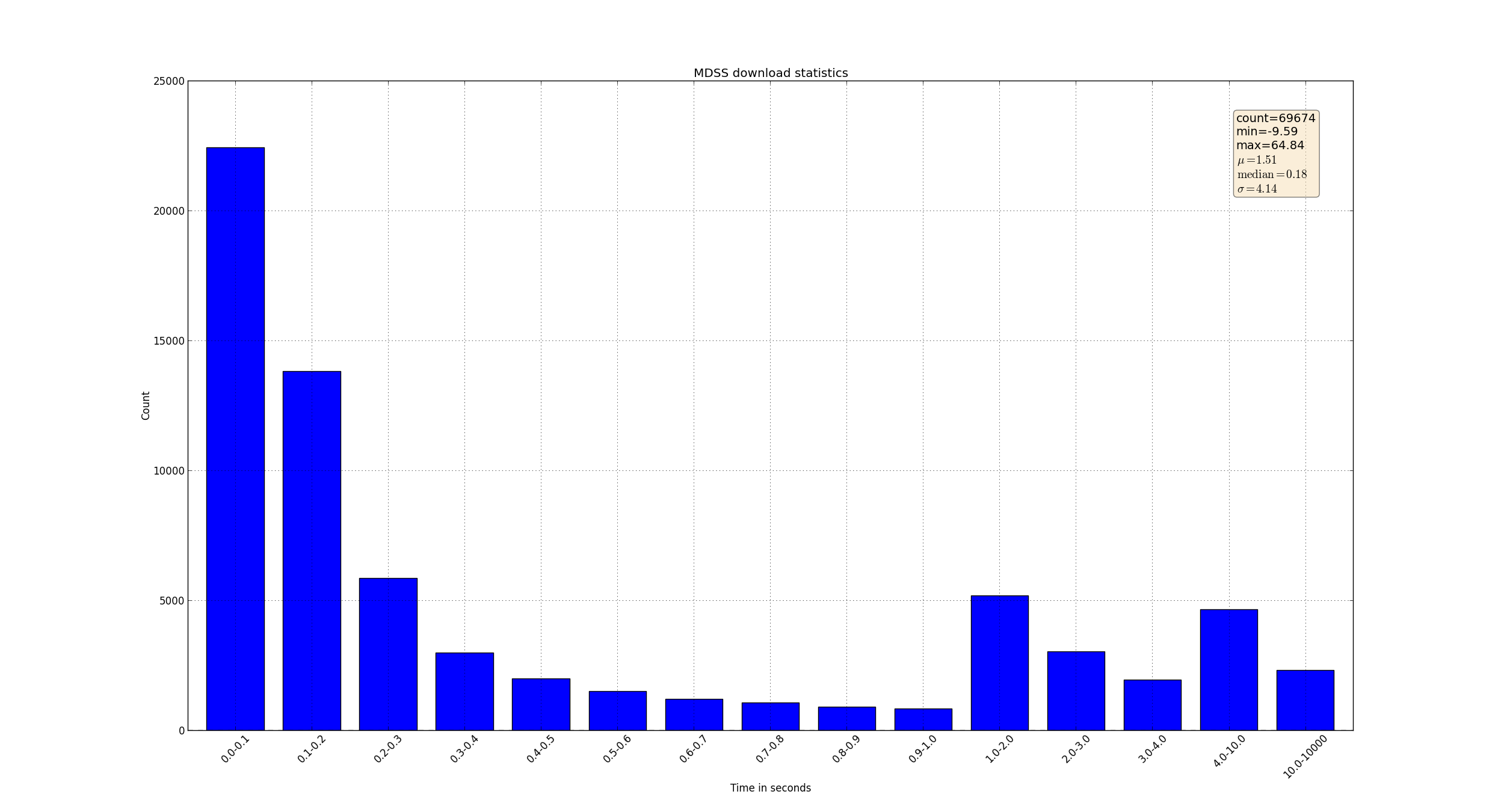
生成图像如下:
使用pandas处理数据并绘图的例子的更多相关文章
- 利用Python进行数据分析(12) pandas基础: 数据合并
pandas 提供了三种主要方法可以对数据进行合并: pandas.merge()方法:数据库风格的合并: pandas.concat()方法:轴向连接,即沿着一条轴将多个对象堆叠到一起: 实例方法c ...
- 【转载】使用Pandas对数据进行筛选和排序
使用Pandas对数据进行筛选和排序 本文转载自:蓝鲸的网站分析笔记 原文链接:使用Pandas对数据进行筛选和排序 目录: sort() 对单列数据进行排序 对多列数据进行排序 获取金额最小前10项 ...
- 【转载】使用Pandas进行数据提取
使用Pandas进行数据提取 本文转载自:蓝鲸的网站分析笔记 原文链接:使用python进行数据提取 目录 set_index() ix 按行提取信息 按列提取信息 按行与列提取信息 提取特定日期的信 ...
- 【转载】使用Pandas进行数据匹配
使用Pandas进行数据匹配 本文转载自:蓝鲸的网站分析笔记 原文链接:使用Pandas进行数据匹配 目录 merge()介绍 inner模式匹配 lefg模式匹配 right模式匹配 outer模式 ...
- 【转载】使用Pandas创建数据透视表
使用Pandas创建数据透视表 本文转载自:蓝鲸的网站分析笔记 原文链接:使用Pandas创建数据透视表 目录 pandas.pivot_table() 创建简单的数据透视表 增加一个行维度(inde ...
- Pandas 把数据写入csv
Pandas 把数据写入csv from sklearn import datasets import pandas as pd iris = datasets.load_iris() iris_X ...
- pandas学习(数据分组与分组运算、离散化处理、数据合并)
pandas学习(数据分组与分组运算.离散化处理.数据合并) 目录 数据分组与分组运算 离散化处理 数据合并 数据分组与分组运算 GroupBy技术:实现数据的分组,和分组运算,作用类似于数据透视表 ...
- Pandas DataFrame数据的增、删、改、查
Pandas DataFrame数据的增.删.改.查 https://blog.csdn.net/zhangchuang601/article/details/79583551 #删除列 df_2 = ...
- pandas 选取数据 修改数据 loc iloc []
pandas选取数据可以通过 loc iloc [] 来选取 使用loc选取某几列: user_fans_df = sample_data.loc[:,['uid','fans_count']] 使 ...
随机推荐
- 并发编程 02—— ConcurrentHashMap
Java并发编程实践 目录 并发编程 01—— ThreadLocal 并发编程 02—— ConcurrentHashMap 并发编程 03—— 阻塞队列和生产者-消费者模式 并发编程 04—— 闭 ...
- 读javascript高级程序设计14-错误处理与调试
一 错误类型 ECMA规定了常见的7种错误类型: Error: 基类型.其他常见的错误类型都继承自该类型,一般供开发人员抛出自定义错误. EvalError:该类型会在eval()函数使用异常时被抛 ...
- 连接英文字符集的ORACLE和调用存储过程问题及64位服务器连接ORACLE问题
部署在IIS上的webservice连接英文字符集的ORACLE数据库出现问题“未在本地计算机上注册"MSDAORA.1"提供程序”,解决方案如下: 原因:如错误,64位系统未注册 ...
- CodeForces #369 div2 D Directed Roads DFS
题目链接:D Directed Roads 题意:给出n个点和n条边,n条边一定都是从1~n点出发的有向边.这个图被认为是有环的,现在问你有多少个边的set,满足对这个set里的所有边恰好反转一次(方 ...
- iOS开发网络篇—NSURLConnection基本使用
iOS开发网络篇—NSURLConnection基本使用 一.NSURLConnection的常用类 (1)NSURL:请求地址 (2)NSURLRequest:封装一个请求,保存发给服务器的全部数据 ...
- js判断 微信浏览器 或者 QQ内置浏览器
function isWeiXinOrQQ(){ var ua = window.navigator.userAgent.toLowerCase(); if(ua.match(/MicroMessen ...
- linux 2.6.21版本的内核合法的MAC地址
当执行ifconfig eth0 hw ether 11:22:33:44:55:66时,当前内核显示修改成功,但是ping时只无限发送ARP包,PC机也已经给板子回ARP包,但没有任何ICMP包的信 ...
- html,if标签使用
$vo.auth_id eq $vo2.auth_pid报错不能用 condition里面访问变量,不能用点的形式,应该用['']的形式访问
- HDU 1829 分组并查集
题意:有两种性别,每组数据表示是男女朋友,判断输入的几组数据是否有同性恋 思路:http://blog.csdn.net/iaccepted/article/details/24304087 分组并查 ...
- asp.net将页面内容按需导入Excel,并设置excel样式,下载文件(解决打开格式与扩展名指定的格式不统一的问题)
//请求一个excel类 Microsoft.Office.Interop.Excel.ApplicationClass excel = null; //创建 Workbook对象 Microsoft ...