
Eclipse利用Maven2搭建SpringMVC框架的Web工程
一、准备工作:
下载apache-maven--> 配置Maven_home -->下载Eclipse Maven插件
二、新建工程:
选择新建Maven Project archetype选择webapp-->输入group ID (src下包名)和Artifact ID (工程名)
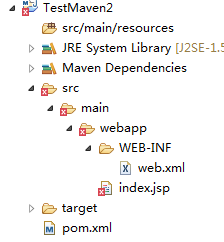
新建Maven工程目录如上图
三、补齐缺失的文件夹:
添加Server支持和缺失的源文件夹
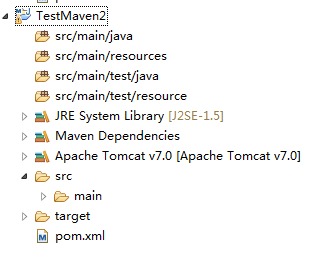
四、添加springMvc支持和web容器支持(若没有,打包时会报错)
<project xmlns="http://maven.apache.org/POM/4.0.0" xmlns:xsi="http://www.w3.org/2001/XMLSchema-instance"

  xsi:schemaLocation="http://maven.apache.org/POM/4.0.0 http://maven.apache.org/maven-v4_0_0.xsd">

  <modelVersion>4.0.0</modelVersion>

  <groupId>com.maven.my</groupId>

  <artifactId>TestMaven2</artifactId>

  <packaging>war</packaging>

  <version>0.0.1-SNAPSHOT</version>

  <name>TestMaven2 Maven Webapp</name>

  <url>http://maven.apache.org</url>
<properties>
<spring.version>4.1.5.RELEASE</spring.version>
</properties>
  <dependencies>

    <dependency>

      <groupId>junit</groupId>

      <artifactId>junit</artifactId>

      <version>3.8.1</version>

      <scope>test</scope>

    </dependency>

     <dependency>

        <groupId>org.springframework</groupId>

        <artifactId>spring-webmvc</artifactId>

        <version>${spring.version}</version>

    </dependency>

    <dependency>

        <groupId>javax.servlet</groupId>

        <artifactId>javax.servlet-api</artifactId>

        <version>3.1.0</version>

    </dependency>

  </dependencies>

  <build>

    <finalName>TestMaven2</finalName>

  </build>

</project>
(五)修改工程配置:
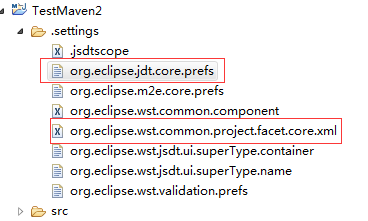
在以上两个文件中修改jdk版本为1.7以上 web为3.0
六:添加springMvc配置:
web.xml
<?xml version="1.0" encoding="UTF-8"?>

<web-app xmlns:xsi="http://www.w3.org/2001/XMLSchema-instance"

         xmlns="http://java.sun.com/xml/ns/javaee" xmlns:web="http://java.sun.com/xml/ns/javaee/web-app_3_0.xsd"

         xsi:schemaLocation="http://java.sun.com/xml/ns/javaee http://java.sun.com/xml/ns/javaee/web-app_3_0.xsd"

         id="study" version="3.0">

         <display-name>Archetype Created Web Application</display-name>

         <description>sprintMVC环境搭建</description>

         <!-- 加载Spring配置文件 -->

         <context-param>

                   <param-name>contextConfigLocation</param-name>

                   <param-value>classpath:configs/beans.xml</param-value>

         </context-param>

         <!-- Spring监听 -->

         <listener>

                   <listener-class>org.springframework.web.context.ContextLoaderListener</listener-class>

         </listener>

         <!-- Spring MVC配置 -->

         <servlet>

                   <servlet-name>Dispatcher</servlet-name>

                   <servlet-class>org.springframework.web.servlet.DispatcherServlet</servlet-class>

                   <!-- 自定义spring mvc的配置文件名称和路径 -->

                   <init-param>

                            <param-name>contextConfigLocation</param-name>

                            <param-value>classpath:configs/beans-mvc.xml</param-value>

                   </init-param>

                   <load-on-startup>1</load-on-startup>

         </servlet>

         <!-- spring mvc 请求后缀 -->

         <servlet-mapping>

                   <servlet-name>Dispatcher</servlet-name>

                   <url-pattern>/</url-pattern>

         </servlet-mapping>

         <welcome-file-list>

                   <welcome-file>index.jsp</welcome-file>

         </welcome-file-list>

</web-app>
src/com/main/resources文件夹下的beans.xml和beans-mvc.xml
beans.xml:
<?xml version="1.0" encoding="UTF-8"?>

<beans xmlns="http://www.springframework.org/schema/beans"

    xmlns:context="http://www.springframework.org/schema/context"

    xmlns:xsi="http://www.w3.org/2001/XMLSchema-instance"

    xsi:schemaLocation="http://www.springframework.org/schema/beans

    http://www.springframework.org/schema/beans/spring-beans-3.0.xsd

    http://www.springframework.org/schema/context

    http://www.springframework.org/schema/context/spring-context-3.0.xsd" >

    <context:property-placeholder />

    <context:annotation-config />

</beans>
<?xml version="1.0" encoding="UTF-8"?>

<beans xmlns="http://www.springframework.org/schema/beans"

    xmlns:xsi="http://www.w3.org/2001/XMLSchema-instance" xmlns:aop="http://www.springframework.org/schema/aop"

    xmlns:util="http://www.springframework.org/schema/util" xmlns:context="http://www.springframework.org/schema/context"

    xmlns:p="http://www.springframework.org/schema/p" xmlns:mvc="http://www.springframework.org/schema/mvc"

    xmlns:task="http://www.springframework.org/schema/task"

    xsi:schemaLocation="

            http://www.springframework.org/schema/beans http://www.springframework.org/schema/beans/spring-beans.xsd

            http://www.springframework.org/schema/aop http://www.springframework.org/schema/aop/spring-aop.xsd

            http://www.springframework.org/schema/context http://www.springframework.org/schema/context/spring-context.xsd

            http://www.springframework.org/schema/util  http://www.springframework.org/schema/util/spring-util.xsd

            http://www.springframework.org/schema/cache http://www.springframework.org/schema/cache/spring-cache.xsd

            http://www.springframework.org/schema/jdbc http://www.springframework.org/schema/jdbc/spring-jdbc.xsd

            http://www.springframework.org/schema/mvc http://www.springframework.org/schema/mvc/spring-mvc.xsd

            ">

    <context:property-placeholder />

    <!-- MVC控制类扫描 -->

    <context:component-scan base-package="com.my.controller" />

    <mvc:annotation-driven />

    <!-- 视图解析器:定义跳转的文件的前后缀 -->

    <bean id="viewResolver" class="org.springframework.web.servlet.view.InternalResourceViewResolver">

        <property name="prefix" value="/view/" />

        <property name="suffix" value=".html" />  <!--可为空,方便实现自已的依据扩展名来选择视图解释类的逻辑  -->

    </bean>

    <mvc:default-servlet-handler />

</beans>
七:补齐自己的controller
package com.my.controller;

import javax.servlet.http.HttpServletRequest;

import org.springframework.stereotype.Controller;

import org.springframework.web.bind.annotation.RequestMapping;

@Controller

@RequestMapping("/user")

public class UserController {

    @RequestMapping(value="/getUserInfo")

    public String getUserInfo(HttpServletRequest request){

        System.out.println("==========");

        return "user";

    }

}
八:部署运行,输入http://localhost:8180/TestMaven2/user/getUserInfo访问。
------------------------------------------------------------------------------------------------------------------------------
一段可能会用到代码:maven依赖无法加入到工程时,在.classpath添加,很有用
<classpathentry kind="con" path="org.eclipse.m2e.MAVEN2_CLASSPATH_CONTAINER">

        <attributes>

            <attribute name="maven.pomderived" value="true"/>

            <attribute name="org.eclipse.jst.component.nondependency" value=""/>

        </attributes>

    </classpathentry>
Eclipse利用Maven2搭建SpringMVC框架的Web工程的更多相关文章
- 教你搭建SpringMVC框架( 更新中、附源码)
一.项目目录结构 二.SpringMVC需要使用的jar包 commons-logging-1.2.jar junit-4.10.jar log4j-api-2.0.2.jar log4j-core- ...
- 脚手架快速搭建springMVC框架项目
apid-framework脚手架快速搭建springMVC框架项目 rapid-framework介绍: 一个类似ruby on rails的java web快速开发脚手架,本着不重复发明轮 ...
- 教你搭建SpringMVC框架( 附源码)
一.项目目录结构 二.SpringMVC需要使用的jar包 commons-logging-1.2.jar junit-4.10.jar log4j-api-2.0.2.jar log4j-core- ...
- 大师养成计划之一:搭建springmvc框架
搭建spring-mvc框架 搭建spring-mvc框架步骤: 1.搭建web项目spring-mvc1 2.引入jar包 3.配置web.xml 3.1拷贝头文件: <web-app xml ...
- 搭建springmvc框架的另一种思路
在一个完整的项目里搭建springmvc框架的时候, 通常情况下,初学者在配置的时候,总是会把"中央控制器的名字"-servlet.xml文件放到/Webroot/WEB-INF下 ...
- 利用 nodeJS 搭建一个简单的Web服务器(转)
下面的代码演示如何利用 nodeJS 搭建一个简单的Web服务器: 1. 文件 WebServer.js: //-------------------------------------------- ...
- 使用eclipse创建在myeclipse中运行的web工程
今天在跟随慕课网学习java时,遇到课程中老师使用Myeclipse,我用的是eclipse,那么就使用eclipse创建在Myeclipse项目 参考: 如何在Eclipse配置Tomcat服务器 ...
- SpringMVC框架下Web项目的搭建与部署
这篇文章已被废弃. 现在,Deolin使用Maven构建项目,而不是下载Jar文件,使用Jetty插件调试项目,而不是外部启动Tomcat. SpringMVC比起Servlet/JSP方便了太多 W ...
- 简单搭建SpringMVC框架详解
在公司待了两年,用的一直是Spring+SpringMVC+Hibernate框架,都是公司自己搭建好的,自己从来没有主动搭建过,闲来无聊,自己搭建试试.一下即我搭建的过程以及搭建所遇到的问题,有部分 ...
随机推荐
- oracle常用命令集合
一. 表空间相关命令 创建数据表空间 create SMALLFILE tablespace dataSpace datafile 'E:\oracle\product\10.2.0\oradata\ ...
- 烂泥:【解决】修改LVM卷组名重启系统后,无法进入进入系统
本文由秀依林枫提供友情赞助,首发于烂泥行天下. 一台服务器系统已经安装完毕,但是LVM的卷组vg使用的是默认的VolGroup名称,使用起来感觉不舒服,打算把这个卷组名称修改为vg. 先来查看系统中有 ...
- CentOS 7.2 安装 Docker 1.12.3 版
本文出自http://www.cnblogs.com/scoter2008 1.强大的官方文档 https://docs.docker.com/engine/installation/linux/ce ...
- Linux安装Mysql rpm
1.安装时候会提示与已经安装的RPM包有冲突,所以我们先卸载一些RPM包,要卸载哪些呢?我们要卸载的是包含有mariadb关键字的RPM包,执行命令:rpm -qa|grep mariadb来查看一下 ...
- Android工程师入门(一)——这周入大门,挤时间,轻喷
挤挤时间,入个门先. 一.环境搭建 略. 二.项目结构 在studio中,项目=Module: res:放置应用到的所有资源——基本决定了生成的APK的大小: java:java源程序: manife ...
- 《2016ThoughtWorks技术雷达峰会----变革的原因》
变革的原因 张松 ,ThoughtWorks中国区总经理 首先回顾IT历史,观点如下: 1.在80,90年代,IT作为一个种生产效率的提高工具,主要是把手工的活动自动化.以client se ...
- ActiveMQ初体验
首先介绍下MQ,MQ英文名MessageQueue,中文名也就是大家用的消息队列,干嘛用的呢,说白了就是一个消息的接受和转发的容器,可用于消息推送. 下面介绍主题,就是今天为大家介绍的ActiveMQ ...
- [No000043]学习Linux操作系统必备基础知识
Linux操作系统概述 Q1.什么是GNU?Linux与GNU有什么关系? A: 1)GNU是GNU is Not Unix的递归缩写,是自由软件基金会(Free Software Foundatio ...
- jsp的九大内置对象和四大作用域
定义:可以不加声明就在JSP页面脚本(Java程序片和Java表达式)中使用的成员变量? JSP共有以下9种基本内置组件(可与ASP的6种内部组件相对应):? 1.request对象(作用域)? 客户 ...
- bzoj2748[HAOI2012]音量调节(背包问题的方案)
Description 一个吉他手准备参加一场演出.他不喜欢在演出时始终使用同一个音量,所以他决定每一首歌之前他都要改变一次音量.在演出开始之前,他已经做好了一个列表,里面写着在每首歌开始之前他想要改 ...