
Eclipse利用Maven2搭建SpringMVC框架的Web工程
一、准备工作:
下载apache-maven--> 配置Maven_home -->下载Eclipse Maven插件
二、新建工程:
选择新建Maven Project archetype选择webapp-->输入group ID (src下包名)和Artifact ID (工程名)
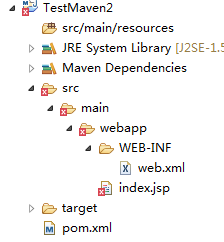
新建Maven工程目录如上图
三、补齐缺失的文件夹:
添加Server支持和缺失的源文件夹
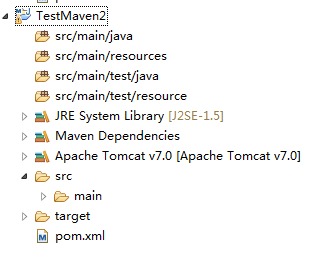
四、添加springMvc支持和web容器支持(若没有,打包时会报错)
<project xmlns="http://maven.apache.org/POM/4.0.0" xmlns:xsi="http://www.w3.org/2001/XMLSchema-instance"

  xsi:schemaLocation="http://maven.apache.org/POM/4.0.0 http://maven.apache.org/maven-v4_0_0.xsd">

  <modelVersion>4.0.0</modelVersion>

  <groupId>com.maven.my</groupId>

  <artifactId>TestMaven2</artifactId>

  <packaging>war</packaging>

  <version>0.0.1-SNAPSHOT</version>

  <name>TestMaven2 Maven Webapp</name>

  <url>http://maven.apache.org</url>
<properties>
<spring.version>4.1.5.RELEASE</spring.version>
</properties>
  <dependencies>

    <dependency>

      <groupId>junit</groupId>

      <artifactId>junit</artifactId>

      <version>3.8.1</version>

      <scope>test</scope>

    </dependency>

     <dependency>

        <groupId>org.springframework</groupId>

        <artifactId>spring-webmvc</artifactId>

        <version>${spring.version}</version>

    </dependency>

    <dependency>

        <groupId>javax.servlet</groupId>

        <artifactId>javax.servlet-api</artifactId>

        <version>3.1.0</version>

    </dependency>

  </dependencies>

  <build>

    <finalName>TestMaven2</finalName>

  </build>

</project>
(五)修改工程配置:
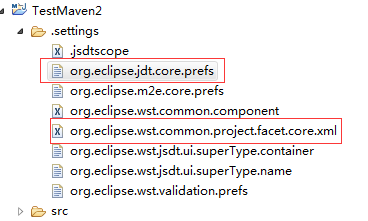
在以上两个文件中修改jdk版本为1.7以上 web为3.0
六:添加springMvc配置:
web.xml
<?xml version="1.0" encoding="UTF-8"?>

<web-app xmlns:xsi="http://www.w3.org/2001/XMLSchema-instance"

         xmlns="http://java.sun.com/xml/ns/javaee" xmlns:web="http://java.sun.com/xml/ns/javaee/web-app_3_0.xsd"

         xsi:schemaLocation="http://java.sun.com/xml/ns/javaee http://java.sun.com/xml/ns/javaee/web-app_3_0.xsd"

         id="study" version="3.0">

         <display-name>Archetype Created Web Application</display-name>

         <description>sprintMVC环境搭建</description>

         <!-- 加载Spring配置文件 -->

         <context-param>

                   <param-name>contextConfigLocation</param-name>

                   <param-value>classpath:configs/beans.xml</param-value>

         </context-param>

         <!-- Spring监听 -->

         <listener>

                   <listener-class>org.springframework.web.context.ContextLoaderListener</listener-class>

         </listener>

         <!-- Spring MVC配置 -->

         <servlet>

                   <servlet-name>Dispatcher</servlet-name>

                   <servlet-class>org.springframework.web.servlet.DispatcherServlet</servlet-class>

                   <!-- 自定义spring mvc的配置文件名称和路径 -->

                   <init-param>

                            <param-name>contextConfigLocation</param-name>

                            <param-value>classpath:configs/beans-mvc.xml</param-value>

                   </init-param>

                   <load-on-startup>1</load-on-startup>

         </servlet>

         <!-- spring mvc 请求后缀 -->

         <servlet-mapping>

                   <servlet-name>Dispatcher</servlet-name>

                   <url-pattern>/</url-pattern>

         </servlet-mapping>

         <welcome-file-list>

                   <welcome-file>index.jsp</welcome-file>

         </welcome-file-list>

</web-app>
src/com/main/resources文件夹下的beans.xml和beans-mvc.xml
beans.xml:
<?xml version="1.0" encoding="UTF-8"?>

<beans xmlns="http://www.springframework.org/schema/beans"

    xmlns:context="http://www.springframework.org/schema/context"

    xmlns:xsi="http://www.w3.org/2001/XMLSchema-instance"

    xsi:schemaLocation="http://www.springframework.org/schema/beans

    http://www.springframework.org/schema/beans/spring-beans-3.0.xsd

    http://www.springframework.org/schema/context

    http://www.springframework.org/schema/context/spring-context-3.0.xsd" >

    <context:property-placeholder />

    <context:annotation-config />

</beans>
<?xml version="1.0" encoding="UTF-8"?>

<beans xmlns="http://www.springframework.org/schema/beans"

    xmlns:xsi="http://www.w3.org/2001/XMLSchema-instance" xmlns:aop="http://www.springframework.org/schema/aop"

    xmlns:util="http://www.springframework.org/schema/util" xmlns:context="http://www.springframework.org/schema/context"

    xmlns:p="http://www.springframework.org/schema/p" xmlns:mvc="http://www.springframework.org/schema/mvc"

    xmlns:task="http://www.springframework.org/schema/task"

    xsi:schemaLocation="

            http://www.springframework.org/schema/beans http://www.springframework.org/schema/beans/spring-beans.xsd

            http://www.springframework.org/schema/aop http://www.springframework.org/schema/aop/spring-aop.xsd

            http://www.springframework.org/schema/context http://www.springframework.org/schema/context/spring-context.xsd

            http://www.springframework.org/schema/util  http://www.springframework.org/schema/util/spring-util.xsd

            http://www.springframework.org/schema/cache http://www.springframework.org/schema/cache/spring-cache.xsd

            http://www.springframework.org/schema/jdbc http://www.springframework.org/schema/jdbc/spring-jdbc.xsd

            http://www.springframework.org/schema/mvc http://www.springframework.org/schema/mvc/spring-mvc.xsd

            ">

    <context:property-placeholder />

    <!-- MVC控制类扫描 -->

    <context:component-scan base-package="com.my.controller" />

    <mvc:annotation-driven />

    <!-- 视图解析器:定义跳转的文件的前后缀 -->

    <bean id="viewResolver" class="org.springframework.web.servlet.view.InternalResourceViewResolver">

        <property name="prefix" value="/view/" />

        <property name="suffix" value=".html" />  <!--可为空,方便实现自已的依据扩展名来选择视图解释类的逻辑  -->

    </bean>

    <mvc:default-servlet-handler />

</beans>
七:补齐自己的controller
package com.my.controller;

import javax.servlet.http.HttpServletRequest;

import org.springframework.stereotype.Controller;

import org.springframework.web.bind.annotation.RequestMapping;

@Controller

@RequestMapping("/user")

public class UserController {

    @RequestMapping(value="/getUserInfo")

    public String getUserInfo(HttpServletRequest request){

        System.out.println("==========");

        return "user";

    }

}
八:部署运行,输入http://localhost:8180/TestMaven2/user/getUserInfo访问。
------------------------------------------------------------------------------------------------------------------------------
一段可能会用到代码:maven依赖无法加入到工程时,在.classpath添加,很有用
<classpathentry kind="con" path="org.eclipse.m2e.MAVEN2_CLASSPATH_CONTAINER">

        <attributes>

            <attribute name="maven.pomderived" value="true"/>

            <attribute name="org.eclipse.jst.component.nondependency" value=""/>

        </attributes>

    </classpathentry>
Eclipse利用Maven2搭建SpringMVC框架的Web工程的更多相关文章
- 教你搭建SpringMVC框架( 更新中、附源码)
一.项目目录结构 二.SpringMVC需要使用的jar包 commons-logging-1.2.jar junit-4.10.jar log4j-api-2.0.2.jar log4j-core- ...
- 脚手架快速搭建springMVC框架项目
apid-framework脚手架快速搭建springMVC框架项目 rapid-framework介绍: 一个类似ruby on rails的java web快速开发脚手架,本着不重复发明轮 ...
- 教你搭建SpringMVC框架( 附源码)
一.项目目录结构 二.SpringMVC需要使用的jar包 commons-logging-1.2.jar junit-4.10.jar log4j-api-2.0.2.jar log4j-core- ...
- 大师养成计划之一:搭建springmvc框架
搭建spring-mvc框架 搭建spring-mvc框架步骤: 1.搭建web项目spring-mvc1 2.引入jar包 3.配置web.xml 3.1拷贝头文件: <web-app xml ...
- 搭建springmvc框架的另一种思路
在一个完整的项目里搭建springmvc框架的时候, 通常情况下,初学者在配置的时候,总是会把"中央控制器的名字"-servlet.xml文件放到/Webroot/WEB-INF下 ...
- 利用 nodeJS 搭建一个简单的Web服务器(转)
下面的代码演示如何利用 nodeJS 搭建一个简单的Web服务器: 1. 文件 WebServer.js: //-------------------------------------------- ...
- 使用eclipse创建在myeclipse中运行的web工程
今天在跟随慕课网学习java时,遇到课程中老师使用Myeclipse,我用的是eclipse,那么就使用eclipse创建在Myeclipse项目 参考: 如何在Eclipse配置Tomcat服务器 ...
- SpringMVC框架下Web项目的搭建与部署
这篇文章已被废弃. 现在,Deolin使用Maven构建项目,而不是下载Jar文件,使用Jetty插件调试项目,而不是外部启动Tomcat. SpringMVC比起Servlet/JSP方便了太多 W ...
- 简单搭建SpringMVC框架详解
在公司待了两年,用的一直是Spring+SpringMVC+Hibernate框架,都是公司自己搭建好的,自己从来没有主动搭建过,闲来无聊,自己搭建试试.一下即我搭建的过程以及搭建所遇到的问题,有部分 ...
随机推荐
- 【转】分布式数据层 TDDL 来自:阿里巴巴
淘宝根据自己的业务特点开发了TDDL(Taobao Distributed Data Layer 外号:头都大了 ©_Ob)框架,主要解决了分库分表对应用的透明化以及异构数据库之间的数据复制,它是一个 ...
- EarthWarrior3D游戏ios源码
这是一款不错的ios源码源码,EarthWarrior3D游戏源码, 并且游戏源代码支持多平台. 适用于cocos v2.1.0.0版本 源码下载:http://code.662p.com/view/ ...
- Equinox P2的学习
product.configuration 点击“Add按钮”并添加以下插件: org.eclipse.equinox.p2.ui org.eclipse.equinox.p2.ui.sdk org. ...
- [转]Asp.net MVC 利用PartialView 构造自定义菜单
本文转自:http://www.cnblogs.com/huyq2002/archive/2012/01/06/2314838.html 在VS2010中利用Asp.net MVC自带的模板生成的菜单 ...
- C#迭代重载等
迭代器 迭代器是作为一个容器,将要遍历的数据放入,通过统一的接口返回相同类型的值 迭代器代码使用 yield return 语句依次返回每个元素.yield break 将终止迭代 类中实现多个迭代器 ...
- NOIP2014飞扬的小鸟[DP][WRONG]
坑人啊朴素的dp 75分 用了完全背包才是80分,结果普遍偏小 为什么啊啊啊啊啊 等以后再写一遍吧 #include<iostream> #include<cstdio> #i ...
- HOLOLENS如何调节屏幕亮度和音量?
圆环左边的两个是亮度按键,右边的是两个音量按键,值得注意的是,无论是两个音量键还是亮度键,它们都被设置成了一凸一凹,凸的按键为音量/亮度+键,凹为-键,其工业设计可见一斑.
- 对RTMP视频流进行BitmapData.draw()出错的解决办法
source on github 在对Flash Media Server中的视频流使用BitmapData.draw()进行绘制的时候,会抛出这样异常: cannot access rtmp://x ...
- Maven学习(一)安装 配置
安装环境 windowXP 32 下载地址 http://maven.apache.org/download.cgi 安装包 apache-maven-3.2.3.zip 一.安装 Step1 解压缩 ...
- guava 学习笔记 使用瓜娃(guava)的选择和预判断使代码变得简洁
guava 学习笔记 使用瓜娃(guava)的选择和预判断使代码变得简洁 1,本文翻译自 http://eclipsesource.com/blogs/2012/06/06/cleaner-code- ...