
windows10搭建django1.10.3+Apache2.4
很多教程都是在linux上搭建,windows上似乎天生不太适合,但是我还是愿意试试这个坑。
首先 交代一下自己的环境
python3.5.2 64位
django 1.10.3
apache 2.4 64位
windows 10
重点在apache上。
python 和django 相信有兴趣看这篇文章的基本上也都已经了解了。
******************分割线*******************************************************
安装Apache2.4
地址:http://www.apachelounge.com/download/
下载:vc_redist.x64.exe 直接安装 vc_redist_x64/86.exe.
下载:httpd-2.4.17-win64-VC14.zip
配置环境变量:path增加D:\Apache24\bin;
解压到指定目录 修改配置文件: http.conf (下面内容中的ServerRoot改成你自己的实际Apche解压路径)
    ServerRoot "D:/Apache24"

    ……

    Listen 127.0.0.1:8081    #修改端口号

    ……

    ServerName www.example.com:8081

    ……

    DocumentRoot "D:/Apache24/htdocs"

    <Directory "D:/Apache24/htdocs">

    ……

    ScriptAlias /cgi-bin/ "D:/Apache24/cgi-bin/"

    ……

    <Directory "D:/Apache24/cgi-bin">

        AllowOverride None

        Options None

        Require all granted

    </Directory>
启动apache服务:
cmd>httpd
http://127.0.0.1:8081/index.html
It works!

apache配置成功
******************分割线*******************************************************
安装mod_wsgi先安装:pip install wheel
安装mod_wsgi-4.4.23+ap24vc14-cp35-cp35m-win_amd64.whl
下载:mod_wsgi-4.4.23+ap24vc14-cp35-cp35m-win_amd64.whl
地址:http://www.lfd.uci.edu/~gohlke/pythonlibs/#mod_wsgi
pip 安装:pip install mod_wsgi-4.4.23+ap24vc14-cp35-cp35m-win_amd64.whl
******************分割线*******************************************************
配置Apache2.4、mod_wsgi、django项目工程
1. 将C:\Python35\mod_wsgi.so 拷贝至 D:\Apache24\modules下
(mod_wsgi.so 只有mod_wsgi-4.4.23+ap24vc14-cp35-cp35m-win_amd64.whl安装成功后才能找到)
2.修改apache2.4的http.conf文件:
#添加mod_wsgi.so 模块
LoadModule wsgi_module modules/mod_wsgi.so
3.配置django项目 修改http.conf
#添加mod_wsgi.so 模块
LoadModule wsgi_module modules/mod_wsgi.so

#指定静态资源路径

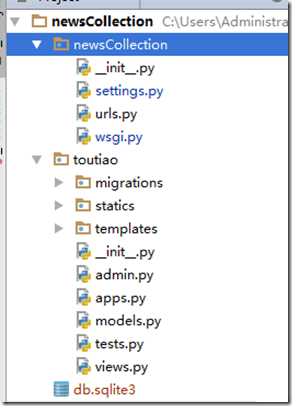
Alias /statics/ F:/pydj/newsCollection/toutiao/statics/
<Directory F:/pydj/newsCollection/toutiao/statics>
    Require all granted
</Directory>

#指定newsCollection项目的wsgi.py配置文件路径
WSGIScriptAlias / F:/pydj/newsCollection/newsCollection/wsgi.py

#指定项目路径
WSGIPythonPath F:/pydj/newsCollection

<Directory F:/pydj/newsCollection/newsCollection>
    <Files wsgi.py>
        Require all granted
    </Files>
</Directory>
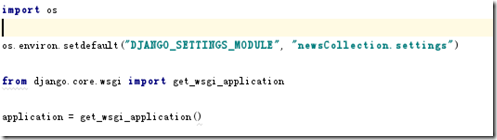
*************分割线************************************************************wsgi.py内容:import os
os.environ.setdefault("DJANGO_SETTINGS_MODULE", "myweb.settings")
from django.core.wsgi import get_wsgi_application
application = get_wsgi_application()#注意上面的myweb,是改成自己的项目名称,比如上图中 newsCollection。参考上上图中的目录结构。*************分割线************************************************************配置django工程setting.pyALLOWED_HOSTS = ['127.0.0.1', 'localhost']最后告诉一点 Apche 启动的时候报错会有log, httpd-2.4.23-x64-vc14-r3\Apache24\logs 目录下 error信息,慢慢排错
windows10搭建django1.10.3+Apache2.4的更多相关文章
- Windows10搭建PHP7开发环境
原文:Windows10搭建PHP7开发环境 3年前写了一篇<Windows下搭建PHP开发环境>之后就再也没有碰过PHP了,最近新发布了PHP7然后回去看了一下之前写的文章,发现很多配置 ...
- Windows10 搭建 ElasticSearch 集群服务
一.前言 集群的搭建需要多台机器,之前我使用 ubuntu 16.04 搭建过 hadoop 的单机模式和分布式模式,这个今后会写,今天先写一篇使用 < Windows10 搭建 Elastic ...
- Django1.10环境安装
在Ubuntu14上 一 安装脚本 wget https://github.com/django/django/archive/master.tar.gz apt-get install python ...
- 将python2.7+django1.10部署到SAE上
首先我想说的是我为什么选择SAE呢?本人学生一枚,没钱.然后sae好像又有免费的一定限额,所以我就选了它. 期间曲折颇多,实在不是三言两语所能道情的.各种百度,谷歌,最后所幸成功了,幸哉! 主要参考了 ...
- win8.1 环境下搭建PHP5.5.6+Apache2.4.7
本文主要阐述在windows8及win8.1 环境下搭建PHP5.5.6+Apache2.4.7. 1.软件准备 apache 2.4.7:http://pan.baidu.com/s/1iUPif ...
- ubuntu 11.10 安装apache2 tomcat6
ubuntu 11.10 安装apache2 tomcat6 导读 Tomcat是Apache 软件基金会(Apache Software Foundation)的Jakarta 项目中的一个核心项目 ...
- django1.10使用本地静态文件
django1.10使用本地静态文件方法 本文介绍的静态文件使用,是指启动web站点后,访问静态资源的用法,实际静态资源地址就是一个个的url 如果没有启动web站点,只是本地调试html页面,那直接 ...
- Cenos6.6 升级 python3.5.2 安装配置 django1.10
1 准备编译环境(环境如果不对的话,可能遇到各种问题,比如wget无法下载https链接的文件) yum groupinstall 'Development Tools' yum install zl ...
- lamp环境搭建(centos6.9+apache2.4+mysql5.7+php7.1)
lamp环境搭建(centos6.9+apache2.4+mysql5.7+php7.1) 安装前准备:CentOS 6.9 64位 最小化安装 yum install -y make gcc gcc ...
随机推荐
- HDU 4858 分块
题目链接:http://acm.hdu.edu.cn/showproblem.php?pid=4858 题意:中文题面 思路:来自此博客 对每个点定义两个值:val,sum,val记录自己的特征值,s ...
- 数据结构之平衡二叉树(AVL树)
平衡二叉树(AVL树)定义如下:平衡二叉树或者是一棵空树,或者是具有以下性质的二叉排序树: (1)它的左子树和右子树的高度之差绝对值不超过1: (2)它的左子树和右子树都是平衡二叉树. AVL树避免了 ...
- POJ 3233 Matrix Power Series(矩阵等比求和)
题目链接 模板题. #include <cstdio> #include <cstring> #include <iostream> #include <ma ...
- sql server存储过程中SELECT 与 SET 对变量赋值的区别
SQL Server 中对已经定义的变量赋值的方式用两种,分别是 SET 和 SELECT. 对于这两种方式的区别,SQL Server 联机丛书中已经有详细的说明,但很多时候我们 并没有注意,其实这 ...
- Redis的PHP操作手册(转)
String 类型操作 string是redis最基本的类型,而且string类型是二进制安全的.意思是redis的string可以包含任何数据.比如jpg图片或者序列化的对象 $redis-> ...
- XMLHttpRequest对象用法
xmlhttprequest is what? 用户后台与服务器交换数据. 可以在不重新加载页面的情况下更新网页: 在页面已加载后从服务器请求数据: 在页面已加载后从服务器接收数据: 在后台向服务器发 ...
- Ubuntu14.04安装wineqq国际版
一开始,我在Ubuntu14.04下安装的QQ版本是WineQQ2013SP6-20140102-Longene, 但后来发现这个版本QQ在linux下问题很多,比如不能用键盘输入密码,QQ表情 ...
- HTML 5 画布(canvas)
canvas 元素使用 JavaScript 在网页上绘制图像,本身是没有绘图能力. canvas 是一个矩形区域,可以控制其每一像素. canvas 拥有多种绘制路径.矩形.圆形.字符以及添加图像的 ...
- C#搜索指定文件夹内的符合要求的文件
下面的列子是文件的模糊查找, 具体功能是:选定文件夹,搜索所有文件命中包含“_bui”字样的shp图层(后缀为.shp)并将信息显示在ListView中.实际应用中可随便修改. 这里采用递归方法进行深 ...
- [转自itilxf论坛]iTop百问百答
iTop是什么,和其他itsm软件相比有什么优势?iTop,是一个开源web应用程序,用于IT环境的日常运营.它基于ITIL最佳实践,而又不拘泥于任何具体流程. 优势: 1. 开源,扩展性强容易开发. ...