
开发人员看测试之细说JBehave
上篇我们说到如何从Github上clone出一个JBehave项目,既是为了学习JBehava,也是为了熟悉下Github。
从clone下来的项目看来,基本没什么问题,稍微捋一捋就可以运行,但是就clone下来的代码来看,自己还是遇到一个问题(不知道是代码问题,还是我自己的操作有问题),就是没有办法运行(后面会详说)。
正如上篇所说,构建一个JBehave的应用的5大步骤:
- Write story
- Map steps to Java
- Configure Stories
- Run Stories
- View Reports
这里,我们结合clone下来的项目分别对应这五个步骤了解JBehave是如何运行的并完成测试的。
1.Write story,设定一个story,给出一个情景,使用通用语言进行表示,不管是开发或是非开发的都能看懂
本项目有两个测试案例,一个是模拟登录的story:
loginYahoo.story:

Narrative:

In order to show the yahoo function

As a user

I want to login yahoo

Scenario: normal login

Given yahoo login address by.bouncer.login.yahoo.com

Then print successful
另一个是模拟浏览的story:
TestStroies.story:

Browse Etsy.com

Meta:

@category browsing

@color red

Narrative:

In order to show the browsing cart functionality

As a user

I want to browse in a gallery

Scenario: Browsing around the site for items

Given I am on localhost

Then print hello world

!--Examples:

!--|host|hello|

!--|localhost|hello world|

!--|www.baidu.com|hello baidu|
2.Map steps to Java, 将上述的每个story细分成每一个step,给出Given条件,则会得到Then的结果,从而将通用语言转换成可以通过代码逻辑描述的问题
loginYahoo.story对应的steps类TestLogin.java:
public class TestLogin {

		@Given("yahoo login address $url")

		public void getHostPage(String url){

			System.out.println("++++++++++++++++++++++++++++++"+url);

		}

		@Then("print $successful")

		public void hello(String successful){

			System.out.println("++++++++++++++++++++++++++++++"+successful);

		}

}
TestStories.story对应的steps类TestStep.java:
public class TestStep {

	@Given("I am on $host")

	public void getHostPage(String host){

		System.out.println("----------------------"+host);

	}

	@Then("print $hello")

	public void hello(String hello){

		System.out.println("----------------------"+hello);

	}

}
3.Configure Stories 配置一些映射关系,比如如何找到并加载story文件等
public class EmbedderBase extends Embedder{

	@Override

    public EmbedderControls embedderControls() {

        return new EmbedderControls().doIgnoreFailureInStories(true).doIgnoreFailureInView(true);

    }

	@Override

    public  Configuration configuration() {

        Class<? extends EmbedderBase> embedderClass = this.getClass();

      //MostUsefulConfiguration使用默认的配置

        return new MostUsefulConfiguration()

        	//设置story文件的加载路径

            .useStoryLoader(new LoadFromClasspath(embedderClass.getClassLoader()))

            //设定生成报告的相关配置

            .useStoryReporterBuilder(new StoryReporterBuilder()

                .withCodeLocation(CodeLocations.codeLocationFromClass(embedderClass))

                .withFormats(Format.CONSOLE, Format.TXT)

                .withCrossReference(new CrossReference()))

             //设定相关参数的转换

            .useParameterConverters(new ParameterConverters()

                    .addConverters(new DateConverter(new SimpleDateFormat("yyyy-MM-dd")))) // use custom date pattern

            .useStepMonitor(new SilentStepMonitor());

    }

}
4.Run Stories
public class TraderStoryRunner {

	@Test(groups={"test"})

    public void runClasspathLoadedStoriesAsJUnit() {

        // Embedder defines the configuration and candidate steps

        Embedder embedder = new TestStories();

        List<String> storyPaths = new StoryFinder().findPaths(CodeLocations.codeLocationFromClass(this.getClass()),"**/TestStories.story",""); // use StoryFinder to look up paths

        embedder.runStoriesAsPaths(storyPaths);

    }

	@Test(groups={"test"})

    public void runClasspathLoadedStories() {

        // Embedder defines the configuration and candidate steps

        Embedder embedder = new loginYahoo();

        List<String> storyPaths = new StoryFinder().findPaths(CodeLocations.codeLocationFromClass(this.getClass()),"**/loginYahoo.story",""); // use StoryFinder to look up paths

        embedder.runStoriesAsPaths(storyPaths);

    }

}
这里可以看出,声明了两个类TestStories和loginYahoo。
TestStories.java
public class TestStories extends EmbedderBase {

    @Override

    public InjectableStepsFactory stepsFactory() {

        return new InstanceStepsFactory(configuration(), new TestStep());//设定需要映射的step类

    }

}
loginYahoo.java:
public class loginYahoo extends EmbedderBase {

    @Override

    public InjectableStepsFactory stepsFactory() {

        return new InstanceStepsFactory(configuration(), new TestLogin());//设定需要映射的step类

    }

}
这两个类是一个桥梁的作用,用于设定从story到step的映射,注意这里的两个类是继承类EmbedderBase的,而EmbedderBase类又是Embedder的子类。
这是项目给出的测试类TraderStoryRunner,但是这里有一个问题,就是没有找到运行的入口,点击右键,除了一些maven的操作,并没有其他可以运行的指标,比如junit。
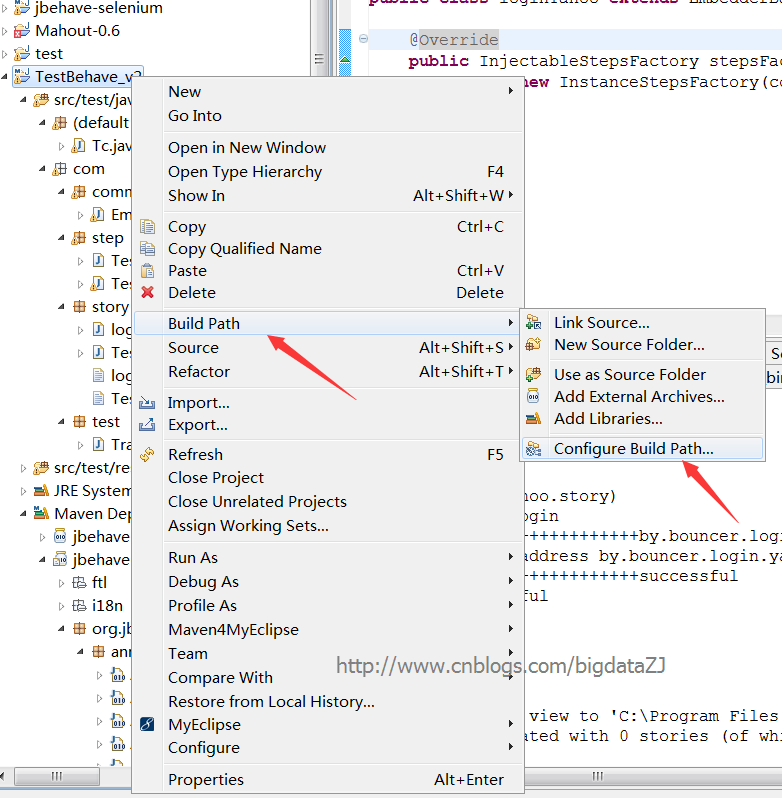
所以通过摸索,按照自己的方法,发现首先要做的就是添加junit测试库,这是必须的。具体步骤:
右键项目->Build path->Configured build path
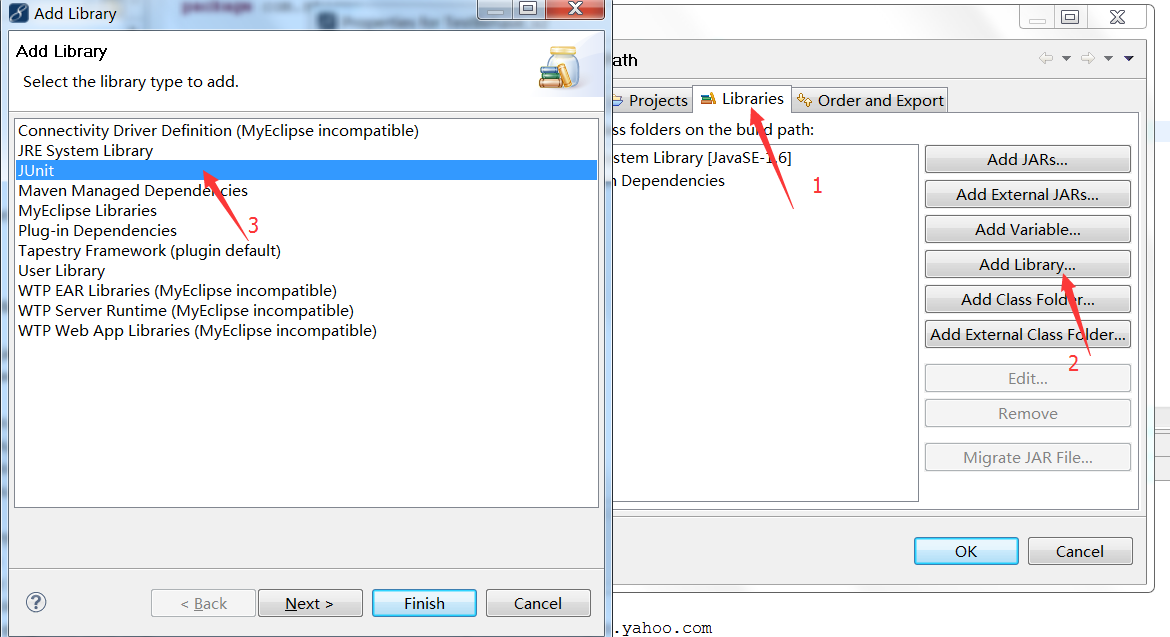
打开对话框,选择Libraries->Add Library->JUnit,点击next,选择junit4->finished。
添加完Junit后,新建一个Junit测试类

将TraderStoryRunner类的主体方法放进去,命名为Tc.java
import static org.junit.Assert.*;

import java.util.List;

import org.jbehave.core.embedder.Embedder;

import org.jbehave.core.io.CodeLocations;

import org.jbehave.core.io.StoryFinder;

import org.junit.After;

import org.junit.AfterClass;

import org.junit.Before;

import org.junit.BeforeClass;

import org.junit.Test;

import com.story.TestStories;

import com.story.loginYahoo;

public class Tc {

 @BeforeClass

 public static void setUpBeforeClass() throws Exception {

 }

 @AfterClass

 public static void tearDownAfterClass() throws Exception {

 }

 @Before

 public void setUp() throws Exception {

 }

 @After

 public void tearDown() throws Exception {

 }

 // @Test : 表示这是一个测试用例,只有标识了改符号的函数才会被执行测试

 @Test

 public void runClasspathLoadedStoriesAsJUnit() {

     // Embedder defines the configuration and candidate steps

     Embedder embedder = new TestStories();

     List<String> storyPaths = new StoryFinder().findPaths(CodeLocations.codeLocationFromClass(this.getClass()),"**/TestStories.story",""); // use StoryFinder to look up paths

     embedder.runStoriesAsPaths(storyPaths);

 }

	@Test

 public void runClasspathLoadedStories() {

     // Embedder defines the configuration and candidate steps

     Embedder embedder = new loginYahoo();

     List<String> storyPaths = new StoryFinder().findPaths(CodeLocations.codeLocationFromClass(this.getClass()),"**/loginYahoo.story",""); // use StoryFinder to look up paths

     embedder.runStoriesAsPaths(storyPaths);

 }

}
至此,这个项目是可以运行起来了。
5.View Reports
点击运行上面的Tc.java类,可以得到:
Processing system properties {}

Using controls EmbedderControls[batch=false,skip=false,generateViewAfterStories=true,ignoreFailureInStories=false,ignoreFailureInView=false,verboseFailures=false,verboseFiltering=false,storyTimeoutInSecs=300,threads=1]

(BeforeStories)

Running story com/story/TestStories.story

Narrative:

In order to show the browsing cart functionality

As a user

I want to browse in a gallery

Browse Etsy.com

(com/story/TestStories.story)

Meta:

@category browsing

@color red

Scenario: Browsing around the site for items

----------------------localhost

Given I am on localhost

----------------------hello world

!--Examples:

!--|host|hello|

!--|localhost|hello world|

!--|www.baidu.com|hello baidu|

Then print hello world

!--Examples:

!--|host|hello|

!--|localhost|hello world|

!--|www.baidu.com|hello baidu|

(AfterStories)

Generating reports view to 'C:\Program Files (x86)\Git\Jbehave\TestBehave_v2_testng\target\jbehave' using formats '[console, txt]' and view properties '{defaultFormats=stats, decorateNonHtml=true, viewDirectory=view, decorated=ftl/jbehave-report-decorated.ftl, reports=ftl/jbehave-reports-with-totals.ftl, maps=ftl/jbehave-maps.ftl, navigator=ftl/jbehave-navigator.ftl, views=ftl/jbehave-views.ftl, nonDecorated=ftl/jbehave-report-non-decorated.ftl}'

Reports view generated with 0 stories (of which 0 pending) containing 0 scenarios (of which 0 pending)

Processing system properties {}

Using controls EmbedderControls[batch=false,skip=false,generateViewAfterStories=true,ignoreFailureInStories=false,ignoreFailureInView=false,verboseFailures=false,verboseFiltering=false,storyTimeoutInSecs=300,threads=1]

(BeforeStories)

Running story com/story/loginYahoo.story

Narrative:

In order to show the yahoo function

As a user

I want to login yahoo

(com/story/loginYahoo.story)

Scenario: normal login

++++++++++++++++++++++++++++++by.bouncer.login.yahoo.com

Given yahoo login address by.bouncer.login.yahoo.com

++++++++++++++++++++++++++++++successful

Then print successful

(AfterStories)

Generating reports view to 'C:\Program Files (x86)\Git\Jbehave\TestBehave_v2_testng\target\jbehave' using formats '[console, txt]' and view properties '{defaultFormats=stats, decorateNonHtml=true, viewDirectory=view, decorated=ftl/jbehave-report-decorated.ftl, reports=ftl/jbehave-reports-with-totals.ftl, maps=ftl/jbehave-maps.ftl, navigator=ftl/jbehave-navigator.ftl, views=ftl/jbehave-views.ftl, nonDecorated=ftl/jbehave-report-non-decorated.ftl}'

Reports view generated with 0 stories (of which 0 pending) containing 0 scenarios (of which 0 pending)
大体的思路,是将story和step对应起来,将story中的条件、参数传入step对应的类中,如果满足则通过测试,得到then给出的结果,否则得不到理想的结果。
如果您觉得阅读本文对您有帮助,请点一下“推荐”按钮,您的“推荐”将是我最大的写作动力!如果您想持续关注我的文章,请扫描二维码,关注JackieZheng的微信公众号,我会将我的文章推送给您,并和您一起分享我日常阅读过的优质文章。

友情赞助
如果你觉得博主的文章对你那么一点小帮助,恰巧你又有想打赏博主的小冲动,那么事不宜迟,赶紧扫一扫,小额地赞助下,攒个奶粉钱,也是让博主有动力继续努力,写出更好的文章^^。
1. 支付宝 2. 微信


开发人员看测试之细说JBehave的更多相关文章
- 开发人员看测试之TDD和BDD
前言: 已经数月没有来园子了,写博客贵在坚持,一旦松懈了,断掉了,就很难再拾起来.但是每每看到自己博客里的博文的浏览量每天都在增加,都在无形当中给了我继续写博客的动力.最近这两天有听到Jbehave这 ...
- 开发人员看测试之运行Github中的JBehave项目
本文要阐述的主要有两点,一是介绍自动化测试框架JBehave,二是介绍如何在Github上拉项目,编译成myeclipse环境中的项目,并最终导入Myeclipse中运行. JBehave是何物? J ...
- 写给Android App开发人员看的Android底层知识(1)
这个系列的文章一共8篇,我酝酿了很多年,参考了很多资源,查看了很多源码,直到今天把它写出来,也是战战兢兢,生怕什么地方写错了,贻笑大方. (一)引言 早在我还是Android菜鸟的时候,有很多技术我都 ...
- 写给Android App开发人员看的Android底层知识(2)
(五)AMS 如果站在四大组件的角度来看,AMS就是Binder中的Server. AMS全称是ActivityManagerService,看字面意思是管理Activity的,但其实四大组件都归它管 ...
- 写给Android App开发人员看的Android底层知识(5)
(十)Service Service有两套流程,一套是启动流程,另一套是绑定流程.我们做App开发的同学都应该知道. 1)在新进程启动Service 我们先看Service启动过程,假设要启动的Ser ...
- 写给Android App开发人员看的Android底层知识(3)
(七)App启动流程第2篇 书接上文,App启动一共有七个阶段,上篇文章篇幅所限,我们只看了第一阶段,接下来讲剩余的六个阶段,仍然是拿斗鱼App举例子. 简单回顾一下第一阶段的流程,就是Launche ...
- 写给Android App开发人员看的Android底层知识(6)
(十一)BroadcastReceiver BroadcastReceiver,也就是广播,简称Receiver. 很多App开发人员表示,从来没用过Receiver.其实吧,对于音乐播放类App,用 ...
- 写给Android App开发人员看的Android底层知识(7)
(十二)ContentProvider (1)ContentProvider是什么? ContentProvider,简称CP. 做App开发的同学,尤其是电商类App,对CP并不熟悉,对这个概念的最 ...
- 写给Web开发人员看的Nginx介绍
译者注:不知道其他开发者是否和我一样,参与或者写了很多Web项目,但是却没有真正的去完整的部署应用,很多时候都是交给ops即运维的同学帮忙来做.而作为一个有节操的开发者,我认为了解一些服务器方面的知识 ...
随机推荐
- centos yum 安装 mongodb 以及php扩展
centos yum 安装 mongodb 以及php扩展 投稿:hebedich 字体:[增加 减小] 类型:转载 MongoDB是一个基于分布式文件存储的数据库.由C++语言编写.旨在为WEB应用 ...
- 一张图片说明MII
- 使用的组件:Layui
Layui 经典模块化前端框架 由职业前端倾情打造,面向所有层次的前后端程序猿,中国最容易使用的前端UI解决方案 Layui 出蛋于2016年金秋,是一款带着浓烈情怀的国产前端UI框架,她追求极简,又 ...
- winform 子报表数据源赋值
this.reportViewer1.LocalReport.DataSources.Add(new Microsoft.Reporting.WinForms.ReportDataSource(&qu ...
- WebApi Post提交报错 调试无法进入对应action函数
调试发现有长内容或者是特殊字符就报错,确定是服务端验证的问题 需要 在配置文件 <system.web> 中添加<httpRuntime requestValidationMode ...
- C# 调用restful服务开源库
.NET环境下我们想调用其它开放平台的服务接口,不需要自己去实现底层,开源的库用起来会很方便 hammock http://www.cnblogs.com/shanyou/archive/2012/0 ...
- Oracle expdp/impdp导出导入命令及数据库备份
使用EXPDP和IMPDP时应该注意的事项: EXP和IMP是客户端工具程序,它们既可以在客户端使用,也可以在服务端使用. EXPDP和IMPDP是服务端的工具程序,他们只能在ORACLE服务端使用, ...
- Oracle中的Temporary tablespace的作用
临时表空间主要用途是在数据库进行排序运算[如创建索引.order by及group by.distinct.union/intersect/minus/.sort-merge及join.analyze ...
- ENode 2.0 - 整体架构介绍
前言 今天是个开心的日子,又是周末,可以轻轻松松的写写文章了.去年,我写了ENode 1.0版本,那时我也写了一个分析系列.经过了大半年的时间,我对第一个版本做了很多架构上的改进,最重要的就是让ENo ...
- 控件UI性能调优 -- SizeChanged不是万能的
简介 我们在之前的“UWP控件开发——用NuGet包装自己的控件“一文中曾提到XAML的布局系统 和平时使用上的一些问题(重写Measure/Arrange还是使用SizeChanged?),这篇博文 ...