
开发人员看测试之细说JBehave
上篇我们说到如何从Github上clone出一个JBehave项目,既是为了学习JBehava,也是为了熟悉下Github。
从clone下来的项目看来,基本没什么问题,稍微捋一捋就可以运行,但是就clone下来的代码来看,自己还是遇到一个问题(不知道是代码问题,还是我自己的操作有问题),就是没有办法运行(后面会详说)。
正如上篇所说,构建一个JBehave的应用的5大步骤:
- Write story
- Map steps to Java
- Configure Stories
- Run Stories
- View Reports
这里,我们结合clone下来的项目分别对应这五个步骤了解JBehave是如何运行的并完成测试的。
1.Write story,设定一个story,给出一个情景,使用通用语言进行表示,不管是开发或是非开发的都能看懂
本项目有两个测试案例,一个是模拟登录的story:
loginYahoo.story:

Narrative:

In order to show the yahoo function

As a user

I want to login yahoo

Scenario: normal login

Given yahoo login address by.bouncer.login.yahoo.com

Then print successful
另一个是模拟浏览的story:
TestStroies.story:

Browse Etsy.com

Meta:

@category browsing

@color red

Narrative:

In order to show the browsing cart functionality

As a user

I want to browse in a gallery

Scenario: Browsing around the site for items

Given I am on localhost

Then print hello world

!--Examples:

!--|host|hello|

!--|localhost|hello world|

!--|www.baidu.com|hello baidu|
2.Map steps to Java, 将上述的每个story细分成每一个step,给出Given条件,则会得到Then的结果,从而将通用语言转换成可以通过代码逻辑描述的问题
loginYahoo.story对应的steps类TestLogin.java:
public class TestLogin {

		@Given("yahoo login address $url")

		public void getHostPage(String url){

			System.out.println("++++++++++++++++++++++++++++++"+url);

		}

		@Then("print $successful")

		public void hello(String successful){

			System.out.println("++++++++++++++++++++++++++++++"+successful);

		}

}
TestStories.story对应的steps类TestStep.java:
public class TestStep {

	@Given("I am on $host")

	public void getHostPage(String host){

		System.out.println("----------------------"+host);

	}

	@Then("print $hello")

	public void hello(String hello){

		System.out.println("----------------------"+hello);

	}

}
3.Configure Stories 配置一些映射关系,比如如何找到并加载story文件等
public class EmbedderBase extends Embedder{

	@Override

    public EmbedderControls embedderControls() {

        return new EmbedderControls().doIgnoreFailureInStories(true).doIgnoreFailureInView(true);

    }

	@Override

    public  Configuration configuration() {

        Class<? extends EmbedderBase> embedderClass = this.getClass();

      //MostUsefulConfiguration使用默认的配置

        return new MostUsefulConfiguration()

        	//设置story文件的加载路径

            .useStoryLoader(new LoadFromClasspath(embedderClass.getClassLoader()))

            //设定生成报告的相关配置

            .useStoryReporterBuilder(new StoryReporterBuilder()

                .withCodeLocation(CodeLocations.codeLocationFromClass(embedderClass))

                .withFormats(Format.CONSOLE, Format.TXT)

                .withCrossReference(new CrossReference()))

             //设定相关参数的转换

            .useParameterConverters(new ParameterConverters()

                    .addConverters(new DateConverter(new SimpleDateFormat("yyyy-MM-dd")))) // use custom date pattern

            .useStepMonitor(new SilentStepMonitor());

    }

}
4.Run Stories
public class TraderStoryRunner {

	@Test(groups={"test"})

    public void runClasspathLoadedStoriesAsJUnit() {

        // Embedder defines the configuration and candidate steps

        Embedder embedder = new TestStories();

        List<String> storyPaths = new StoryFinder().findPaths(CodeLocations.codeLocationFromClass(this.getClass()),"**/TestStories.story",""); // use StoryFinder to look up paths

        embedder.runStoriesAsPaths(storyPaths);

    }

	@Test(groups={"test"})

    public void runClasspathLoadedStories() {

        // Embedder defines the configuration and candidate steps

        Embedder embedder = new loginYahoo();

        List<String> storyPaths = new StoryFinder().findPaths(CodeLocations.codeLocationFromClass(this.getClass()),"**/loginYahoo.story",""); // use StoryFinder to look up paths

        embedder.runStoriesAsPaths(storyPaths);

    }

}
这里可以看出,声明了两个类TestStories和loginYahoo。
TestStories.java
public class TestStories extends EmbedderBase {

    @Override

    public InjectableStepsFactory stepsFactory() {

        return new InstanceStepsFactory(configuration(), new TestStep());//设定需要映射的step类

    }

}
loginYahoo.java:
public class loginYahoo extends EmbedderBase {

    @Override

    public InjectableStepsFactory stepsFactory() {

        return new InstanceStepsFactory(configuration(), new TestLogin());//设定需要映射的step类

    }

}
这两个类是一个桥梁的作用,用于设定从story到step的映射,注意这里的两个类是继承类EmbedderBase的,而EmbedderBase类又是Embedder的子类。
这是项目给出的测试类TraderStoryRunner,但是这里有一个问题,就是没有找到运行的入口,点击右键,除了一些maven的操作,并没有其他可以运行的指标,比如junit。
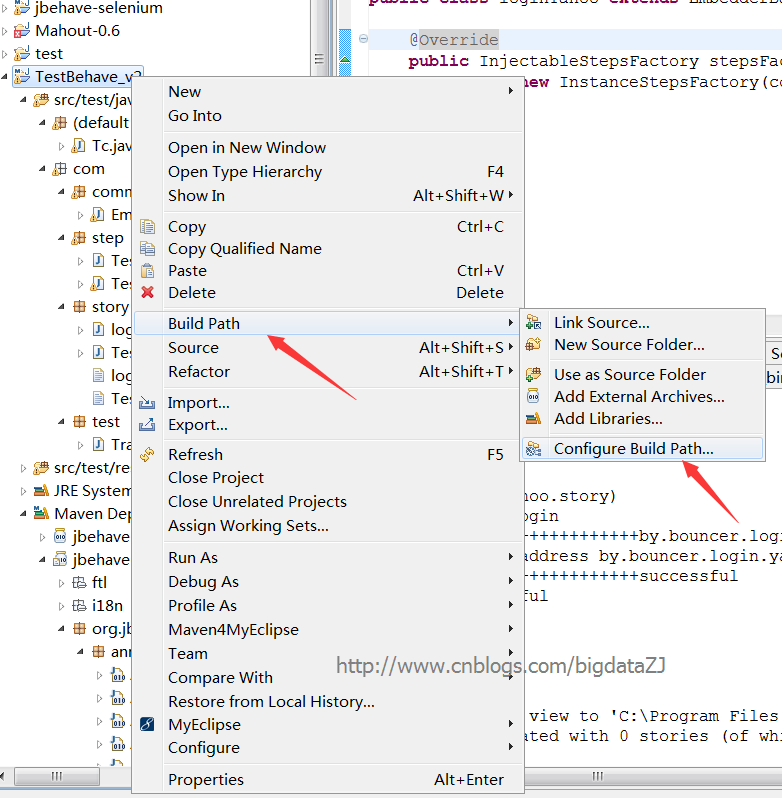
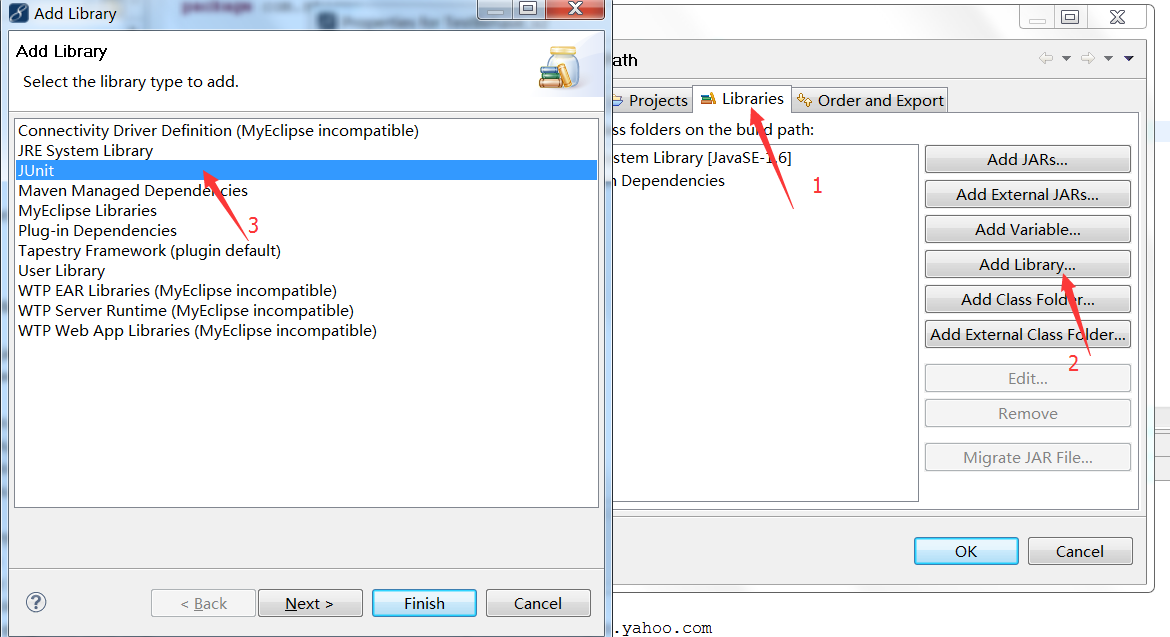
所以通过摸索,按照自己的方法,发现首先要做的就是添加junit测试库,这是必须的。具体步骤:
右键项目->Build path->Configured build path
打开对话框,选择Libraries->Add Library->JUnit,点击next,选择junit4->finished。
添加完Junit后,新建一个Junit测试类

将TraderStoryRunner类的主体方法放进去,命名为Tc.java
import static org.junit.Assert.*;

import java.util.List;

import org.jbehave.core.embedder.Embedder;

import org.jbehave.core.io.CodeLocations;

import org.jbehave.core.io.StoryFinder;

import org.junit.After;

import org.junit.AfterClass;

import org.junit.Before;

import org.junit.BeforeClass;

import org.junit.Test;

import com.story.TestStories;

import com.story.loginYahoo;

public class Tc {

 @BeforeClass

 public static void setUpBeforeClass() throws Exception {

 }

 @AfterClass

 public static void tearDownAfterClass() throws Exception {

 }

 @Before

 public void setUp() throws Exception {

 }

 @After

 public void tearDown() throws Exception {

 }

 // @Test : 表示这是一个测试用例,只有标识了改符号的函数才会被执行测试

 @Test

 public void runClasspathLoadedStoriesAsJUnit() {

     // Embedder defines the configuration and candidate steps

     Embedder embedder = new TestStories();

     List<String> storyPaths = new StoryFinder().findPaths(CodeLocations.codeLocationFromClass(this.getClass()),"**/TestStories.story",""); // use StoryFinder to look up paths

     embedder.runStoriesAsPaths(storyPaths);

 }

	@Test

 public void runClasspathLoadedStories() {

     // Embedder defines the configuration and candidate steps

     Embedder embedder = new loginYahoo();

     List<String> storyPaths = new StoryFinder().findPaths(CodeLocations.codeLocationFromClass(this.getClass()),"**/loginYahoo.story",""); // use StoryFinder to look up paths

     embedder.runStoriesAsPaths(storyPaths);

 }

}
至此,这个项目是可以运行起来了。
5.View Reports
点击运行上面的Tc.java类,可以得到:
Processing system properties {}

Using controls EmbedderControls[batch=false,skip=false,generateViewAfterStories=true,ignoreFailureInStories=false,ignoreFailureInView=false,verboseFailures=false,verboseFiltering=false,storyTimeoutInSecs=300,threads=1]

(BeforeStories)

Running story com/story/TestStories.story

Narrative:

In order to show the browsing cart functionality

As a user

I want to browse in a gallery

Browse Etsy.com

(com/story/TestStories.story)

Meta:

@category browsing

@color red

Scenario: Browsing around the site for items

----------------------localhost

Given I am on localhost

----------------------hello world

!--Examples:

!--|host|hello|

!--|localhost|hello world|

!--|www.baidu.com|hello baidu|

Then print hello world

!--Examples:

!--|host|hello|

!--|localhost|hello world|

!--|www.baidu.com|hello baidu|

(AfterStories)

Generating reports view to 'C:\Program Files (x86)\Git\Jbehave\TestBehave_v2_testng\target\jbehave' using formats '[console, txt]' and view properties '{defaultFormats=stats, decorateNonHtml=true, viewDirectory=view, decorated=ftl/jbehave-report-decorated.ftl, reports=ftl/jbehave-reports-with-totals.ftl, maps=ftl/jbehave-maps.ftl, navigator=ftl/jbehave-navigator.ftl, views=ftl/jbehave-views.ftl, nonDecorated=ftl/jbehave-report-non-decorated.ftl}'

Reports view generated with 0 stories (of which 0 pending) containing 0 scenarios (of which 0 pending)

Processing system properties {}

Using controls EmbedderControls[batch=false,skip=false,generateViewAfterStories=true,ignoreFailureInStories=false,ignoreFailureInView=false,verboseFailures=false,verboseFiltering=false,storyTimeoutInSecs=300,threads=1]

(BeforeStories)

Running story com/story/loginYahoo.story

Narrative:

In order to show the yahoo function

As a user

I want to login yahoo

(com/story/loginYahoo.story)

Scenario: normal login

++++++++++++++++++++++++++++++by.bouncer.login.yahoo.com

Given yahoo login address by.bouncer.login.yahoo.com

++++++++++++++++++++++++++++++successful

Then print successful

(AfterStories)

Generating reports view to 'C:\Program Files (x86)\Git\Jbehave\TestBehave_v2_testng\target\jbehave' using formats '[console, txt]' and view properties '{defaultFormats=stats, decorateNonHtml=true, viewDirectory=view, decorated=ftl/jbehave-report-decorated.ftl, reports=ftl/jbehave-reports-with-totals.ftl, maps=ftl/jbehave-maps.ftl, navigator=ftl/jbehave-navigator.ftl, views=ftl/jbehave-views.ftl, nonDecorated=ftl/jbehave-report-non-decorated.ftl}'

Reports view generated with 0 stories (of which 0 pending) containing 0 scenarios (of which 0 pending)
大体的思路,是将story和step对应起来,将story中的条件、参数传入step对应的类中,如果满足则通过测试,得到then给出的结果,否则得不到理想的结果。
如果您觉得阅读本文对您有帮助,请点一下“推荐”按钮,您的“推荐”将是我最大的写作动力!如果您想持续关注我的文章,请扫描二维码,关注JackieZheng的微信公众号,我会将我的文章推送给您,并和您一起分享我日常阅读过的优质文章。

友情赞助
如果你觉得博主的文章对你那么一点小帮助,恰巧你又有想打赏博主的小冲动,那么事不宜迟,赶紧扫一扫,小额地赞助下,攒个奶粉钱,也是让博主有动力继续努力,写出更好的文章^^。
1. 支付宝 2. 微信


开发人员看测试之细说JBehave的更多相关文章
- 开发人员看测试之TDD和BDD
前言: 已经数月没有来园子了,写博客贵在坚持,一旦松懈了,断掉了,就很难再拾起来.但是每每看到自己博客里的博文的浏览量每天都在增加,都在无形当中给了我继续写博客的动力.最近这两天有听到Jbehave这 ...
- 开发人员看测试之运行Github中的JBehave项目
本文要阐述的主要有两点,一是介绍自动化测试框架JBehave,二是介绍如何在Github上拉项目,编译成myeclipse环境中的项目,并最终导入Myeclipse中运行. JBehave是何物? J ...
- 写给Android App开发人员看的Android底层知识(1)
这个系列的文章一共8篇,我酝酿了很多年,参考了很多资源,查看了很多源码,直到今天把它写出来,也是战战兢兢,生怕什么地方写错了,贻笑大方. (一)引言 早在我还是Android菜鸟的时候,有很多技术我都 ...
- 写给Android App开发人员看的Android底层知识(2)
(五)AMS 如果站在四大组件的角度来看,AMS就是Binder中的Server. AMS全称是ActivityManagerService,看字面意思是管理Activity的,但其实四大组件都归它管 ...
- 写给Android App开发人员看的Android底层知识(5)
(十)Service Service有两套流程,一套是启动流程,另一套是绑定流程.我们做App开发的同学都应该知道. 1)在新进程启动Service 我们先看Service启动过程,假设要启动的Ser ...
- 写给Android App开发人员看的Android底层知识(3)
(七)App启动流程第2篇 书接上文,App启动一共有七个阶段,上篇文章篇幅所限,我们只看了第一阶段,接下来讲剩余的六个阶段,仍然是拿斗鱼App举例子. 简单回顾一下第一阶段的流程,就是Launche ...
- 写给Android App开发人员看的Android底层知识(6)
(十一)BroadcastReceiver BroadcastReceiver,也就是广播,简称Receiver. 很多App开发人员表示,从来没用过Receiver.其实吧,对于音乐播放类App,用 ...
- 写给Android App开发人员看的Android底层知识(7)
(十二)ContentProvider (1)ContentProvider是什么? ContentProvider,简称CP. 做App开发的同学,尤其是电商类App,对CP并不熟悉,对这个概念的最 ...
- 写给Web开发人员看的Nginx介绍
译者注:不知道其他开发者是否和我一样,参与或者写了很多Web项目,但是却没有真正的去完整的部署应用,很多时候都是交给ops即运维的同学帮忙来做.而作为一个有节操的开发者,我认为了解一些服务器方面的知识 ...
随机推荐
- Ms - Sql 定位附近的人
数据库结构: T_Users longitude decimal(6,0) latitude decimal(6,0) 经纬度:113.284137,23.184625 查出周围2公里以内的人: se ...
- SSIS 错误
[OLE DB 源 [1]] 错误: SSIS 错误代码 DTS_E_OLEDBERROR.出现 OLE DB 错误.错误代码: 0x80040E14.已获得 OLE DB 记录.源:"Or ...
- 关于placeholder中 文字添加换行 用转义字符 代替<br>
今天遇到一个问题 UI给的效果图中 文本域的提示文字 是两行显示, 于是就想到placeholder中能否解析html标签, 尝试后发现并无卵用, 经过调查后发现 可以用转义字符代替<br> ...
- 使用WMI和性能计数器监控远程服务器权限设置
应用场景:在web服务器中,通过.NET编码使用WMI查询远程服务器的一些硬件配置信息,使用性能计数器查询远程机器的运行时资源使用情况.在网上没有找到相关的东西,特记录与大家共享. 将web服务器和所 ...
- 【C语言学习】《C Primer Plus》第10章 数组和指针
学习总结 1.数组初始化方式: int a[]={1,2,3} int a[SIZE]={1,2,3} //SIZE是宏定义,数组初始化个数不能大于SIZE,否则报错:当个数小 //SIZE,自动补0 ...
- channel vs mutex
记录许总演讲PPT指出的实践: channel– 本质上是一个 MessageQueue– 非常正统的执行体间通讯设施• sync.Mutex/RWMutex/Cond/etc– 不要把 channe ...
- 如何将Icon转成Bitmap
最近工作中有个需求是将Icon转成带Alpha通道的Bitmap, 虽然网上有不少这方面的文章,但很多都是错的, 这里记录下,或许对后来人有用. 要实现这个功能,我们首先需要理解Icon的格式,我们可 ...
- iphone按home键后,正在运行的程序是否退出了呢?
是否一直有个疑问,当iphone手机正在运行一个APP,如果按Home键后,那么原来正在运行的程序还在运行吗?如果开发过ios程序,可能不是问题,如果没有开发过的,可能会疑惑了,我就简单的说一下.以几 ...
- Winform文件下载之断点续传
在本系列的前两篇文章中,分别向大家介绍了用于完成下载任务的 WebClinet 和 WinINet 的基本用法和一些实用技巧. 今天来为大家讲述下载过程中最常遇到的断点续传问题. 首先明确一点,本文所 ...
- Senparc.Weixin.MP SDK 微信公众平台开发教程(五):使用Senparc.Weixin.MP SDK
Senparc.Weixin.MP SDK已经涵盖了微信6.x的所有公共API. 整个项目的源代码以及已经编译好的程序集可以在这个项目中获取到:https://github.com/JeffreySu ...