
手持设备点击响应速度,鼠标事件与touch事件的那些事
前言
现在一直在做移动端的开发,这次将单页应用的网页内嵌入了app,于是老大反映了一个问题:
app应用点击响应慢!
我开始不以为然,于是拿着网页版的试了试,好像确实有一定延迟,于是开始了研究,最后选择了touch取代鼠标事件
但是,touch事件取代mouse事件,还是有一定问题的,据说网上问题很多,因为两者之间还是有一定差异
而且如果完全使用touch事件,对自动化测试的同事来说,他们的系统根本不支持touch事件,再者我们平时网页开发也不方便
所以,了解鼠标事件与touch事件的区别,探讨鼠标事件与touch事件的兼容也是有必要的,于是我们开始今天的学习吧
PS:这里使用zepto框架,懒得自己搞了......
事件差异
鼠标事件
首先,我们来看看鼠标事件相关吧:
 var startTime;

 var log = function (msg) {

     console.log(new Date().getTime() - startTime);

     console.log(msg);

 };

 var mouseDown = function () {

     startTime = new Date().getTime();

     log('mouseDown');

 };

 var mouseClick = function () {

     log('mouseClick');

 };

 var mouseUp = function () {

     log('mouseUp');

 };

 document.addEventListener('mousedown', mouseDown);

 document.addEventListener('click', mouseClick);

 document.addEventListener('mouseup', mouseUp);

从这里看到了,鼠标顺序是有mousedown -> click -> mouseup 的顺序,其时间差也出来了
touch事件
然后我们看看touch事件
没有click
touch包含三个事件,touchstart、touchmove、touchend,并没有click事件,所以click事件需要自己模拟,这个我们后面来看看
 var startTime;

 var log = function (msg) {

     console.log(new Date().getTime() - startTime);

     console.log(msg);

 };

 var touchStart = function () {

     startTime = new Date().getTime();

     log('touchStart');

 };

 var touchEnd = function () {

     log('touchEnd');

 };

 document.addEventListener('touchstart', touchStart);

 document.addEventListener('touchend', touchEnd);
在chrome开启touch事件的情况下,可以看到这个结果

混合事件
现在我们在手机上同时触发两者事件看看区别,这里代码做一定修改
 <!DOCTYPE html PUBLIC "-//W3C//DTD XHTML 1.0 Transitional//EN" "http://www.w3.org/TR/xhtml1/DTD/xhtml1-transitional.dtd">

 <html xmlns="http://www.w3.org/1999/xhtml">

 <head>

     <title></title>

     <script id="others_zepto_10rc1" type="text/javascript" class="library" src="http://sandbox.runjs.cn/js/sandbox/other/zepto.min.js"></script>

 </head>

 <body>

     <div id="d" style="width: 100px; height: 100px; border: 1px solid black;">

     </div>

 </body>

 <script type="text/javascript">

     var startTime;

     var log = function (msg) {

         var div = $('<div></div>');

         div.html((new Date().getTime()) + ': ' + (new Date().getTime() - startTime) + ': ' + msg)

         $('body').append(div);

     };

     var touchStart = function () {

         startTime = new Date().getTime();

         log('touchStart');

     };

     var touchEnd = function () {

         log('touchEnd');

     };

     var mouseDown = function () {

         log('mouseDown');

     };

     var mouseClick = function () {

         log('mouseClick');

     };

     var mouseUp = function () {

         log('mouseUp');

     };

     var d = $('#d');

     d.bind('mousedown', mouseDown);

     d.bind('click', mouseClick);

     d.bind('mouseup', mouseUp);

     d.bind('touchstart', touchStart);

     d.bind('touchend', touchEnd);

 </script>

 </html>
测试地址
http://sandbox.runjs.cn/show/ey54cgqf
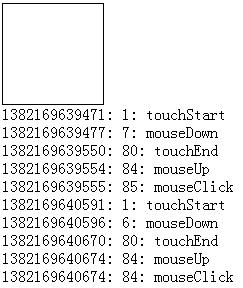
此处手机与电脑有非常大的区别!!!

结论
不要同时给document绑定鼠标与touch事件
document.addEventListener('mousedown', mouseDown);

document.addEventListener('click', mouseClick);

document.addEventListener('mouseup', mouseUp);

document.addEventListener('touchstart', touchStart);

document.addEventListener('touchend', touchEnd);
这个样子,在手机上不会触发click事件,click事件要绑定到具体元素
PS:此处的原因我就不去研究了,如果您知道为什么,请留言
手机上mousedown本来响应就慢
经过测试,电脑上touch与click事件的差距不大,但是手机上,当我们手触碰屏幕时,要过300ms左右才会触发mousedown事件
所以click事件在手机上响应就是慢一拍
数据说明

可以看到,在手机上使用click事件其实对用户体验并不好,所以我们可能会逐步使用touch事件
参数差异
现在,我们来看看鼠标与touch事件的参数差异
 var startTime;

 var log = function (msg, e) {

     console.log(e);

     var div = $('<div></div>');

     div.html((new Date().getTime()) + ': ' + (new Date().getTime() - startTime) + ': ' + msg)

     $('body').append(div);

 };

 var touchStart = function (e) {

     startTime = new Date().getTime();

     log('touchStart', e);

 };

 var touchEnd = function (e) {

     log('touchEnd', e);

 };

 var mouseDown = function (e) {

     log('mouseDown', e);

 };

 var mouseClick = function (e) {

     log('mouseClick', e);

 };

 var mouseUp = function (e) {

     log('mouseUp', e);

 };

 var d = $('#d');

 d.bind('mousedown', mouseDown);

 d.bind('click', mouseClick);

 d.bind('mouseup', mouseUp);

 d.bind('touchstart', touchStart);

 d.bind('touchend', touchEnd);
事件参数(touchstart/mouseup)

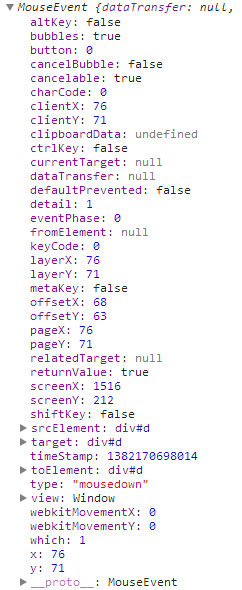
我们来看几个关键的地方:
changedTouches/touches/targetTouches
touches:为屏幕上所有手指的信息
PS:因为手机屏幕支持多点触屏,所以这里的参数就与手机有所不同
targetTouches:手指在目标区域的手指信息
changedTouches:最近一次触发该事件的手指信息
比如两个手指同时触发事件,2个手指都在区域内,则容量为2,如果是先后离开的的话,就会先触发一次再触发一次,这里的length就是1,只统计最新的
PS:一般changedTouches的length都是1
touchend时,touches与targetTouches信息会被删除,changedTouches保存的最后一次的信息,最好用于计算手指信息
这里要使用哪个数据各位自己看着办吧,我也不是十分清晰(我这里还是使用changedTouches吧)
参数信息(changedTouches[0])
几个重要通用点:
① clientX:在显示区的坐标
② pageX:鼠标在页面上的位置
③ screenX:鼠标在显示屏上的坐标(我是双屏所以x很大)
④ target:当前元素
几个重要不同点:
① layerX:这个是相对距离,这个不同,所以不要用这个东西了
② ......
这个有必要说明下,比如我们改下代码:


 <!DOCTYPE html PUBLIC "-//W3C//DTD XHTML 1.0 Transitional//EN" "http://www.w3.org/TR/xhtml1/DTD/xhtml1-transitional.dtd">

 <html xmlns="http://www.w3.org/1999/xhtml">

 <head>

     <title></title>

      <script id="others_zepto_10rc1" type="text/javascript" class="library" src="http://sandbox.runjs.cn/js/sandbox/other/zepto.min.js"></script>

 </head>

 <body>

 <div style=" position: relative; width: 500px; height: 300px; border: 1px solid black;">

 <div id="d" style=" position: absolute; top: 50px; left: 50px; width: 100px; height: 100px; border: 1px solid black;" ></div>

 </div>

 </body>

 <script type="text/javascript">

 var startTime;

 var log = function (msg, e) {

     console.log(e);

     var div = $('<div></div>');

     div.html((new Date().getTime()) + ': ' + (new Date().getTime() - startTime) + ': ' + msg)

     $('body').append(div);

 };

 var touchStart = function (e) {

     startTime = new Date().getTime();

     log('touchStart', e);

 };

 var touchEnd = function (e) {

     log('touchEnd', e);

 };

 var mouseDown = function (e) {

     log('mouseDown', e);

 };

 var mouseClick = function (e) {

     log('mouseClick', e);

 };

 var mouseUp = function (e) {

     log('mouseUp', e);

 };

 var d = $('#d');

 d.bind('mousedown', mouseDown);

 d.bind('click', mouseClick);

 d.bind('mouseup', mouseUp);

 d.bind('touchstart', touchStart);

 d.bind('touchend', touchEnd);

     </script>

 </html>
测试地址
http://sandbox.runjs.cn/show/7tyo48bf
各位自己运行看看差异吧
简单扩展touch事件
touch没有click事件,于是有zepto搞了个tap事件,我们这里先来简单模拟一下,再看源码怎么干的
 var mouseData = {

     sTime: 0,

     eTime: 0,

     sX: 0,

     eX: 0,

     sY: 0,

     eY: 0

 };

 var log = function (msg) {

     console.log(msg);

 };

 var touchStart = function (e) {

     var pos = e.changedTouches[0];

     mouseData.sTime = new Date().getTime();

     mouseData.sX = pos.pageX;

     mouseData.sY = pos.pageY;

 };

 var touchMove = function (e) {

     //        var pos = e.changedTouches[0];

     //        mouseData.eTime = new Date().getTime();

     //        mouseData.eX = pos.pageX;

     //        mouseData.eY = pos.pageY;

     e.preventDefault();

     return false;

 };

 var touchEnd = function (e) {

     var pos = e.changedTouches[0];

     mouseData.eTime = new Date().getTime();

     mouseData.eX = pos.pageX;

     mouseData.eY = pos.pageY;

     var data = onTouchEnd();

     log(data);

     var d = $('body');

     d.append($('<div>间隔:' + data.timeLag + ', 方向:' + data.dir + '</div>'));

 };

 var onTouchEnd = function () {

     //时间间隔

     var timeLag = mouseData.eTime - mouseData.sTime;

     //移动状态,默认乱移动

     var dir = 'move';

     if (mouseData.sX == mouseData.eX) {

         if (mouseData.eY - mouseData.sY > 0) dir = 'down';

         if (mouseData.eY - mouseData.sY < 0) dir = 'up';

         if (mouseData.eY - mouseData.sY == 0) dir = 'tap';

     }

     if (mouseData.sY == mouseData.eY) {

         if (mouseData.eX - mouseData.sX > 0) dir = 'right';

         if (mouseData.eX - mouseData.sX < 0) dir = 'left';

         if (mouseData.eX - mouseData.sX == 0) dir = 'tap';

     }

     return {

         timeLag: timeLag,

         dir: dir

     };

 };

 var touchEvents = function (el, func) {

     el = el || document;

     func = func || function () { };

     el.addEventListener('touchstart', touchStart);

     el.addEventListener('touchmove', touchMove);

     el.addEventListener('touchend', touchEnd);

 };

 var d = $('body');

 touchEvents(d[0]);
测试地址
http://sandbox.runjs.cn/show/2n9nqssv

这里就可以看到一次touch事件是tap还是up等属性,当然很多时候我们需要设置x方向或者y方向不可拖动,这样就更好呈现
时间间隔长短可以让我们判断自己的拖动是长拖动还是短拖动,长拖动也许用户希望动画慢点,短拖动也许动画就快了
touch事件代码汇总
 var log = function (msg) {

     console.log(msg);

 };

 var d = $('body');

 var touchEvents = function (el, type, func) {

     this.long = 400; //用于设置长点击阀值

     this.el = el || document;

     this.func = func || function () { };

     this.type = type || 'tap';

     this.mouseData = {

         sTime: 0,

         eTime: 0,

         sX: 0,

         eX: 0,

         sY: 0,

         eY: 0

     };

     this.addEvent();

 };

 touchEvents.prototype = {

     constructor: touchEvents,

     addEvent: function () {

         var scope = this;

         this.startFn = function (e) {

             scope.touchStart.call(scope, e);

         };

         this.moveFn = function (e) {

             scope.touchMove.call(scope, e);

         };

         this.endFn = function (e) {

             scope.touchEnd.call(scope, e);

         };

         this.el.addEventListener('touchstart', this.startFn);

         //此处可以换成这样

         //            document.addEventListener('touchmove', this.touchMove);

         this.el.addEventListener('touchmove', this.moveFn);

         this.el.addEventListener('touchend', this.endFn);

     },

     removeEvent: function () {

         this.el.removeEventListener('touchstart', this.touchStart);

         this.el.removeEventListener('touchmove', this.touchMove);

         this.el.removeEventListener('touchend', this.touchEnd);

     },

     touchStart: function (e) {

         var pos = e.changedTouches[0];

         this.mouseData.sTime = new Date().getTime();

         this.mouseData.sX = pos.pageX;

         this.mouseData.sY = pos.pageY;

     },

     touchMove: function (e) {

         e.preventDefault();

         return false;

     },

     touchEnd: function (e) {

         var pos = e.changedTouches[0];

         this.mouseData.eTime = new Date().getTime();

         this.mouseData.eX = pos.pageX;

         this.mouseData.eY = pos.pageY;

         this.onTouchEnd();

     },

     onTouchEnd: function () {

         if (this.type == this._getDir()) {

         }

     },

     _getDir: function () {

         //时间间隔,间隔小于100都认为是快速,大于400的认为是慢速

         var timeLag = this.mouseData.eTime - this.mouseData.sTime;

         var dir = 'swipe';

         if (timeLag > this.long) dir = 'longSwipe';

         if (this.mouseData.sX == this.mouseData.eX && this.mouseData.sY == this.mouseData.eY) {

             dir = 'tap';

             if (timeLag > this.long) dir = 'longTap';

         } else {

             if (Math.abs(this.mouseData.eY - this.mouseData.sY) > Math.abs(this.mouseData.eX - this.mouseData.sX)) {

                 dir = this._getUDDir(dir);

             } else {

                 dir = 'swipe';

                 dir = this._getLRDir(dir);

             }

         }

         log(dir);

         d.append($('<div>间隔:' + timeLag + ', 方向:' + dir + '</div>'));

         return dir;

     },

     //单独用于计算上下的

     _getUDDir: function (dir) {

         if (this.mouseData.eY - this.mouseData.sY > 0) dir += 'Down';

         if (this.mouseData.eY - this.mouseData.sY < 0) dir += 'Up';

         return dir;

     },

     //计算左右

     _getLRDir: function (dir) {

         if (this.mouseData.eX - this.mouseData.sX > 0) dir += 'Right';

         if (this.mouseData.eX - this.mouseData.sX < 0) dir += 'Left';

         return dir;

     }

 };

 new touchEvents(d[0], 'swipe', function () {

 //        d.append($('<div>间隔:' + data.timeLag + ', 方向:' + data.dir + '</div>'));

 });
测试地址
http://sandbox.runjs.cn/show/rpohk79w
测试时请使用chrome,并且开启touch事件
测试效果
完整可绑定事件代码
 <!DOCTYPE html PUBLIC "-//W3C//DTD XHTML 1.0 Transitional//EN" "http://www.w3.org/TR/xhtml1/DTD/xhtml1-transitional.dtd">

 <html xmlns="http://www.w3.org/1999/xhtml">

 <head>

     <title></title>

     <meta name="viewport" content="width=device-width, initial-scale=1.0, minimum-scale=1.0, maximum-scale=1.0, user-scalable=no">

     <script id="others_zepto_10rc1" type="text/javascript" class="library" src="http://sandbox.runjs.cn/js/sandbox/other/zepto.min.js"></script>

 </head>

 <body>

     <div id="d" style="position: absolute; top: 50px; left: 50px; width: 100px; height: 100px;

         border: 1px solid black;">滑动我

     </div>

 </body>

 <script type="text/javascript">

 var log = function (msg) {

     console.log(msg);

 };

 var d = $('body');

 var touchEvents = function (el, type, func) {

     this.long = 400; //用于设置长点击阀值

     this.el = el || document;

     this.func = func || function () { };

     this.type = type || 'tap';

     this.mouseData = {

         sTime: 0,

         eTime: 0,

         sX: 0,

         eX: 0,

         sY: 0,

         eY: 0

     };

     this.addEvent();

 };

 touchEvents.prototype = {

     constructor: touchEvents,

     addEvent: function () {

         var scope = this;

         this.startFn = function (e) {

             scope.touchStart.call(scope, e);

         };

         this.moveFn = function (e) {

             scope.touchMove.call(scope, e);

         };

         this.endFn = function (e) {

             scope.touchEnd.call(scope, e);

         };

         this.el.addEventListener('touchstart', this.startFn);

         //此处可以换成这样

         //            document.addEventListener('touchmove', this.touchMove);

         this.el.addEventListener('touchmove', this.moveFn);

         this.el.addEventListener('touchend', this.endFn);

     },

     removeEvent: function () {

         this.el.removeEventListener('touchstart', this.touchStart);

         this.el.removeEventListener('touchmove', this.touchMove);

         this.el.removeEventListener('touchend', this.touchEnd);

     },

     touchStart: function (e) {

         var pos = e.changedTouches[0];

         this.mouseData.sTime = new Date().getTime();

         this.mouseData.sX = pos.pageX;

         this.mouseData.sY = pos.pageY;

     },

     touchMove: function (e) {

         e.preventDefault();

         return false;

     },

     touchEnd: function (e) {

         var pos = e.changedTouches[0];

         this.mouseData.eTime = new Date().getTime();

         this.mouseData.eX = pos.pageX;

         this.mouseData.eY = pos.pageY;

         this.onTouchEnd(e);

     },

     onTouchEnd: function (e) {

         if (this.type == this._getDir()) {

             this.func(e, this);

         }

     },

     _getDir: function () {

         //时间间隔,间隔小于100都认为是快速,大于400的认为是慢速

         var timeLag = this.mouseData.eTime - this.mouseData.sTime;

         var dir = 'swipe';

         if (timeLag > this.long) dir = 'longSwipe';

         if (this.mouseData.sX == this.mouseData.eX && this.mouseData.sY == this.mouseData.eY) {

             dir = 'tap';

             if (timeLag > this.long) dir = 'longTap';

         } else {

             if (Math.abs(this.mouseData.eY - this.mouseData.sY) > Math.abs(this.mouseData.eX - this.mouseData.sX)) {

                 dir = this._getUDDir(dir);

             } else {

                 dir = this._getLRDir(dir);

             }

         }

         log(dir);

         d.append($('<div>间隔:' + timeLag + ', 方向:' + dir + '</div>'));

         return dir;

     },

     //单独用于计算上下的

     _getUDDir: function (dir) {

         if (this.mouseData.eY - this.mouseData.sY > 0) dir += 'Down';

         if (this.mouseData.eY - this.mouseData.sY < 0) dir += 'Up';

         return dir;

     },

     //计算左右

     _getLRDir: function (dir) {

         if (this.mouseData.eX - this.mouseData.sX > 0) dir += 'Right';

         if (this.mouseData.eX - this.mouseData.sX < 0) dir += 'Left';

         return dir;

     }

 };

 new touchEvents(d[0], 'tap', function (e) {

     log(arguments);

 });

 </script>

 </html>
这个代码基本可用了,但是使用上不是很方便,我们这里就不关注了,下面我们来看看zepto的代码和兼容问题
zepto的touch与兼容
先上zepto源码,一看就知道我写的有多不行啦!
 (function ($) {

     var touch = {},

     touchTimeout, tapTimeout, swipeTimeout,

     longTapDelay = 750, longTapTimeout

     function parentIfText(node) {

         return 'tagName' in node ? node : node.parentNode

     }

     function swipeDirection(x1, x2, y1, y2) {

         var xDelta = Math.abs(x1 - x2), yDelta = Math.abs(y1 - y2)

         return xDelta >= yDelta ? (x1 - x2 > 0 ? 'Left' : 'Right') : (y1 - y2 > 0 ? 'Up' : 'Down')

     }

     function longTap() {

         longTapTimeout = null

         if (touch.last) {

             touch.el.trigger('longTap')

             touch = {}

         }

     }

     function cancelLongTap() {

         if (longTapTimeout) clearTimeout(longTapTimeout)

         longTapTimeout = null

     }

     function cancelAll() {

         if (touchTimeout) clearTimeout(touchTimeout)

         if (tapTimeout) clearTimeout(tapTimeout)

         if (swipeTimeout) clearTimeout(swipeTimeout)

         if (longTapTimeout) clearTimeout(longTapTimeout)

         touchTimeout = tapTimeout = swipeTimeout = longTapTimeout = null

         touch = {}

     }

     $(document).ready(function () {

         var now, delta

         $(document.body)

       .bind('touchstart', function (e) {

           now = Date.now()

           delta = now - (touch.last || now)

           touch.el = $(parentIfText(e.touches[0].target))

           touchTimeout && clearTimeout(touchTimeout)

           touch.x1 = e.touches[0].pageX

           touch.y1 = e.touches[0].pageY

           if (delta > 0 && delta <= 250) touch.isDoubleTap = true

           touch.last = now

           longTapTimeout = setTimeout(longTap, longTapDelay)

       })

       .bind('touchmove', function (e) {

           cancelLongTap()

           touch.x2 = e.touches[0].pageX

           touch.y2 = e.touches[0].pageY

           if (Math.abs(touch.x1 - touch.x2) > 10)

               e.preventDefault()

       })

       .bind('touchend', function (e) {

           cancelLongTap()

           // swipe

           if ((touch.x2 && Math.abs(touch.x1 - touch.x2) > 30) ||

             (touch.y2 && Math.abs(touch.y1 - touch.y2) > 30))

               swipeTimeout = setTimeout(function () {

                   touch.el.trigger('swipe')

                   touch.el.trigger('swipe' + (swipeDirection(touch.x1, touch.x2, touch.y1, touch.y2)))

                   touch = {}

               }, 0)

           // normal tap

           else if ('last' in touch)

           // delay by one tick so we can cancel the 'tap' event if 'scroll' fires

           // ('tap' fires before 'scroll')

               tapTimeout = setTimeout(function () {

                   // trigger universal 'tap' with the option to cancelTouch()

                   // (cancelTouch cancels processing of single vs double taps for faster 'tap' response)

                   var event = $.Event('tap')

                   event.cancelTouch = cancelAll

                   touch.el.trigger(event)

                   // trigger double tap immediately

                   if (touch.isDoubleTap) {

                       touch.el.trigger('doubleTap')

                       touch = {}

                   }

                   // trigger single tap after 250ms of inactivity

                   else {

                       touchTimeout = setTimeout(function () {

                           touchTimeout = null

                           touch.el.trigger('singleTap')

                           touch = {}

                       }, 250)

                   }

               }, 0)

       })

       .bind('touchcancel', cancelAll)

         $(window).bind('scroll', cancelAll)

     })

   ; ['swipe', 'swipeLeft', 'swipeRight', 'swipeUp', 'swipeDown', 'doubleTap', 'tap', 'singleTap', 'longTap'].forEach(function (m) {

       $.fn[m] = function (callback) { return this.bind(m, callback) }

   })

 })(Zepto)
touch对象与上面mouseData功效相同,记录一些属性
delta 用于记录两次点击的间隔,间隔短就是双击
swipeDirection 函数与_getDir _getUDDir _getLRDir 功能相似,只不过代码更为简练,并且真正的私有化了
63行代码开始,若是代码移动过便是划屏,否则就是点击,这点我也没考虑到
73行,否则就应该是点击,这里并且判断是否存在结束时间,代码比较健壮,做了双击或者快速点击的判断
开始兼容
zepto代码我自然没有资格去评说,现在我们来看看他的兼容问题
PS:我这里很水,不太敢动源码,就加一个tap判断,因为也只是用了这个,具体大动手脚的事情,我们后面再做
这样做事因为,我们的项目主要是把click改成了tap事件,导致页面很多功能不可用
 ['swipe', 'swipeLeft', 'swipeRight', 'swipeUp', 'swipeDown', 'doubleTap', 'tap', 'singleTap', 'longTap'].forEach(function (m) {

   //兼容性方案处理,以及后期资源清理,如果为假时候,就触发点击事件

     var isTouch = 'ontouchstart' in document.documentElement;

     if(m === 'tap' && isTouch === false) {

         $.fn[m] = function (callback) { return this.bind('click', callback) }

     } else {

         $.fn[m] = function (callback) { return this.bind(m, callback) }

     }

   })
我就干了这么一点点事情......
待续
今天耗时过长,暂时到这里,对鼠标等操作,对event参数的兼容我们后面点再看看
手持设备点击响应速度,鼠标事件与touch事件的那些事的更多相关文章
- iOS 事件传递(Touch事件)
先总说如下: 1.当手指触摸到屏幕时,会产生UITouch对象和UIEvent对象. 2.这两个对象产生后会被传递到UIApplication管理的一个事件队列中. 3.再有UIApplication ...
- 事件之Touch 事件的分发和消费机制
Android 中与 Touch 事件相关的方法包括:dispatchTouchEvent(MotionEvent ev).onInterceptTouchEvent(MotionEvent ev). ...
- zepto学习(二)之tap事件以及tap事件点透处理
前言 为什么通过touch可以触发click事件? touch事件的来源 PC网页上的大部分操作都是用鼠标的,即响应的是鼠标事件,包括mousedown.mouseup.mousemove和click ...
- 提升手持设备点击速度之touch事件带来的坑!
前言 上周六,我将我们项目的click换成了tap事件,于是此事如梦魇一般折磨了我一星期!!! 经过我前仆后继的努力,不计代价的牺牲,不断的埋坑填坑,再埋坑的动作,最后悲伤的发现touch事件确实是个 ...
- 【读fastclick源码有感】彻底解决tap“点透”,提升移动端点击响应速度
申明!!!最后发现判断有误,各位读读就好,正在研究中.....尼玛水太深了 前言 近期使用tap事件为老夫带来了这样那样的问题,其中一个问题是解决了点透还需要将原来一个个click变为tap,这样的话 ...
- 彻底解决TAP(点透)提升移动端点击响应速度
使用fastclick 尼玛使用太简单了,直接一句: FastClick.attach(document.body); 于是所有的click响应速度直接提升,刚刚的!什么input获取焦点的问题也解决 ...
- 彻底解决tap“点透”,提升移动端点击响应速度
申明!!!最后发现判断有误,各位读读就好,正在研究中.....尼玛水太深了 前言 近期使用tap事件为老夫带来了这样那样的问题,其中一个问题是解决了点透还需要将原来一个个click变为tap,这样的话 ...
- 【Stage3D学习笔记续】山寨Starling(十一):Touch事件体系
我们的山寨Starling版本将会在这里停止更新了,主要还是由于时间比较有限,而且我们的山寨版本也很好的完成了他的任务“了解Starling的核心渲染”,接下来的Starling解析我们将会直接阅读S ...
- Android的Touch事件分发机制简单探析
前言 Android中关于触摸事件的分发传递是一个很值得研究的东西.曾不见你引入了一个ListView的滑动功能,ListView就不听你手指的指唤来滚动了:也不知道为啥Button设置了onClic ...
随机推荐
- Yii2 modal中 ajax提交表单
view: // view 代码 $form = ActiveForm::begin(['id' => $model->formName()]); // js 代码 $js = <& ...
- 基于easyUI实现组织结构树图形
一. 准备工作 1. 点击此下载相关文件 2. 进入 js 文件夹,解压缩 jquery-easyui-1.5.rar 到当前文件夹 二. 在浏览器中运行 organize.html 文件,即可看到效 ...
- linux共享windows文件并自动化改变文件编码
以k3日志为例: 在k3的数据库服务器进行如下操作: 1.在k3的数据库服务器导出日志数据到本地D:/K3LOG下(脚本自动化执行) 2.设置脚本定时任务每天拷贝D:/K3LOG下的文件到D:/K3L ...
- java.lang.OutOfMemoryError: PermGen space及其解决方法
PermGen space的全称是Permanent Generation space,是指内存的永久保存区域OutOfMemoryError: PermGen space从表面上看就是内存益出,解决 ...
- 【转】虚拟机VMware与主机共享文件介绍
from: http://www.cnblogs.com/kerrycode/p/3818095.html 写的比较详细,但是vm版本较旧. 2:通过共享文件夹功能 虚拟机VMware提供了在宿主机与 ...
- docker学习(8) 在mac机上搭建私有仓库
docker的私有仓库类似maven的私服,一般用于公司内部搭建一个类似docker hub的环境,这样上传.下载镜像速度较快,本文将演示如何在mac上利用docker-machine搭建无需SSL证 ...
- [LeetCode] Design Hit Counter 设计点击计数器
Design a hit counter which counts the number of hits received in the past 5 minutes. Each function a ...
- Ajax入门(一)
最近开始学习Ajax了0.0,虽然其他的还没巩固,但既然学了就先写下来吧... Ajax的定义呢,百度吧= =...就觉得最实用的地方就是页面无刷新,但网页实现了与后台的同步更新. 1, 首先创建 ...
- jsp的九大内置对象
九大内置对象 jsp servlet 对象名 类型 使用范围 request HttpServletRequest 请求 浏览器--->服务器 response HttpServletRes ...
- #define与typedef在重定义类型中的区别
#define 为完全的替换 typedef 重新定一个数据类型 eg #define charp1 char* typedef char* charp2charp1 a,b; //a char* b ...