
JavaWeb——tomcat manager 403 Access Denied .You are not authorized to view this page.
403 Access Denied
You are not authorized to view this page.
If you have already configured the Manager application to allow access and you have used your browsers back button, used a saved book-mark or similar then you may have triggered the cross-site request forgery (CSRF) protection that has been enabled for the HTML interface of the Manager application. You will need to reset this protection by returning to the main Manager page. Once you return to this page, you will be able to continue using the Manager appliction’s HTML interface normally. If you continue to see this access denied message, check that you have the necessary permissions to access this application.
If you have not changed any configuration files, please examine the file conf/tomcat-users.xml in your installation. That file must contain the credentials to let you use this webapp.
For example, to add the manager-gui role to a user named tomcat with a password of s3cret, add the following to the config file listed above.
Note that for Tomcat 7 onwards, the roles required to use the manager application were changed from the single manager role to the following four roles. You will need to assign the role(s) required for the functionality you wish to access.
manager-gui - allows access to the HTML GUI and the status pages
manager-script - allows access to the text interface and the status pages
manager-jmx - allows access to the JMX proxy and the status pages
manager-status - allows access to the status pages only
The HTML interface is protected against CSRF but the text and JMX interfaces are not. To maintain the CSRF protection:
Users with the manager-gui role should not be granted either the manager-script or manager-jmx roles.
If the text or jmx interfaces are accessed through a browser (e.g. for testing since these interfaces are intended for tools not humans) then the browser must be closed afterwards to terminate the session.
一般遇到此问题的解决方案是:
D:\tomcat-8.5.34\conf/tomcat-users.xml
在此文件中添加用户和角色:
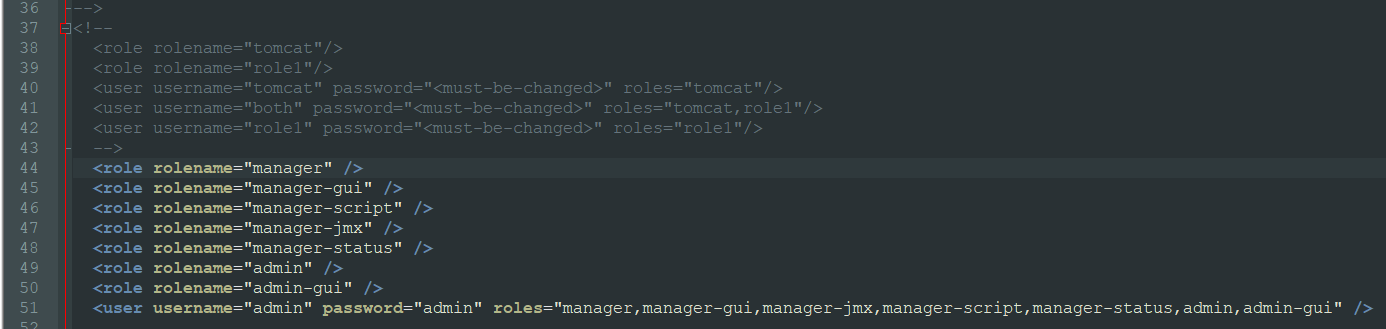
但是tomcat8.5 更改之后,仍然访问拒绝。
还需步骤如下:
D:\tomcat-8.5.34/webapps/manager/META-INF/context.xml
备注:将
Valve className=”org.apache.catalina.valves.RemoteAddrValve”
allow=”127.\d+.\d+.\d+|::1|0:0:0:0:0:0:0:1” /> 注解掉。

之后就可以访问 localhost:8080/manager/html页面

JavaWeb——tomcat manager 403 Access Denied .You are not authorized to view this page.的更多相关文章
- tomcat在浏览器输入用户名和密码后报错Tomcat Manager App--403 Access Denied You are not authorized to view this page
报错截图:Tomcat Manager App--403 Access Denied You are not authorized to view this page 解决办法: 1.关闭Tomcat ...
- Tomcat8访问管理页面localhost出现:403 Access Denied
问题: Access Denied You are not authorized to view this page. If you have already configured the Manag ...
- Tomcat的Manager显示403 Access Denied
管理tomcat的时候遇到了以下问题: 1.刚开始需要用户名密码,不知道用户名和密码是什么,但是输入什么都不正确. 解决办法: 自己在tomcat-users.xml中按格式添加用户 conf文件夹里 ...
- Tomcat 9.0 配置问题 403 Access Denied
tomcat9.0 管理页面如:http://10.10.10.10:8080/manager/html出现如下错误: 403 Access Denied 1.需要配置: Tomcat/conf/to ...
- tomcat管理页面403 Access Denied的解决方法
安装tomcat,配置好tomcat环境变量以后,访问manager app页面,出现403 Access Denied错误,解决的方法如下: 首先在conf/tomcat-users.xml文件里面 ...
- tomcat8 管理页面403 Access Denied的解决方法
安装tomcat,配置好tomcat环境变量以后,访问manager app页面,出现403 Access Denied错误,解决的方法如下: 首先在conf/tomcat-users.xml文件 ...
- linux 访问tomcat 管理页面时 You are not authorized to view this page 403(真实可用)
ava代码 收藏代码 You are not authorized to view this page. If you have not changed any configuration files ...
- 运行JavaWeb项目报错Access denied for user 'root'@'localhost' (using password: YES)
问题重现:(以下讨论范围仅限Windows环境): C:\AppServ\MySQL> mysql -u root -p Enter password: ERROR 1045 (28000): ...
- 403 Access Denied :进入Tomcat的manager时拒绝访问
解决办法: https://blog.csdn.net/Hello_World_QWP/article/details/79581174
随机推荐
- css隐藏滚动条依旧可以滚动
在做企业页面的时候,大部分页面都应该是活的,不应该写死,因为要从后台拿数据进行填充.而后台的数据是不确定的,有时候会让我们的容器撑得很大.这时候我们需要隐藏掉滚动条达到美观或者其他布局效果,隐藏掉单个 ...
- <文档学习>AirSim/using_car.md Choosing Your Vehicle: Car or Multirotor
如何在AirSim中使用汽车 默认情况下,AirSim中使用的车型为多转子multirotor. 如果你想使用汽车,那么只需在你的settings.json(https://github.com/Mi ...
- nginx搭建以及其配置文件
nginx搭建: 参考link:https://blog.csdn.net/wxyjuly/article/details/79443432 nginx配置文件详解: 参考link:https://w ...
- Python简介(一)
1.Python简介 python的创始人为吉多·范罗苏姆(Guido van Rossum).1989年的圣诞节期间,吉多·范罗苏姆为了在阿姆斯特丹打发时间,决心开发一个新的脚本解释程序,作为ABC ...
- javascrit--常用互动方法
本文是刚开始学习javascript的一些基础知识 JavaScript--互动 JavaScript输出内容 document.write("内容"+"<br&g ...
- freckles
题目描述: In an episode of the Dick Van Dyke show, little Richie connects the freckles on his Dad's back ...
- 一篇提及如何通过串口读取并提取GPS信号的论文
一篇提及如何通过串口读取并提取GPS信号的论文 作者:崔杰 梁计春 王国军 目前,在用计算机进行数据传输时,常用的是串行通信方式.在Visual C++的编程中,既可以用Windows API函数进行 ...
- canvas 绘画随机点
直接看图吧: 这样的随机点,是小圆点组成的,然后一直在动,记录一下,万一以后要用到呢: canvas的具体设置我就不写了,另一篇文档里有: drawRandomDot () { let leftCan ...
- 20155219 第十周课下作业-IPC
题目:研究Linux下IPC机制:原理,优缺点,每种机制至少给一个示例,提交研究博客的链接 共享内存 管道 FIFO 信号 消息队列 1.共享内存 共享内存就是允许两个不相关的进程访问同一个逻辑内存. ...
- 关于loadrunner的了解
1.性能测试目的: 为什么要进行性能测试呢? 有些问题是只有在大并发或者压力测试下才会暴露出来的,在平常的公司内部测试中,感觉一切都是正常的,但是把服务放到生产线上,例如某个时刻突然有很多的用户要向 ...