
IPV4/IPV6双协议栈配置案例
拓扑:
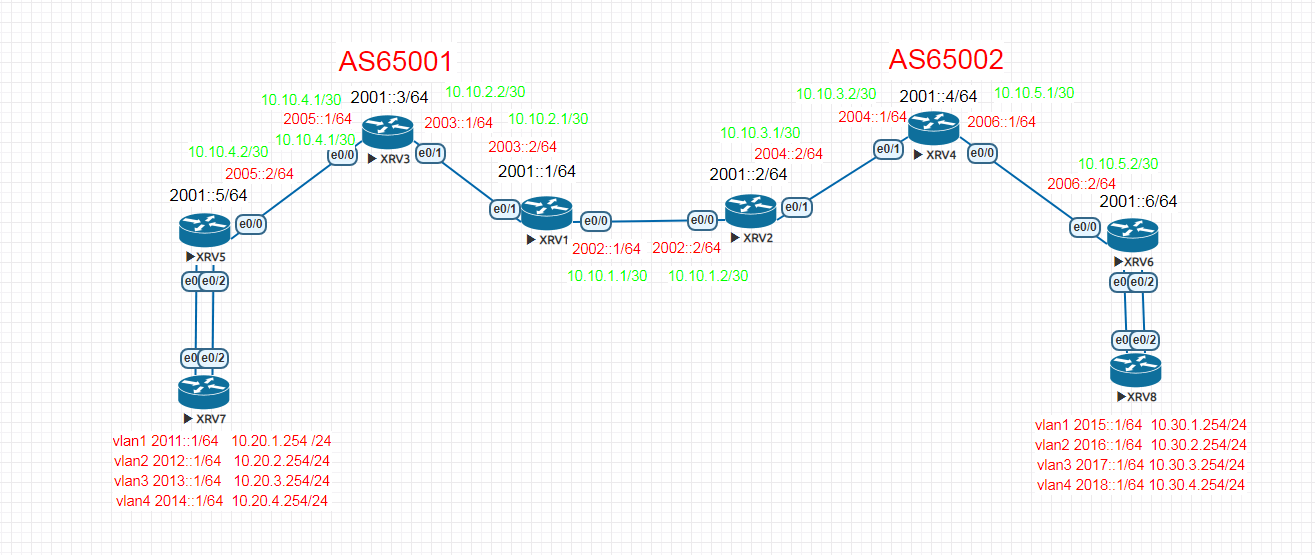
XRV1配置:
===================================================================
hostname XRV1
!
ipv6 unicast-routing
!
interface Loopback0
ip address 192.168.1.1 255.255.255.255
ipv6 address 2001::1/64
ipv6 ospf 100 area 0
!
interface Ethernet0/0
ip address 10.10.1.1 255.255.255.252
ipv6 address 2002::1/64
!
interface Ethernet0/1
ip address 10.10.2.1 255.255.255.252
ip ospf network point-to-point
ipv6 address 2003::2/64
ipv6 ospf 100 area 0
ospfv3 network point-to-point
!
router ospfv3 100
router-id 192.168.1.1
!
address-family ipv6 unicast
exit-address-family
!
router ospf 100
router-id 192.168.1.1
network 10.10.2.0 0.0.0.3 area 0
network 192.168.1.1 0.0.0.0 area 0
!
router bgp 65001
bgp router-id 192.168.1.1
bgp log-neighbor-changes
bgp graceful-restart restart-time 120
bgp graceful-restart stalepath-time 360
bgp graceful-restart
neighbor 10.10.1.2 remote-as 65002
neighbor 2001::3 remote-as 65001
neighbor 2001::3 update-source Loopback0
neighbor 2002::2 remote-as 65002
neighbor 192.168.1.3 remote-as 65001
neighbor 192.168.1.3 update-source Loopback0
!
address-family ipv4
neighbor 10.10.1.2 activate
neighbor 2001::3 activate
no neighbor 2002::2 activate
neighbor 192.168.1.3 activate
neighbor 192.168.1.3 next-hop-self
exit-address-family
!
address-family ipv6
neighbor 2001::3 activate
neighbor 2001::3 next-hop-self
neighbor 2002::2 activate
exit-address-family
!
XRV2配置:
===================================================================
!
hostname XRV2
!
no aaa new-model
clock timezone CST 8 0
mmi polling-interval 60
no mmi auto-configure
no mmi pvc
!
ipv6 unicast-routing
!
interface Loopback0
ip address 192.168.1.2 255.255.255.255
ipv6 address 2001::2/64
ipv6 ospf 100 area 0
!
interface Ethernet0/0
ip address 10.10.1.2 255.255.255.252
ipv6 address 2002::2/64
!
interface Ethernet0/1
ip address 10.10.3.1 255.255.255.252
ip ospf network point-to-point
ipv6 address 2004::2/64
ipv6 ospf 100 area 0
ipv6 ospf network point-to-point
!
router ospfv3 100
router-id 192.168.1.2
!
address-family ipv6 unicast
exit-address-family
!
router ospf 100
router-id 192.168.1.2
network 10.10.3.0 0.0.0.3 area 0
network 192.168.1.2 0.0.0.0 area 0
!
router bgp 65002
bgp router-id 192.168.1.2
bgp log-neighbor-changes
bgp graceful-restart restart-time 120
bgp graceful-restart stalepath-time 360
bgp graceful-restart
neighbor 10.10.1.1 remote-as 65001
neighbor 2001::4 remote-as 65002
neighbor 2001::4 update-source Loopback0
neighbor 2002::1 remote-as 65001
neighbor 192.168.1.4 remote-as 65002
neighbor 192.168.1.4 update-source Loopback0
!
address-family ipv4
neighbor 10.10.1.1 activate
no neighbor 2001::4 activate
no neighbor 2002::1 activate
neighbor 192.168.1.4 activate
neighbor 192.168.1.4 next-hop-self
exit-address-family
!
address-family ipv6
neighbor 2001::4 activate
neighbor 2001::4 next-hop-self
neighbor 2002::1 activate
exit-address-family
XRV3配置:
===================================================================
!
hostname XRV3
!
ip cef
ipv6 unicast-routing
ipv6 cef
!
interface Loopback0
ip address 192.168.1.3 255.255.255.255
ipv6 address 2001::3/64
ipv6 ospf 100 area 0
!
interface Ethernet0/0
ip address 10.10.4.1 255.255.255.252
ip ospf network point-to-point
ipv6 address 2005::1/64
ipv6 ospf 100 area 0
ospfv3 network point-to-point
!
interface Ethernet0/1
ip address 10.10.2.2 255.255.255.252
ip ospf network point-to-point
ipv6 address 2003::1/64
ipv6 ospf 100 area 0
ospfv3 network point-to-point
!
router ospfv3 100
router-id 192.168.1.3
!
address-family ipv6 unicast
exit-address-family
!
router ospf 100
router-id 192.168.1.3
network 10.10.2.0 0.0.0.3 area 0
network 10.10.4.0 0.0.0.3 area 0
network 192.168.1.3 0.0.0.0 area 0
!
router bgp 65001
bgp router-id 192.168.1.3
bgp log-neighbor-changes
bgp graceful-restart restart-time 120
bgp graceful-restart stalepath-time 360
bgp graceful-restart
neighbor 2001::1 remote-as 65001
neighbor 2001::1 update-source Loopback0
neighbor 2001::5 remote-as 65001
neighbor 2001::5 update-source Loopback0
neighbor 192.168.1.1 remote-as 65001
neighbor 192.168.1.1 update-source Loopback0
neighbor 192.168.1.5 remote-as 65001
neighbor 192.168.1.5 update-source Loopback0
!
address-family ipv4
no neighbor 2001::1 activate
no neighbor 2001::5 activate
neighbor 192.168.1.1 activate
neighbor 192.168.1.1 route-reflector-client
neighbor 192.168.1.5 activate
neighbor 192.168.1.5 route-reflector-client
exit-address-family
!
address-family ipv6
neighbor 2001::1 activate
neighbor 2001::1 route-reflector-client
neighbor 2001::5 activate
neighbor 2001::5 route-reflector-client
exit-address-family
XRV4配置:
===================================================================
!
hostname XRV4
!
no ip domain lookup
ip cef
ipv6 unicast-routing
ipv6 cef
!
interface Loopback0
ip address 192.168.1.4 255.255.255.255
ipv6 address 2001::4/64
ipv6 ospf 100 area 0
!
interface Ethernet0/0
ip address 10.10.5.1 255.255.255.252
ip ospf network point-to-point
ipv6 address 2006::1/64
ipv6 ospf 100 area 0
ipv6 ospf network point-to-point
!
interface Ethernet0/1
ip address 10.10.3.2 255.255.255.252
ip ospf network point-to-point
ipv6 address 2004::1/64
ipv6 ospf 100 area 0
ipv6 ospf network point-to-point
!
router ospfv3 100
router-id 192.168.1.4
!
address-family ipv6 unicast
exit-address-family
!
router ospf 100
router-id 192.168.1.4
network 10.10.3.0 0.0.0.3 area 0
network 10.10.5.0 0.0.0.3 area 0
network 192.168.1.4 0.0.0.0 area 0
!
router bgp 65002
bgp router-id 192.168.1.4
bgp log-neighbor-changes
bgp graceful-restart restart-time 120
bgp graceful-restart stalepath-time 360
bgp graceful-restart
neighbor 2001::2 remote-as 65002
neighbor 2001::2 update-source Loopback0
neighbor 2001::6 remote-as 65002
neighbor 2001::6 update-source Loopback0
neighbor 192.168.1.2 remote-as 65002
neighbor 192.168.1.2 update-source Loopback0
neighbor 192.168.1.6 remote-as 65002
neighbor 192.168.1.6 update-source Loopback0
!
address-family ipv4
no neighbor 2001::2 activate
no neighbor 2001::6 activate
neighbor 192.168.1.2 activate
neighbor 192.168.1.2 route-reflector-client
neighbor 192.168.1.6 activate
neighbor 192.168.1.6 route-reflector-client
exit-address-family
!
address-family ipv6
neighbor 2001::2 activate
neighbor 2001::2 route-reflector-client
neighbor 2001::6 activate
neighbor 2001::6 route-reflector-client
exit-address-family
!
XRV5配置:
===================================================================
hostname XRV5
!
ip cef
ipv6 unicast-routing
ipv6 cef
!
interface Loopback0
ip address 192.168.1.5 255.255.255.255
ipv6 address 2001::5/64
ipv6 ospf 100 area 0
!
interface Port-channel10
switchport trunk encapsulation dot1q
switchport mode trunk
!
interface Ethernet0/0
no switchport
ip address 10.10.4.2 255.255.255.252
ip ospf network point-to-point
duplex auto
ipv6 address 2005::2/64
ipv6 ospf 100 area 0
ospfv3 network point-to-point
!
interface Ethernet0/1
switchport trunk encapsulation dot1q
switchport mode trunk
channel-group 10 mode active
!
interface Ethernet0/2
switchport trunk encapsulation dot1q
switchport mode trunk
channel-group 10 mode active
!
interface Ethernet0/3
shutdown
!
interface Vlan1
ip address 10.20.1.254 255.255.255.0
ipv6 address 2011::1/64
!
interface Vlan2
ip address 10.20.2.254 255.255.255.0
ipv6 address 2012::1/64
!
interface Vlan3
ip address 10.20.3.254 255.255.255.0
ipv6 address 2013::1/64
!
interface Vlan4
ip address 10.20.4.254 255.255.255.0
ipv6 address 2014::1/64
!
router ospfv3 100
router-id 192.168.1.5
!
address-family ipv6 unicast
exit-address-family
!
router ospf 100
router-id 192.168.1.5
network 10.10.4.0 0.0.0.3 area 0
network 192.168.1.5 0.0.0.0 area 0
!
router bgp 65001
bgp router-id 192.168.1.5
bgp log-neighbor-changes
bgp graceful-restart restart-time 120
bgp graceful-restart stalepath-time 360
bgp graceful-restart
neighbor 2001::3 remote-as 65001
neighbor 2001::3 update-source Loopback0
neighbor 192.168.1.3 remote-as 65001
neighbor 192.168.1.3 update-source Loopback0
!
address-family ipv4
network 10.20.1.0 mask 255.255.255.0
network 10.20.2.0 mask 255.255.255.0
network 10.20.3.0 mask 255.255.255.0
network 10.20.4.0 mask 255.255.255.0
no neighbor 2001::3 activate
neighbor 192.168.1.3 activate
exit-address-family
!
address-family ipv6
network 2011::/64
network 2012::/64
network 2013::/64
network 2014::/64
neighbor 2001::3 activate
exit-address-family
XRV6配置:
===================================================================
!
hostname XRV6
!
no ip domain-lookup
ip cef
ipv6 unicast-routing
ipv6 cef
!
interface Loopback0
ip address 192.168.1.6 255.255.255.255
ipv6 address 2001::6/64
ipv6 ospf 100 area 0
!
interface Port-channel10
switchport trunk encapsulation dot1q
switchport mode trunk
!
interface Ethernet0/0
no switchport
ip address 10.10.5.2 255.255.255.252
ip ospf network point-to-point
duplex auto
ipv6 address 2006::2/64
ipv6 ospf 100 area 0
ipv6 ospf network point-to-point
!
interface Ethernet0/1
switchport trunk encapsulation dot1q
switchport mode trunk
channel-group 10 mode active
!
interface Ethernet0/2
switchport trunk encapsulation dot1q
switchport mode trunk
channel-group 10 mode active
!
interface Ethernet0/3
!
interface Vlan1
ip address 10.30.1.254 255.255.255.0
ipv6 address 2015::1/64
!
interface Vlan2
ip address 10.30.2.254 255.255.255.0
ipv6 address 2016::2/64
!
interface Vlan3
ip address 10.30.3.254 255.255.255.0
ipv6 address 2017::1/64
!
interface Vlan4
ip address 10.30.4.254 255.255.255.0
ipv6 address 2018::1/64
!
router ospfv3 100
router-id 192.168.1.6
!
address-family ipv6 unicast
exit-address-family
!
router ospf 100
router-id 192.168.1.6
network 10.10.5.0 0.0.0.3 area 0
network 192.168.1.6 0.0.0.0 area 0
!
router bgp 65002
bgp router-id 192.168.1.6
bgp log-neighbor-changes
bgp graceful-restart restart-time 120
bgp graceful-restart stalepath-time 360
bgp graceful-restart
neighbor 2001::4 remote-as 65002
neighbor 2001::4 update-source Loopback0
neighbor 192.168.1.4 remote-as 65002
neighbor 192.168.1.4 update-source Loopback0
!
address-family ipv4
network 10.30.1.0 mask 255.255.255.0
network 10.30.2.0 mask 255.255.255.0
network 10.30.3.0 mask 255.255.255.0
network 10.30.4.0 mask 255.255.255.0
no neighbor 2001::4 activate
neighbor 192.168.1.4 activate
exit-address-family
!
address-family ipv6
network 2015::/64
network 2016::/64
network 2017::/64
network 2018::/64
neighbor 2001::4 activate
exit-address-family
!
XRV7配置:
=========================================================================================================
!
hostname XRV7
!
interface Port-channel10
switchport trunk encapsulation dot1q
!
interface Ethernet0/0
!
interface Ethernet0/1
switchport trunk encapsulation dot1q
channel-group 10 mode active
!
interface Ethernet0/2
switchport trunk encapsulation dot1q
channel-group 10 mode active
!
XRV8配置:
===================================================================
!
hostname XRV8
!
interface Port-channel10
switchport trunk encapsulation dot1q
!
interface Ethernet0/0
!
interface Ethernet0/1
switchport trunk encapsulation dot1q
channel-group 10 mode active
!
interface Ethernet0/2
switchport trunk encapsulation dot1q
channel-group 10 mode active
!
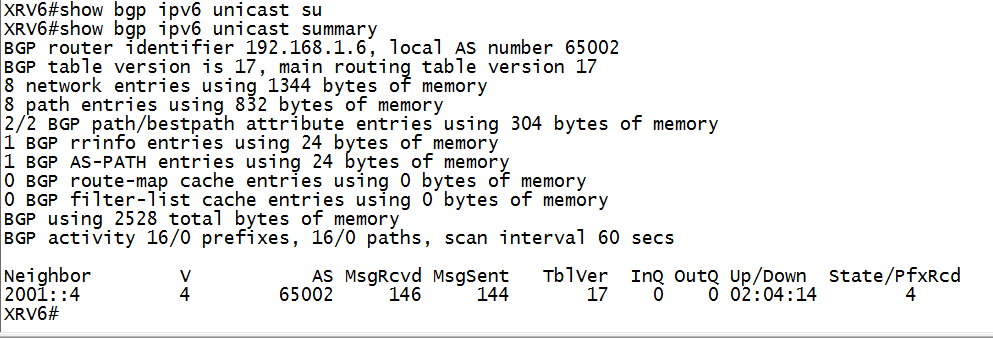
在XRV6上使用show bgp ipv6 unicast summary看V6的邻居关系建立如下图:
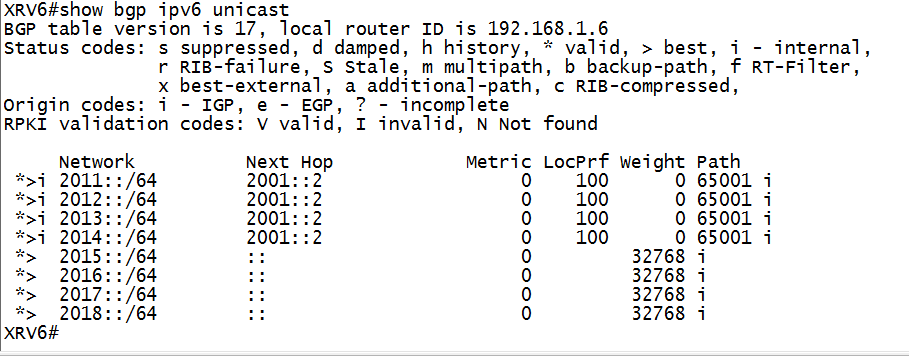
在XRV6上使用show bgp ipv6 unicast 查看V6的BGP路由表如下图:
IPV4/IPV6双协议栈配置案例的更多相关文章
- IPv4和IPv6的差异;如何实现IPv4和IPv6双协议栈的通信
1 IPv4和IPv6的差异 1.1 地址空间 IPv6 与 IPv4 比较最显著的一个改动就是使用 128 比特上的地址来代替了 32 比特长的 IPv4 地址. IPv6 中取消了广播地址, ...
- IPv4&IPv6双重协议栈
IPV4 TCP客户与IPV6服务器之间的通信: 1 启动IPV6服务器,创建套接监听口,绑定通配地址 2 IPV4调用gethostbyname找到该服务器对应的A记录 3 调用connect,向服 ...
- IP协议/地址(IPv4&IPv6)概要
IP协议/地址(IPv4&IPv6)概要 IP协议 什么是IP协议 IP是Internet Protocol(网际互连协议)的缩写,是TCP/IP体系中的网络层协议. [1] 协议的特征 无连 ...
- Centos7+nginx+keepalived集群及双主架构案例
目录简介 一.简介 二.部署nginx+keepalived 集群 三.部署nginx+keepalived双主架构 四.高可用之调用辅助脚本进行资源监控,并根据监控的结果状态实现动态调整 一.简介 ...
- LwIP Application Developers Manual10---LwIP IPv4/IPv6 stacks
1.前言 lwIP正在加入IPv6,一个实验性的版本可以通过git下载,该版本实现了一个IPv4/IPv6的双协议栈.通过在lwipopts.h定义LWIP_IPV6可以使能IPv6 2.已实现的IP ...
- netty——私有协议栈开发案例
netty--私有协议栈开发案例 摘要: 在学习李林峰老师的Netty权威指南中,觉得第十二章<私有协议栈开发>中的案例代码比较有代表性,讲的也不错,但是代码中个人认为有些简单的错误,个人 ...
- Keepalived LVS-DR单网络双活双主配置模式
Keepalived LVS-DR单网络双活双主配置模式 Linux就该这么学 今天 LVS是Linux Virtual Server的简写,意即Linux虚拟服务器,是一个虚拟的服务器集群系统.LV ...
- 烂泥:VMWare Workation双网卡配置IP地址
本文由ilanniweb提供友情赞助,首发于烂泥行天下 想要获得更多的文章,可以关注我的微信ilanniweb 前几天给一个客户做远程项目实施,客户那边的服务器是Windows OS的,我们这边的业务 ...
- [STL]双层级配置器
考虑到过多“小型区块”可能造成的内存碎片问题,SGI设计了双层级配置器: 第一级配置器直接调用malloc()和free(): 第二级配置器分两种情况:当配置区块大于128字节时,调用第一级配置器:当 ...
随机推荐
- linux的基本操作2
/dev/ha[a-d] IDE硬盘(过时了)/dev/sd[a-p] U盘,scsi,sata,ssd硬盘(流行)/dev/cdrom 光盘 CD-ROM/dev/mouse 鼠标 fdisk ...
- Web前端入门教程之浏览器兼容问题及解决方法
JavaScript 被称为JS,是作为浏览器的内置脚本语言,为我们提供操控浏览器的能力,可以让网页呈现出各种特殊效果,为用户提供友好的互动体验.JS是Web前端入门教程中的重点和难点,而浏览器兼容性 ...
- javascript将浮点数转换成整数
Summary 临时我就想到3个方法而已.假设读者想到其它好用方法,也能够交流一下 parseInt 位运算符 Math.floor Math.ceil Description 一.parseInt ...
- 第十七章 java8特性
17.java8中Lambda表达式与Stream API的使用 17.1 Lambda 表达式(Lambda Expressions) 1课时 17.2 函数式(Functional)接口 1课时 ...
- Vue 移动端常用tap事件封装
基于Vue的移动端项目,有些时间原生并没用提供,需要我们自己手动封装,可以封装一些自定义指令来供全局使用. 本文封装了 tap, swipe, swipeleft, swiperight, swipe ...
- c++11 关于typelist的foreach
建好一个typelist,其中都是类型信息而已,很重要的一个应用,循环迭代干些事情. 看了下boost的for_each实现,用我自己的typelist,大概代码如下: template<typ ...
- DSP2812 启动详解
百度文库转载 1. 从0X3F FFC0处复位→执行0X3F FC00地址处的初始化引导函数(Initboot) →根据GPIO选择引导模式→确定用户程序入口地址→从入口处开始执行用户程序. 输入外部 ...
- 如何增加黑客通过ssh入侵的难度--保护ssh的三把锁
源文档:https://blog.csdn.net/cnbird2008/article/details/6130696 简介 如果需要远程访问计算机并启用了 Secure Shell (SSH) 连 ...
- JavaScript常见的代码精简
1.&& callback && callback() 等价于: if(callback){ callback(); } 表达的意思: 先判断 callback 是不是 ...
- DevExpress破解和消除弹出框问题
在解决方案管理器列表中找到 license.licx 设置属性 将[生成操作]选项改为[无]