
h5定位geolaction无法调试解决方法
昨天接到一个在h5获取经纬度的需求,看了文档后,代码其实很简单,但在浏览器上调试就比较蛋疼了...
代码:
关于geolaction的介绍,我想这个文档会比我讲得更详细:
https://developer.mozilla.org/zh-CN/docs/Web/API/Geolocation/Using_geolocation
获取经纬度方式有两种:
1.navigator.geolocation.getCurrentPosition(successCallback, errorCallback, options) 【适用于对经度要求不高的,可获得低精度,后两个参数可选】
2.navigator.geolocation.watchPosition(successCallback, errorCallback, options) 【适用于对经度有要求的,可获得高精度,后两个参数可选】
ps:watchPosition()会返回一个 ID,唯一地标记该位置监视器。可将该ID 传给clearWatch(ID)来停止监视用户位置。
本地无服务调试:
1.是否获取地理位置的提示框有时不出来.... 很尴尬;
2.出来了,点击允许就没然后了.... 也很尴尬
3.点击允许后,获得了想要的经纬度 ... 大概要看浏览器心情
公司测试环境看效果:
是否同意获取地理位置的弹框始终不出来..... 我一度以为是代码问题or环境问题【公司项目比较老】
后发现这个提示:

搜了下CanIus里各浏览器支持情况:

查看其CanIUse里的notice,会发现,geolocation越往后基本就只支持https请求的,点击测试环境里浏览器提示里的链接,里面提供了非安全环境(即http环境)测试方法:
https://sites.google.com/a/chromium.org/dev/Home/chromium-security/deprecating-powerful-features-on-insecure-origins
粘贴部分原文如下:
Testing Powerful Features
- Secure the server with a publicly-trusted certificate. If the server is reachable from the Internet, several public CAs offer free, automatically-renewed server certificates.
- http://localhost is treated as a secure origin, so if you're able to run your server from localhost, you should be able to test the feature on that server.
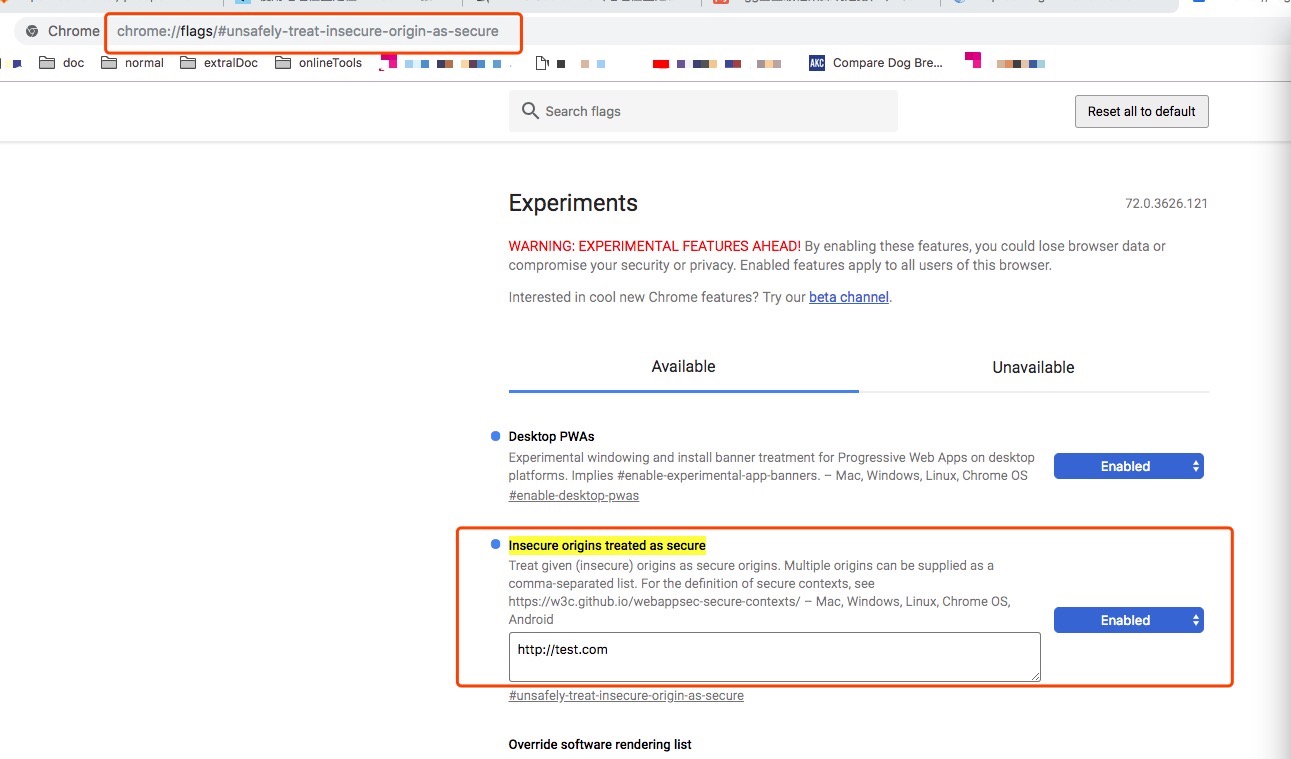
- You can run chrome with the --unsafely-treat-insecure-origin-as-secure="http://example.com" flag (replacing "example.com" with the origin you actually want to test), which will treat that origin as secure for this session. Note that on Android and ChromeOS this requires having a device with root access/dev mode. (This flag is broken in Chrome 63 but fixed in Chrome 64 and later. Prior to Chrome 62, you must also include the --user-data-dir=/test/only/profile/dir to create a fresh testing profile for the flag to work.)
- Create a self-signed certificate for temporary testing. Direct use of such a certificate requires clicking through an invalid certificate interstitial, which is otherwise not recommended. Note that because of this interstitial click-through (which also prevents HTTPS-response caching), we recommend options (1) and (2) instead, but they are difficult to do on mobile. See this post on setting up a self-signed certificate for a server for more information on how to do this.
An alternative approach is to generate a self-signed root certificate which you place into the trust store of the developer PC/devices, and then issue one or more certificates for the test servers. Trusting the root certificate means that Chrome will treat the site as secure and load it without interstitials or impacting caching. One easy way of setting up and using a custom root certificate is to use the open source mkcert tool.
h5定位geolaction无法调试解决方法的更多相关文章
- Segger RTT : Real Time Terminal SRAM 调试解决方法
http://segger.com/jlink-real-time-terminal.html Real Time Terminal SEGGER's Real Time Terminal (RTT) ...
- ADF控件ID变化引发JS无法定位控件的解决方法
原文地址:ADF控件ID变化引发JS无法定位控件的解决方法作者:Nicholas JSFF定义的控件ID到了客户端时往往会改变.例如在JSFF中的一个的ID为"ot1",但是当这个 ...
- Android 10不能使用uiautomatorviewer定位元素的终极解决方法
Android app 元素定位除了使用Appium Inspector 外,还可以使用Android SDK 里tools中的uiautomatorviewer 工具.但今天打算使用 uiautom ...
- 关于百度地图js api的getCurrentPosition定位不准确的解决方法
很久之前帮大叔解决了一个gps坐标转换为百度地图坐标的问题.今天大叔又给我讲百度地图定位不准.我查了一下api,用了官方给出的这样一组函数. //创建查询对象 var geolocation = ne ...
- Android 进入页面默认定位到ListView的解决方法
由于ListView会默认去获取焦点,如果说ListView在页面的下方的话,那么点击条目进入新页面并退出,那么这时候就会定位到ListView这里,而不是展示头部. 解决这个问题,只需要在Lis ...
- autodesk fbx sdk sample里面的工程无法调试解决方法
1.项目属性->常规中的目标文件名改为1 2.链接器->调试中的生成程序数据库文件改成:$(OutDir)1.pdb 3.连接器->常规中的输出文件改成:$(OutDir)1.exe ...
- 关于selenium无法定位动态元素的解决方法
今天在写一个关于登录的自动化脚本时,在对元素定位时总会报下面的错:
- Thinkphp5.1允许uni-app的H5跨域请求接口解决方法
情景: uni-app使用vue框架开发混合APP,虽然APP或者小程序没有跨域,但希望就是写完这个既有H5,又有APP,小程序等,所以能通过后端解决跨域最好.但是不知道是vue的原因还是什么,在PH ...
- h5页面滑动卡顿解决方法
解决方式: 给滚动的元素加样式:-webkit-overflow-scrolling: touch; -webkit-overflow-scrolling(允许独立的滚动区域和触摸回弹) 如果值为au ...
随机推荐
- Linux Java 环境配置及内置tomcat部署
tar zxvf jdk-8u101-linux-x64.tar.gz vi /etc/profile JAVA_HOME=/home/puma/jdk1.8.0_111JAVA_BIN=/home/ ...
- 检測iPhone/iPad设备方向的三种方法
版权声明:本文为博主原创文章,未经博主同意不得转载. https://blog.csdn.net/iefreer/article/details/24210391 使用meta tag "v ...
- 使用OPEN XML SDK 读取EXCEL中的超链接Hyperlink
使用OPEN XML SDK 读取EXCEL中的超链接Hyperlink 原理 先创建一个包括全部EXCEL单元格中超链接Hyperlink数据的表,再定位单元格通过列头(如A1,B1)获取超链接信息 ...
- MySql常用命令集Mysql常用命令2
MYSQL 常用命令 1.导出整个数据库 mysqldump -u 用户名 -p --default-character-set=latin1 数据库名 > 导出的 文件名(数据库默认编码是la ...
- 在web.xml中通过contextConfigLocation配置spring
<context-param> <param-name>contextConfigLocation</param-name> < ...
- python3 练习题(购物车)
'''购物车程序需求:1.启动程序后,让用户输入工资,然后打印商品列表2.允许用户根据商品编号购买商品3.用户选择商品后,检查余额是否够,够就直接扣款,不够就提醒4.用户可一直购买商品,也可随时退出, ...
- 安装Docker和配置加速器(二)
一. 安装 docker-ce 1. 访问 https://opsx.alibaba.com/mirror 2. 打开这条URL: 二.Ubuntu 系统安装 Docker 1. 使用apt-get进 ...
- <数据结构与算法分析>读书笔记--模型
为了在正式的构架中分析算法,我们需要一个计算模型.我们的模型基本上是一台标准的计算机,在机器中指令被顺序地执行.该模型有一个标准的简单指令系统,如加法.乘法.比较和赋值等.但不同于实际计算机情况的是, ...
- MP实战系列(四)之DAO讲解
说到DAO不得不提一个开发名词"三层架构",所谓的三层架构是什么呢?简单的可以概括为数据访问层,业务逻辑层,界面层(又称表现层). 这也是我们Java开发常用的手段,经常有人将三层 ...
- ubuntu 设置github秘钥
github的SSH配置如下: 一 . 设置Git的user name和email: $ git config --global user.name "AmyOrz" $ git ...