
编辑datagridview单元格
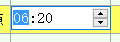
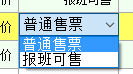
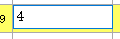
以这3种为例,最简单的是第三种,直接让单元格处于可编辑状态,当完成编辑后触发CellEndEdit事件,最后对输入的数据进行处理。
 private DateTimePicker dtp = new DateTimePicker();

 private ComBox sellstyle = new ComBox ();//设置全局变量
 public PlanVindicateForm()

         {

             InitializeComponent();

             dgvReaschResult.Controls.Add(dtp);//在窗体的构造函数里将datetimepicker控件加入

             this.dgvReaschResult.Controls.Add(this.sellstyle);//combox控件

             this.sellstyle.Visible = false;//设置是否显示

             this.dtp.Visible = false;

             this.dtp.Format = DateTimePickerFormat.Custom;//设置显示格式

             this.dtp.CustomFormat = "HH:mm";

             this.dtp.KeyDown += new KeyEventHandler(dtp_KeyDown);//注册控件用到的事件

             this.sellstyle.cbTypeBox.SelectedIndexChanged += new EventHandler(cbTypeBox_SelectedIndexChanged);

         }
 private void dgvReaschResult_CellClick(object sender, DataGridViewCellEventArgs e)

         {

             if ((e.RowIndex > -) && (e.ColumnIndex > -))

             {

                 string dataPropertyName = this.dgvReaschResult.Columns[e.ColumnIndex].DataPropertyName;

                 switch (dataPropertyName)

                 {

                     case "CanSellSeatCount":

                         this.dgvReaschResult.BeginEdit(true);

                         this.Original = int.Parse(this.dgvReaschResult.Rows[this.dgvReaschResult.CurrentCell.RowIndex].Cells[e.ColumnIndex].Value.ToString());

                         return;

                     case "DrvTime":

                         this.dgvReaschResult.BeginEdit(true);

                         this._Rectangle = this.dgvReaschResult.GetCellDisplayRectangle(e.ColumnIndex, e.RowIndex, true);

                         this.dtp.Size = new Size(this._Rectangle.Width, this._Rectangle.Height);

                         this.dtp.Location = new Point(this._Rectangle.X, this._Rectangle.Y);

                         this.dtp.Visible = true;

                         this.dtp.ShowUpDown = true;

                         this.dtp.Value = DateTime.Parse(this.SelectSchedule.DrvTime);

                         this.dtp.Focus();

                         this.originaTime = this.dtp.Value;

                         return;

                     case "SellStyleName":

                     this.dgvReaschResult.BeginEdit(true);

                     this._Rectangle = this.dgvReaschResult.GetCellDisplayRectangle(e.ColumnIndex, e.RowIndex, true);

                     this.sellstyle.Size = new Size(this._Rectangle.Width, this._Rectangle.Height);

                     this.sellstyle.Location = new Point(this._Rectangle.X, this._Rectangle.Y);

                     this.sellstyle.Visible = true;

                     this.sellstyle.SelectedText = this.SelectSchedule.SellStyleName;

                     this.sellstyle.Focus();

                     this.sellStyleName = this.SelectSchedule.SellStyleName;

                     return;

                 }

                 this.dtp.Visible = false;

                 this.sellstyle.Visible = false;

             }

         }
  private void dgvReaschResult_CellEndEdit(object sender, DataGridViewCellEventArgs e)

         {

             if ((e.RowIndex > -) && (e.ColumnIndex > -))

             {

                 try

                 {

                     string dataPropertyName = this.dgvReaschResult.Columns[e.ColumnIndex].DataPropertyName;//获取选中单元格的数据源的名称,即列名

                     int seats = ;

                     int num2 = ;

                     switch (dataPropertyName)

                     {

                         case "CanSellSeatCount";//第3种

                             {

                                 //对获取到的数据进行处理

                                 break;

                             }

                         case "DrvTime"://第1种

                              //对获取到的数据进行处理

                             break;

                         case "SellStyleName"://第2种

                             //对获取到的数据进行处理

                             break;

                     }

                 }

                 catch (Exception exception)

                 {

                     this.ShowError("执行失败!");

                 }

             }

         }
编辑datagridview单元格的更多相关文章
- WinForm笔记1:TextBox编辑时和DataGridView 单元格编辑时 的事件及其顺序
TextBox 编辑框 When you change the focus by using the mouse or by calling the Focus method, focus event ...
- DataGridView单元格内容自动匹配下拉显示
页面显示数据使用的控件是ComponentFactory.Krypton.Toolkit中的KryptonDataGridView控件.在指定“商品”单元格中需要根据用户输入内容自动匹配数据库中商品信 ...
- DataGridView 单元格自动填充
在DataGridView单元格中,当输入指定字符时,自动完成填充. 通过 TextBox实现 AutoCompleteMode AutoCompleteMode.Suggest: AutoCompl ...
- winform中dataGridView单元格根据值设置新值,彻底解决绑定后数据类型转换的困难
// winform中dataGridView单元格在数据绑定后,数据类型更改困难,只能迂回实现.有时候需要将数字变换为不同的文字描述,就会出现int32到string类型转换的异常,借助CellFo ...
- Cxgrid获取选中行列,排序规则,当前正在编辑的单元格内的值
Delphi Cxgrid获取选中行列,排序规则,当前正在编辑的单元格内的值 cxGrid1DBTableView1.Controller.FocusedRowIndex 当前行号 cxGrid1DB ...
- DataGridView单元格合并
本文章转载:http://www.cnblogs.com/xiaofengfeng/p/3382094.html 图: 代码就是如此简单 文件下载:DataGridView单元格合并源码 也可以参考: ...
- DataGridView单元格显示GIF图片
本文转载:http://home.cnblogs.com/group/topic/40730.html DataGridView单元格显示GIF图片 gifanimationindatagrid.ra ...
- Winfrom设置DataGridView单元格获得焦点(DataGridView - CurrentCell)
设置DataGridView单元格获得焦点 this.dgv_prescription.BeginEdit(true);
- Winform Datagridview 单元格html格式化支持富文本
Winform Datagridview 单元格html格式化支持富文本 示例: 源码:https://github.com/OceanAirdrop/DataGridViewHTMLCell 参考: ...
随机推荐
- LeetCode(81): 搜索旋转排序数组 II
Medium! 题目描述: 假设按照升序排序的数组在预先未知的某个点上进行了旋转. ( 例如,数组 [0,0,1,2,2,5,6] 可能变为 [2,5,6,0,0,1,2] ). 编写一个函数来判断给 ...
- Jenkins删除或替换All view
一.Jenkins删除All view “系统管理”→“系统设置”页面,更改“Default view”的下拉选项.(前提你已经新建了新的view) 二.My Views删除All view “用户” ...
- Jmeter 获取CSV行数
import java.io.BufferedReader; import java.io.FileInputStream; String str = "E:\\Desktop\\WOS接口 ...
- C++ Primer 笔记——运行时类型识别
1.dynamic_cast运算符的使用形式如下: dynamic_cast<type*>(e) // e必须是一个有效指针 dynamic_cast<type&>(e ...
- Ajax增删改查-----------增
<!DOCTYPE html> <html lang="en"> <head> <meta charset="UTF-8&quo ...
- 20165206 2017-2018-2 《Java程序设计》第七周学习总结
20165206 2017-2018-2 <Java程序设计>第七周学习总结 教材学习内容总结 MySqL:是世界上最流行的开源数据管理系统. 配置启动MySQL. 连接数据库:Conne ...
- Java开发环境笔记
在配置环境变量中 设置Java_home: 一是为了方便引用,比如,jdk安装在c:\jdk16.0目录里,则设置java_home为该目录路径,那么以后要使用这个路径的时候,只需输入%java_ho ...
- 我的第一个Java程序和Java简介
public calss HelloWorld{ public static void main(String[] args){ System.out.println("Hello Worl ...
- 设置git记住用户和密码
git config --global credential.helper store
- ES标准
精确来说,ES1 ~ ES5 中的数字是 ECMA-262 标准的版本号(edition). 即:Standard ECMA-262, 1st Edition(其实第一个版本是没有版本号的)Stand ...