
python基础学习笔记(九)
python异常
python用异常对象(exception object)来表示异常情况。遇到错误后,会引发异常。如果异常对象并未被处理或捕捉,程序就会用所谓的 回溯(Traceback, 一种错误信息)终止执行:

>>> 1/0

Traceback (most recent call last):

  File "<pyshell#0>", line 1, in <module>

    1/0

ZeroDivisionError: integer division or modulo by zero
raise 语句
为了引发异常,可以使用一个类(Exception的子类)或者实例参数数调用raise 语句。下面的例子使用内建的Exception异常类:
>>> raise Exception    #引发一个没有任何错误信息的普通异常

Traceback (most recent call last):

  File "<pyshell#1>", line 1, in <module>

    raise Exception

Exception

>>> raise Exception('hyperdrive overload')   # 添加了一些异常错误信息

Traceback (most recent call last):

  File "<pyshell#2>", line 1, in <module>

    raise Exception('hyperdrive overload')

Exception: hyperdrive overload
系统自带的内建异常类:
>>> import exceptions

>>> dir(exceptions)

['ArithmeticError', 'AssertionError', 'AttributeError', 'BaseException', 'BufferError', 'BytesWarning', 'DeprecationWarning', 'EOFError', 'EnvironmentError', 'Exception', 'FloatingPointError', 'FutureWarning', 'GeneratorExit', 'IOError', 'ImportError', 'ImportWarning', 'IndentationError', 'IndexError', 'KeyError', 'KeyboardInterrupt', 'LookupError', 'MemoryError', 'NameError', 'NotImplementedError', 'OSError', 'OverflowError', 'PendingDeprecationWarning', 'ReferenceError', 'RuntimeError', 'RuntimeWarning', 'StandardError', 'StopIteration', 'SyntaxError', 'SyntaxWarning', 'SystemError', 'SystemExit', 'TabError', 'TypeError', 'UnboundLocalError', 'UnicodeDecodeError', 'UnicodeEncodeError', 'UnicodeError', 'UnicodeTranslateError', 'UnicodeWarning', 'UserWarning', 'ValueError', 'Warning', 'WindowsError', 'ZeroDivisionError', '__doc__', '__name__', '__package__']
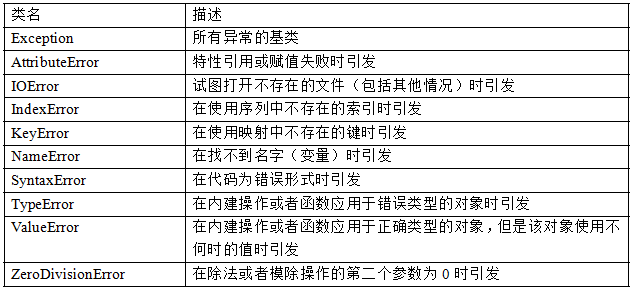
哇!好多,常用的内建异常类:
自定义异常
尽管内建的异常类已经包括了大部分的情况,而且对于很多要求都已经足够了,但有些时候还是需要创建自己的异常类。
和常见其它类一样----只是要确保从Exception类继承,不管直接继承还是间接继承。像下面这样:
>>> class someCustomExcetion(Exception):pass
当然,也可以为这个类添加一些方法。
捕捉异常
我们可以使用 try/except 来实现异常的捕捉处理。
假设创建了一个让用户输入两个数,然后进行相除的程序:
x = input('Enter the first number: ')

y = input('Enter the second number: ')

print x/y

#运行并且输入

Enter the first number: 10

Enter the second number: 0

Traceback (most recent call last):

  File "I:/Python27/yichang", line 3, in <module>

    print x/y

ZeroDivisionError: integer division or modulo by zero
为了捕捉异常并做出一些错误处理,可以这样写:
try:

    x = input('Enter the first number: ')

    y = input('Enter the second number: ')

    print x/y

except ZeroDivisionError:

  print "输入的数字不能为0!"


#再来云行

>>>

Enter the first number: 10

Enter the second number: 0

输入的数字不能为0!           #怎么样?这次已经友好的多了
假如,我们在调试的时候引发异常会好些,如果在与用户的进行交互的过程中又是不希望用户看到异常信息的。那如何开启/关闭 “屏蔽”机制?
class MuffledCalulator:

    muffled = False   #这里默认关闭屏蔽

    def calc(self,expr):

        try:

            return eval(expr)

        except ZeroDivisionError:

            if self.muffled:

                print 'Divsion by zero is illagal'

            else:

                raise

#运行程序:

>>> calculator = MuffledCalulator()

>>> calculator.calc('10/2')

5

>>> calculator.clac('10/0')

Traceback (most recent call last):

  File "<pyshell#30>", line 1, in <module>

    calculator.clac('10/0')

AttributeError: MuffledCalulator instance has no attribute 'clac'   #异常信息被输出了

>>> calculator.muffled = True   #现在打开屏蔽

>>> calculator.calc('10/0')

Divsion by zero is illagal
多个except 子句
如果运行上面的(输入两个数,求除法)程序,输入面的内容,就会产生另外一个异常:
try:

    x = input('Enter the first number: ')

    y = input('Enter the second number: ')

    print x/y

except ZeroDivisionError:

  print "输入的数字不能为0!"


#运行输入:

>>>

Enter the first number: 10

Enter the second number: 'hello.word'  #输入非数字

Traceback (most recent call last):

  File "I:\Python27\yichang", line 4, in <module>

    print x/y

TypeError: unsupported operand type(s) for /: 'int' and 'str'  #又报出了别的异常信息
好吧!我们可以再加个异常的处理来处理这种情况:
try:

    x = input('Enter the first number: ')

    y = input('Enter the second number: ')

    print x/y

except ZeroDivisionError:

    print "输入的数字不能为0!"

except TypeError:           # 对字符的异常处理

  print "请输入数字!"


#再来运行:

>>>

Enter the first number: 10

Enter the second number: 'hello,word'

请输入数字!
一个块捕捉多个异常
我们当然也可以用一个块来捕捉多个异常:
try:

    x = input('Enter the first number: ')

    y = input('Enter the second number: ')

    print x/y

except (ZeroDivisionError,TypeError,NameError):

    print "你的数字不对!"
捕捉全部异常
就算程序处理了好几种异常,比如上面的程序,运行之后,假如我输入了下面的内容呢
>>>

Enter the first number: 10

Enter the second number:   #不输入任何内容,回车

Traceback (most recent call last):

  File "I:\Python27\yichang", line 3, in <module>

    y = input('Enter the second number: ')

  File "<string>", line 0

   ^

SyntaxError: unexpected EOF while parsing
晕死~! 怎么办呢?总有被我们不小心忽略处理的情况,如果真想用一段代码捕捉所有异常,那么可在except子句中忽略所有的异常类:
try:

    x = input('Enter the first number: ')

    y = input('Enter the second number: ')

    print x/y

except:

    print '有错误发生了!'

#再来输入一些内容看看

>>>

Enter the first number: 'hello' * )0

有错误发生了!
结束
别急!再来说说最后一个情况,好吧,用户不小心输入了错误的信息,能不能再给次机会输入?我们可以加个循环,保你输对时才结束:
while True:

    try:

        x = input('Enter the first number: ')

        y = input('Enter the second number: ')

        value = x/y

        print 'x/y is',value
        break

    except:

        print '列效输入,再来一次!'

#运行

>>>

Enter the first number: 10

Enter the second number:

列效输入,再来一次!

Enter the first number: 10

Enter the second number: 'hello'

列效输入,再来一次!

Enter the first number: 10

Enter the second number: 2

x/y is 5
python基础学习笔记(九)的更多相关文章
- 0003.5-20180422-自动化第四章-python基础学习笔记--脚本
0003.5-20180422-自动化第四章-python基础学习笔记--脚本 1-shopping """ v = [ {"name": " ...
- Python基础学习笔记(九)常用数据类型转换函数
参考资料: 1. <Python基础教程> 2. http://www.runoob.com/python/python-variable-types.html 3. http://www ...
- python 基础学习笔记(1)
声明: 本人是在校学生,自学python,也是刚刚开始学习,写博客纯属为了让自己整理知识点和关键内容,当然也希望可以通过我都博客来提醒一些零基础学习python的人们.若有什么不对,请大家及时指出, ...
- Python 基础学习笔记(超详细版)
1.变量 python中变量很简单,不需要指定数据类型,直接使用等号定义就好.python变量里面存的是内存地址,也就是这个值存在内存里面的哪个地方,如果再把这个变量赋值给另一个变量,新的变量通过之前 ...
- Python基础学习笔记(十三)异常
参考资料: 1. <Python基础教程> 2. http://www.runoob.com/python/python-exceptions.html Python用异常对象(excep ...
- Python基础学习笔记(十二)文件I/O
参考资料: 1. <Python基础教程> 2. http://www.runoob.com/python/python-files-io.html ▶ 键盘输入 注意raw_input函 ...
- Python基础学习笔记(十一)函数、模块与包
参考资料: 1. <Python基础教程> 2. http://www.runoob.com/python/python-functions.html 3. http://www.liao ...
- Python基础学习笔记(十)日期Calendar和时间Timer
参考资料: 1. <Python基础教程> 2. http://www.runoob.com/python/python-date-time.html 3. http://www.liao ...
- Python基础学习笔记(八)常用字典内置函数和方法
参考资料: 1. <Python基础教程> 2. http://www.runoob.com/python/python-dictionary.html 3. http://www.lia ...
- Python基础学习笔记(七)常用元组内置函数
参考资料: 1. <Python基础教程> 2. http://www.runoob.com/python/python-tuples.html 3. http://www.liaoxue ...
随机推荐
- mybatis 初始
接下来带着大家建立一个mybatis的初级项目 首先我们利用idea利用maven建立一个空项目 然后输入名称什么的就会创建一个空的maven项目了 然后我们需要在项目总得pom.xml中进行配置信息 ...
- oracle FLASHBACK TABLE
闪回表 -- 开启行迁移 ALTER TABLE employees_test ENABLE ROW MOVEMENT; UPDATE employees_test SET salary = sala ...
- 解决eclipse启动慢
每次启动eclipse时都要等待半分钟左右,对于追求效率的程序员来说,等待每一秒都是一种折磨,出于高效开发的精神,这个问题必须解决掉.方案如下: ①在工具栏中的help中找到about eclipse ...
- RD340服务器安装windows2003系统
RD340服务器安装windows2003系统云修网
- Sql注入的分类:数字型+字符型
Sql注入: 就是通过把SQL命令插入到Web表单提交或输入域名或页面请求的查询字符串,最终达到欺骗服务器执行恶意的SQL命令.通过构造恶意的输入,使数据库执行恶意命令,造成数据泄露或者修改内容等,以 ...
- log4.net 配置 - 自定义过滤器按LoggerName过滤日志
自定义过滤器按LoggerName过滤日志,本来想使用 PropertyFilter 来实现,后来研究发现一直不能成功,源代码debug了一下获取一直为null,时间关系只好用 StringMatch ...
- January 29th, 2018 Week 05th Monday
Losing all hope was freedom. 彻底绝望就是真正的自由. Losing all the hopes, and we are free to challenge everyth ...
- [php] yii debug设置
最近在使用yii写rest api发现在所有错误信息都写在log文件里调试不是很直接 在index.php头部查入就ok了 defined('YII_ENABLE_EXCEPTION_HANDLER' ...
- k8s mysql 单点部署
参考官网:https://kubernetes.io/docs/tasks/run-application/run-replicated-stateful-application/ 20-nproc. ...
- mascara-2(MetaMask/mascara本地实现)-连接线上钱包
https://github.com/MetaMask/mascara (beta) Add MetaMask to your dapp even if the user doesn't have t ...