
spring-mvc.xml 和 application-context.xml的区别
转自:https://www.cnblogs.com/binlin1987/p/7053016.html
application-context.xml是全局的,应用于多个serverlet,配合listener一起使用,web.xml中配置如下:
<!-- 配置监听器 -->

    <listener>

        <listener-class>org.springframework.web.context.ContextLoaderListener</listener-class>

    </listener>

    <context-param>

        <param-name>contextConfigLocation</param-name>

        <param-value>classpath:applicationContext.xml</param-value>

    </context-param>

spring-mvc.xml 是spring mvc的配置,web.xml中配置如下:
<!--配置springmvc DispatcherServlet-->
<servlet>
  <servlet-name>springMVC</servlet-name>
  <servlet-class>org.springframework.web.servlet.DispatcherServlet</servlet-class>
  <init-param>
    <param-name>contextConfigLocation</param-name>
    <param-value>classpath:config/spring-mvc.xml</param-value>
  </init-param>
  <load-on-startup>1</load-on-startup>
  <async-supported>true</async-supported>
</servlet>
application-context.xml这个一般是采用非spring mvc架构,用来加载Application Context。
如果直接采用SpringMVC,只需要把所有相关配置放到spring-mvc.xml中就好,一般spring mvc项目用不到多个serverlet
applicationContext.xml 配置文件在web.xml中的配置详解
一、首先写一下代码结构。
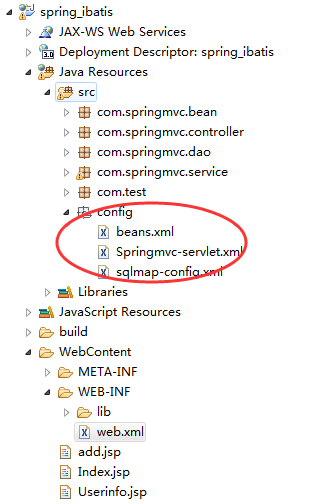
二、再看web.xml中的配置情况。

<?xml version="1.0" encoding="UTF-8"?>

<web-app xmlns:xsi="http://www.w3.org/2001/XMLSchema-instance" xmlns="http://java.sun.com/xml/ns/javaee" xsi:schemaLocation="http://java.sun.com/xml/ns/javaee http://java.sun.com/xml/ns/javaee/web-app_3_0.xsd" id="WebApp_ID" version="3.0">

  <display-name>SpringMVC</display-name>

  <welcome-file-list>

    <welcome-file>index.html</welcome-file>

    <welcome-file>index.htm</welcome-file>

    <welcome-file>index.jsp</welcome-file>

    <welcome-file>default.html</welcome-file>

    <welcome-file>default.htm</welcome-file>

    <welcome-file>default.jsp</welcome-file>

  </welcome-file-list>

  <context-param>

            <param-name>contextConfigLocation</param-name>

            <!-- <param-value>classpath*:config/applicationContext.xml</param-value> -->

            <param-value>/WEB-INF/classes/config/applicationContext.xml</param-value>

  </context-param>

  <listener>

    <listener-class>org.springframework.web.context.ContextLoaderListener</listener-class>

  </listener>

     <servlet>

        <servlet-name>springmvc</servlet-name>

        <servlet-class>org.springframework.web.servlet.DispatcherServlet</servlet-class>

        <init-param>

           <param-name>contextConfigLocation</param-name>

           <!-- <param-value>classpath*:config/Springmvc-servlet.xml</param-value> -->

           <param-value>/WEB-INF/classes/config/Springmvc-servlet.xml</param-value>

        </init-param>

        <load-on-startup>1</load-on-startup>

    </servlet>

    <servlet-mapping>

        <servlet-name>springmvc</servlet-name>

        <url-pattern>/</url-pattern>

    </servlet-mapping>

</web-app>
三、下面是对配置文件的说明。
  <listener>

    <listener-class>org.springframework.web.context.ContextLoaderListener</listener-class>

  </listener>
ContextLoaderListener是Spring的监听器,它的作用就是启动Web容器时,自动装配ApplicationContext的配置信息。因为它实现了ServletContextListener这个接口,在web.xml配置这个监听器,启动容器时,就会默认执行它实现的方法。
  <context-param>

            <param-name>contextConfigLocation</param-name>

            <!-- <param-value>classpath*:config/applicationContext.xml</param-value> -->

            <param-value>/WEB-INF/classes/config/applicationContext.xml</param-value>

  </context-param>
这段配置是用于指定applicationContext.xml配置文件的位置,可通过context-param加以指定:
这里需要搞清楚classpath是什么,以及classpath:和classpath*有何区别:
1. 首先 classpath是指 WEB-INF文件夹下的classes目录
2. classpath 和 classpath* 区别:
classpath:只会到你的class路径中查找找文件;
classpath*:不仅包含class路径,还包括jar文件中(class路径)进行查找.
如果applicationContext.xml配置文件存放在src目录下,就好比上面的代码结构中的存放位置,那么在web.xml中的配置就如下所示:
    <context-param>

        <param-name>contextConfigLocation</param-name>

        <param-value>classpath:applicationContext.xml</param-value>

    </context-param>
如果applicationContext.xml配置文件存放在WEB-INF下面,那么在web.xml中的配置就如下所示:
    <context-param>

        <param-name>contextConfigLocation</param-name>

        <param-value>WEB-INF/applicationContext*.xml</param-value>

    </context-param>
需要注意的是,部署到应用服务器后,src目录下的配置文件会和class文件一样,自动copy到应用的 classes目录下,spring的 配置文件在启动时,加载的是web-info目录下的applicationContext.xml, 运行时使用的是web-info/classes目录下的applicationContext.xml。因此,不管applicationContext.xml配置文件存放在src目录下,还是存放在WEB-INF下面,都可以用下面这种方式来配置路径:
    <context-param>

        <param-name>contextConfigLocation</param-name>

        <param-value>WEB-INF/applicationContext*.xml</param-value>

    </context-param>
当有多个配置文件加载时,可采用下面代码来配置:
    <context-param>

        <param-name>contextConfigLocation</param-name>

        <param-value>

            classpath*:conf/spring/applicationContext_core*.xml,

            classpath*:conf/spring/applicationContext_dict*.xml,

            classpath*:conf/spring/applicationContext_hibernate.xml,
            ......

        </param-value>

    </context-param>
也可以用下面的这种方式:
    <context-param>

        <param-name>contextConfigLocation</param-name>

        <param-value>classpath*:**/applicationContext-*.xml</param-value>

    </context-param>
"**/"表示的是任意目录;
"**/applicationContext-*.xml"表示任意目录下的以"applicationContext-"开头的XML文件。
Spring配置文件最好以"applicationContext-"开头,且最好把所有Spring配置文件都放在一个统一的目录下,也可以分模块创建。
spring-mvc.xml 和 application-context.xml的区别的更多相关文章
- Jsoup问题---获取http协议请求失败 org.jsoup.UnsupportedMimeTypeException: Unhandled content type. Must be text/*, application/xml, or application/xhtml+xml.
Jsoup问题---获取http协议请求失败 1.问题:用Jsoup在获取一些网站的数据时,起初获取很顺利,但是在访问某浪的数据是Jsoup报错,应该是请求头里面的请求类型(ContextType)不 ...
- Jsoup获取部分页面数据失败 org.jsoup.UnsupportedMimeTypeException: Unhandled content type. Must be text/*, application/xml, or application/xhtml+xml.
用Jsoup在获取一些网站的数据时,起初获取很顺利,但是在访问某浪的数据是Jsoup报错,应该是请求头里面的请求类型(ContextType)不符合要求. 请求代码如下: private static ...
- Jsoup获取部分页面数据失败 Unhandled content type. Must be text/*, application/xml, or application/xhtml+xml
用Jsoup在获取一些网站的数据时,起初获取很顺利,但是在访问某浪的数据是Jsoup报错,应该是请求头里面的请求类型(ContextType)不符合要求. 请求代码如下: private static ...
- Spring MVC 的 Java Config ( 非 XML ) 配置方式
索引: 开源Spring解决方案--lm.solution 参看代码 GitHub: solution/pom.xml web/pom.xml web.xml WebInitializer.java ...
- Spring MVC 搭建过程中web.xml配置引入文件的路径问题
为啥要说一下这么low的问题,因为我是一个比较low的人,哈哈.本来我技术有限,没事干自己撘个环境找找乐趣,结果被各种基础问题,弄的一脸蒙蔽.算了不多说,直接说问题. 1.首先说一下java编译后的文 ...
- Spring MVC同一方法返回JSON/XML格式
最近一道面试题,要求同一API接口支持不同格式返回值.一开始是设想通过过滤器(Filter)设置返回值,但是并不可行,因为方法返回值一般都是类型需要做转换,而过滤器则是前置的.另一方面可以通过拦截器的 ...
- spring MVC的困惑--url-pattern的/和/*有区别
总是现象就是:spring用到forward("/WEB-INF/jsp/*.jsp")而forward当然是又要经过web.xml的映射的,然后,在URL匹配时,<url- ...
- Spring MVC中的ResponseEntity和ResponseBody的区别
1.ResponseEntity的优先级高于@ResponseBody. 在不是ResponseEntity的情况下才去检查有没有@ResponseBody注解. 如果响应类型是ResponseEnt ...
- spring boot 1.x完整学习指南(含各种常见问题servlet、web.xml、maven打包,spring mvc差别及解决方法)
spring boot 入门 关于版本的选择,spring boot 2.0开始依赖于 Spring Framework 5.1.0,而spring 5.x和之前的版本差距比较大,而且应该来说还没有广 ...
- 精尽Spring MVC源码分析 - 寻找遗失的 web.xml
该系列文档是本人在学习 Spring MVC 的源码过程中总结下来的,可能对读者不太友好,请结合我的源码注释 Spring MVC 源码分析 GitHub 地址 进行阅读 Spring 版本:5.2. ...
随机推荐
- 使用PHP的反射Reflection获取对象信息
PHP5添加了一项新的功能:Reflection.这个功能使得程序员可以reverse-engineer class, interface,function,method and extension. ...
- 构建模式--Adapter模式(JAVA)
适配器模式: 适配器就相当于我们的转接头,比如手机充电器插头(小米和华为的手机充电器不能共用,这时候就可以给华为的充电器按一个转接头,就可以给小米手机充电). 同理,当一个类(充电器 HuaweiCh ...
- mysql存储过程使用游标循环插入数据
DELIMITER $$ DROP PROCEDURE IF EXISTS `procedure_course`$$ CREATE DEFINER=`root`@`localhost` PROCEDU ...
- jquery接触初级-----juqery DOM操作 之二
DOm 操作之: 1.1 children(),这个函数只是查找元素的子元素,而不考虑其他后代元素 <body> <p title="请选择你最喜欢的水果"&g ...
- 尚硅谷springboot学习5-主入口类说明
package com.atguigu; import org.springframework.boot.SpringApplication; import org.springframework.b ...
- 【剑指offer】单链表尾部插入一个节点
#include <iostream> using namespace std; //链表结构体 struct ListNode { int m_Value; ListNode *next ...
- MongoDB分布式集群搭建
最近在做一个关于车险的项目,由于数据量较大,实验室的Boss决定采用HBase+ES/MongoDB这两种方案,并做性能对比,本人负责MongoDB方案.为了满足海量数据的存储要求,需要搭建一个分布式 ...
- java 代码块,静态代码块,构造器等的执行顺序
写了一段测试代码,如下: public class ExecutionSequence extends fatherClass{ static{ System.out.printl ...
- Django中使用mysql数据库并使用原生sql语句操作
Django自身默认使用sqlite3这个轻量级的数据库,但是当我们开发网站时,sqlite3就没有mysql好,sqlite3适合一些手机上开发使用的数据库. 准备的软件mysql数据库,版本5.7 ...
- java中garadle工程没有src问题
https://www.jb51.net/article/142791.htm 前几天遇到一个问题,就是使用ider创建gradle项目后,src目录没有自动生成出来,今天就给大家分享一下怎么解决. ...