
windform 重绘Treeview "+-"号图标
模仿wind系统界面,重绘Treeview + - 号图标
一,首先需要图片 ,用于替换原有的 +-号
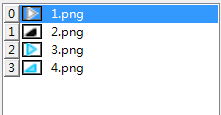
二、新建Tree扩展类 TreeViewEx继承TreeView
using System;

using System.Collections.Generic;

using System.Drawing;

using System.Linq;

using System.Text;

using System.Windows.Forms;

/*******************************************************************

* Copyright (C)  版权所有

* 文件名称:TreeViewEx

* 命名空间:TestRecentMenu

* 创建时间:2018/12/18 16:49:08

* 作    者: wangyonglai

* 描    述:

* 修改记录:

* 修改人:

* 版 本 号:v1.0.0

**********************************************************************/

namespace TestRecentMenu

{

    public class TreeViewEx : TreeView

    {

        private bool ArrowKeyUp = false;

        private bool ArrowKeyDown = false;

        private System.Windows.Forms.ImageList arrowImageList1;

        /*1节点被选中 ,TreeView有焦点*/

        private SolidBrush brush1 = new SolidBrush(Color.FromArgb(209, 232, 255));//填充颜色

        private Pen pen1 = new Pen(Color.FromArgb(102, 167, 232), 1);//边框颜色

        /*2节点被选中 ,TreeView没有焦点*/

        private SolidBrush brush2 = new SolidBrush(Color.FromArgb(247, 247, 247));

        private Pen pen2 = new Pen(Color.FromArgb(222, 222, 222), 1);

        /*3 MouseMove的时候 画光标所在的节点的背景*/

        private SolidBrush brush3 = new SolidBrush(Color.FromArgb(229, 243, 251));

        private Pen pen3 = new Pen(Color.FromArgb(112, 192, 231), 1);

        public const int WM_PRINTCLIENT = 0x0318;

        public const int PRF_CLIENT = 0x00000004;

        //替换+-号图标的imagelist

        public ImageList arrowImageList

        {

            get

            {

                return arrowImageList1;

            }

            set

            {

                arrowImageList1 = value;

            }

        }

        public TreeViewEx()

        {

            //双缓存防止屏幕抖动

            //this.SetStyle(ControlStyles.UserPaint, true);

            this.SetStyle(ControlStyles.OptimizedDoubleBuffer | ControlStyles.AllPaintingInWmPaint | ControlStyles.DoubleBuffer, true);

            this.UpdateStyles();

            this.DrawMode = TreeViewDrawMode.OwnerDrawAll;

            this.FullRowSelect = true;

            this.HotTracking = true;

            this.HideSelection = false;

            this.ShowLines = false;
       this.ShowNodeToolTips = true;

            this.ItemHeight = 20;

        }

        protected override void OnDrawNode(DrawTreeNodeEventArgs e)

        {

            base.OnDrawNode(e);

            #region 1     选中的节点背景=========================================

            Rectangle nodeRect = new Rectangle(1, e.Bounds.Top, e.Bounds.Width - 3, e.Bounds.Height - 1);

            if (e.Node.IsSelected)

            {

                if (this.Focused)

                {

                    e.Graphics.FillRectangle(brush1, nodeRect);

                    e.Graphics.DrawRectangle(pen1, nodeRect);

                }

                else

                {

                    e.Graphics.FillRectangle(brush2, nodeRect);

                    e.Graphics.DrawRectangle(pen2, nodeRect);

                }

            }

            else if ((e.State & TreeNodeStates.Hot) != 0 && e.Node.Text != "")//|| currentMouseMoveNode == e.Node)

            {

                e.Graphics.FillRectangle(brush3, nodeRect);

                e.Graphics.DrawRectangle(pen3, nodeRect);

            }

            else

            {

                e.Graphics.FillRectangle(Brushes.White, e.Bounds);

            }

            #endregion

            #region 2     +-号绘制=========================================

            Rectangle plusRect = new Rectangle(e.Node.Bounds.Left - 32, nodeRect.Top + 6, 9, 9); // +-号的大小 是9 * 9

            if (e.Node.IsExpanded)

                e.Graphics.DrawImage(arrowImageList.Images[1], plusRect);

            else if (e.Node.IsExpanded == false && e.Node.Nodes.Count > 0)

                e.Graphics.DrawImage(arrowImageList.Images[0], plusRect);

            /*测试用 画出+-号出现的矩形*/

            //if (e.Node.Nodes.Count > 0)

            //    e.Graphics.DrawRectangle(new Pen(Color.Red), plusRect);

            #endregion

            #region 3     画节点文本=========================================

            Rectangle nodeTextRect = new Rectangle(

                                                    e.Node.Bounds.Left,

                                                    e.Node.Bounds.Top + 4,

                                                    e.Node.Bounds.Width + 2,

                                                    e.Node.Bounds.Height

                                                    );

            nodeTextRect.Width += 4;

            nodeTextRect.Height -= 4;

            e.Graphics.DrawString(e.Node.Text,

                                  e.Node.TreeView.Font,

                                  new SolidBrush(Color.Black),

                                  nodeTextRect);

            //画子节点个数 (111)

            if (e.Node.GetNodeCount(true) > 0)

            {

                e.Graphics.DrawString(string.Format("({0})", e.Node.GetNodeCount(true)),

                                        new Font("Arial", 8),

                                        Brushes.Gray,

                                        nodeTextRect.Right - 4,

                                        nodeTextRect.Top -2);

            }

            ///*测试用,画文字出现的矩形*/

            //if (e.Node.Text != "")

            //    e.Graphics.DrawRectangle(new Pen(Color.Blue), nodeTextRect);

            #endregion

            #region 4   画IImageList 中的图标===================================================================

            int currt_X = e.Node.Bounds.X;

            if (this.ImageList != null && this.ImageList.Images.Count > 0)

            {

                //图标大小16*16

                Rectangle imagebox = new Rectangle(

                    e.Node.Bounds.X - 3 - 16,

                    e.Node.Bounds.Y + 2,

                    16,//IMAGELIST IMAGE WIDTH

                    16);//HEIGHT

                int index = e.Node.ImageIndex;

                string imagekey = e.Node.ImageKey;

                if (imagekey != "" && this.ImageList.Images.ContainsKey(imagekey))

                    e.Graphics.DrawImage(this.ImageList.Images[imagekey], imagebox);

                else

                {

                    if (e.Node.ImageIndex < 0)

                        index = 0;

                    else if (index > this.ImageList.Images.Count - 1)

                        index = 0;

                    e.Graphics.DrawImage(this.ImageList.Images[index], imagebox);

                }

                currt_X -= 19;

                /*测试 画IMAGELIST的矩形*/

                //if (e.Node.ImageIndex > 0)

                //    e.Graphics.DrawRectangle(new Pen(Color.Black, 1), imagebox);

            }

            #endregion

        }

        protected override void OnBeforeSelect(TreeViewCancelEventArgs e)

        {

            base.OnBeforeSelect(e);

            if (e.Node != null)

            {

                //禁止选中空白项

                if (e.Node.Text == "")

                {

                    //响应上下键

                    if (ArrowKeyUp)

                    {

                        if (e.Node.PrevNode != null && e.Node.PrevNode.Text != "")

                            this.SelectedNode = e.Node.PrevNode;

                    }

                    if (ArrowKeyDown)

                    {

                        if (e.Node.NextNode != null && e.Node.NextNode.Text != "")

                            this.SelectedNode = e.Node.NextNode;

                    }

                    e.Cancel = true;

                }

            }

        }

        /// <summary>

        /// 防止在选择设,treeNode闪屏

        /// </summary>

        protected override CreateParams CreateParams

        {

            get

            {

                CreateParams cp = base.CreateParams;

                if (!DesignMode)

                {

                    cp.ExStyle |= 0x02000000;// Turn on WS_EX_COMPOSITED

                }

                return cp;

            }

        }

    }

}
生成后拖动控件到界面中,实际效果如下

windform 重绘Treeview "+-"号图标的更多相关文章
- WinForm TreeView节点重绘,失去焦点的高亮显示
当用户焦点离开TreeView时,TreeView选中节点仍然高亮,但是颜色符合主题. 设置TreeView.HideSelection = False;可让选中节点保持高亮. 添加重绘事件 Tree ...
- C#重绘TabControl
C#重绘TabControl的Tabpage标签,添加图片及关闭按钮 Code highlighting produced by Actipro CodeHighlighter (freeware)h ...
- 玩转控件:重写/重绘Dev中MessageBox弹窗控件
很久没有更新博客了,本想着直接发一篇<手撕ERP>系列,从控件重写.重绘,到框架搭建,再到部分模块实现+业务的.但是每次动手的时候,都觉得难以下手.直接从数据库设计开始吧,模块设计还没定下 ...
- (转)使用Custom Draw实现ListCtrl的重绘
使用Custom Draw实现ListCtrl的重绘 common control 4.7版本介绍了一个新的特性叫做Custom Draw,这个名字显得模糊不清,让人有点摸不着头脑,而且MSDN里 ...
- 『转载』C# winform 中dataGridView的重绘(进度条,虚线,单元格合并等)
原文转载自:http://hi.baidu.com/suming/item/81e45b1ab9b4585f2a3e2243 最近比较浅的研究了一下dataGridView的重绘,发现里面还是有很多东 ...
- 重绘TabControl
本文转载自:http://blog.csdn.net/conmajia/article/details/7596718 作者:野比 (conmajia@gmail.com) 时间:May, 2012 ...
- 重绘panel控件,实现panel的阴影效果
最近想在项目中添加一个要有阴影的panel控件,找了好多资料,最后通过采用图片的方式实现了panel的阴影效果,效果图如下: 重绘代码如下: using System; using System.Co ...
- HighChart学习-更新数据data Series与重绘
一:HighChart介绍 基于JQuery的纯JavaScript的图标库,支持各种图表显示,同时还支持Mootools 与Prototype详细版本支持在这里: JQuery 1.3.2 - 1. ...
- Windows开发进阶之VC++中如何实现对话框的界面重绘
技术:Windows 系统+Visual studio 2008 概述 应用程序界面是用户与应用程序之间的交互的桥梁和媒介,用户界面是应用程序中最重要的组成部分,也是最为直观的视觉体现.对用户而言 ...
随机推荐
- 设计服务类网站原型模板分享——Fortyseven
Fortyseven是一个设计服务网站,设计理念是帮助企业设计出赚钱的品牌和网站.该网站图文排版配色都很不错,很有欧美复古风,多采用大图结合文案排版. 本原型由国产Mockplus(原型工具)和iDo ...
- c++11 时间相关操作练习
博客和书籍资料 来自该地址 https://www.cnblogs.com/qicosmos/category/490693.html 自行编写相应代码进行学习 // TimeTest.cpp: 定义 ...
- oracle 62进制序列号
create or replace function GetSerial62(v_lpad number default 0) return varchar2 IS v_tmp number(38,0 ...
- 【转】四、可空类型Nullable<T>到底是什么鬼
[转]四.可空类型Nullable<T>到底是什么鬼 值类型为什么不可以为空 首先我们都知道引用类型默认值都是null,而值类型的默认值都有非null. 为什么引用类型可以为空?因为引用类 ...
- Servlet 知识点 中文乱码的本质与解决
本质原因:在servlet中出现中文乱码的原因编码和解码采用的不是一个编码表或者两个编码表不是兼容 例如UTF-8编码.GBK编码都可以读取中文,那么如果采用UTF-8编码保存文件,但是采用GBK编码 ...
- 使用delphi 10.2 开发linux 上的webservice
前几天做了linux下apache的开发,今天做一个linux 下的webservice ,以供客户端调用. 闲话少说,直接干. 新建一个工程.选other...,选择如图. 继续输入服务名 然后就生 ...
- Kotlin入门
转载自:https://www.cnblogs.com/jaymo/articles/6924144.html 创建类的实例 要创建一个类的实例,我们就像普通函数一样调用构造函数: 1 2 3 val ...
- Django继承AbstractUser新建User Model时出现fields.E304错误
错误内容如下 ERRORS: audit.UserProfile.groups: (fields.E304) Reverse accessor for 'UserProfile.groups' cla ...
- WebLogic 11gR1修改jdk版本
WebLogic 11gR1默认是支持jdk1.6的 我们可以进入到E:\weblogic\user_projects\domains\base_domain\bin中的修改setDomainEnv. ...
- Vsftpd完全攻略(三)基于系统用户支持ftp上传 访问和vsftp安全设置
原文链接:http://viong.blog.51cto.com/844766/261342 1.关闭匿名用户登录 ftp支持匿名登录是不安全,所以要禁止匿名ftp登录 在/etc/vsftpd/vs ...