
iframe之间通信问题及iframe自适应高度问题
下面本人来谈谈iframe之间通信问题及iframe自适应高度问题。
1. iframe通信 分为:同域通信 和 跨域通信。所谓同域通信是指 http://localhost/demo/iframe/iframeA.html 下的a.html页面嵌套 iframe 比如: <iframe src="http://localhost/demo/iframe/iframeB.html" id="iframeA" name="iframeA">的B.html页面,这两个页面数据进行通信,比如我想在父页面A.html 调用子页面当中的函数 我们很容易想到或者google下 document.getElementById('iframeA').contentWindow.b(); 这种方法,其中b 是子页面B.html中的一个函数。但是这样调用下有个问题我纠结了很久,就是既然在火狐下报这样的错误, 如下: b不是个函数 但是我在子页面明明定义了这么一个函数,那么为什么会报这样的错误呢?经过仔细分析及google,发现有这么一个问题需要理解,当iframe没有加载完成后 我就去执行这个js会报这样的错误,所以就试着在火狐下 用iframe.onload 这个函数 进行测试,果然没有报错,是正确的 所以就确定是这个问题。所以就想写个兼容IE和火狐 google写个函数 来确定iframe已经加载完成!,其实给个回调函数来调用我们上面的方法。
综合上面的思路 就可以写个这样的代码:
<iframe src="http://localhost/demo/iframe/iframeB.html" id="iframeA" name="iframeA"></iframe>

    <div id="topName">topNddddddddddddddddame</div>

    <script>

         function A(){

            alert("A");

        }

        var iframe = document.getElementById('iframeA');

        iframeIsLoad(iframe,function(){

            var obj = document.getElementById('iframeA').contentWindow;

            obj.b();

        });

     function iframeIsLoad(iframe,callback){

        if(iframe.attachEvent) {

            iframe.attachEvent('onload',function(){

                callback && callback();

            });

        }else {

            iframe.onload = function(){

                callback && callback();

            }

        }

     }

    </script>
B.html 代码如下:
var b = function(){

            alert("B");

        }
2.子页面调用父页面的函数很简单,只要这样搞下就ok了,window.parent.A();
3. 子页面取父页面元素的值: window.parent.document.getElementById("topName").innerHTML等方法。
二: iframe跨域通信。
iframe跨域访问一般分为2种情况,第一种是同主域,不同子域的跨域。 第二种是:不同主域跨域。
一、 是同主域下面,不同子域之间的跨域;可以通过document.domain 来设置相同的主域来解决。
假如现在我有个域 abc.example.com 下有个页面叫abc.html, 页面上嵌套了一个iframe 如下:<iframe src="http://def.example.com/demo/def.html" id="iframe2" style="display:none;"></iframe>,我想在abc域下的页面abc.html 访问 def域下的def.html 我们都知道由于安全性 游览器的同源策略的限制,js不能操作页面不同域下 不同协议下 不同端口的页面,所以就要解决跨域访问了,假如父页面abc.html 页面有个js函数:function test(){console.log(1);}; 我想在子页面调用这个函数 还是按照上面的同域方式调用 parent.test();这样,通过在火狐下看 已经跨域了 解决的办法是 在各个js函数顶部 加一句 document.domain = 'example.com',就可以解决了。abc.html代码如下:
<iframe src="http://def.example.com/demo/def.html"  id="iframe2" style="display:none;"></iframe>

// 跨域 子页调用父页的 函数 (假设是下面test函数)

document.domain = 'example.com';

function test(){console.log(1);};
def.html代码如下:
/*

 * 子页调用父页的方法

 */

document.domain = 'example.com';

//window.top.test();

window.parent.test();
还是这两个页面 我想父页调用子页 如下方法:
a.html代码如下:
/*

 * 跨域 父页想调用子页的的函数

 */

document.domain = 'example.com';

var iframe = document.getElementById('iframe2');

iframeIsLoad(iframe,function(){

    var obj = iframe.contentWindow;

         obj.child();

});

function iframeIsLoad(iframe,callback){

        if(iframe.attachEvent) {

            iframe.attachEvent('onload',function(){

                callback && callback();

            });

        }else {

            iframe.onload = function(){

                callback && callback();

            }

        }

 }
假如现在def.html页面有个child函数 代码如下:
document.domain = 'example.com';

function child(){console.log('我是子页');}
就可以跨域调用了 不管是子页面调用父页面 还是父页面调用子页面。一切ok!
二、 是不同主域跨域;
虽然google有几种方法关于不同主域上的跨域问题 有通过location.hash方法或者window.name方法或者html5及flash等等,但是我觉得下面iframe这种方法值得学习下,
如下图所示:域a.com的页面request.html(即http://a.com/demo/ajax/ajaxproxy/request.html)里面嵌套了一个iframe指向域b.com(http://b.com/demo/ajax/ajaxproxy/response.html)的response.html,而response.html里又嵌套了域a.com的proxy.html。
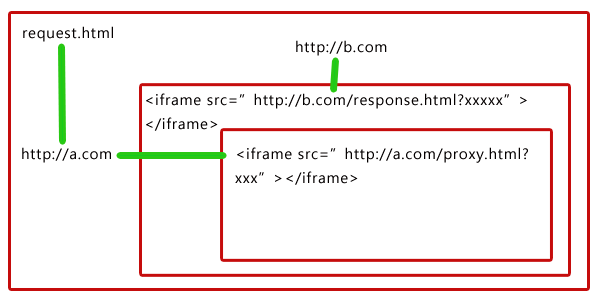
思路:要实现a.com域下的request.html页面请求域b.com下的process.php,可以将请求参数通过url传给response.html,由response.html向process.php发起真正的ajax请求(response.html与process.php都属于域b.com),然后将返回的结果通过url传给proxy.html,最后由于proxy.html和request.html是在同个域下,所以可以在proxy.html利用window.top 将结果返回在request.html完成真正的跨域。

ok, 先看看页面结构
a.com域下有:
request.html
proxy.html
b.com域下有:
response.html
process.php
先来看看request.html页面如下:
<!DOCTYPE HTML>

<html>

 <head>

  <title> New Document </title>

 </head>

 <body>

	<p id="result">这里将会填上响应的结果</p>

    <a id="sendBtn" href="javascript:void(0)">点击,发送跨域请求</a>

    <iframe id="serverIf" style="display:none"></iframe>

	<script>

		document.getElementById('sendBtn').onclick = function() {

			var url = 'http://b.com/demo/ajax/ajaxproxy/reponse.html',

				fn = 'GetPerson',          //这是定义在response.html的方法

				reqdata = '{"id" : 24}',   //这是请求的参数

				callback = "CallBack";     //这是请求全过程完成后执行的回调函数,执行最后的动作

			CrossRequest(url, fn, reqdata, callback);  //发送请求

		}

		function CrossRequest(url,fn,reqdata,callback) {

			var server = document.getElementById('serverIf');

			server.src = url + '?fn=' +encodeURIComponent(fn) + "&data=" +encodeURIComponent(reqdata) + "&callback="+encodeURIComponent(callback);

		}

		//回调函数

		function CallBack(data) {

			var str = "My name is " + data.name + ". I am a " + data.sex + ". I am " + data.age + " years old.";

			 document.getElementById("result").innerHTML = str;

		}

	</script>

 </body>

</html>
这个页面其实就是要告诉response.html:我要让你执行你定义好的方法GetPerson,并且要用我给你的参数'{"id" : 24}'。response.html纯粹是负责将CallBack这个方法名传递给下一位仁兄proxy.html,而proxy.html拿到了CallBack这个方法名就可以执行了,因为proxy.html和request.html是同域的。
response.html代码如下:
<!DOCTYPE HTML>

<html>

 <head>

  <title> New Document </title>

 </head>

 <body>

	 <iframe id="proxy"></iframe>

	<script>

		// 通用方法 ajax请求

		function _request (reqdata,url,callback) {

			var xmlhttp;

			if(window.XMLHttpRequest) {

				xmlhttp = new XMLHttpRequest();

			}else {

				xmlhttp = new ActiveXObject("Microsoft.XMLHTTP");

			}

			xmlhttp.onreadystatechange = function(){

				if(xmlhttp.readyState == 4 && xmlhttp.status == 200) {

					var data = xmlhttp.responseText;

					callback(data);

				}

			}

			xmlhttp.open('POST',url);

			xmlhttp.setRequestHeader("Content-Type", "application/json; charset=utf-8");

			xmlhttp.send(reqdata);

		}

		// 通用方法 获取url参数

		function _getQuery(key) {

			var query = location.href.split('?')[1],

				value = decodeURIComponent(query.split(key + "=")[1].split("&")[0]);

			return value;

		}

		//向process.php发送ajax请求

		function GetPerson(reqdata,callback) {

			var url = 'http://b.com/demo/ajax/ajaxproxy/process.php';

			var fn = function(data) {

				var proxy = document.getElementById('proxy');

				proxy.src = "http://a.com/demo/ajax/ajaxproxy/Proxy.html?data=" + encodeURIComponent(data) + "&callback=" + encodeURIComponent(callback);

			};

			_request(reqdata, url, fn);

		}

		(function(){

			var fn = _getQuery('fn'),

				reqdata = _getQuery("data"),

				callback = _getQuery("callback");

           eval(fn + "('" + reqdata +"', '" + callback + "')");

		})();

	</script>

 </body>

</html>
这里其实就是接收来自request.html的请求得到请求参数和方法后向服务器process.php发出真正的ajax请求,然后将从服务器返回的数据以及从request.html传过来的回调函数名传递给proxy.html。
接下来看看php代码如下,其实就是想返回一个json数据:
<?php

	$data = json_decode(file_get_contents("php://input"));

	header("Content-Type: application/json; charset=utf-8");

	echo ('{"id" : ' . $data->id . ', "age" : 24, "sex" : "boy", "name" : "huangxueming"}');

?>
最后就是proxy.html代码:
<!DOCTYPE HTML>

<html>

 <head>

  <title> New Document </title>

 </head>

 <body>

	<script>

		 function _getUrl(key) {//通用方法,获取URL参数

                       var query = location.href.split("?")[1],

			    value = decodeURIComponent(query.split(key + "=")[1].split("&")[0]);

                    return value;

               }

         (function() {

             var callback = _getUrl("callback"),

				 data = _getUrl("data");

             eval("window.top." + decodeURIComponent(callback) + "(" + decodeURIComponent(data) + ")");

         })();

	</script>

 </body>

</html>
这里也是最后一步了,proxy终于拿到了request.html透过response.html传过来的回调函数名以及从response.html直接传过来的响应数据,利用window.top执行request.html里定义的回调函数。
三:iframe高度自适应的问题。
iframe高度自适应分为2种,一种是同域下自适应 另外一种是跨域下自适应,下面我们来看看同域下iframe高度自适应的问题。
1.同域下iframe高度自适应的问题:
思路:获取被嵌套iframe元素,通过JavaScript取得被嵌套页面最终高度,然后在主页面进行设置来实现。
假如我们demo有iframe1.html和iframe2.html 下面贴上iframe1.html代码如下:
<!DOCTYPE HTML>

<html>

 <head>

  <title> New Document </title>

  <style>

	*{margin:0;padding:0;}

  </style>

 </head>

 <body>

	<iframe src="http://a.com/demo/ajax/iframeheight/iframe2.html" style="width:100%;border:1px solid #333;" frameborder="0" id="iframe"></iframe>

	<script>

		window.onload = function() {

			var iframeid = document.getElementById('iframe');

			if(iframeid && !window.opera) {

				if(iframeid.contentDocument && iframeid.contentDocument.body.offsetHeight) {

					iframeid.height = iframeid.contentDocument.body.offsetHeight;

				}else if(iframeid.Document && iframeid.Document.body.scrollHeight){

					iframeid.height = iframeid.Document.body.scrollHeight;

				}

			}

		}

	</script>

 </body>

</html>
iframe2.html
<!DOCTYPE HTML>

<html>

 <head>

  <title> New Document </title>

  <style>

	*{margin:0;padding:0;}

  </style>

 </head>

 <body>

	<div style="height:500px;"></div>

 </body>

</html>
就可以动态设置iframe1页面的高度为iframe2的高度了。
2. 跨域下iframe高度自适应的问题。
首先我们知道iframe跨域我们是不能用上面js方式来控制了,所以我们只能用个中间键 我们可以在a.com域下iframe1.html页面嵌套一个b.com域下的iframe2.html页面,然后我在iframe2.html页面嵌套个和iframe1.html相同域的iframe3.html页面了,这样的话 iframe1.html和iframe3.html就可以无障碍的进行通信了,因为页面iframe2.html嵌套iframe3.html,所以iframe2.html可以改写iframe3.html的href值。
iframe1中的内容:
iframe1.html内容主要接受iframe3.html页面传过来的内容并且去完成相应的操作。iframe1.html代码如下:
<iframe src="http://b.com/demo/ajax/iframeheight/iframe2.html" style="width:400px;height:200px;" id="iframe"></iframe>

<script>

   var ifr_el = document.getElementById("iframe");

   function getIfrData(data){

    ifr_el.style.height = data+"px";

   }

</script>
iframe2.html中的内容:
iframe2.html内容是怎么把值传给iframe3.html页面,刚才说了是将值传递到iframe3.html页面的href中,所以只要修改iframe的src就可以,因为不用刷新C页面,所以可以用过hash的方式传递给iframe3.html页面.iframe2.html代码如下:
<!DOCTYPE HTML>

<html>

 <head>

  <title> New Document </title>

  <style>

	*{margin:0;padding:0;}

  </style>

 </head>

 <body>

	<iframe id="iframe" src="http://a.com/demo/ajax/iframeheight/iframe3.html" width="0" height="230px"></iframe>

	<script>

		var oldHeight = 0,

		      ifr_el = document.getElementById("iframe");

		t && clearInterval(t);

		var t = setInterval(function(){

			var height = document.body.scrollHeight;

			if(oldHeight != height) {

				oldHeight = height;

				ifr_el.src += '#' +oldHeight;

			}

		},200);

	</script>

 </body>

</html>
可以看到 默认情况下 iframe1.html 页面我给iframe2.html的高度是200像素 但是在iframe2.html我给iframe3.html高度是230像素,那么正常情况下是有滚动条的,那么现在我是想在iframe2.html获取滚动条的高度,把高度传给通过iframe3.html的src里面去,然后在iframe3.html页面里获取这个高度值 传给iframe1.html(因为iframe1.html和iframe3.html是同域的),所以iframe1.html能取到这个高度值,再设置下本身的高度就是这个值就ok了。
iframe3.html页面的唯一功能就是接收iframe2.html页面通过href传进来的值并且传递给iframe1.html页面,可到iframe2.html页面传来的值可以通过一个定时器不停去查看location.href是 否被改变,但是这样感觉效率很低,还有个方式就是在新的浏览器中通过onhashchange事件 (IE8+,Chrome5.0+,Firefox3.6+,Safari5.0+,Opera10.6+)来监听href的改变。
iframe3.html代码如下:
<script>

	var oldHeight = 0;

	t && clearInterval(t);

	var t = setInterval(function(){

		var height = location.href.split('#')[1];

		if(height && height != oldHeight) {

			oldHeight = height;

			if(window.parent.parent.getIfrData) {

				window.parent.parent.getIfrData(oldHeight);

			}

		}

	},200);

	</script>
这样就可以解决通过跨域实现iframe自适应高度的问题了。
iframe之间通信问题及iframe自适应高度问题的更多相关文章
- iframe嵌入其他网站,如何自适应高度
终于有一周时间,工作不那么忙了,腾出手来总结下工作过程中学到的知识. 每天遇到新问题,解决新问题,但是却很少有时间去仔细研究下,或者总结下.攒的多了,就得从头捋一遍. 说下iframe自适应高度: 搜 ...
- javascript 中contentWindow和 frames和iframe之间通信
iframe父子兄弟之间通过jquery传值(contentWindow && parent),iframe的调用包括以下几个方面:(调用包含html dom,js全局变量,js方法) ...
- iframe 如何让它展现内容自适应高度
引用: <iframe id="ifm1" runat="server" src="/comment/page1?id=@productId&q ...
- 使iframe随内容(target到iframe的内容)改变而自适应高度,完美解决各种获取第一个demo高度后第二个高度不变情况
转自:http://caiceclb.iteye.com/blog/281102 很高兴,终于使用jquery实现了点击外部链接,更改iframe内容时,iframe的高度自适应问题. 失败的测试就不 ...
- layer iframe 之间传值和关闭iframe弹窗
1.访问父页面元素值 var parentId=parent.$("#id").val();//访问父页面元素值 2.访问父页面方法 var parentMethodValue=p ...
- iframe 完全跨域自适应高度
1.跨域访问页面, 需要访问后台的页面,通过后台调转 2.跨域自适应宽高 思路:通过相互嵌套,获取跨域页面的高度,通过src传回到本域,通过parent方法设置主页的iframe的高度 index ...
- iframe标签用法详解(属性、透明、自适应高度)
1.iframe 定义和用法 iframe 元素会创建包含另外一个文档的内联框架(即行内框架). HTML 与 XHTML 之间的差异 在 HTML 4.1 Strict DTD 和 XHTML 1. ...
- 网页制作技巧:iframe自适应高度
转自:http://www.enet.com.cn/article/2012/0620/A20120620126237.shtml 通过Google搜索iframe 自适应高度,结果5W多条,搜索if ...
- iframe标签用法详解(属性、透明、自适应高度)(总结)
<iframe src="http://www.jb51.net" width="200" height="500"> 脚本之家 ...
随机推荐
- 企业数据总线(ESB)和注册服务管理(dubbo)的区别
企业数据总线(ESB)和注册服务管理(dubbo)的区别 转载 2015年11月04日 09:05:14 7607 企业数据总线(ESB)和注册服务管理(dubbo)的区别 2015-03-09 0 ...
- 注册表项关于start参数的说明
start = {0,1,2,3,4}0 == 由核心装载器装载1 == 由I/O子系统装载2 == 自动启动3 == 手工启动4 == 禁止启动
- PHP操作mongoDB 笔记
转自 http://blog.csdn.net/black_ox/article/details/22678747 命令也可以在参考http://www.jb51.net/article/51601. ...
- windows下vscode修复c++找不到头文件
因为原博客太长将部分内容分开 vscode找不到头文件的问题是由于windows下vscode默认的编译器是微软的MSVC(vs使用的编译器)的头文件路径 如果你没有安装vs肯定会因为找不到头文件而报 ...
- 使用RetionalRose根据现有的java工程逆向生成类图
1.进入RetionalRose选择J2EE模板 2.在菜单栏选择tools->java/j2EE->reverse engineer 3.编辑路径Edit CLASSPATH选择要生成类 ...
- 浏览器唤起APP的功能
http://blog.html5funny.com/2015/06/19/open-app-from-mobile-web-browser-or-webview/ http://panli.mu.g ...
- Zabbix agentd 命令
#zabbix_agentd -p 查看zabbix所有的内置监控项 [root@nod01 zabbix_agentd.d]# zabbix_agentd -pagent.hostname [s|Z ...
- Redis 在线管理工具(phpRedisAdmin)介绍 两次git
phpRedisAdmin is a simple web interface to manage Redis databases. phpRedisAdmin 在 Redis clients 的列表 ...
- version control(关于版本控制)
版本控制(Version Control Systems)是一种记录一个或若干文件内容变化,以便将来查阅特定版本修订情况的系统. 这个系统可以自动帮我们备份文件的每一次更改,并且可以非常方便的恢复到 ...
- Css学习(三)
1 行高 ◆浏览器默认文字大小 浏览器默认文字大小:16px 行高:是基线与基线之间的距离 行高=文字高度+上下边距 一行文字行高和父元素高度一致的时候,垂直居中显示. 行高的单位 总结:单位除了像素 ...