
Android通知栏沉浸式/透明化完整解决方案
转载请注明出处:http://www.cnblogs.com/cnwutianhao/p/6640649.html
参考文献:https://github.com/ljgsonx/adaptiveStatusBar
Google在Android 4.4版本加入了半透明的界面样式,在Android 5.0的时候推出了Material Design的概念。
这些样式的加入使得原本死板、丑陋、和App颜色不一致的通知栏变得更亲和、顺眼、用户体验更友好。
作者是常年做对日项目的,对日项目以界面简洁功能强大而著称。最近客户要求UI方面做一些改变,让App看上去给用户感觉更友好。所以就提到了Android 4.4以后的通知栏问题。
网上关于通知栏的文章铺天盖地,什么沉浸式,什么半透明。。。挺会拽词。也不乏有Android大神也写过类似的文章,但是那文章能看?长篇大论,程序员够累了,哪有那些时间看你在那里车轱辘话满天飞,说了一大顿表达不明白,浪费时间,写的一堆垃圾文章。
本篇文章杜绝冗余,做到最简单,最实用,对日项目比的不是代码量,而是最少的代码写出最漂亮的程序。
文章对应的项目已上传到Github,欢迎Star,欢迎Fork。地址:https://github.com/cnwutianhao/ImmersiveDemo
先上Gif图,Android 4.4 和 Android 6.0 实现样式效果之后的对比图
Android 4.4 Android 6.0
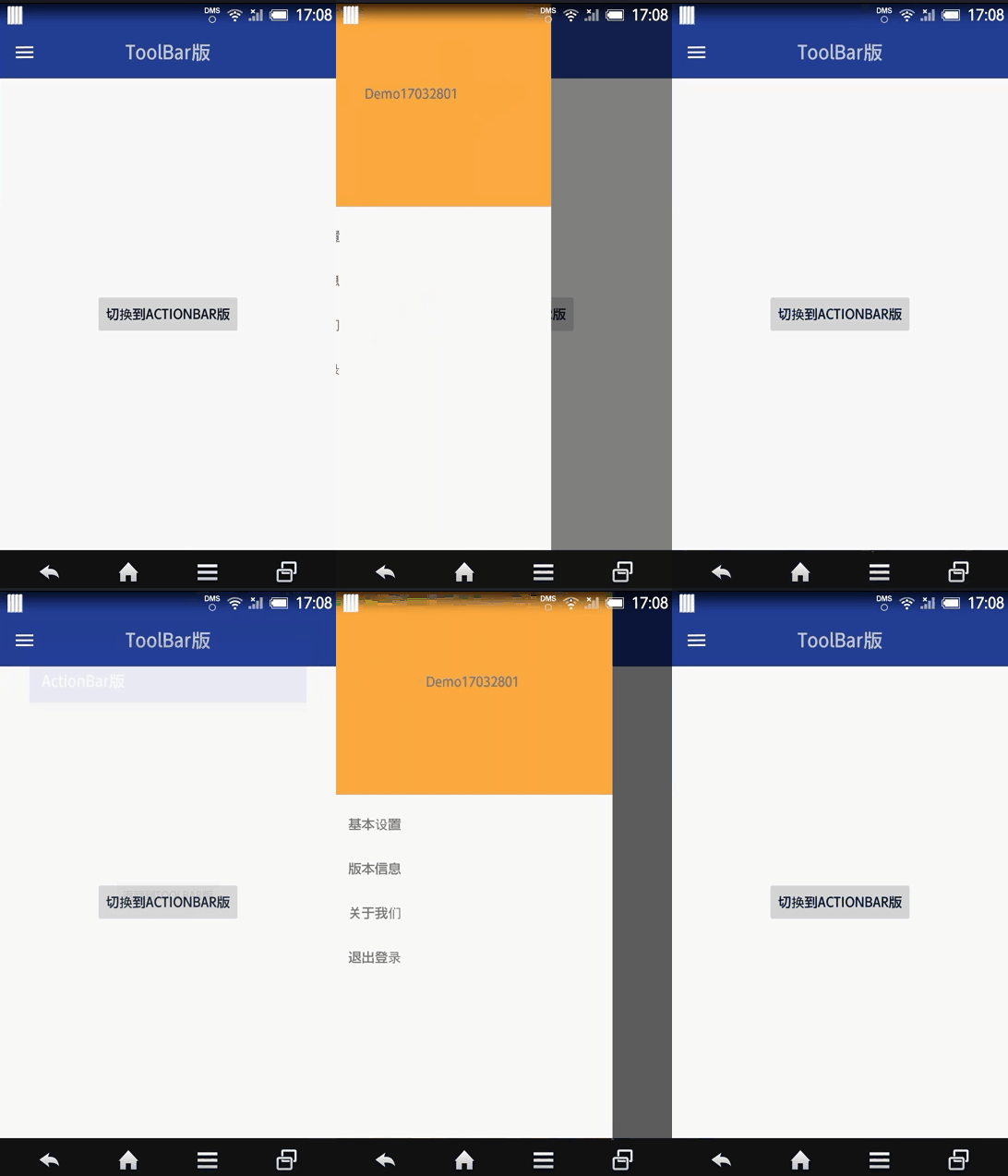
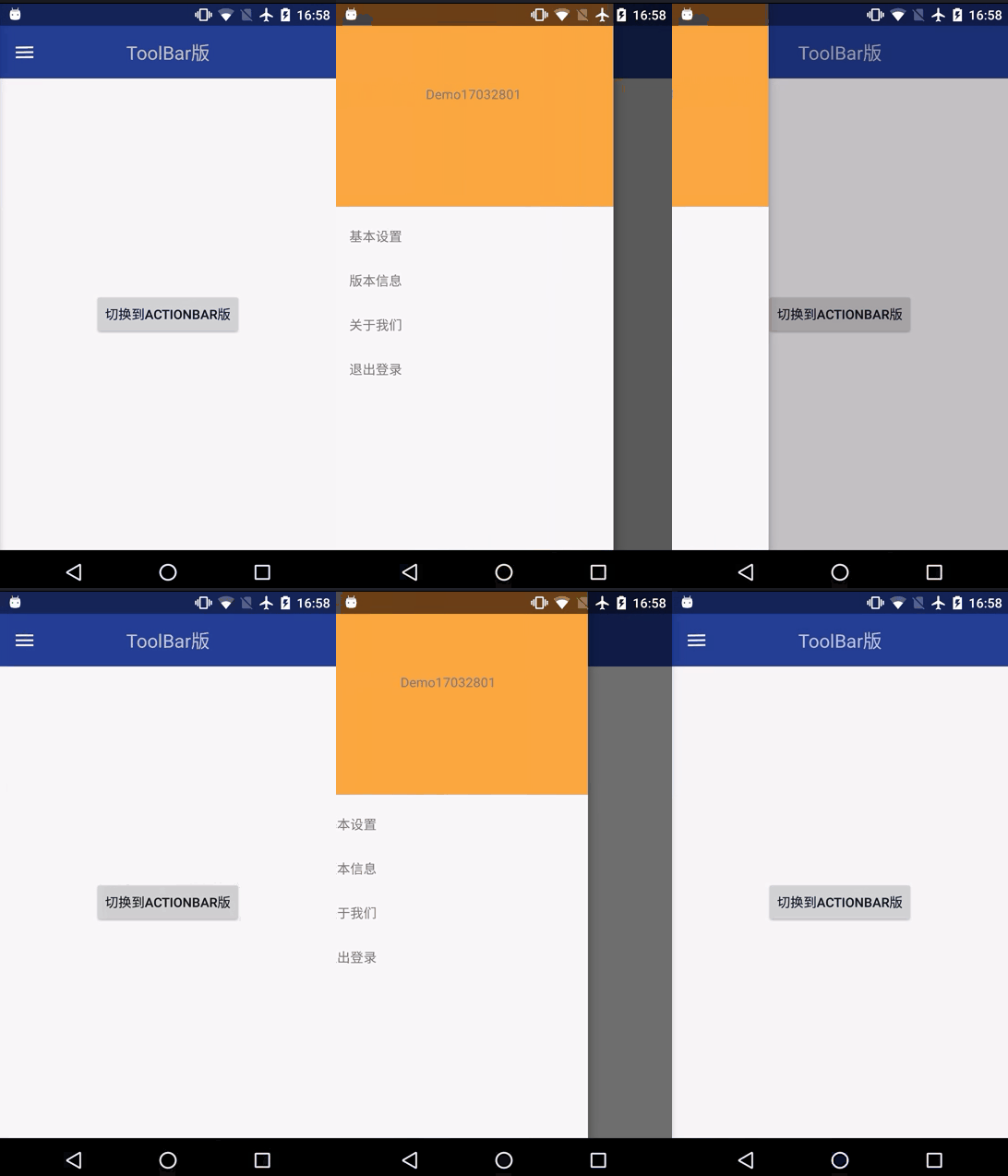
实现样式效果我们有两种方案
①DrawerLayout+Toolbar
②ActionBar
下面我们就来一一实现
①DrawerLayout+Toolbar
添加依赖库(谷歌提供)
compile 'com.android.support:design:25.3.1'
布局代码1:使用 DrawerLayout做最外层,引入NavigationView侧边抽屉控件
<?xml version="1.0" encoding="utf-8"?>

<android.support.v4.widget.DrawerLayout xmlns:android="http://schemas.android.com/apk/res/android"

    xmlns:app="http://schemas.android.com/apk/res-auto"

    xmlns:tools="http://schemas.android.com/tools"

    android:id="@+id/id_drawerlayout"

    android:layout_width="match_parent"

    android:layout_height="match_parent"

    tools:context="com.tnnowu.android.demo17032801.MainActivity">

    <include layout="@layout/content_layout" />

    <android.support.design.widget.NavigationView

        android:id="@+id/id_navigationview"

        android:layout_width="match_parent"

        android:layout_height="match_parent"

        android:layout_gravity="left"

        app:itemTextColor="@color/c_light_gray3" />

</android.support.v4.widget.DrawerLayout>
布局代码2:里层嵌套Toolbar
<?xml version="1.0" encoding="utf-8"?>

<LinearLayout xmlns:android="http://schemas.android.com/apk/res/android"

    xmlns:app="http://schemas.android.com/apk/res-auto"

    android:layout_width="match_parent"

    android:layout_height="match_parent"

    android:orientation="vertical">

    <android.support.v7.widget.Toolbar

        android:id="@+id/toolbar"

        android:layout_width="match_parent"

        android:layout_height="wrap_content"

        android:background="#30469b"

        android:paddingTop="@dimen/toolbar_padding_top"

        app:popupTheme="@style/ThemeOverlay.AppCompat.Light"

        app:theme="@style/ThemeOverlay.AppCompat.Dark.ActionBar">

        <TextView

            android:layout_width="wrap_content"

            android:layout_height="wrap_content"

            android:layout_gravity="center"

            android:text="ToolBar版"

            android:textSize="20sp" />

    </android.support.v7.widget.Toolbar>

    <!--内容显示布局-->

    <RelativeLayout

        android:layout_width="match_parent"

        android:layout_height="match_parent">

        <Button

            android:id="@+id/goToActionBar"

            android:layout_width="wrap_content"

            android:layout_height="wrap_content"

            android:layout_centerInParent="true"

            android:text="切换到ActionBar版" />

    </RelativeLayout>

</LinearLayout>
Style样式:无ActionBar
<style name="AppThemeNoActionBar" parent="Theme.AppCompat.Light.NoActionBar">

    <!-- Customize your theme here. -->

    <item name="colorPrimary">@color/colorPrimary</item>

    <item name="colorPrimaryDark">@color/colorPrimaryDark</item>

    <item name="colorAccent">@color/colorAccent</item>

</style>
主程序代码:除了要在onCreate()里面初始化 DrawerLayout、NavigationView、Toolbar控件 即initViews(),还要在onCreate()里面添加手机系统版本判断和相应的样式适配initImmersive()
private void initViews() {

        mDrawerLayout = (DrawerLayout) findViewById(R.id.id_drawerlayout);

        mNagigationView = (NavigationView) findViewById(R.id.id_navigationview);

        mNagigationView.inflateHeaderView(R.layout.header_nav);

        mNagigationView.inflateMenu(R.menu.menu_nav);

        mToolbar = (Toolbar) findViewById(R.id.toolbar);

        mBtn = (Button) findViewById(R.id.goToActionBar);

        mToolbar.setTitle("");

        if (mToolbar != null) {

            setSupportActionBar(mToolbar);

        }

        ActionBarDrawerToggle mActionBarDrawerToggle = new ActionBarDrawerToggle(this, mDrawerLayout, mToolbar, R.string.open, R.string.close);

        mActionBarDrawerToggle.syncState();

        mDrawerLayout.setDrawerListener(mActionBarDrawerToggle);

        mBtn.setOnClickListener(new View.OnClickListener() {

            @Override

            public void onClick(View v) {

                startActivity(new Intent(MainActivity.this, DemoActionBarActivity.class));

            }

        });

    }
private void initImmersive() {

        if (Build.VERSION.SDK_INT >= Build.VERSION_CODES.KITKAT) {

            WindowManager.LayoutParams localLayoutParams = getWindow().getAttributes();

            localLayoutParams.flags = (WindowManager.LayoutParams.FLAG_TRANSLUCENT_STATUS | localLayoutParams.flags);

            if (Build.VERSION.SDK_INT < Build.VERSION_CODES.LOLLIPOP) {

                //将侧边栏顶部延伸至status bar

                mDrawerLayout.setFitsSystemWindows(true);

                //将主页面顶部延伸至status bar;虽默认为false,但经测试,DrawerLayout需显示设置

                mDrawerLayout.setClipToPadding(false);

            }

        }

    }
这样Drawlayout + Toolbar就实现了样式改变。
②ActionBar
布局代码
<?xml version="1.0" encoding="utf-8"?>

<LinearLayout xmlns:android="http://schemas.android.com/apk/res/android"

    android:layout_width="match_parent"

    android:layout_height="match_parent"

    android:background="@color/colorPrimary"

    android:fitsSystemWindows="true"

    android:orientation="vertical">

    <!--内容显示布局-->

    <RelativeLayout

        android:layout_width="match_parent"

        android:layout_height="match_parent"

        android:background="@color/c_light_white">

        <Button

            android:id="@+id/goBack"

            android:layout_width="wrap_content"

            android:layout_height="wrap_content"

            android:layout_centerInParent="true"

            android:text="返回到ToolBar版" />

    </RelativeLayout>

</LinearLayout>
Style样式:有ActionBar
<style name="AppThemeActionBar" parent="Theme.AppCompat.Light.DarkActionBar">

    <!-- Customize your theme here. -->

    <item name="colorPrimary">@color/colorPrimary</item>

    <item name="colorPrimaryDark">@color/colorPrimaryDark</item>

    <item name="colorAccent">@color/colorAccent</item>

</style>
主程序代码:
public class DemoActionBarActivity extends AppCompatActivity {

    private Button mBtn;

    @Override

    protected void onCreate(Bundle savedInstanceState) {

        super.onCreate(savedInstanceState);

        setContentView(R.layout.activity_main_actionbar);

        if (Build.VERSION.SDK_INT >= Build.VERSION_CODES.KITKAT) {

            WindowManager.LayoutParams localLayoutParams = getWindow().getAttributes();

            localLayoutParams.flags = (WindowManager.LayoutParams.FLAG_TRANSLUCENT_STATUS | localLayoutParams.flags);

        }

        initView();

    }

    private void initView() {

        mBtn = (Button) findViewById(R.id.goBack);

        mBtn.setOnClickListener(new View.OnClickListener() {

            @Override

            public void onClick(View v) {

                finish();

            }

        });

    }

}
这样ActionBar就实现了样式改变。
无冗余代码,对日项目都在用的代码你为何不尝试使用。
关注我的新浪微博,获取更多Android开发资讯!
关注科技评论家,领略科技、创新、教育以及最大化人类智慧与想象力!
Android通知栏沉浸式/透明化完整解决方案的更多相关文章
- Android:沉浸式状态栏(一)工具类
参考自Android 沉浸式状态栏完美解决方案 基本功能 状态栏深色或浅色图标切换 自定义状态栏背景 设置沉浸式状态栏 先准备几个工具类 1.SystemBarTintManager package ...
- Android 中沉浸式状态栏实现
Android 中沉浸式状态栏实现方式如下 计算状态栏高度及调用沉浸式状态栏的相关API方法 package com.example.status; import android.annotation ...
- 8.Android 系统状态栏沉浸式/透明化解决方案
转载:http://www.jianshu.com/p/34a8b40b9308 前言 网上已经有很多有关于系统状态栏的解决方案,这篇文章也不会有什么新奇的解决方案,都是本人经过自己试验,统计提炼出来 ...
- Android App 沉浸式状态栏解决方案
伴随着 Android 5.0 发布的 Material Design,让 Android 应用告别了以前的工程师审美,迎来了全新的界面,灵动的交互,也让越来越多的 App 开始遵从 material ...
- Android 沉浸式状态栏完美解决方案
现在搜索Android 沉浸式状态栏,真的是一堆一堆,写的特别多,但是真正用的舒服的真没有,在这里自己整理一下开发记录 注意,在使用这个步骤过程之前,请把之前设置的代码注释一下 把布局带有androi ...
- 81.Android之沉浸式状态栏攻略
转载:http://blog.csdn.net/lmj623565791/article/details/48649563/ 一.概述 近期注意到QQ新版使用了沉浸式状态栏,ok,先声明一下:本篇博客 ...
- 【Android】沉浸式状态栏实现
在Android4.4(API 19)及以后的版本中都增加了对沉浸式状态栏的支持,实现起来也很简单,将application的主题稍作修改即可: <style name="AppThe ...
- Android 之 沉浸式状态栏及顶部状态栏背景色设置
现在很多应用都引用了沉浸式状态栏,如QQ,效果下图: 效果很酷炫,其实设置也很简单.但是,需要注意的是,这种效果只能在API19以及以上版本中才能够做到. 方法一: 首先,如果想让界面Activity ...
- Android中沉浸式状态栏的应用
在Android5.0版本后,谷歌公司为Android系统加入了很多新特性,刷新了Android用户的体验度.而其中的一个新特性就是沉浸式状态栏.那么问题来了,很多非移动端的小伙伴就要问了,什么是沉浸 ...
随机推荐
- linux BASH shell下设置字体及背景颜色
BASH shell下设置字体及背景颜色 echo -e "\e[31mtest\e[41m" \e[30m 将字符的显示颜色改为黑色 \e[31m 将字符的显示颜色改为红色 \e ...
- Openstack 网络服务 Neutron介绍和控制节点部署 (九)
Neutron介绍 neutron是openstack重要组件之一,在以前是时候没有neutron项目. 早期的时候是没有neutron,早期所使用的网络的nova-network,经过版本改变才有个 ...
- Scala进阶之路-Scala的基本语法
Scala进阶之路-Scala的基本语法 作者:尹正杰 版权声明:原创作品,谢绝转载!否则将追究法律责任. 一.函数式编程初体验Spark-Shell之WordCount var arr=Array( ...
- 《Two Dozen Short Lessons in Haskell》(二十四)代数类型
这是<Two Dozen Short Lessons in Haskell>这本书的最后一章,第23章没有习题. 这一章里介绍了Haskell如果自定义一种类型,并且用一个双人博弈游戏为例 ...
- 在Ubuntu14.04 64bit上搭建单机Spark环境,IDE为Intelli IDEA
在Ubuntu14.04 64bit上搭建单机Spark环境,IDE为Intelli IDEA 一. 环境 Ubuntu14.04 64位 JDK 1.8.0_73 scala-2.10. ...
- Yii 自定义模型路径
例如现有两个 Yii 项目,分别是 test1 和 test2.在 test1 中,已经有模型了,test2 直接调用 test1 中的模型,其实添加个别名,然后修改下配置即可. 先在 index.p ...
- Jenkins mac pkg安装 后默认配置文件/启动路径
自启动文件路径 /Library/LaunchDaemons/org.jenkins-ci.plist jenkins.war 执行文件路径 /Applications/Jenkins/jenkins ...
- 原生JS获取元素的位置与尺寸
1.内高度.内宽度: 内边距 + 内容框 element.clientWidth element.clientHeight 2.外高度,外宽度: 边框 + 内边距 + 内容框 element.offs ...
- str函数
python2: a = str(unicode类对象) #str()函数如果接收的参数是unicode类,会转换为python的defaultencoding格式,所以,如果unicode类对象是汉 ...
- 『Matplotlib』数据可视化专项
一.相关知识 官网介绍 matplotlib API 相关博客 matplotlib绘图基础 漂亮插图demo 使用seaborn绘制漂亮的热度图 fig, ax = plt.subplots(2,2 ...