
C#——性能计数器
简要Windows性能监视器:
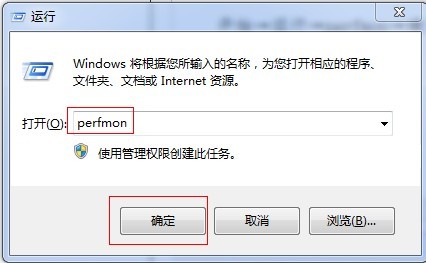
打开Windows性能监视器的步骤如下:
开始→运行→perfmon→确定
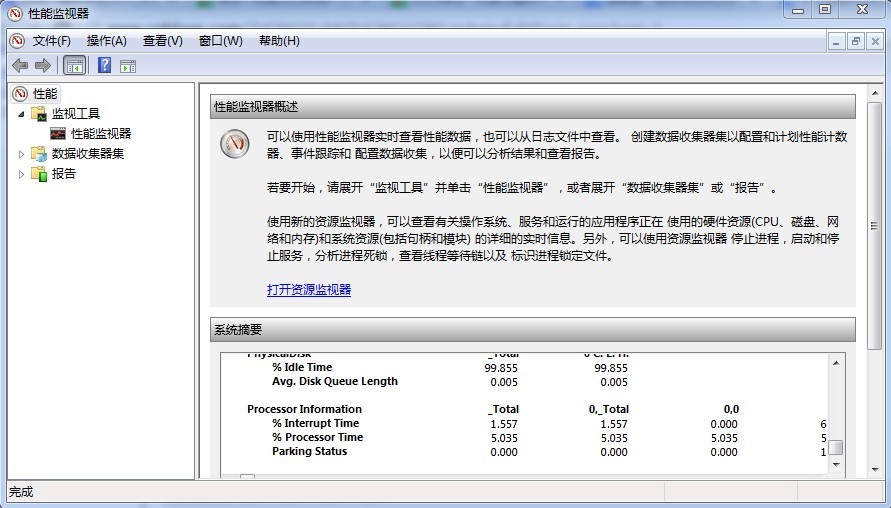
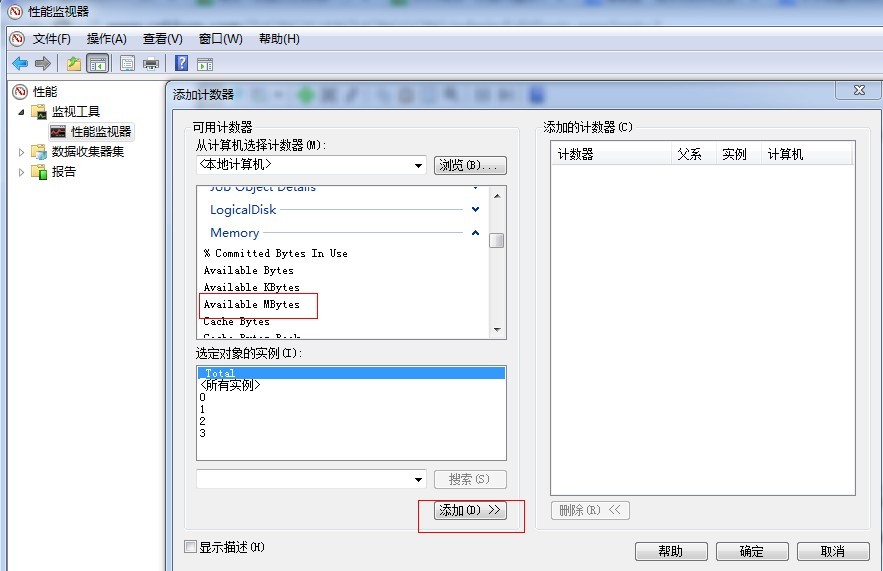
在这里我们可以选择添加我们要监控的计数器,比如:cpu使用率、内存使用量等,作为asp.net攻城师我们还可以使用它来监控我们站点的请求队列、应道队列数量、请求总数等。比如我们要开可用内存的信息:
可用内存大小事实数据如下:
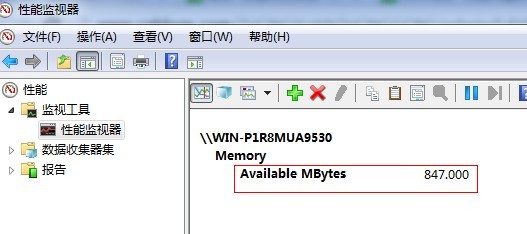
瞬间感觉到在微软怀抱下的孩纸好幸福有木有。好啦接下来我们来看看C#是如何调用它的,并且是如何自定义自己的计数器的呢?
C#如何调用本地主机Windows性能监视器获取数据
上代码:
|
1
2
3
4
5
6
7
8
9
10
11
12
13
14
15
16
17
18
19
20
21
22
23
24
|
using System;using System.Collections.Generic;using System.Text;//应引用此名门空间using System.Diagnostics;using System.Threading;namespace Performance_Demo{ class Class1 { static void Main(string[] arge) { //性能计数器组件类 PerformanceCounter cpu = new PerformanceCounter("Memory", "Available MBytes", ""); while (true) { Console.WriteLine("{0} MB",cpu.NextValue()); Thread.Sleep(1000); } } }} |
结果如下:
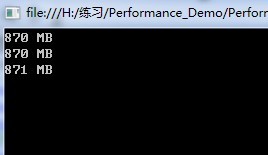
代码很简单,最主要的就是一个PerformanceCounter类的实例cpu,PerformanceCounter类有5个构造函数重载,就代码中的构造函数讲述,构造函数为new PerformanceCounter(“计数器类型名称”,“计数器名称”,“计数器实例名称”),(如果该计数器为单实例,那么计数器实例名称可为“”)。可使用实例的NextValue()方法获取当前值。
呵呵,当你看到代码时会说“如此 so easy”,但你可能对“计数器类型名称”,“计数器名称”,“计数器实例名称”这三个名称有点糊涂啦吧,别着急,先看一张图:
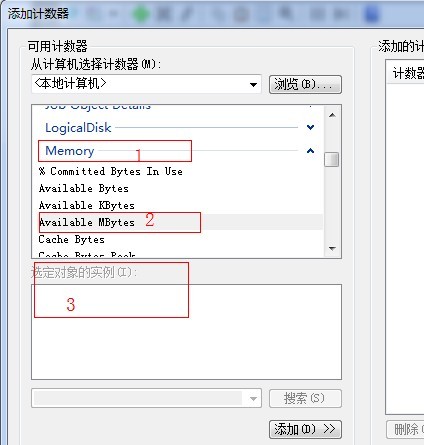
对这张图不陌生吧,没错,添加可用内存计数器时见过,那么“1”就是“计数器类型名称”,“2”就是“计数器名称”,“3”就是“计数器实例名称”(应为该计数器是单实例的,所以“3”下面没有具体的实例),所以三者的关系我们可以归纳为:计数器类型》计数器》计数器实例。赶紧试一下吧小伙伴们。。。
C#如何调用远程主机Windows性能监视器获取数据
上代码
|
1
2
3
4
5
6
7
8
9
10
11
12
13
14
15
16
17
18
19
20
21
22
23
24
25
26
27
28
29
30
31
32
33
34
35
36
37
38
39
40
41
42
|
class Class3{ //访问远程主机的性能监视器 static void Main(string[] arge) { //先于远程IP建立连接 string tmpstr = "net use \\\\" + "172.16.164.000" + "\\ipc$ " + "密码" + " /user:" + "用户名"; RunDOS(tmpstr); //性能计数器组件类 PerformanceCounter cpu = new PerformanceCounter("Memory", "Available MBytes", "", "172.16.164.215"); while (true) { Console.WriteLine("{0} MB", cpu.NextValue()); Thread.Sleep(1000); } } //使用DOS运行命令 static void RunDOS(string DOS) { Process p = null; p = new Process(); p.StartInfo.FileName = "cmd.exe"; p.StartInfo.UseShellExecute = false; p.StartInfo.RedirectStandardInput = true; p.StartInfo.RedirectStandardOutput = true; p.StartInfo.RedirectStandardError = true; p.StartInfo.CreateNoWindow = true; p.Start(); string strOutput = ""; p.StandardInput.WriteLine(DOS); p.StandardInput.WriteLine("exit"); while (p.StandardOutput.EndOfStream) { strOutput = p.StandardOutput.ReadLine(); } p.WaitForExit(); p.Close(); }} |
代码也很简单,与调用本地主机不同之处就是多了一段运行DOS命令的代码,目的就是先与远程主机建立连接,需要指定远程主机IP、用户名、密码(可以为一般管理员身份),此时需要注意的是远程主机上的“Remote Registry”服务应处于启动状态,目的是为了能让远程用户能修改此计算机上的注册表。
C#如何自定义计数器
前面我们学习如何使用C#调用Windows性能监视器,来获取系统的各个计数器实时数据,那么我们可不可以自己定义一个计数器,并且添加到性能监视器中供我们实时查看呢?答案是肯定的。试想一下我们在日常开发当中会有类似这样的需求:我们有一个队列(可能是各种命令啊或者是消息啊、订单啊等等),那么我们想有一个可视化的东西来监控一下这个队列中积压了多少内容,当然啦我们万能的攻城师们肯定希望积压数量永远是0啦,哈哈,此时我们就可以为我们的队列设计一个计数器,那么我们就可以在Windows性能监视器中找到并且实时查看队列积压情况啦。(开始动手吧)
先上代码:
(代码就语无伦次吧,神马都不讲究啦)
|
1
2
3
4
5
6
7
8
9
10
11
12
13
14
15
16
17
18
19
20
21
22
23
24
25
26
27
28
29
30
31
32
33
34
35
36
37
38
39
40
41
42
43
44
45
46
47
48
49
50
51
52
53
54
55
56
57
58
59
60
61
62
63
64
65
66
67
68
69
70
71
72
73
74
75
76
|
using System;using System.Collections.Generic;using System.Text;using System.Diagnostics;using System.Collections;namespace Performance_Demo{ class Class2 { //我的队列 static Queue<int> myQueue = new Queue<int>(); //计数器实例 static PerformanceCounter counter1 = null; static void Main(string[] arge) { //计数器类型名称 string CategoryName = "a_yigebeiyiwangdebaozi"; //计数器名称 string CounterName = "a_yigebeiyiwangdebaozi_counter1"; if (PerformanceCounterCategory.Exists(CategoryName)) { PerformanceCounterCategory.Delete(CategoryName); } CounterCreationDataCollection ccdc = new CounterCreationDataCollection(); //计数器 CounterCreationData ccd = new CounterCreationData(CounterName, "myCounter", PerformanceCounterType.NumberOfItems64); ccdc.Add(ccd); //使用PerformanceCounterCategory.Create创建一个计数器类别 PerformanceCounterCategory.Create(CategoryName, "", PerformanceCounterCategoryType.MultiInstance, ccdc); //初始化计数器实例 counter1 = new PerformanceCounter(); counter1.CategoryName = CategoryName; counter1.CounterName = CounterName; counter1.InstanceName = "myCounter1"; counter1.InstanceLifetime = PerformanceCounterInstanceLifetime.Process; counter1.ReadOnly = false; counter1.RawValue = 0; while (true) { EnqueueQueue(); System.Threading.Thread.Sleep(1000); DequeueQueue(); } } static void EnqueueQueue() { int C = new Random().Next(10); for (int i = 0; i < C; i++) { myQueue.Enqueue(i); //计数器加一 counter1.Increment(); } } static void DequeueQueue() { int C = new Random().Next(20); for (int i = 0; i < C; i++) { if (myQueue.Count == 0) break; myQueue.Dequeue(); //计数器减一 counter1.Decrement(); } } }} |
我们先在性能监视器中找到我们的计数器如下:
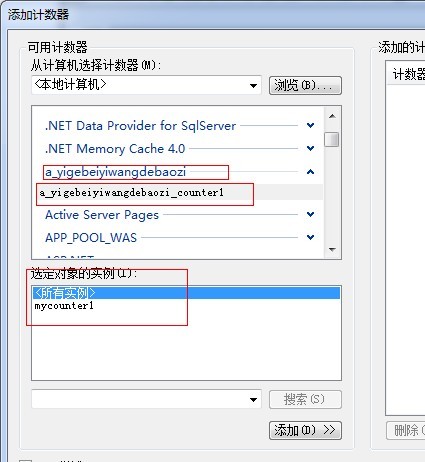
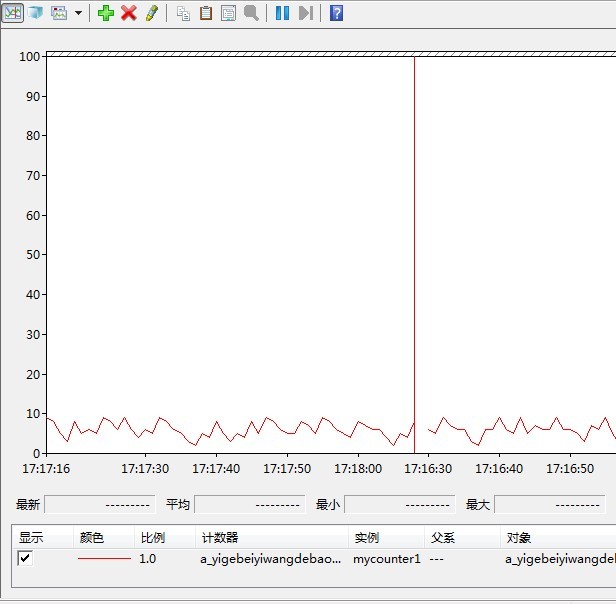
我们队列的实时数据如下:
这个代码可以检测msmq里消息的数量:
using System.Diagnostics;

PerformanceCounter objCounter = new PerformanceCounter("MSMQ Queue", "Messages in Queue", @"mymachine\private$\MyQueue");

int count = (int)(objCounter.NextValue());
C#——性能计数器的更多相关文章
- C# 利用性能计数器监控网络状态
本例是利用C#中的性能计数器(PerformanceCounter)监控网络的状态.并能够直观的展现出来 涉及到的知识点: PerformanceCounter,表示 Windows NT 性能计数器 ...
- 使用PowerShell收集多台服务器的性能计数器
写在前面 当管理多台Windows Server服务器时(无论是DB.AD.WEB以及其他的应用服务器),当出现性能或其他问题后,参阅性能计数器都是一个非常好的维度从而推测出问题可能出现的原因 ...
- SQL Server性能计数器部署(批量)
一.计数器部署项目介绍 SQL Server每个服务器,日常需要监控的计数器指标高达上百,若一个个手动添加非常麻烦.此项目通过命令行工具针对指定计数器集成部署,提高部署效率.此包括开发数据库互联(OD ...
- SQL Server性能计数器收集汇总方案(Reporting Service)
通过收集计数器信息,并将计数器信息汇总为不同粒度存储,以Reporting Service报表服务器显示.以下是计数器收集汇总的基本架构. 笔者需要收集的SQL Server计数器包括:SQL Ser ...
- 性能计数器与profiler的组合性能诊断
性能计数器和sql profiler都是常用的性能诊断工具和优化工具,最近和群友聊天发现很多人竟然不知道这两个可以“组合”使用,所以这篇算是一篇扫盲贴吧. 两种工具简述 通过计数器可以收集两部分内容: ...
- Buffer cache hit ratio性能计数器真的可以作为内存瓶颈的判断指标吗?
Buffer cache hit ratio官方是这么解释的:“指示在缓冲区高速缓存中找到而不需要从磁盘中读取的页的百分比.” Buffer cache hit ratio被很多人当做判断内存的性能指 ...
- SQL Server 2008 安装过程中遇到“性能计数器注册表配置单元一致性”检查失败 问题的解决方法
操作步骤: 1. 在 Microsoft Windows 2003 或 Windows XP 桌面上,依次单击"开始"."运行",然后在"打开&quo ...
- 使用WMI和性能计数器监控远程服务器权限设置
应用场景:在web服务器中,通过.NET编码使用WMI查询远程服务器的一些硬件配置信息,使用性能计数器查询远程机器的运行时资源使用情况.在网上没有找到相关的东西,特记录与大家共享. 将web服务器和所 ...
- (转载)Windows常见性能计数器(较好的说明)
转载地址:http://blog.csdn.net/dfbrt56/article/details/3341591 Windows常见性能计数器 性能计数器(counter)是描述服务器或操作系统性能 ...
- sqlserver服务器常用的性能计数器
sqlserver服务器常用的性能计数器,在此标记. 性能对象 计数器 说明 Processor %Processor Time %Privileged Time 建议值:持续低于80 建议值:持续低 ...
随机推荐
- .net中的一般处理程序实例
最近在学习一般处理程序,也学习了一些jQuery的异步操作,于是就想着亲手做一个小的登陆,锻炼一下自己. 1.首先新建了一个项目LoginDemo,在此基础上又添加了一个一般处理程序BackLogin ...
- 【问题收集·中级】关于指示器自定义图片与UUID
博友问题: 大哥 求教一下 iOS7 能否获取到 uuid 大哥 忙不忙 iOS的加载的时候 动态旋转效果 是 图片 嘛 ? 我的回答 05:43:34hud指示器我用的是这个MBProgressHU ...
- 洛谷 P1563 玩具谜题
如果你想不耗费脑力做出这个题目,往下看: 本萌新看到这个题目,想到了乘法法则,题目中左右方向要判断两次,很耗脑力,和乘法中的正负号判断非常像. 抽象一点:这个人向内向外就是乘法中括号外的正负号,他的左 ...
- Django用ajax进行post请求
post请求有两种,跨域和不跨域 1.不跨域 # 不跨域的 view.py def re_json(request): print(request.POST['name']) p1 = Product ...
- c# 防止sql注入对拼接sql脚本的各个参数处理
调用方法:GameServerId = this.NoHtml(GameServerId);//GameServerId为一个拼接sql的参数 /// <summary> /// 过滤标记 ...
- 内置函数bytes()
a=b'\x00\x9c@c' print a[3]#99,c的ascii码是99 print a[1]#156 并且byte是无法修改的 c[1]=155 Traceback (most recen ...
- PyCharm 2018实现远程调试代码
pycharm是一个非常强大的python开发工具,现在很多代码最终在线上跑的环境都是linux,而开发环境可能还是windows下开发,这就需要经常在linux上进行调试,或者在linux对代码进行 ...
- [原创]Sql2008 使用TVP批量插入数据
TVP(全称 :Table-Valued Parameter) 叫做表值参数(Table-Valued Parameter)是SQL2008的一个新特性.顾名思义,表值参数表示你可以把一个表类型作为参 ...
- idea导入maven项目,包没有自动下载
解决办法: 先把这里面的全部删掉 然后在pom.xml里面右键 这样就会重新下载包
- mysql存储表情字符
windows下是my.inilinux下是my.cnf 路径是: /etc/my.cnf 参考: https://blog.csdn.net/fhzaitian/article/details/53 ...