
Go环境下,编译运行etcd与goreman集群管理(1)
Go环境下编译运行etcd与goreman管理
近几年了Go在比特币、区块链、云服务等相关重要领域贡献突出,作为IT行业的传承“活到老、学到光头”,保持学习心态。
周末放假,补充一二
主题:在Go环境下首试传闻已久的etcd与goreman, 开源高性能KV集群服务,并提供共享配置、服务的注册和发现,在当前微服务流行的年代,充当着中间存储与代理服务的重要角色,除了与redis相对比功能相似外,etcd更贴近于微服务集成,得益于它的共享配置、服务的注册和发现。
SO,试行一把并作记录~~
1.安装Golang
下载地址: https://studygolang.com/dl 各平台版本按需自助,
此处for MAC: https://studygolang.com/dl/golang/go1.12.1.darwin-amd64.pkg
2.获取etcd与goreman源码
go get github.com/etcd-io/etcd

go get github.com/mattn/goreman
3.编译,并生成exe到$GOPATH/bin目录,( go build编译输出到main文件同目录,go install编译输出到$GOPATH/bin )
go install github.com/etcd-io/etcd          #KV服务

go install github.com/etcd-io/etcd/etcdctl     #读写控件

go install github.com/mattn/goreman        #KV集群管理
4.启动执行,启动goreman需要一个集群配置来启动和管理集群的etcd,并选中其中一个作为Master其余作为Slave
创建 $GOPATH/bin/Procfile文件
# Use goreman to run `go get github.com/mattn/goreman`

etcd1: etcd --name infra1 --listen-client-urls http://127.0.0.1:2379 --advertise-client-urls http://127.0.0.1:2379 --listen-peer-urls http://127.0.0.1:12380 --initial-advertise-peer-urls http://127.0.0.1:12380 --initial-cluster-token etcd-cluster-1 --initial-cluster 'infra1=http://127.0.0.1:12380,infra2=http://127.0.0.1:22380,infra3=http://127.0.0.1:32380' --initial-cluster-state new --enable-pprof --logger=zap --log-outputs=stderr

etcd2: etcd --name infra2 --listen-client-urls http://127.0.0.1:22379 --advertise-client-urls http://127.0.0.1:22379 --listen-peer-urls http://127.0.0.1:22380 --initial-advertise-peer-urls http://127.0.0.1:22380 --initial-cluster-token etcd-cluster-1 --initial-cluster 'infra1=http://127.0.0.1:12380,infra2=http://127.0.0.1:22380,infra3=http://127.0.0.1:32380' --initial-cluster-state new --enable-pprof --logger=zap --log-outputs=stderr

etcd3: etcd --name infra3 --listen-client-urls http://127.0.0.1:32379 --advertise-client-urls http://127.0.0.1:32379 --listen-peer-urls http://127.0.0.1:32380 --initial-advertise-peer-urls http://127.0.0.1:32380 --initial-cluster-token etcd-cluster-1 --initial-cluster 'infra1=http://127.0.0.1:12380,infra2=http://127.0.0.1:22380,infra3=http://127.0.0.1:32380' --initial-cluster-state new --enable-pprof --logger=zap --log-outputs=stderr

#proxy: etcd grpc-proxy start --endpoints=127.0.0.1:,127.0.0.1:,127.0.0.1: --listen-addr=127.0.0.1: --advertise-client-url=127.0.0.1: --enable-pprof
执行命令
PS:~/go/bin goreman start
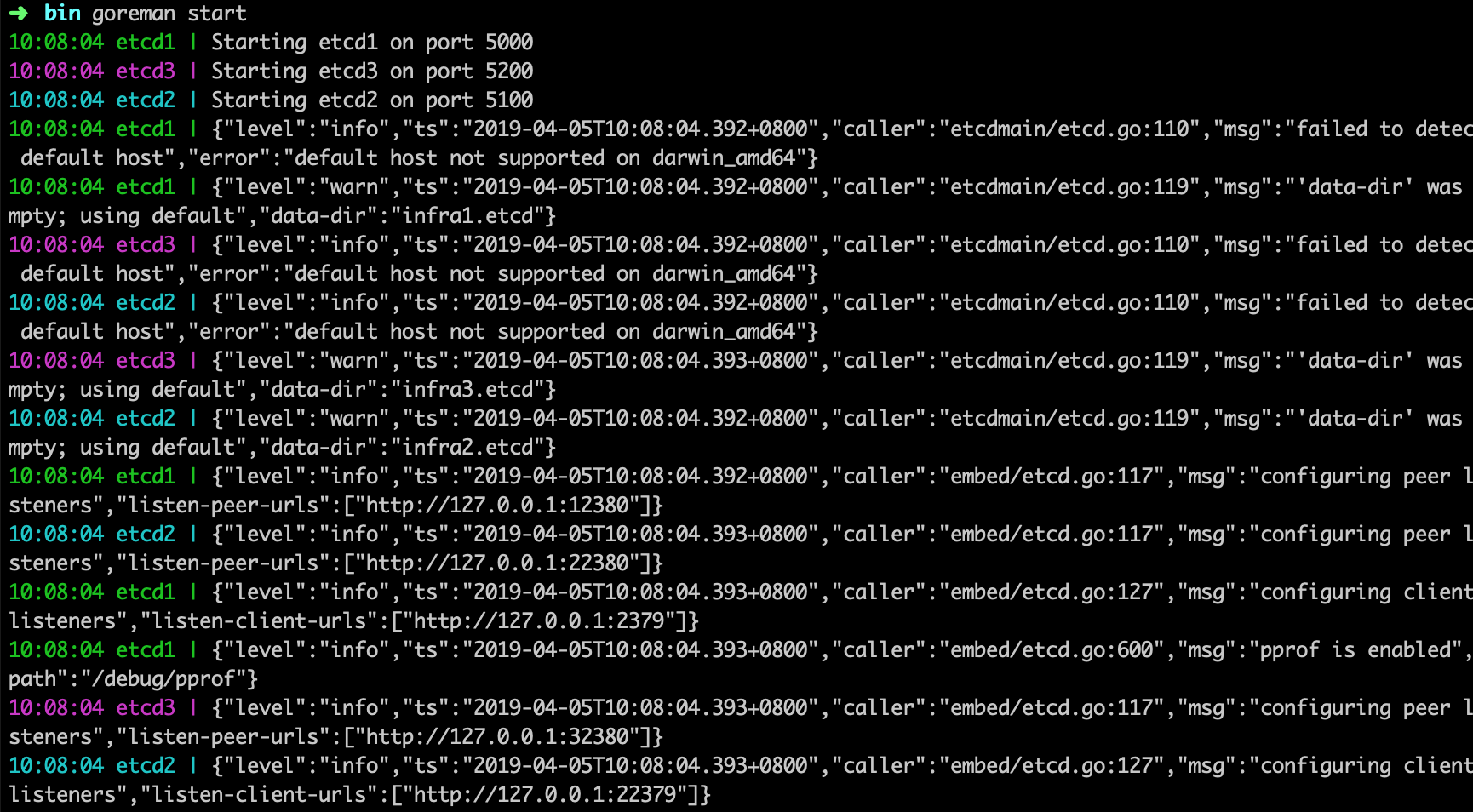
附:更多转阅 https://frank6866.gitbooks.io/linux/content/chapters/db/db-etcd-etcdctl.html
5.验证结果
当前启动集群:
http://127.0.0.1:2379
http://127.0.0.1:22379
http://127.0.0.1:32379
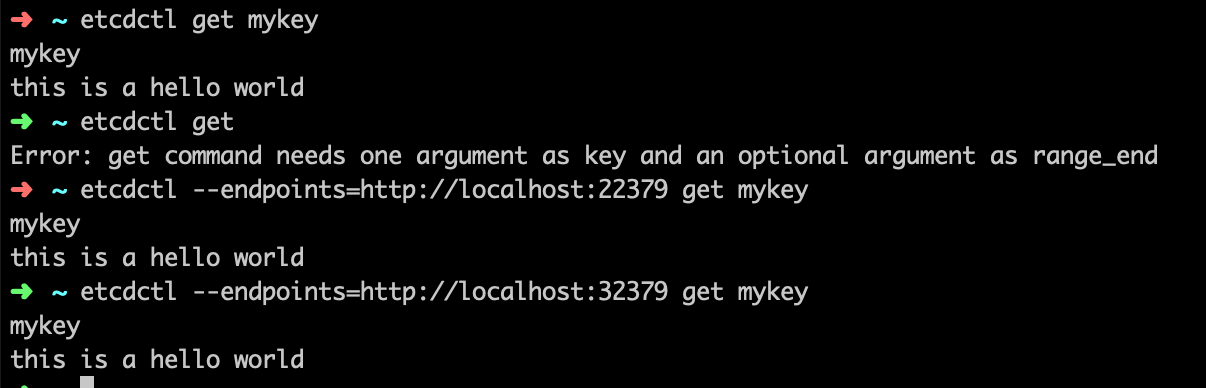
往其中一个服务添加一个key,然后在另外两个服务读取
# 添加一个Key,默认缺省endpoints服务为端口2379,可以不用写

etcdctl put mykey "this is a hello world"

# 在2379上读取

etcdctl get mykey

# 在22379上读取

etcdctl --endpoints=http://localhost:22379 get mykey

# 在33379上读

etcdctl --endpoints=http://localhost:32379 get mykey
Bingo~
Go环境下,编译运行etcd与goreman集群管理(1)的更多相关文章
- 基于CentOS与VmwareStation10搭建Oracle11G RAC 64集群环境:3.安装Oracle RAC-3.6.集群管理命令
3.6. 集群管理命令 3.6.1. RAC的启动与关闭 oracle rac默认会开机自启动,如需维护时可使用以下命令: 关闭: crsctl stop cluster 停止本节点集群服务 crsc ...
- 在linux环境下编译运行OpenCV程序的两种方法
原来以为在Ubuntu下安装好了OpenCV之后,自己写个简单的程序应该很容易吧,但是呢,就是为了编译一个简单的显示图片的程序我都快被弄崩溃了. 在谷歌和上StackOverFlow查看相关问题解答之 ...
- Linux环境下配置及启动Hadoop(伪集群)
1.下载tag软件包后,我习惯放到software文件夹下,并建立app文件夹2.通过tar -zxvf hadoop-2.6.0-cdh5.7.0.tar.gz -C ~/app/ 命令解压到app ...
- linux环境下redis安装(redis伪集群搭建)
redis在linux环境下搭建 1.创建目录 [root@192 local]# mkdir /usr/local/redis 2.下载redis,并解压 [root@192 local]# wge ...
- Centos6.9下RocketMQ3.4.6高可用集群部署记录(双主双从+Nameserver+Console)
之前的文章已对RocketMQ做了详细介绍,这里就不再赘述了,下面是本人在测试和生产环境下RocketMQ3.4.6高可用集群的部署手册,在此分享下: 1) 基础环境 ip地址 主机名 角色 192. ...
- Redhat环境下编译安装Google Bazel
Redhat环境下编译安装bazel 作者:Jack47 目前Google Bazel没有提供各个操作系统下的二进制安装包,只提供源代码,需要我们自己编译安装,详情可以见我翻译的中文版Google B ...
- Android 环境下编译FFmpeg
Android 环境下编译FFmpeg 开发环境:Ubuntu 12.04.2 LTS , android-sdk-linux, android-ndk-r8e 一 .X264 编译 1. X2 ...
- Boost学习总结(一)VS2010环境下编译STLport和Boost
Boost学习总结(一)VS2010环境下编译STLport和Boost Boost简介 Boost库是一个功能强大.构造精巧.跨平台.开源并且完全免费的C++程序库.1998年,Beman G.Da ...
- libCURL开源库在VS2010环境下编译安装,配置详解
libCURL开源库在VS2010环境下编译安装,配置详解 转自:http://my.oschina.net/u/1420791/blog/198247 http://blog.csdn.net/su ...
随机推荐
- python return 及lambda函数
return有两个作用: 1.用来返回函数的运行结果,或者调用另外一个函数.比如max()函数 >>> def fun(a,b): #返回函数结果. return max(a,b) ...
- JMeter学习(十三)目录介绍(转载)
转载自 http://www.cnblogs.com/yangxia-test JMeter也学了一阵子了,对于基本的操作已了解,再回过头来看看Jmeter的目录,本篇是对于它的目录进行一些简单的介绍 ...
- WDlinux 修改后台默认8080端口的方法
修改8080端口正确方法 新版本: 方法一: apache sed -i 's/8080/8088/' /www/wdlinux/wdapache/conf/httpd.conf 然后记得修改防火墙i ...
- 过滤sql特殊字符方法集合
/// <summary> /// 过滤不安全的字符串 /// </summary> /// <param name="Str" ...
- 98. Validate Binary Search Tree (Tree; DFS)
Given a binary tree, determine if it is a valid binary search tree (BST). Assume a BST is defined as ...
- 微信小程序template模板与component组件的区别和使用
前言: 除了component,微信小程序中还有另一种组件化你的方式template模板,这两者之间的区别是,template主要是展示,方法则需要在调用的页面中定义.而component组件则有自己 ...
- Repeater绑定数据 后台自定义的DataTable
前台:<asp:Repeater ID="Repeater1" runat="server"> <ItemTemplat ...
- sap 给集团分配一个逻辑系统
1.进入事务代码 SALE定义一个新的逻辑系统 2.通过事务代码RZ10 进入之后, 将参数login/no_automatic_user_sapstar 修改为“0”, 然后重启SAP服务生效 3. ...
- 线特征---LineMatching代码运行(五)
[1] https://github.com/dlut-dimt/LineMatching The code is based on Matlab. https://github.com/ka ...
- 非线性优化(高翔slam---第六讲 )
1.线性最小二乘问题 2.非线性最小二乘问题 因为它非线性,所以df/dx有时候不好求,那么可以采用迭代法(有极值的话,那么它收敛,一步步逼近): 这样求导问题就变成了递归逼近问题,那么增量△xk如何 ...