
python time 和 datetime 模块
- 时间戳(timestamp):通常来说,时间戳表示的是从1970年1月1日00:00:00开始按秒计算的偏移量。我们运行“type(time.time())”,返回的是float类型。
- 格式化的时间字符串(Format String)
- 结构化的时间(struct_time):struct_time元组共有9个元素共九个元素:(年,月,日,时,分,秒,一年中第几周,一年中第几天,夏令时)

import time
#--------------------------我们先以当前时间为准,让大家快速认识三种形式的时间
print(time.time()) # 时间戳:1487130156.419527
print(time.strftime("%Y-%m-%d %X")) #格式化的时间字符串:'2017-02-15 11:40:53'
print(time.localtime()) #本地时区的struct_time
print(time.gmtime()) #UTC时区的struct_time
%a Locale’s abbreviated weekday name.
%A Locale’s full weekday name.
%b Locale’s abbreviated month name.
%B Locale’s full month name.
%c Locale’s appropriate date and time representation.
%d Day of the month as a decimal number [01,31].
%H Hour (24-hour clock) as a decimal number [00,23].
%I Hour (12-hour clock) as a decimal number [01,12].
%j Day of the year as a decimal number [001,366].
%m Month as a decimal number [01,12].
%M Minute as a decimal number [00,59].
%p Locale’s equivalent of either AM or PM. (1)
%S Second as a decimal number [00,61]. (2)
%U Week number of the year (Sunday as the first day of the week) as a decimal number [00,53]. All days in a new year preceding the first Sunday are considered to be in week 0. (3)
%w Weekday as a decimal number [0(Sunday),6].
%W Week number of the year (Monday as the first day of the week) as a decimal number [00,53]. All days in a new year preceding the first Monday are considered to be in week 0. (3)
%x Locale’s appropriate date representation.
%X Locale’s appropriate time representation.
%y Year without century as a decimal number [00,99].
%Y Year with century as a decimal number.
%z Time zone offset indicating a positive or negative time difference from UTC/GMT of the form +HHMM or -HHMM, where H represents decimal hour digits and M represents decimal minute digits [-23:59, +23:59].
%Z Time zone name (no characters if no time zone exists).
%% A literal '%' character.
格式化字符串的时间格式
#--------------------------按图1转换时间
# localtime([secs])
# 将一个时间戳转换为当前时区的struct_time。secs参数未提供,则以当前时间为准。
time.localtime()
time.localtime(1473525444.037215)
# gmtime([secs]) 和localtime()方法类似,gmtime()方法是将一个时间戳转换为UTC时区(0时区)的struct_time。
# mktime(t) : 将一个struct_time转化为时间戳。
print(time.mktime(time.localtime()))#1473525749.0
# strftime(format[, t]) : 把一个代表时间的元组或者struct_time(如由time.localtime()和
# time.gmtime()返回)转化为格式化的时间字符串。如果t未指定,将传入time.localtime()。如果元组中任何一个
# 元素越界,ValueError的错误将会被抛出。
print(time.strftime("%Y-%m-%d %X", time.localtime()))#2016-09-11 00:49:56
# time.strptime(string[, format])
# 把一个格式化时间字符串转化为struct_time。实际上它和strftime()是逆操作。
print(time.strptime('2011-05-05 16:37:06', '%Y-%m-%d %X'))
#time.struct_time(tm_year=2011, tm_mon=5, tm_mday=5, tm_hour=16, tm_min=37, tm_sec=6,
# tm_wday=3, tm_yday=125, tm_isdst=-1)
#在这个函数中,format默认为:"%a %b %d %H:%M:%S %Y"。
time.sleep(recs)
线程推迟指定的时间运行,单位为秒
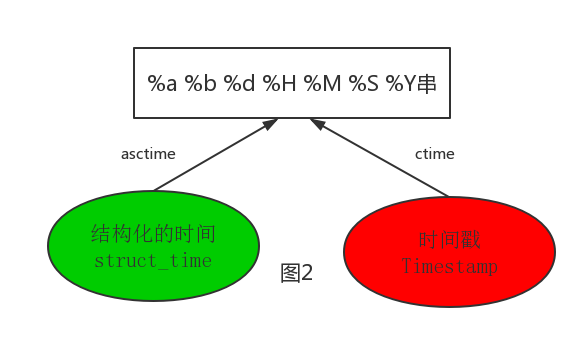
#--------------------------按图2转换时间
# asctime([t]) : 把一个表示时间的元组或者struct_time表示为这种形式:'Sun Jun 20 23:21:05 1993'。
# 如果没有参数,将会将time.localtime()作为参数传入。
print(time.asctime())#Sun Sep 11 00:43:43 2016
# ctime([secs]) : 把一个时间戳(按秒计算的浮点数)转化为time.asctime()的形式。如果参数未给或者为
# None的时候,将会默认time.time()为参数。它的作用相当于time.asctime(time.localtime(secs))。
print(time.ctime()) # Sun Sep 11 00:46:38 2016
print(time.ctime(time.time())) # Sun Sep 11 00:46:38 2016
#时间加减
import datetime
# print(datetime.datetime.now()) #返回 2016-08-19 12:47:03.941925
#print(datetime.date.fromtimestamp(time.time()) ) # 时间戳直接转成日期格式 2016-08-19
# print(datetime.datetime.now() )
# print(datetime.datetime.now() + datetime.timedelta(3)) #当前时间+3天
# print(datetime.datetime.now() + datetime.timedelta(-3)) #当前时间-3天
# print(datetime.datetime.now() + datetime.timedelta(hours=3)) #当前时间+3小时
# print(datetime.datetime.now() + datetime.timedelta(minutes=30)) #当前时间+30分
#
# c_time = datetime.datetime.now()
# print(c_time.replace(minute=3,hour=2)) #时间替换
datetime模块
python time 和 datetime 模块的更多相关文章
- Python处理时间 time && datetime 模块
Python处理时间 time && datetime 模块 个人整理,获取时间方式: import datetime import time #获取当前时间:Thu Nov 03 ...
- python time 和 datetime模块
time模块 时间相关的操作,时间有三种表示方式: 时间戳 1970年1月1日之后的秒,即:time.time() 格式化的字符串 2014-11-11 11:11, ...
- python time、datetime模块
时间的三种格式:1)时间戳 2)格式化的时间字符串 3)元组(struct_time):time.struct_time(tm_year=1970, tm_mon=5, tm_mday=23, tm_ ...
- python time 和 datetime 模块的简介
时间处理 time 和 datetime import timeimport datetimeprint time.time() #时间戳显示为1508228106.49print time.strf ...
- python内建datetime模块
datetime 获取当前日期和时间 from datetime import datetime now = datetime.now() print(now) datetime转换为timestam ...
- python使用datetime模块计算各种时间间隔的方法
python使用datetime模块计算各种时间间隔的方法 本文实例讲述了python使用datetime模块计算各种时间间隔的方法.分享给大家供大家参考.具体分析如下: python中通过datet ...
- python中datetime模块
Python提供了多个内置模块用于操作日期时间,像calendar,time,datetime.time模块我在之前的文章已经有所介绍,它提供 的接口与C标准库time.h基本一致.相比于time模块 ...
- python datetime模块参数详解
Python提供了多个内置模块用于操作日期时间,像calendar,time,datetime.time模块,它提供 的接口与C标准库time.h基本一致.相比于time模块,datetime模块的接 ...
- python time模块和datetime模块详解
一.time模块 time模块中时间表现的格式主要有三种: a.timestamp时间戳,时间戳表示的是从1970年1月1日00:00:00开始按秒计算的偏移量 b.struct_time时间元组,共 ...
随机推荐
- LeetCode OJ 450. Delete Node in a BST
Given a root node reference of a BST and a key, delete the node with the given key in the BST. Retur ...
- LINUX系统一一常用命令
前言 LINUX UNIX Centos RedHat Ubuntu SHELL shell脚本 shell shell命令 类似windows系统的bat 批处理文件 里面都是脚本 CentOS6. ...
- UI简单工作
UI用户界面 需求——效果图——风格设计——高保证效果——html 网页的宽度=屏幕的宽度-纵向滚动条的宽度 企业网站一般是1280 根据百度流量研究所 目前我们的网页注主要是1024和1200 ...
- k近邻算法(KNN)
k近邻算法(KNN) 定义:如果一个样本在特征空间中的k个最相似(即特征空间中最邻近)的样本中的大多数属于某一个类别,则该样本也属于这个类别. from sklearn.model_selection ...
- scrapy 常用代码
一,scrapy请求 yield scrapy.Request(url=url, dont_filter=True, callback=self.page, meta={'item': item}) ...
- jenkins commande not found
解决方法: http://www.geekcome.com/content-10-3868-1.html 1.控制台执行 echo $PATH 把输出的这句话复制 2.jenkins->系统管理 ...
- html----h1-6标签
Html的标题标签h1-h6种选择,从大到小:默认上下margin一样,靠左,不好改变:能用定位改变. 1.<h1></h1> display:block; font-size ...
- 安装 Java Cryptography Extension (JCE) Unlimited Strength
http://www.oracle.com/technetwork/java/javase/downloads/jce8-download-2133166.html cp ./* /usr/java/ ...
- metasploit framework(九):SMB服务扫描
SMB版本扫描 扫描命名管道,判断SMB服务类型 SMB共享枚举 SMB用户枚举 SID枚举
- mysql 定时备份任务
备份方案: 本地备份并同步至远程服务器,保留30天数据 1. 本地数据库备份,备份数据库gold_ecooy,naiang#!/bin/bash#xliang#Created Time: 2018-1 ...