
ProgressBar学习笔记,自定义横向进度条的样式(包含ActionBar上面的进度条)
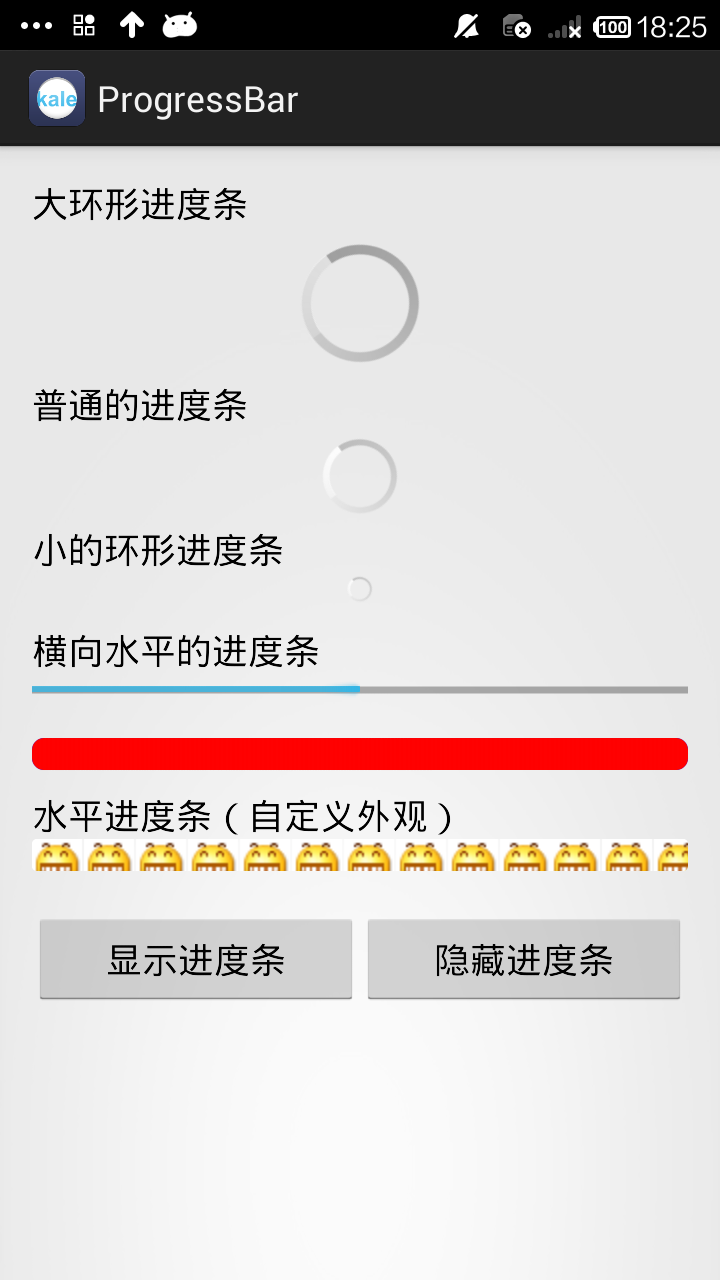 点显示进度条后→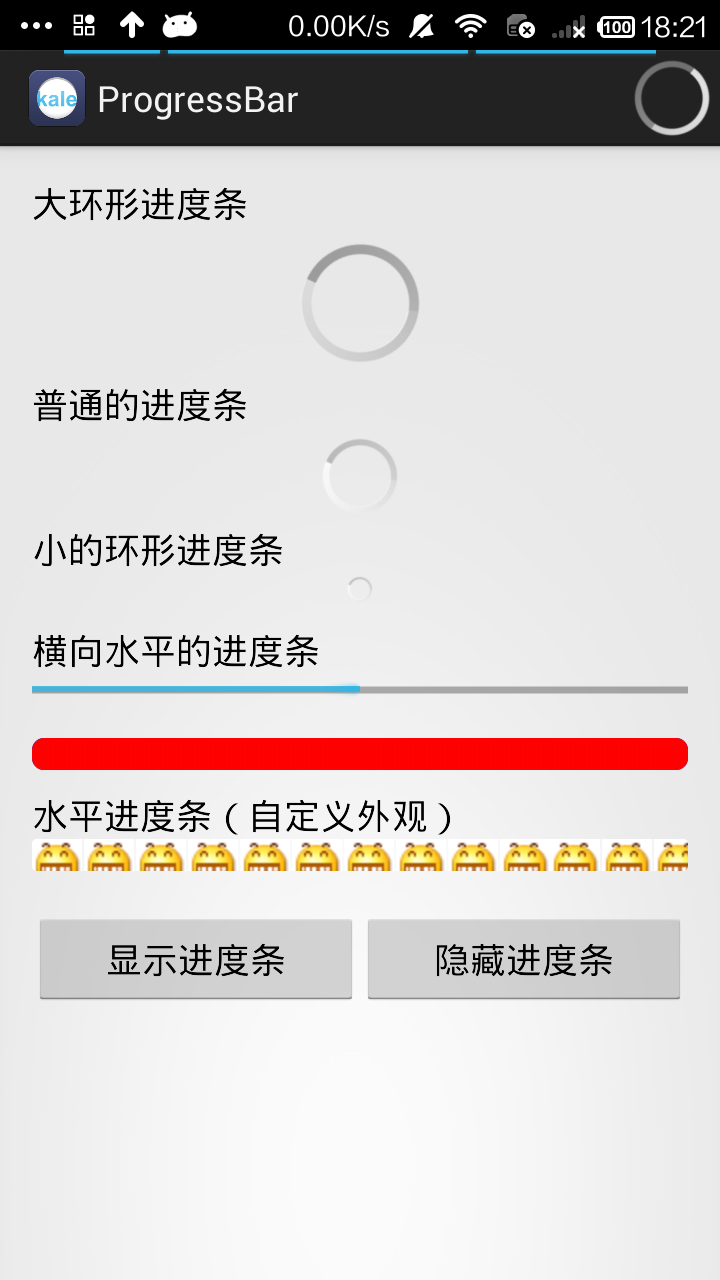
android:max="100" 进度条的最大值
android:progress 进度条已经完成的进度值
android:progressDrawable 已经完成的进度条轨道显示的Drawable对象
indeterminateDrawable 设置绘制不显示进度的进度条的Drawable对象
android:indeterminate 设置为true,进度条不精准显示进度
android:indeterminateDuration 设置不精准显示进度的时间
布局文件
<LinearLayout xmlns:android="http://schemas.android.com/apk/res/android"

    xmlns:tools="http://schemas.android.com/tools"

    android:layout_width="match_parent"

    android:layout_height="match_parent"

    android:orientation="vertical"

    android:padding="16dp" >

    <TextView

        android:layout_width="wrap_content"

        android:layout_height="wrap_content"

        android:text="大环形进度条"

        android:textAppearance="?android:attr/textAppearanceMedium" />

    <ProgressBar

        android:id="@+id/progressBar01_id"

        style="?android:attr/progressBarStyleLarge"

        android:layout_gravity="center_horizontal"

        android:layout_width="wrap_content"

        android:layout_height="wrap_content" />

    <TextView

        android:layout_width="wrap_content"

        android:layout_height="wrap_content"

        android:text="普通的进度条"

        android:textAppearance="?android:attr/textAppearanceMedium" />

    <ProgressBar

        android:id="@+id/progressBar02_id"

        android:layout_gravity="center_horizontal"

        android:layout_width="wrap_content"

        android:layout_height="wrap_content" />

    <TextView

        android:layout_width="wrap_content"

        android:layout_height="wrap_content"

        android:text="小的环形进度条"

        android:textAppearance="?android:attr/textAppearanceMedium" />

    <ProgressBar

        android:id="@+id/progressBar03_id"

        android:layout_gravity="center_horizontal"

        style="?android:attr/progressBarStyleSmall"

        android:layout_width="wrap_content"

        android:layout_height="wrap_content" />

    <TextView

        android:layout_width="wrap_content"

        android:layout_height="wrap_content"

        android:layout_marginTop="10dp"

        android:text="横向水平的进度条"

        android:textAppearance="?android:attr/textAppearanceMedium" />

    <ProgressBar

        android:id="@+id/progressBar04_id"

        style="?android:attr/progressBarStyleHorizontal"

        android:max="100"

        android:progressDrawable="@drawable/bar_color"

        android:layout_width="match_parent"

        android:layout_height="wrap_content" />

    <TextView

        android:id="@+id/textView1"

        android:layout_width="wrap_content"

        android:layout_height="wrap_content"

        android:text="水平进度条(自定义外观)"

        android:layout_marginTop="10dp"

        android:textAppearance="?android:attr/textAppearanceMedium" />

    <ProgressBar

        android:id="@+id/progressBar05_id"

        style="?android:attr/progressBarStyleHorizontal"

        android:layout_width="match_parent"

        android:layout_height="wrap_content"

        android:max="100"

        android:progress="40"

        android:progressDrawable="@drawable/bar_style" />

    <LinearLayout

        android:layout_width="match_parent"

        android:layout_height="wrap_content"

        android:layout_marginTop="20dp">

        <Button

            android:id="@+id/show_button_id"

            android:layout_width="wrap_content"

            android:layout_height="wrap_content"

            android:layout_weight="1"

            android:text="显示进度条" />

        <Button

            android:id="@+id/hint_button_id"

            android:layout_width="wrap_content"

            android:layout_height="wrap_content"

            android:layout_weight="1"

            android:text="隐藏进度条" />

    </LinearLayout>

</LinearLayout>
bar_color.xml 设置进度条的颜色
<?xml version="1.0" encoding="UTF-8"?>

<layer-list xmlns:android="http://schemas.android.com/apk/res/android">

    <!--  设置背景色(蓝色)  -->

    <item  android:id="@android:id/background" >

        <shape>

            <corners android:radius="6dp" />

                <gradient android:startColor="#0000ff"

                      android:endColor="#0000ff" />

        </shape>

    </item>

    <!--  设置进度条颜色(红色)  -->

    <item  android:id="@android:id/progress" >

        <clip>

            <shape>

                <corners android:radius="6dp" />

            <gradient  android:startColor="#ff0000"

                   android:endColor="#ff0000" />

            </shape>

        </clip>

    </item>

</layer-list>
bar_style.xml 用图片来设置进度条
<?xml version="1.0" encoding="UTF-8"?>

<layer-list xmlns:android="http://schemas.android.com/apk/res/android" >

<!--  设置背景色图像资源  -->

<item

    android:id="@android:id/background"

    android:drawable="@drawable/bar_bg" />

<!--  设置进度条颜色图像资源  -->

<item

    android:id="@android:id/progress"

    android:drawable="@drawable/bar_progress" />

</layer-list>
MainActivity.java
package com.kale.progressbar;

import android.app.Activity;

import android.os.Bundle;

import android.os.Handler;

import android.os.Message;

import android.view.View;

import android.view.View.OnClickListener;

import android.view.Window;

import android.widget.Button;

import android.widget.ProgressBar;

public class MainActivity extends Activity {

    ProgressBar pB04,pB05;

    Button showBt,hintBt;

    //模拟一个长度为100的数组

    private int [] data = new int[100];

    int hasData = 0,status = 0;

    Handler mHandler = new Handler() {

        @Override

        public void handleMessage(Message msg) {

            if(msg.what == 0x111) {

                pB04.setProgress(status);

                pB05.setProgress(status);

            }

        }

    };

    @Override

    protected void onCreate(Bundle savedInstanceState) {

        super.onCreate(savedInstanceState);

        requestWindowFeature(Window.FEATURE_PROGRESS);//在窗口标题上显示带进度的横向进度条

        requestWindowFeature(Window.FEATURE_INDETERMINATE_PROGRESS);//显示不带进度的进度条

        //上面的代码必须在setContentView之前写

        setContentView(R.layout.activity_main);

        initView();

        new Thread() {

            public void run() {

                while(status < 100) {

                    //获取耗时操作完成的百分比

                    status = doWork();

                    //发送消息

                    mHandler.sendEmptyMessage(0x111);

                }

            }

        }.start();

        showBt.setOnClickListener(new OnClickListener() {

            @Override

            public void onClick(View arg0) {

                //显示不带进度的进度条

                setProgressBarIndeterminate(true);

                //显示带进度的进度条

                setProgressBarVisibility(true);

                setProgress(4500);

            }

        });

        hintBt.setOnClickListener(new OnClickListener() {

            @Override

            public void onClick(View arg0) {

                //隐藏不带进度的进度条

                setProgressBarIndeterminate(false);

                //隐藏带进度的进度条

                setProgressBarVisibility(false);

            }

        });

    }

    public int doWork() {

        data[hasData++] = (int)(Math.random() * 100);

        try {

            Thread.sleep(100);

        } catch (Exception e) {

            // TODO: handle exception

        }

        return hasData;

    }

    private void initView() {

        pB04 = (ProgressBar)findViewById(R.id.progressBar04_id);

        pB05 = (ProgressBar)findViewById(R.id.progressBar05_id);

        showBt = (Button) findViewById(R.id.show_button_id);

        hintBt = (Button)findViewById(R.id.hint_button_id);

    }

}
源码地址:http://download.csdn.net/detail/shark0017/7650871
ProgressBar学习笔记,自定义横向进度条的样式(包含ActionBar上面的进度条)的更多相关文章
- iOS学习笔记-自定义过渡动画
代码地址如下:http://www.demodashi.com/demo/11678.html 这篇笔记翻译自raywenderlick网站的过渡动画的一篇文章,原文用的swift,由于考虑到swif ...
- iOS 去掉tabaar上面的 一条线
iOS 去掉tabaar上面的 一条线 利用一个 1像素高的图片 [[UITabBar appearance] setShadowImage:[UIImage imageNamed:@"tr ...
- Dynamic CRM 2013学习笔记(二十五)JS调用web service 实现多条记录复制(克隆)功能
前面介绍过如何克隆一条当前的记录: Dynamic CRM 2013学习笔记(十四)复制/克隆记录 , 主要是通过界面上加一个字段,单击form上的clone 按钮时,改变这个字段的值以触发插件来实现 ...
- Android学习笔记之横向二级菜单实现
PS:元旦来一发. 学习内容: 1.Android二级横向菜单的实现过程.效果如上图... 这种横向的二级菜单在很多的app都有所应用.效果看起来还是非常的美观的.也算是项目需要,自己也就学了一下 ...
- Spark学习笔记3(IDEA编写scala代码并打包上传集群运行)
Spark学习笔记3 IDEA编写scala代码并打包上传集群运行 我们在IDEA上的maven项目已经搭建完成了,现在可以写一个简单的spark代码并且打成jar包 上传至集群,来检验一下我们的sp ...
- 【Spring学习笔记-MVC-13.2】Spring MVC之多文件上传
作者:ssslinppp 1. 摘要 前篇文章讲解了单文件上传<[Spring学习笔记-MVC-13]Spring MVC之文件上传>http://www.cnblogs.co ...
- 【转】Pro Android学习笔记(五):了解Content Provider(上)
Content Provider是抽象数据封装和数据访问机制,例如SQLite是Android设备带有的数据源,可以封装到一个content provider中.要通过content provider ...
- 【转】Pro Android学习笔记(三):了解Android资源(上)
在Android开发中,资源包括文件或者值,它们和执行应用捆绑,无需在源代码中写死,因此我们可以改变或替换他们,而无需对应用重新编译. 了解资源构成 参考阅读Android学习笔记(三八):资源res ...
- 【Android开发学习笔记】【第七课】五大布局-上
概念 Android程序各式各样,依靠的就是布局,先来看看布局都是怎么来的: 白色部分就是我们经常用的几种布局,主要说说介绍下面五大布局 FrameLayout AbsoluteLayout Line ...
随机推荐
- 直接以管理员身份运行bat代码
https://www.cnblogs.com/dengpeng1004/p/7044441.html
- 自定义yum源
1.创建rpm包的存放目录 mkdir -p /yum/yum-sum/package 2.准备rpm包,可以通过自带yum只下载不安装工具下载 yum install --downloadon ...
- MVC插件
MVC插件 最近领导让我搞一下插件化,就是实现多个web工程通过配置文件进行组装.之前由于做过一个简单的算是有点经验,当时使用的不是area,后来通过翻看orchard源码有点启发,打算使用area改 ...
- 022 StringTokenizer替换掉String的操作
一:说明 1.说明 String的操作特别消耗内存,所以可以考虑优化. 二:程序 1.程序修改 这部分程序属于Mapper端的程序,稍微优化一下. 2.程序 //Mapper public stati ...
- Qt5编译oracle驱动教程
我们都知道oracle数据库的强大,并且好多企业或者教学用到数据库时都会推荐使用.但是Qt因为版权问题没有封装oracle数据库专用驱动,网上也有一大堆说法和教程,但是或多或少的都有问题.下面废话不多 ...
- .NET工作准备--02基础知识
(已过时) 框架基础,语法基础,字符串&集合&流,常见类和接口; 02.net基础(重点) -第一部分 框架基础 1.基础概念 CTS(Common Type System),CLS( ...
- DBUtils工具
DBUtils工具 简介 是Apache旗下的产品.是对jdbc的简单封装.提供出通用的jdbc操作方法.简化开发者使用jdbc的成本. 常用的API说明 |- QueryRunner类: 主要进行j ...
- NLP文本相似度(TF-IDF)
本篇博文是数据挖掘部分的首篇,思路主要是先聊聊相似度的理论部分,下一篇是代码实战. 我们在比较事物时,往往会用到“不同”,“一样”,“相似”等词语,这些词语背后都涉及到一个动作——双方的比 ...
- django权限管理
当我们为应用创建一个Models, 在同步到数据库里,django默认给了三个权限 ,就是 add, change, delete权限. 首先,我们创建一个perm_test的project, 然后再 ...
- hadoop 视频教程3之实战教程
一,视频内容: 海量数据处理平台框架 hadoop介绍 hadoop 生态系统介绍 hdfs 设计原则 hdfs 系统架构 namenode datanode secondarynamenode hd ...