
Android性能优化工具之Systrace
本文大部分内容来自:http://www.androidperformance.com/android-performance-tools-systrace-1.html?utm_source=tuicool
Systrace是Android4.1中新增的性能数据采样和分析工具。它可帮助开发者收集Android关键子系统(如surfaceflinger、WindowManagerService等Framework部分关键模块、服务,View系统等)的运行信息,从而帮助开发者更直观的分析系统瓶颈,改进性能。
Systrace的功能包括跟踪系统的I/O操作、内核工作队列、CPU负载以及Android各个子系统的运行状况等。在Android平台中,它主要由3部分组成:
- 内核部分:Systrace利用了Linux Kernel中的ftrace功能。所以,如果要使用Systrace的话,必须开启kernel中和ftrace相关的模块。
- 数据采集部分:Android定义了一个Trace类。应用程序可利用该类把统计信息输出给ftrace。同时,Android还有一个atrace程序,它可以从ftrace中读取统计信息然后交给数据分析工具来处理。
- 数据分析工具:Android提供一个systrace.py(python脚本文件,位于Android SDK目录/tools/systrace中,其内部将调用atrace程序)用来配置数据采集的方式(如采集数据的标签、输出文件名等)和收集ftrace统计数据并生成一个结果网页文件供用户查看。 从本质上说,Systrace是对Linux Kernel中ftrace的封装。应用进程需要利用Android提供的Trace类来使用Systrace.
关于Systrace的官方介绍和使用可以看这里:Systrace
1.Systrace简单使用
使用Systrace前,要先了解一下Systrace在各个平台上的使用方法,鉴于大家使用Eclipse和Android Studio的居多,所以直接摘抄官网关于这个的使用方法,不过不管是什么工具,流程是一样的:
- 手机准备好你要进行抓取的界面
- 点击开始抓取(命令行的话就是开始执行命令)
- 手机上开始操作
- 设定好的时间到了之后,会将生成Trace文件,使用Chrome将这个文件打开进行分析
Using Eclipse
- In Eclipse, open an Android application project.
- Switch to the DDMS perspective, by selecting Window > Perspectives > DDMS.
- In the Devices tab, select the device on which to run a trace. If no devices are listed, make sure your device is connected via USB cable and that debugging is enabled on the device.
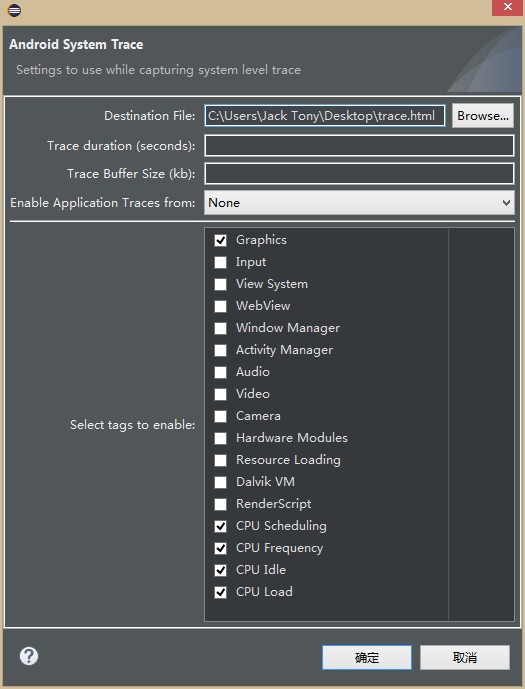
- Click the Systrace icon at the top of the Devices panel to configure tracing.
- Set the tracing options and click OK to start the trace.
Using Android Studio
- In Android Studio, open an Android application project.
- Open the Device Monitor by selecting Tools > Android > Monitor.
- In the Devices tab, select the device on which to run a trace. If no devices are listed, make sure your device is connected via USB cable and that debugging is enabled on the device.
- Click the Systrace icon at the top of the Devices panel to configure tracing.
- Set the tracing options and click OK to start the trace.
Using Device Monitor
- Navigate to your SDK tools/ directory.
- Run the monitor program.
- In the Devices tab, select the device on which to run a trace. If no devices are listed, make sure your device is connected via USB cable and that debugging is enabled on the device.
- Click the Systrace icon at the top of the Devices panel to configure tracing.
- Set the tracing options and click OK to start the trace.
图解:
首先进入DDMS,然后点击设备,点击Systrace按钮,接着选择测试项,这里可以设定时间。点击确定后开始操作手机,在时间到了后会自动生成报表。


参考自:
http://blog.csdn.net/tommy_wxie/article/details/8636853
http://www.androidperformance.com/android-performance-tools-systrace-1.html?utm_source=tuicool
Android性能优化工具之Systrace的更多相关文章
- Linux/Android 性能优化工具 perf
/***************************************************************************** * Linux/Android 性能优化工 ...
- (转)Android性能优化——工具篇
Android性能优化是Android开发中经常遇见的一个问题,接下来将对Android性能优化方面的知识点做一个简单的梳理和总结,将从工具和代码两方面进行梳理.所谓工欲善其事必先利其器,本文首先来看 ...
- android 性能优化-工具篇
一.Traceview 使用TraceView主要有两种方式: 1.直接打开DDMS,选择一个进程,然后按上面的“Start Method Profiling”按钮,等红色小点变成黑色以后就表示Tra ...
- Android 性能优化之工具和优化点总结
Android性能优化学习 最近公司主抓性能优化工作,借此春风也学习到了许多Android性能优化方面的知识.由于组内队友的给力,优化的成果也是比较喜人.同时也学习和实践了不少知识,特此记录. 1.性 ...
- 【腾讯Bugly干货分享】Android性能优化典范——第6季
本文来自于腾讯bugly开发者社区,非经作者同意,请勿转载,原文地址:http://dev.qq.com/topic/580d91208d80e49771f0a07c 导语 这里是Android性能优 ...
- Android性能优化典范(二)
Google前几天刚发布了Android性能优化典范第2季的课程,一共20个短视频,包括的内容大致有:电量优化,网络优化,Wear上如何做优化,使用对象池来提高效率,LRU Cache,Bitmap的 ...
- android app性能优化大汇总(google官方Android性能优化典范 - 第2季)
Google前几天刚发布了Android性能优化典范第2季的课程,一共20个短视频,包括的内容大致有:电量优化,网络优化,Wear上如何做优化,使用对象池来提高效率,LRU Cache,Bitmap的 ...
- 正确使用Android性能分析工具——TraceView
http://blog.jobbole.com/78995/ 首页 最新文章 IT 职场 前端 后端 移动端 数据库 运维 其他技术 - 导航条 - 首页 最新文章 IT 职场 前端 - Ja ...
- Android性能优化典范 - 第2季
Google发布了Android性能优化典范第2季的课程,一共20个短视频,包括的内容大致有:电量优化,网络优化,Wear上如何做优化,使用对象池来提高效率,LRU Cache,Bitmap的缩放,缓 ...
随机推荐
- 微信小程序开发之IOS/Android兼容坑(持续更新)
一.时间转换问题: 这不只是小程序上面的问题是ios系统 都有这个问题就是new Date("2017-06-16") 在IOS会出现NAN的情况所以对于时间转换需要另行封装,解 ...
- AIM Tech Round 4 (Div. 1) C - Upgrading Tree 构造 + 树的重心
C - Upgrading Tree 我发现我构造题好弱啊啊啊. 很明显能想到先找到重心, 然后我们的目标就是把所有点接到重心的儿子上,让重心的儿子子树变成菊花图, 这个先把重心到儿子的边连到 i , ...
- JMS(Java消息服务)
JMS即Java消息服务(Java Message Service)应用程序接口是一个Java平台中关于面向消息中间件(MOM:指的是利用高效可靠的消息传递机制进行平台无关的数据交流,并基于数据通信来 ...
- 用scrapy爬取京东的数据
本文目的是使用scrapy爬取京东上所有的手机数据,并将数据保存到MongoDB中. 一.项目介绍 主要目标 1.使用scrapy爬取京东上所有的手机数据 2.将爬取的数据存储到MongoDB 环境 ...
- Android-LayoutAnimation
Android-LayoutAnimation 学习自 <Android开发艺术探索> LayoutAnimation漫谈 LayoutAnimation 也是View动画的一种,作用是为 ...
- java 使用grpc步骤
1.配置grpc maven依赖 <dependency> <groupId>io.grpc</groupId> <artifactId>grpc-ne ...
- Loj10154 选课
试题描述: 大学实行学分制.每门课程都有一定的学分,学生只要选修了这门课并通过考核就能获得相应学分.学生最后的学分是他选修各门课的学分总和.每个学生都要选择规定数量的课程.其中有些课程可以直接选修,有 ...
- 【转载】GetDeviceCaps()函数相关说明
CDC::GetDeviceCaps()物理长度与屏幕像素间的转换 作用:读取DC的一些打印区域信息,主要是像素和英寸方面的数据. 声明:GetDeviceCaps(int ) 使用例子://所有像素 ...
- node部署静态页面;node上线静态页面
node部署静态页面上线 静态页面上线可以采用 nginx, tomcat或者node ,我们这里介绍下node部署静态页面 这里采用最简单的上线方式,我们就不用node + express + ej ...
- spring-boot 速成(11) - 单元测试
一.添加依赖项: testCompile 'org.springframework.boot:spring-boot-starter-test:1.5.2.RELEASE' 二.单元测试代码示例 im ...