
mybatis 关联映射
一对一
创建数据表
CREATE TABLE `tb_card` (

`id`  int NOT NULL AUTO_INCREMENT ,

`code`  varchar() NULL ,

PRIMARY KEY (`id`)

);

insert into tb_card(code) values('');

CREATE TABLE tb_person(id int not null PRIMARY KEY auto_increment,name VARCHAR(),sex VARCHAR(),age int,card_id int UNIQUE);

INSERT INTO tb_person(name,sex,age,card_id) VALUES('jack','男',,);
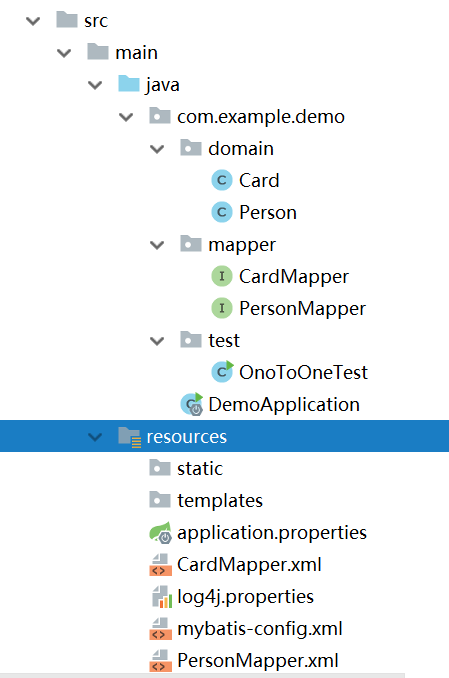
目录结构
Card
package com.example.demo.domain;

import java.io.Serializable;

public class Card implements Serializable {

    private Integer id;

    private String code;

    public Integer getId() {

        return id;

    }

    public void setId(Integer id) {

        this.id = id;

    }

    public String getCode() {

        return code;

    }

    public void setCode(String code) {

        this.code = code;

    }

}
Person
package com.example.demo.domain;

import java.io.Serializable;

public class Person implements Serializable {

    private Integer id;

    private String name;

    private String sex;

    private Integer age;

    private Card card;

    public Card getCard() {

        return card;

    }

    public void setCard(Card card) {

        this.card = card;

    }

    public Integer getId() {

        return id;

    }

    public void setId(Integer id) {

        this.id = id;

    }

    public String getName() {

        return name;

    }

    public void setName(String name) {

        this.name = name;

    }

    public String getSex() {

        return sex;

    }

    public void setSex(String sex) {

        this.sex = sex;

    }

    public Integer getAge() {

        return age;

    }

    public void setAge(Integer age) {

        this.age = age;

    }

}
CardMapper
package com.example.demo.mapper;

import com.example.demo.domain.Card;

public interface CardMapper {

    Card selectCardById(Integer id);

}
PersonMapper
package com.example.demo.mapper;

import com.example.demo.domain.Person;

public interface PersonMapper {

    Person selectPersonById(Integer id);

}
CardMapper.xml
<?xml version="1.0" encoding="UTF-8" ?>

<!DOCTYPE mapper

        PUBLIC "-//mybatis.org//DTD Mapper 3.0//EN"

        "http://mybatis.org/dtd/mybatis-3-mapper.dtd">

<mapper namespace="com.example.demo.mapper.CardMapper">

    <!--<insert id="save" parameterType="com.example.demo.domain.Card" useGeneratedKeys="true">-->

        <!--INSERT INTO tb_card(code) VALUES (#{code})-->

    <!--</insert>-->

    <select id="selectCardById" parameterType="int" resultType="com.example.demo.domain.Card">

        SELECT  *  FROM tb_card WHERE id=#{id}

    </select>

</mapper>
PersonMapper.xml
<?xml version="1.0" encoding="UTF-8" ?>

<!DOCTYPE mapper

        PUBLIC "-//mybatis.org//DTD Mapper 3.0//EN"

        "http://mybatis.org/dtd/mybatis-3-mapper.dtd">

<mapper namespace="com.example.demo.mapper.PersonMapper">

    <!--<insert id="save" parameterType="com.example.demo.domain.Person" useGeneratedKeys="true">-->

        <!--INSERT INTO tb_person(name,sex,age,card_id) VALUES (#{name},#{sex},#{age},#{card_id})-->

    <!--</insert>-->

    <select id="selectPersonById" parameterType="int" resultMap="personMapper">

        SELECT  *  FROM tb_person WHERE id=#{id}

    </select>

    <resultMap id="personMapper" type="com.example.demo.domain.Person">

        <id property="id" column="id"></id>

        <result property="name" column="name"></result>

        <result property="sex" column="sex"></result>

        <result column="age" property="age"></result>

        <association property="card" column="card_id" select="com.example.demo.mapper.CardMapper.selectCardById"

                     javaType="com.example.demo.domain.Card"></association>

    </resultMap>

</mapper>
mybatis-config.xml
<?xml version="1.0" encoding="UTF-8" ?>

<!DOCTYPE configuration

        PUBLIC "-//mybatis.org//DTD Config 3.0//EN"

        "http://mybatis.org/dtd/mybatis-3-config.dtd">

<configuration>

    <environments default="development">

        <environment id="development">

            <transactionManager type="JDBC"/>

            <dataSource type="POOLED">

                <property name="driver" value="com.mysql.jdbc.Driver"/>

                <property name="url" value="jdbc:mysql://192.168.31.146:3306/mydb"/>

                <property name="username" value="root"/>

                <property name="password" value="password"/>

            </dataSource>

        </environment>

    </environments>

    <mappers>

        <mapper resource="CardMapper.xml"></mapper>

        <mapper resource="PersonMapper.xml"></mapper>

    </mappers>

</configuration>
OnoToOneTest
package com.example.demo.test;

import com.example.demo.domain.Person;

import com.example.demo.mapper.PersonMapper;

import org.apache.ibatis.io.Resources;

import org.apache.ibatis.session.SqlSession;

import org.apache.ibatis.session.SqlSessionFactory;

import org.apache.ibatis.session.SqlSessionFactoryBuilder;

import java.io.IOException;

import java.io.InputStream;

public class OnoToOneTest {

    public static void main(String[] args) throws IOException {

        InputStream inputStream= Resources.getResourceAsStream("mybatis-config.xml");

        SqlSessionFactory factory=new SqlSessionFactoryBuilder().build(inputStream);

        SqlSession session=factory.openSession();

        PersonMapper pm=session.getMapper(PersonMapper.class);

        Person p=pm.selectPersonById();

        System.out.println(p);

        System.out.println(p.getCard());

        session.commit();

        session.close();

    }

}
运行结果:

这里特别需要注意的是CardMapper.xml和PersonMapper.xml的位置。
一对多
Clazz
package com.example.demo.domain;

import java.io.Serializable;

import java.util.List;

public class Clazz implements Serializable {

    private Integer id;

    private String code;

    private String name;

    private List<Student> students;

    public List<Student> getStudents() {

        return students;

    }

    public void setStudents(List<Student> students) {

        this.students = students;

    }

    public Integer getId() {

        return id;

    }

    public void setId(Integer id) {

        this.id = id;

    }

    public String getCode() {

        return code;

    }

    public void setCode(String code) {

        this.code = code;

    }

    public String getName() {

        return name;

    }

    public void setName(String name) {

        this.name = name;

    }

}
Student
package com.example.demo.domain;

import java.io.Serializable;

public class Student implements Serializable {

    private Integer id;

    private String name;

    private String sex;

    private Integer age;

    private Clazz clazz;

    public Integer getId() {

        return id;

    }

    public void setId(Integer id) {

        this.id = id;

    }

    public String getName() {

        return name;

    }

    public void setName(String name) {

        this.name = name;

    }

    public String getSex() {

        return sex;

    }

    public void setSex(String sex) {

        this.sex = sex;

    }

    public Integer getAge() {

        return age;

    }

    public void setAge(Integer age) {

        this.age = age;

    }

    public Clazz getClazz() {

        return clazz;

    }

    public void setClazz(Clazz clazz) {

        this.clazz = clazz;

    }

}
ClazzMapper.xml
<?xml version="1.0" encoding="UTF-8" ?>

<!DOCTYPE mapper

        PUBLIC "-//mybatis.org//DTD Mapper 3.0//EN"

        "http://mybatis.org/dtd/mybatis-3-mapper.dtd">

<mapper namespace="com.example.demo.mapper.ClazzMapper">

    <select id="selectClazzById" parameterType="int"

            resultMap="clazzResultMap">

        SELECT  *  FROM tb_clazz WHERE id=#{id}

    </select>

    <resultMap id="clazzResultMap" type="com.example.demo.domain.Clazz">

        <id column="id" property="id"></id>

        <result property="code" column="code"></result>

        <result column="name" property="name"></result>

        <collection property="students" javaType="ArrayList" column="id" ofType="com.example.demo.domain.Student"

                    select="com.example.demo.mapper.StudentMapper.selectStudentByClazzId" fetchType="lazy">

            <id property="id" column="id"></id>

            <result property="name" column="name"></result>

            <result property="sex" column="sex"></result>

            <result property="age" column="age"></result>

        </collection>

    </resultMap>

</mapper>
StudentMapper.xml
<?xml version="1.0" encoding="UTF-8" ?>

<!DOCTYPE mapper

        PUBLIC "-//mybatis.org//DTD Mapper 3.0//EN"

        "http://mybatis.org/dtd/mybatis-3-mapper.dtd">

<mapper namespace="com.example.demo.mapper.StudentMapper">

    <select id="selectStudentById" parameterType="int" resultType="com.example.demo.domain.Student">

        SELECT  *  FROM tb_Student WHERE id=#{id}

    </select>

    <select id="selectStudentByClazzId" parameterType="int" resultType="com.example.demo.domain.Student">

        SELECT * FROM  tb_student WHERE clazz_id=#{id}

    </select>

</mapper>
ClazzMapper
package com.example.demo.mapper;

import com.example.demo.domain.Clazz;

public interface ClazzMapper {

    Clazz selectClazzById(Integer id);

}
StudentMapper
package com.example.demo.mapper;

import com.example.demo.domain.Student;

public interface StudentMapper {

    Student selectStudentByClazzId(Integer id);

}
mybatis-config.xml
<?xml version="1.0" encoding="UTF-8" ?>

<!DOCTYPE configuration

        PUBLIC "-//mybatis.org//DTD Config 3.0//EN"

        "http://mybatis.org/dtd/mybatis-3-config.dtd">

<configuration>

    <settings>

        <setting name="lazyLoadingEnabled" value="true"/>

        <setting name="aggressiveLazyLoading" value="false"/>

    </settings>

    <environments default="development">

        <environment id="development">

            <transactionManager type="JDBC"/>

            <dataSource type="POOLED">

                <property name="driver" value="com.mysql.jdbc.Driver"/>

                <property name="url" value="jdbc:mysql://192.168.31.146:3306/mydb"/>

                <property name="username" value="root"/>

                <property name="password" value="weiwei1207"/>

            </dataSource>

        </environment>

    </environments>

    <mappers>

        <mapper resource="CardMapper.xml"></mapper>

        <mapper resource="PersonMapper.xml"></mapper>

        <mapper resource="ClazzMapper.xml"></mapper>

        <mapper resource="StudentMapper.xml"></mapper>

    </mappers>

</configuration>
注意这里添加了settings配置延迟加载
OneToManyTest
package com.example.demo.test;

import com.example.demo.domain.Clazz;

import com.example.demo.domain.Student;

import com.example.demo.mapper.ClazzMapper;

import org.apache.ibatis.io.Resources;

import org.apache.ibatis.session.SqlSession;

import org.apache.ibatis.session.SqlSessionFactory;

import org.apache.ibatis.session.SqlSessionFactoryBuilder;

import java.io.IOException;

import java.io.InputStream;

public class OneToManyTest {

    public static void main(String[] args) throws IOException {

        InputStream inputStream= Resources.getResourceAsStream("mybatis-config.xml");

        SqlSessionFactory factory=new SqlSessionFactoryBuilder().build(inputStream);

        SqlSession session=factory.openSession();

        ClazzMapper mapper=session.getMapper(ClazzMapper.class);

        Clazz clazz=mapper.selectClazzById();

        System.out.println(clazz.getId()+" "+clazz.getCode()+" "+clazz.getName());

        for(Student student:clazz.getStudents()){

            System.out.println(student.getId()+" "+student.getName());

        }

    }

}
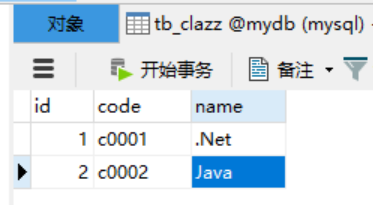
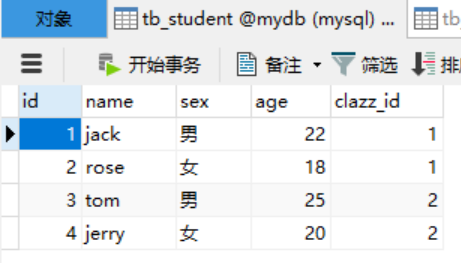
数据库
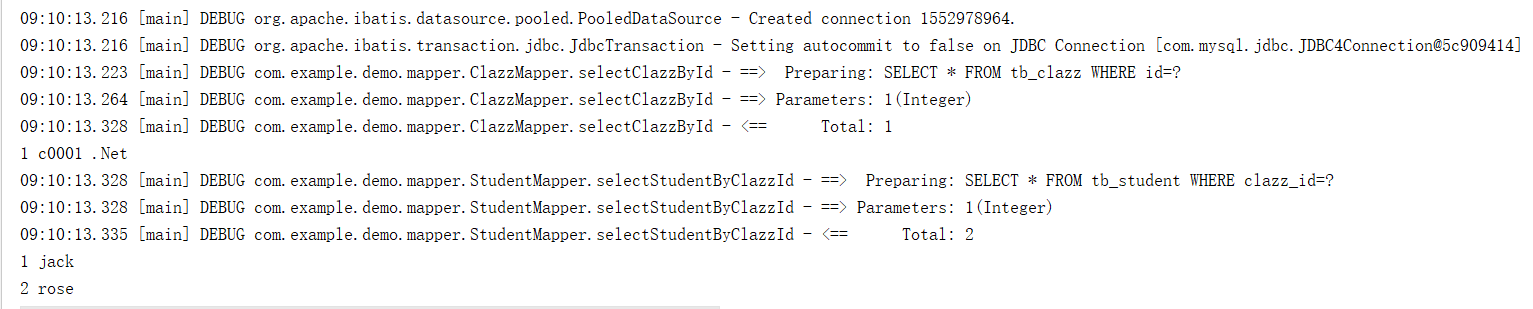
运行结果
修改StudentMapper
package com.example.demo.mapper;

import com.example.demo.domain.Student;

public interface StudentMapper {

    Student selectStudentByClazzId(Integer id);

    Student selectStudentById(Integer id);

}
修改StudentMapper.xml
<?xml version="1.0" encoding="UTF-8" ?>

<!DOCTYPE mapper

        PUBLIC "-//mybatis.org//DTD Mapper 3.0//EN"

        "http://mybatis.org/dtd/mybatis-3-mapper.dtd">

<mapper namespace="com.example.demo.mapper.StudentMapper">

    <select id="selectStudentById" parameterType="int" resultMap="studentResultMap">

        SELECT  *  FROM tb_student a JOIN tb_clazz b ON a.clazz_id=b.id WHERE a.id=#{id}

    </select>

    <resultMap id="studentResultMap" type="com.example.demo.domain.Student">

        <id property="id" column="id"></id>

        <result property="name" column="name"></result>

        <result property="sex" column="sex"></result>

        <result property="age" column="age"></result>

        <association property="clazz" javaType="com.example.demo.domain.Clazz">

            <id property="id" column="id"></id>

            <result property="code" column="code"></result>

            <result column="name" property="name"></result>

        </association>

    </resultMap>

    <select id="selectStudentByClazzId" parameterType="int" resultType="com.example.demo.domain.Student">

        SELECT * FROM  tb_student WHERE clazz_id=#{id}

    </select>

</mapper>
修改OneToManyTest
StudentMapper mapper=session.getMapper(StudentMapper.class);

        Student student=mapper.selectStudentById();

        System.out.println(student.getId()+" "+student.getName()+" "+student.getClazz().getCode()+" "+student.getClazz().getName());
运行

mybatis 关联映射的更多相关文章
- MyBatis学习(七)MyBatis关联映射之多对多映射
对于数据库中的多对多关系建议使用一个中间表来维护关系. 1.创建四张表,分别为用户表,商品表,订单表,中间表. DROP TABLE IF EXISTS `t_user`; CREATE TABLE ...
- spring boot(9)-mybatis关联映射
一对多 查询type表的某一条数据,并且要同时查出所有typeid与之配置的user,最终要得到一个以下类型的Type对象 public class Type { String id; String ...
- 0049 MyBatis关联映射--一对一关系
世上的事务总不是孤立存在的,表现在Java类里面,则是类与类之间的关系,比如继承is-a.依赖use-a.关联has-a,反映在数据库中,则是表与表之间的关系,比如外键 关联关系存在着以下几种类型:一 ...
- Spring Boot (11) mybatis 关联映射
一对多 查询category中的某一条数据,同时查询该分类下的所有Product. Category.java public class Category { private Integer id; ...
- mybatis关联映射一对一
在项目开发中,会存在一对一的关系,比如一个人只有一个身份证,一个身份证只能给一个人使用,这就是一对一关系.一对一关系使用主外键关联. table.sql,在数据库中创建如下两个表并插入数据 CREAT ...
- mybatis关联映射一对多
实际项目中也存在很多的一对多的情况,下面看看这个简单的例子 table.sql CREATE TABLE tb_clazz( id INT PRIMARY KEY AUTO_INCREMENT, CO ...
- mybatis关联映射多对多
项目开发中,多对多关系也是非常常见的关系 在数据库中创建表的脚本 table.sql CREATE TABLE tb_user( id INT PRIMARY KEY AUTO_INCREMENT, ...
- MyBatis学习(六)MyBatis关联映射之一对多映射
数据库中一对多通常使用主外键关联,外键应该在多方,即多方维护关系. 下面举一个简单实例来看看MyBatis怎么处理一对多的关系. 1.创建一个项目,导入所需jar包,导入db.properties配置 ...
- MyBatis(五):mybatis关联映射
Mybatis中表与表之间的关系分为一下4类: 1)一对一 2)一对多 3)多对一 4)多对多 创建数据Demo表 数据库表: 用户表user:记录了购买商品的用户信息. 订单表orders:记录了用 ...
- 0050 MyBatis关联映射--一对多关系
一对多关系更加常见,比如用户和订单,一个用户可以有多个订单 DROP TABLE IF EXISTS customer; /*用户表*/ CREATE TABLE customer( `pk` INT ...
随机推荐
- 通过sftp操作Linux服务器上的文件(java)
本文为实现对linux服务器文件的操作.windows服务器不支持. 引入jar包:jsch-0.1.42.jar package com.csvreader.sftp; import java.io ...
- 如何批量下载网站中的超链接(一次性下载网页中所有可能的PDF文件)
最近公司在做工程项目,实现文件批量下载. 网上找了很久,发现网上的代码都有相似的问题,不过最终还是让我找到了一个符合的项目. 工程: 进行项目文件下载功能分析,弄清楚文件批量下载的原理,提供的数据支持 ...
- Ng第十三课:聚类(Clustering)
13.1 无监督学习:简介 13.2 K-均值算法 13.3 优化目标 13.4 随机初始化 13.5 选择聚类数 13.1 无监督学习:简介 在这个视频中,将开始介绍聚类算法.这将是一个激 ...
- webService之helloword(java)rs
webservice之rs(helloworld) 1.pom.xml文件 <dependencies> <!-- 使用CXF RS开发 --> <dependency& ...
- 关于 cxGrid 的过滤问题
http://bbs.csdn.net/topics/390536919 关于 cxGrid 的过滤问题 [问题点数:20分,结帖人zhengyc653] 不显示删除回复 ...
- Git的一些资源链接
@import url(http://i.cnblogs.com/Load.ashx?type=style&file=SyntaxHighlighter.css);@import url(/c ...
- 1*1卷积核在GoogleLeNet中的作用
1. 实现跨通道的交互和信息整合 1×1的卷积层(可能)引起人们的重视是在NIN的结构中,论文中林敏师兄的想法是利用MLP代替传统的线性卷积核,从而提高网络的表达能力.文中同时利用了跨通道poolin ...
- IIS8.0配置网站,错误提示:用户 'IIS APPPOOL\你的网站名称'登录失败
项目在vs2013中能正常运行,配置到服务器(windows2012+IIS8.0),运行提示用户 'IIS APPPOOL\DefaultAppPool' 登录失败. 解决方案: 比如我的网站取名m ...
- 解决网页出现 net::ERR_ABORTED 404 (Not Found)问题
1.在web.config配置文件中添加woff字体的MIME类型 在Web.config中的system.webServer节点添加 <staticContent> <remove ...
- codefirst数据迁移技术,在保留数据库数据下实现对模型的修改并映射到数据库
一前言 这是我的处女作,写的不好的地方还望指出共同讨论.EF的数据访问方式有三种DbFirst,ModelFirst,还有本文要提到的CodeFirst 三者都是以ORM的方式建立.本人之前学习的.n ...