
freeswitch verto communicator客户端

概述
我们在web客户端使用sip协议时用的比较多的是sipml5库和jssip库。
但是sip协议比较重,又复杂,所以freeswitch内部就自定义了一个verto协议,方便在web页面上使用音视频服务。
verto协议通过websocket传输信令,协议内部数据格式为json,这样比较符合互联网开发人员的习惯,同时比sip协议更加轻量化。
freeswitch有一个endpoint模块叫做mod_verto,是用来作为服务端的协议适配器。
freeswitch的源码中有几个支持verto协议的web客户端实现,分别是verto demo、video_demo和verto communicator等,都是基于js实现的。
verto客户端的源码在freeswitch-1.8.7_master\html5\verto目录下,用户可以自行查看。
今天我们主要介绍一下verto communicator的安装部署过程。
verto communicator
verto communicator的官方介绍页面:https://freeswitch.org/confluence/display/FREESWITCH/Verto+Communicator 。
verto communicator是基于nodejs安装部署的,源代码目录中已经有nodejs相关的工具配置文件,可以快速的安装、部署、构建和运行verto communicator客户端。
但是呵呵,这玩意用的人少,所以维护更新也少,安装过程中大坑小坑很多。
坑一,nodejs不熟悉。先去学习nodejs的教程和基本使用方法。
坑二,npm的包安装要区分全局和本地。先去学习npm工具的基本教程。
坑三,bower安装依赖库时,git链接各种问题。拆分命令,多次尝试。
坑四,grunt对nodejs版本有要求。centos7默认的nodejs版本最高只有6.17,需要使用至少8+的版本。
唯一欣慰的一点就是,在verto communicator目录下安装成功过一次,再把整个目录拷贝到其他地方,就可以直接使用了。
环境
centos:CentOS release 7.0 (Final)或以上版本
freeswitch:v1.8.7
GCC:4.8.5
安装部署
进入verto communicator目录
cd /root/freeswitch-1.8.7_master/html5/verto/verto_communicator
安装npm工具
yum install npm
安装nodejs版本管理工具n,安装nodejs的8+版本并选定
npm install -g n
n 8
n lts
n
使用n选定nodejs8版本后,重启ssh终端
安装工具bower和grunt
npm install -g bower grunt
使用npm安装依赖库
npm install
使用bower安装依赖库,这一步巨坑无比
方法一,默认方法,但是无限失败
bower --allow-root install
方法二,拆分依赖库安装步骤,最后再合并
诀窍是。。。多试几次,然后祈祷。。。因为我第2次重装的时候,怎么都是失败
mv bower.json bower.json.back
bower --allow-root init
bower install --allow-root moment/moment@~2.9.0 --save
bower install --allow-root jquery@~2.1.4 --save
bower install --allow-root js-cookie/js-cookie@~1.4.1 --save
bower install --allow-root jquery-json@~2.5.1 --save
bower install --allow-root angular@~1.3.15 --save
bower install --allow-root angular-gravatar@~0.4.1 --save
bower install --allow-root bootstrap@~3.3.4 --save
bower install --allow-root angular-toastr@~1.4.1 --save
bower install --allow-root angular-sanitize@~1.3.15 --save
bower install --allow-root angular-route@~1.3.15 --save
bower install --allow-root bower-angular@~1.2.16 --save
bower install --allow-root angular-prompt@~1.1.1 --save
bower install --allow-root angular-animate@~1.3.15 --save
bower install --allow-root angular-cookies@~1.3.15 --save
bower install --allow-root angular-directive.g-signin@~0.1.2 --save
bower install --allow-root angular-fullscreen@~1.0.1 --save
bower install --allow-root ngstorage@~0.3.9 --save
bower install --allow-root humanize-duration#~3.10.0 --save
bower install --allow-root angular-timer@~1.3.3 --save
bower install --allow-root angular-tooltips@~0.1.21 --save
bower install --allow-root datatables@~1.10.8 --save
bower install --allow-root angular-bootstrap@~0.14.3 --save
bower install --allow-root mdbootstrap/bootstrap-material-design@~0.3.0 --save
bower install --allow-root angular-translate@~2.10.0 --save
bower install --allow-root angular-translate-loader-static-files@~2.10.0 --save
bower install --allow-root angular-click-outside@~2.9.2 --save
mv bower.json.back bower.json
修改bower.json文件:
"bootstrap-material-design": "~0.3.0"修改为 "bootstrap-material-design": "mdbootstrap/bootstrap-material-design#~0.3.0"
bower --allow-root install
使用grunt构建
grunt build --force
配置启动
在安装部署的所有步骤都成功的情况下,直接启动
[root@localhost verto_communicator]# grunt serve
Running "serve" task
Running "wiredep:app" (wiredep) task
Running "concurrent:server" (concurrent) task
Running "copy:styles" (copy) task
Copied 1 file
Done, without errors.
Execution Time (2021-09-16 09:19:36 UTC+8)
loading tasks 372ms ▇▇▇▇▇▇▇▇▇▇▇▇▇▇▇▇▇▇▇▇▇▇▇▇▇▇▇▇▇▇▇▇▇ 95%
loading grunt-contrib-copy 6ms ▇ 2%
copy:styles 13ms ▇▇ 3%
Total 391ms
Running "postcss:dist" (postcss) task
>> 1 processed stylesheet created.
Running "browserSync:livereload" (browserSync) task
[Browsersync] Access URLs:
------------------------------------
Local: https://localhost:9001
External: https://192.168.0.152:9001
------------------------------------
[Browsersync] Serving files from: ../js/src/
[Browsersync] Serving files from: ./js
[Browsersync] Serving files from: .
[Browsersync] Watching files...
Running "watch" task
Waiting...
测试
浏览器打开URL:https://192.168.0.152:9001
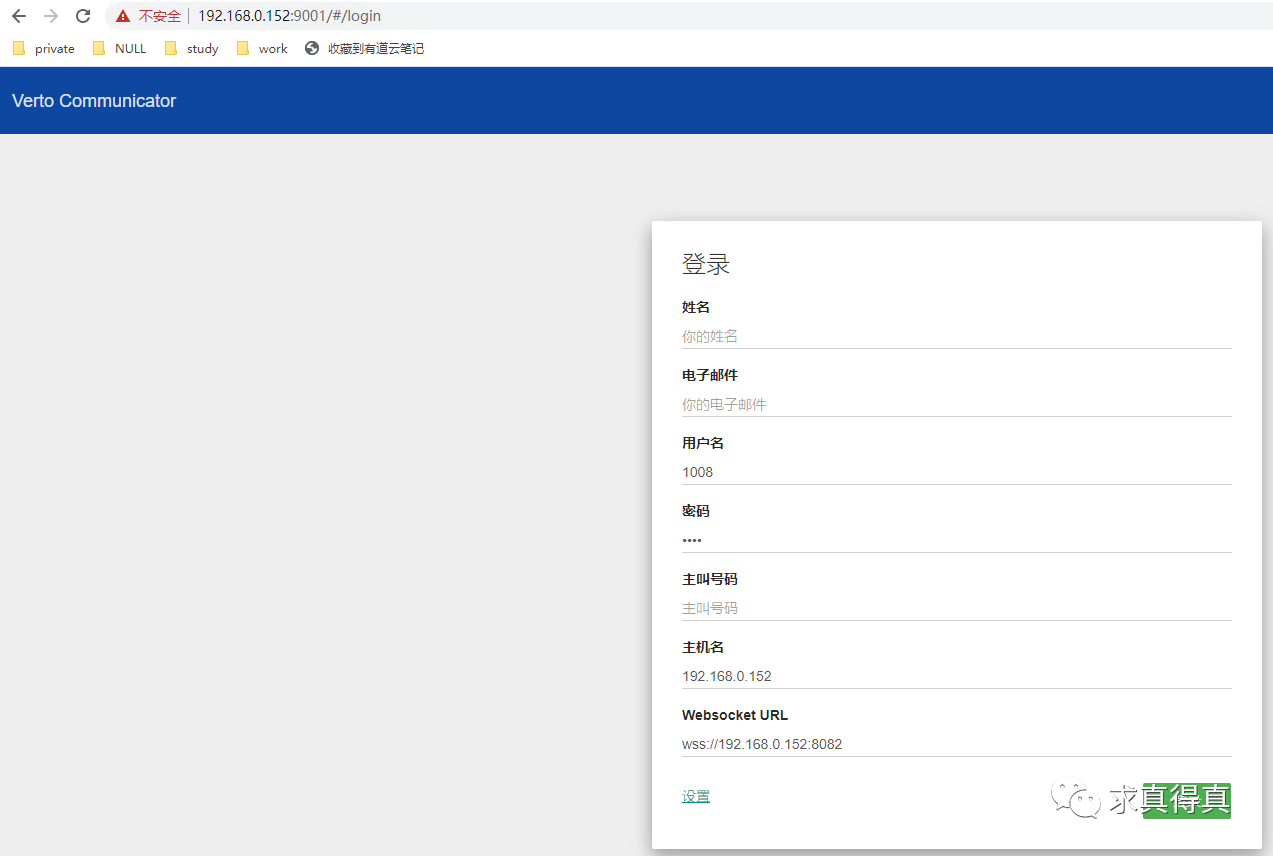
按照freeswitch server的注册信息配置字段。
其中,websocket URL地址必须使用域名方式才能正常登陆,可以通过修改本地host,将域名直接指向fs注册服务器地址的方式来实现。
总结
verto协议是基于json的轻量化协议,在web应用中使用和实现都非常方便。
其中verto communicator在nodejs环境的安装部署过程中问题太多,而且难以解决,不推荐使用。(也可能是因为本人对nodejs不熟悉,如果有更好的解决方案,请留言,多谢)
空空如常
求真得真
freeswitch verto communicator客户端的更多相关文章
- FreeSWITCH 1.2.5.3 Step by Step Install
Ubuntu: apt-get -y install build-essential automake autoconf git-core wget libtool apt-get -y instal ...
- freeswitch与外部网关链接
我建了一个 Freeswitch 内核研究 交流群, 45211986, 欢迎加入, 另外,提供基于SIP的通信服务器及客户端解决方案, 承接 sip/ims 视频客户端开发,支持接入sip软交换,i ...
- FreeSWITCH 学习笔记
[1]FreeSWITCH学习笔记 1.Windows安装包下载地址:http://files.freeswitch.org/windows/installer/ 2.源码下载地址:http://fi ...
- PKI系统深入介绍
公钥基础设施(Public Key Infrastructure,简称PKI)是目前网络安全建设的基础与核心,是电子商务安全实施的基本保障,因 此,对PKI技术的研究和开发成为目前信息安全领域的热点. ...
- [转帖]PKI系统深入介绍
PKI系统深入介绍 https://blog.csdn.net/liuhuiyi/article/details/7776825 2012年07月23日 20:17:01 liuhuiyi 阅读数 4 ...
- FreeSWITCH 客户端fs_cli连接设置(acl)
FreeSWITCH 默认配置只能 在本机连接, 要从 外面连接, 就要配置: acl.conf.xml::network-lists/list event_socket.conf.xml::appl ...
- [原创]如何让freeswitch转发客户端自定义的INFO消息
如何让freeswitch转发客户端自定义的INFO消息 英文概述: this article is about how to configure freeswitch to forward self ...
- FreeSWITCH视频直播
大家都知道,如今,视频直播比较火啊. 今天,在FreeSWITCH精英群里分享了FreeSWITCH做视频直播相关的技术. 首先,要做直播就得有好机器.笔者买了一台阿里云的主机,买的是按量付费的,4核 ...
- freeswitch注册过程分析
操作系统:debian8.5_x64freeswitch 版本 : 1.6.8 本文仅描述sip注册的简单场景,即话机直接向处于同一个局域网的fs进行注册. SIP协议的消息结构 消息框架 SIP协议 ...
随机推荐
- 洛谷4322 SHOI2014 三叉神经树(LCT+思维)
好久之前做的题了QWQ 现在来补一发博客 一道神仙题啊..qwq 首先,我们可以看出来,我们如果对于每个点维护一个\(val\),表示他的直系儿子中有几个表现为1的. 那么\(val[x]>&g ...
- bzoj1503 郁闷的出纳员(平衡树,思维)
题目大意: 现在有n个操作和一个最低限度m \(I\)命令\(I\ k\)新建一个工资档案,初始工资为k. \(A\)命令$A\ k $把每位员工的工资加上k \(S\)命令$S\ k $把每位员工的 ...
- CTF入门记录(1
(https://ctf-wiki.org) 00 基础了解 CTF简介 (wolai.com) 00-1 CTF题目类型 Web 大部分情况下和网.Web.HTTP等相关技能有关. Web攻防的一些 ...
- 2021.1.23--vj补题
B - B CodeForces - 879B n people are standing in a line to play table tennis. At first, the first tw ...
- Java---String和StringBuffer类
Java---String和StringBuffer类 Java String 类 字符串在Java中属于对象,Java提供String类来创建和操作字符串. 创建字符串 创建字符串常用的方法如下: ...
- Java:包装类小记
Java:包装类 对 Java 中的 包装类 这个概念,做一个微不足道的小小小小记 基本数据&包装类 四类八种基本数据类型: 数据类型 关键字 内存占用 取值范围 字节型 byte 1个字节 ...
- 实用小工具:screen
实用小工具:screen 首先,吹爆screen screen,实现了不间断的会话服务,通过SSH连接至远程服务器,当使用了screen开启的会话,不会因为你断开SSH而中断在远程服务器上运行的命令. ...
- springboot读取配置文件中的信息
在一个项目中,我们有时候会把一些配置信息写入到一个配置文件中,在java代码中读取配置文件的信息.在此记录下读取属性文件中的内容. 在springboot项目中,springboot的配置文件可以使用 ...
- CSP-S2021幽寂
不管怎么说,这次比赛考的比这一段时间以来的模拟赛都难看 难受,但是也不想太表现出来,所以更难受.... 有点害怕会退役...... Day -6 前一天晚上回宿舍的时候和\(zxs\)一路,聊的过程中 ...
- uni-app 安卓离线打包详细教程
借鉴 uni-app官方给出的文章http://ask.dcloud.net.cn/article/508(虽说是04年的) 预备环境 AndroidStudio开发环境,要求安装Android4.0 ...