
open数据库报错ERROR at line 1: ORA-03113: end-of-file on communication channel Process ID: 3880 Session ID: 125 Serial number: 3
1.今天打开数据时,失败,报错
ERROR at line 1:
ORA-03113: end-of-file on communication channel
Process ID: 3880
Session ID: 125 Serial number: 3
2.想看下数据库的状态,发现提示:not connected to ORACLE
SYS@EMREP> select status,instance_name from v$instance;
ERROR:
ORA-03114: not connected to ORACLE
3.排查错误,使用Oracle三部启动法:
startup nomount;(如果起来,说明参数文件没问题)
alter database mount;(如果起来,说明控制文件没问题)
alter database open;(报错了,需要查看具体的报错,通过aler日志查看)
> show parameter background_dump (查看alert日志所在位置)
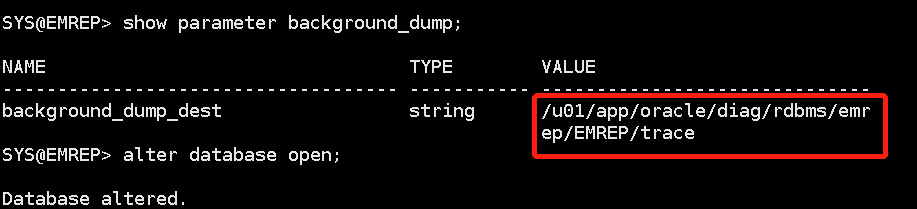
4.进入alert日志,查看详细报错
cd /u01/app/oracle/diag/rdbms/emrep/EMREP/trace (到alert日志所在的目录下)
tail -100f alert_EMREP.log (查看详细报错日志,如下:)
Errors in file /u01/app/oracle/diag/rdbms/emrep/EMREP/trace/EMREP_ora_3823.trc:
ORA-19815: WARNING: db_recovery_file_dest_size of 2147483648 bytes is 100.00% used, and has 0 remaining bytes available.
************************************************************************
You have following choices to free up space from recovery area:
1. Consider changing RMAN RETENTION POLICY. If you are using Data Guard,
then consider changing RMAN ARCHIVELOG DELETION POLICY.
2. Back up files to tertiary device such as tape using RMAN
BACKUP RECOVERY AREA command.
3. Add disk space and increase db_recovery_file_dest_size parameter to
reflect the new space.
4. Delete unnecessary files using RMAN DELETE command. If an operating
system command was used to delete files, then use RMAN CROSSCHECK and
DELETE EXPIRED commands.
************************************************************************
ARCH: Error 19809 Creating archive log file to '/u01/app/oracle/EMREP/archivelog/2018_11_24/o1_mf_1_21_%u_.arc'
ARC2: Error 19809 Creating archive log file to '/u01/app/oracle/EMREP/archivelog/2018_11_24/o1_mf_1_22_%u_.arc'
Errors in file /u01/app/oracle/diag/rdbms/emrep/EMREP/trace/EMREP_ora_3823.trc:
ORA-16038: log 3 sequence# 21 cannot be archived
ORA-19809: limit exceeded for recovery files
ORA-00312: online log 3 thread 1: '/u01/app/oracle/oradata/EMREP/redo03.log'
ORA-00312: online log 3 thread 1: '/u01/app/oracle/oradata/EMREP/redo06.log'
ARCH: Archival stopped, error occurred. Will continue retrying
ORACLE Instance EMREP - Archival Error
ORA-16038: log 1 sequence# 22 cannot be archived
ORA-19809: limit exceeded for recovery files
ORA-00312: online log 1 thread 1: '/u01/app/oracle/oradata/EMREP/redo01.log'
ORA-00312: online log 1 thread 1: '/u01/app/oracle/oradata/EMREP/redo04.log'
USER (ospid: 3823): terminating the instance due to error 16038
System state dump requested by (instance=1, osid=3823), summary=[abnormal instance termination].
System State dumped to trace file /u01/app/oracle/diag/rdbms/emrep/EMREP/trace/EMREP_diag_3791_20181124081720.trc
Dumping diagnostic data in directory=[cdmp_20181124081720], requested by (instance=1, osid=3823), summary=[abnormal instance termination].
根据日志,可以看出,是因为归档空间满了,而且给出了解决办法:
1) Consider changing RMAN RETENTION POLICY. If you are using Data Guard,
then consider changing RMAN ARCHIVELOG DELETION POLICY. (将备份策略改为基于冗余数量的备份策略)
如:RMAN> configure retention policy to redundancy 5;
2). Back up files to tertiary device such as tape using RMAN BACKUP RECOVERY AREA command.
3). Add disk space and increase db_recovery_file_dest_size parameter to reflect the new space.(增加db_recovery_file_dest_size的大小)
SQL> alter system set db_recovery_file_dest_size=2000M;
4). Delete unnecessary files using RMAN DELETE command. If an operating
system command was used to delete files, then use RMAN CROSSCHECK and
DELETE EXPIRED commands. 手动删除不需要的归档日志文件 (删除 3 天以前的日志记录)
rman> delete archivelog all completed before 'sysdate - 3'
以上任意一种方法都可以,执行完毕,直接:alter database open 即可。
open数据库报错ERROR at line 1: ORA-03113: end-of-file on communication channel Process ID: 3880 Session ID: 125 Serial number: 3的更多相关文章
- Zabbix导入MySQL数据库报错ERROR 1046 (3D000) at line 1: No database selected
使用如下命令导入Zabbix数据库时报错 解决办法: 1.先把原始的数据库压缩包备份 cd /usr/share/doc/zabbix-server-mysql-4.0.7/ cp create.sq ...
- SVG报错error on line 39 at column 26: Namespace prefix xlink for href on script is not defined
转自:http://stackoverflow.com/questions/3561270/error-on-line-39-at-column-26-namespace-prefix-xlink-f ...
- git切换分支报错:error: pathspec 'origin/XXX' did not match any file(s) known to git
项目上有一个分支test,使用git branch -a看不到该远程分支,直接使用命令git checkout test报错如下: error: pathspec 'origin/test' did ...
- Dbvisual连接远程数据库报错Error Code: 17401
Long Message:违反协议 Details: Type: java.sql.SQLException Error Code: 17401 SQL State: null 现象: 本 ...
- windows 8 安装 oracle 11g 报错:command line option syntax error,type command/? for help
windows 8 安装 oracle 11g 报错:command line option syntax error,type command/? for help 在windows8操作系统上安装 ...
- 【IntellJ IDEA】idea启动测试类报错Error running 'Test1.test': Command line is too long. Shorten command line for Test1.test or also for JUnit default configuration.
idea启动测试类报错 Error running 'Test1.test': Command line is too long. Shorten command line for Test1.tes ...
- Hive 报错 Error while compiling statement: FAILED: ParseException line 1:0 character '' not supported here (state=42000,code=40000)
Hive报错 Error while compiling statement: FAILED: ParseException line 1:0 character '' not supported h ...
- 运行springboot项目报错 Error running 'ResourceApplication': Command line is too long. Shorten comma
方法1 IDEA 运行报错:Error running '***': Command line is too long 技术标签: IDEA Error running 'Test': Com ...
- MySQL报错ERROR 1558 (HY000): Column count of mysql.user is wrong.
MySQL报错ERROR 1558 (HY000): Column count of mysql.user is wrong. 1.今天在使用MySQL创建数据库时出现如下报错: mysql> ...
随机推荐
- Spring与Springboot
1.Spring能做什么 1.1.Spring的能力 1.2.Spring的生态 https://spring.io/projects/spring-boot 覆盖了: web开发 数据访问 安全控制 ...
- 如何使用GoLand debug
debug 常用操作 /* 如何使用 goland debug goroutine */ package main import ( "fmt" "runtime&quo ...
- Linux Centos7设置UTF-8编码,防止中文乱码
Linux Centos7设置UTF-8编码,防止中文乱码 # localeLANG=zh_CN.gb2312LC_CTYPE="zh_CN.gb2312"LC_NUMERIC=& ...
- UltraISO制作启动盘安装CentOS7
UltraISO制作启动盘安装CentOS7 发表于 2020-03-10 | 分类于 DevOps | 没有评论 简单几个步骤即可完成启动盘的制作,非常便利 准备工具 准备8G优盘(启动盘制 ...
- 【山外笔记-SVN命令】svn命令详解
本文打印版文件下载地址 [山外笔记-SVN命令]svn命令详解-打印版.pdf 一.命令简介 svn命令用于Subversion命令行客户端,执行svn相关的操作. 二.命令语法 1.svn语法: ( ...
- 马哥Linux SysAdmin学习笔记(一)
Linux入门 Linux系统管理: 磁盘管理,文件系统管理 RAID基础原理,LVM2 网络管理:TCP/IP协议,Linux网络属性配置 程序包管理:rpm,yum 进程管理:htop,glanc ...
- liveCD版: CD光盘映像,和liveDVD一样,唯一的区别就是该版本中包含的软件包会少一点,安装系统时使用 U 盘或者CD光盘进行安装。
https://man.linuxde.net/download/CentOS/ CentOS,英文全称"Community Enterprise Operating System" ...
- 051.Python的Django框架简单使用
一 HTTP相关概念 http协议包含由浏览器发送数据到服务器需要遵循的请求协议与服务器发送数据到浏览器需要遵循的响应协议.用于HTTP协议交互的信息被为HTTP报文.请求端(客户端)的HTTP报文 ...
- 重定向-管道技术-xargs命令详解
重定向 什么是重定向? 将原本要输出在屏幕的内容,重新定向输出到指定的文件或设备中. 为什么要使用重定向? 1.备份的时候需要知道备份的结果. 2.屏幕上输出信息比较重要的时候需要保存下来. 3.定时 ...
- ubuntu设置允许root用户登录
一.允许ssh登录root用户(命令行) 1.修改root 密码,sudo passwd root 2.修改ssh配置, sudo vim /etc/ssh/shd_config,修改文件中的Perm ...