
eth-trunk
------------恢复内容开始------------
1.eth-trunk 是什么
*链路 聚合技术
2.做什么用的
*作为一种链路捆绑技术,可以把多个独立物理接口绑定在一起,作为一个大带宽的逻辑接口使用
3.有什么优点
*增加设备之间的互联带宽
*增加设备之间的可靠性
*对流量负载均衡,提高链路利用率
4.配置方式
*静态手动配置
*动态LACP配置 【老机器可能没有这功能,只能静态配置】
5.静态配置案例
要求增加一条物理链路,增加互联带宽
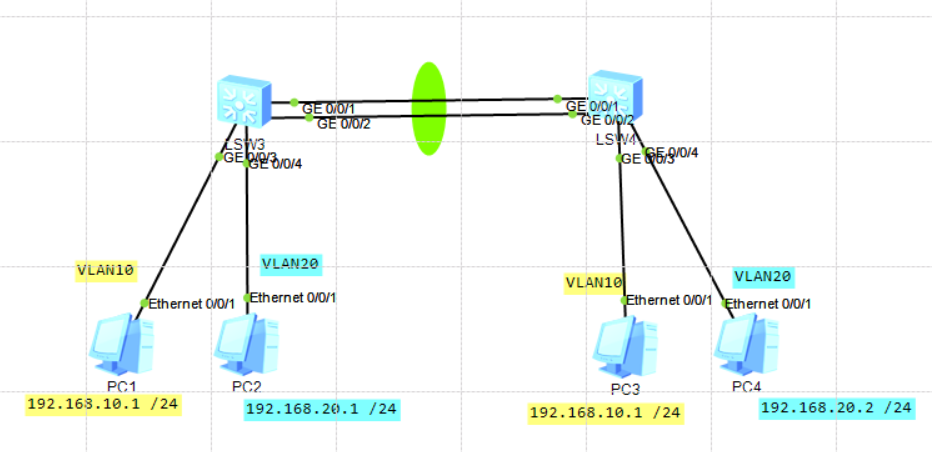
*创建VLAN 10 20,配置基础命令将 交换机连接pc的线路配置为access ,并加入对应VLAN 【前面介绍VLAN的随笔里有详细操作流程】
*创建链路捆绑,静态手动配置
s1]interface Eth-Trunk 1 创建链路 1
[s1-Eth-Trunk1]mode manual load-balance 链路·捆绑· 负载均衡
[s1-Eth-Trunk1]trunkport GigabitEthernet 0/0/1 加入捆绑链路。。。。
Info: This operation may take a few seconds. Please wait for a moment...done.
[s1-Eth-Trunk1]trunkport GigabitEthernet 0/0/2
Info: This operation may take a few seconds. Please wait for a moment...done.
[s1-Eth-Trunk1]port link-type trunk
[s1-Eth-Trunk1]port trunk allow-pass vlan all
[s2]interface Eth-Trunk 2
[s2-Eth-Trunk2]mode manual load-balance
[s2-Eth-Trunk2]trunkport GigabitEthernet 0/0/1
Info: This operation may take a few seconds. Please wait for a moment...done.
[s2-Eth-Trunk2]trunkport GigabitEthernet 0/0/2
Info: This operation may take a few seconds. Please wait for a moment...done.
[s2-Eth-Trunk2]port link-type trunk
[s2-Eth-Trunk2]port trunk allow-pass vlan all
6.动态配置案例
要求两条链路带宽正常运作, 并能在其中一端口 无法联通正常运作时,第三条链路作为他的备份
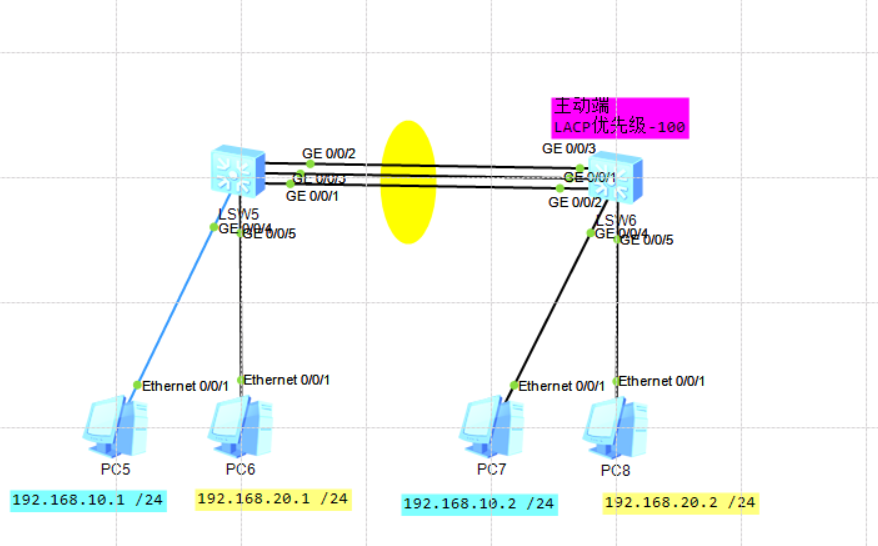
*创建VLAN 10 20,配置基础命令将 交换机连接pc的线路配置为access ,并加入对应VLAN 【前面介绍VLAN的随笔里有详细操作流程】
*创建捆绑链路,并动态LACP配置
s1]interface Eth-Trunk 1 创建捆绑链路
[s1-Eth-Trunk1]mode lacp-static LACP模式
[s1-Eth-Trunk1]trunkport GigabitEthernet 0/0/1 捆绑加入.......
Info: This operation may take a few seconds. Please wait for a moment...done.
[s1-Eth-Trunk1]trunkport GigabitEthernet 0/0/2
Info: This operation may take a few seconds. Please wait for a moment...done.
[s1-Eth-Trunk1]trunkport GigabitEthernet 0/0/3
Info: This operation may take a few seconds. Please wait for a moment...done.
s2]interface Eth-Trunk 1
[s2-Eth-Trunk1]mode lacp-static
[s2-Eth-Trunk1]trunkport GigabitEthernet 0/0/1
Info: This operation may take a few seconds. Please wait for a moment...done.
[s2-Eth-Trunk1]trunkport GigabitEthernet 0/0/2
Info: This operation may take a few seconds. Please wait for a moment...done.
[s2-Eth-Trunk1]trunkport GigabitEthernet 0/0/3
Info: This operation may take a few seconds. Please wait for a moment...done.
*要决定哪两根链路启动,哪一根做备份,必需有一方能决定,例如 设置主动端是s2
【s2】lacp priority 100 LACP 优先级为100
*只有两条链路能连通,一条做备份
*[s2-Eth-Trunk1]max active-linknumber 2
允许连通链路2根【默认8根】
*确保其中一端口 无法联通正常运作时,第三条链路作为他的备份
[s2-Eth-Trunk1]lacp preempt enable 在主动端开启链路抢占 30s
[s2-Eth-Trunk1]port trunk allow-pass vlan all
*验证命令
display eth-trunk 1
如何查看
Eth-Trunk1's state information is:
Local:本地
LAG ID: 1 WorkingMode: STATIC
Preempt Delay Time: 30抢占延迟 Hash arithmetic: According to SIP-XOR-DIP
System Priority: 100 System ID: 4c1f-ccef-28df
Least Active-linknumber: 1 Max Active-linknumber: 2 允许端口数2 【默认8 】
Operate status: up Number Of Up Port In Trunk: 2
--------------------------------------------------------------------------------
ActorPortName Status PortType PortPri PortNo PortKey PortState Weight
GigabitEthernet0/0/1 Selected 1GE 32768 2 305 10111100 1
GigabitEthernet0/0/2 Selected 1GE 32768 3 305 10111100 1
GigabitEthernet0/0/3 Unselect 1GE 32768 4 305 10100000 1
Partner: 对方
--------------------------------------------------------------------------------
ActorPortName SysPri SystemID PortPri PortNo PortKey PortState
GigabitEthernet0/0/1 32768 4c1f-cc07-0ecb 32768 4 305 10111100
GigabitEthernet0/0/2 32768 4c1f-cc07-0ecb 32768 2 305 10111100
GigabitEthernet0/0/3 32768 4c1f-cc07-0ecb 32768 3 305 10110000
------------恢复内容结束------------
eth-trunk的更多相关文章
- 实验五:配置Eth-Trunk链路聚合(手工负载分担模式)
1.配置图 2.配置命令 LSW1的eth trunk 1配置如下: 配置命令如下: [S1]Eth-Trunk1 创建Eth-Trunk1端口 [S1-Eth-Trunk1]mode lacp-st ...
- 配置trunk和access
配置trunk和access 拓扑图 PC地址设置 PC1 :192.168.1.1 vlan10 PC2 :192.168.1.2 vlan10 交换机配置 LSW3配置 <Huawei> ...
- 【原】iOS:手把手教你发布代码到CocoaPods(Trunk方式)
Change Log: 2015.08.20 - 添加podspec文件更新方法 2015.08.19 - 首次发布 概述 关于CocoaPods的介绍不在本文的主题范围内,如果你是iOS开发者却不知 ...
- SVN中trunk、branches、tag的使用
我相信初学开发在SVN作为版本管理时,都估计没可能考虑到如何灵活的运用SVN来管理开发代码的版本,下面我就摘录一篇文章来简单说明SVN里的trunk,branched,tags这个三个文件目录的用法 ...
- trunk 的坑
三层交换机A和三层交换机B之间原本配置有trunk口,如再用trunk连二层交换机会导致环路,网络不通.将L3 A和L3-B之间断开正常.
- 发布自己的pods到CocoaPods trunk 及问题记录
这两天准备把之前写的一些小玩意添加到pods库中去,参考了一些资料后进行操作,实际中也遇到了一些问题,记录下来,问题及解决方式在后面. 参考内容转载如下: 首先更新了用trunk之后,CocoaPod ...
- Access、Hybrid和Trunk
以太网端口有三种链路类型:Access.Hybrid和Trunk.Access类型的端口只能属于1个VLAN,一般用于连接计算机的端口:Trunk类型的端口可以属于多个VLAN,可以接收和发送多个VL ...
- TRUNK的作用功能.什么是TRUNK
TRUNK的作用功能.什么是TRUNK(转) [复制链接] 发表于 2011-11-24 11:01 | 来自 51CTO网页 在技术领域中把TRUNK翻译为中文是“主干.干线.中继线.长途线 ...
- svn三大目录trunk、branch和tag
SVN中Branch和tag的比较在SVN中Branch和tag在一个功能选项中,在使用中也往往产生混淆.在实现上,branch和tag,对于svn都是使用copy实现的,所以他们在默认的权限上和一般 ...
- TCP/IP协议学习(三) STM32中ETH驱动配置注意事项
1.MII/RMII/SMI接口连接和配置 SMI又称站点管理接口,用于cpu与外置PHY芯片通讯,配置相关参数,包含MDC和MDIO两个管脚(CPU上有对应引脚,当然用普通GPIO口模拟SMI管理也 ...
随机推荐
- wrf模拟的domain图绘制
wrf模拟的区域绘制,domain图,利用python的cartopy库绘制模拟区域 参考Liang Chen的draw_wrf_domian.py这个代码, 出处python画wrf模式的模拟区域 ...
- 4、Spring教程之Spring配置
别名 alias 设置别名 , 为bean设置别名 , 可以设置多个别名 <!--设置别名:在获取Bean的时候可以使用别名获取--> <alias name="userT ...
- Java例题_17 猴子偷桃问题
1 /*17 [程序 17 猴子吃桃问题] 2 题目:猴子吃桃问题 3 猴子第一天摘下若干个桃子,当即吃了一半,还不瘾,又多吃了一个 4 第二天早上又将剩下的桃子吃掉一半,又多吃了一个. 5 以后每天 ...
- 详解CURL状态码,最全的代码列表
curl是一个强大的命令,其中我们经常使用的通过curl 加地址和端口号,判断目标链接状态,下面列出了curl 返回的状态码. 举例: [root@k8s-master1 ~]# curl k8s-m ...
- Elasticsearch集群升级指引
目录 背景 第一部分 版本升级指引 第二部分 升级方法和具体步骤 总结 参考文献及资料 背景 Elasticsearch集群的版本升级是一项重要的集群维护工作.本篇文章参考官方文档,将详细介绍相关细节 ...
- 深度学习---1cycle策略:实践中的学习率设定应该是先增再降
深度学习---1cycle策略:实践中的学习率设定应该是先增再降 本文转载自机器之心Pro,以作为该段时间的学习记录 深度模型中的学习率及其相关参数是最重要也是最难控制的超参数,本文将介绍 Lesli ...
- python基础(六):列表的使用(下)
列表排序的三种方式 sort()方法:原地修改列表的排序方法 注 1:" 默认是升序" ,参数 reverse=True,表示将列表降序. 注 2:" 原地修改列表&qu ...
- 【Android】修改Android Studio的SDK位置
解决SDK占用C盘空间问题 由于Android Studio默认会将环境下载到C盘,会导致C盘空间被大量占用. 对于C盘窘迫的童鞋非常不友好. 可以通过修改SDK位置的方式缓解C盘空间焦虑. 打开&q ...
- 使用Vanilla框架制作时间倒数器 ——JavaScript
一.制作时间倒数器要求以及思路: 1.首先创建三个输入字段,分别是小时,分钟和秒,以及"开始"按钮.输入的初始值必须为0h 5m 0s.当用户输入小时,分钟和秒并单击" ...
- c++ 实现向量去重操作
去重的时候要考虑线性表或链表是否是有序 1.1.无序线性表 对于向量[1,5,3,7,2,4,7,3], 从头开始扫描vector内的元素, 对于表中r处的元素a[r], 检查数组0至r-1区间内是否 ...