
SpringCloud(四) config
Spring Cloud Config
在分布式系统中,尤其是当我们的分布式项目越来越多,每个项目都有自己的配置文件,对配置文件的统一管理就成了一种需要,而 Spring Cloud Config 就提供了对各个分布式项目配置文件的统一管理支持。
它包含 Client和 Server 两个部分,Server 提供配置文件的存储、以接口的形式将配置文件的内容提供出去,Client 通过接口获取数据、并依据此数据初始化自己的应用。
构建 Springcloud config 配置中心
1、创建 Spring Boot 项目并添加如下依赖:
<dependency>

 <groupId>org.springframework.cloud</groupId>

 <artifactId>spring-cloud-config-server</artifactId>

</dependency>
2、在入口类上添加注解 @EnableConfigServer
3、在 application.yml中配置一下 git 仓库信息,这里使用的是gitee码云,需要先在 gitee上 创建一个 spring-cloud-config 的项目
server:

  port: 3721

spring:

  application:

    name: springcloud-config-server

  cloud:

    config:

      server:

        git:

          uri:

          search-paths: config-center

          username:

          password:
- uri 表示配置中心所在仓库的位置
- search-paths 表示仓库下的子目录
- username 表示你的 gitee 用户名
- password 表示你的 gitee 密码
构建 Springcloud config 配置中心仓库
首先在本地创建一个文件夹,然后在里面创建一个文件夹叫 config-center,然后在 config-center中创建四个配置文件,如下:
application.properties

application-dev.properties

application-test.properties

application-online.properties
并分别写:
url=http://www.*.com

url=http://www.dev.com

url=http://www.test.com

url=http://www.online.com
将本地文件推送到远程仓库:
git init # 初始化

git add config-center/ # 将文件添加到暂存区

git commit -m 'add config-center' # 把文件提交到本地仓库

git remote add origin https://github.com/hnylj/spring-cloud-config.git # 添加远程主机

git push -u origin master # 将本地的 master 分支推送到 origin 主机
启动配置中心,通过/{application}/{profile}/{label}访问配置文件,
- {application} 表示配置文件的名字,对应的配置文件即 application,
- {profile} 表示环境,有 dev、test、online 及默认,
- {label} 表示分支,默认我们放在 master 分支上
访问http://localhost:3721/application/dev/master,返回结果:
{

    "name":"application",

    "profiles":[

        "dev"

    ],

    "label":"master",

    "version":"4ac223e179ba14cd15079e8f486cc69a5d3a7a43",

    "state":null,

    "propertySources":[

        {

            "name":

            "source":{

                "url":"http://www.dev.com"

            }

        },

        {

            "name":

            "source":{

                "url":"http://www.*.com"

            }

        }

    ]

}
构建 Springcloud config 配置中心客户端
创建一个Spring Boot 工程 springcloud-config-client,并添加依赖:
<dependency>

 <groupId>org.springframework.cloud</groupId>

 <artifactId>spring-cloud-starter-config</artifactId>

</dependency>
创建 bootstrap.yml 文件,用于获取配置信息
spring:

  application:

    name: application

  cloud:

    config:

      profile: dev

      label: master

      uri: http://localhost:3721/
- uri:配置中心地址
创建一个 Controller 进行测试:
@RestController

public class ConfigController {

    @Value("${url}")

    private String      url;

    @Autowired

    private Environment env;

    @RequestMapping("/cloud/url")

    public String url1 () {

        return this.url;

    }

    @RequestMapping("/cloud/url2")

    public String url2 () {

        return env.getProperty("url");

    }

}

Springcloud config 的工作原理
- 首先需要一个远程 Git 仓库,平时测试可以使用 GitHub,在实际生产环境中,需要自己搭建一个 Git 服务器,远程 Git 仓库的主要作用是用来保存我们的配置文件;
- 除了远程 Git 仓库之外,我们还需要一个本地 Git 仓库,每当 Config Server访问远程 Git 仓库时,都会克隆一份到本地,这样当远程仓库无法连接时,就直接使用本地存储的配置信息;
- 微服务 A、微服务 B 则是我们的具体应用,这些应用在启动的时会从 Config Server 中获取相应的配置信息;
- 当微服务 A、微服务 B 尝试从 Config Server 中加载配置信息的时候,Config Server 会先通过 git clone 命令克隆一份配置文件保存到本地;
- 由于配置文件是存储在 Git 仓库中,所以配置文件天然具有版本管理功能。
Springcloud config 的安全保护
生产环境中我们的配置中心肯定是不能随随便便被人访问的,我们可以加上适当的保护机制,由于微服务是构建在 Spring Boot 之上,所以整合 Spring Security是最方便的方式。
在配置中心添加:
<dependency>

 <groupId>org.springframework.boot</groupId>

 <artifactId>spring-boot-starter-security</artifactId>

</dependency>
在 配置中心目的 application.yml 中配置用户名密码:
spring:

    security:

        user:

          name: author

          password: 123
在配置中心客户端的 bootstrap.yml 中:
spring:

  application:

    name: application

  cloud:

    config:

      profile: dev

      label: master

      uri: http://localhost:3721/

      username: author

      password: 123
直接访问http://localhost:3721/application/dev/master:
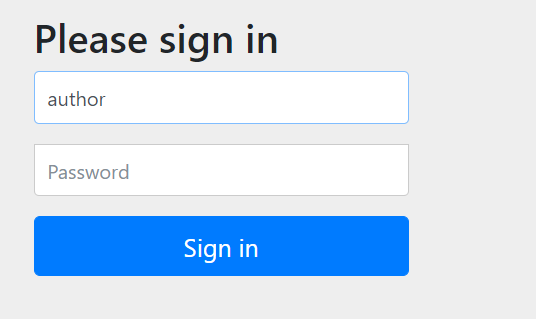
需要输入用户名、密码才能就访问
内部访问:localhost:3722/cloud/url,可以访问成功

SpringCloud(四) config的更多相关文章
- SpringCloud创建Config读取本地配置
1.说明 Config Server获取配置支持的方式很多, 包括Git仓库(github/gitee等),任何与JDBC兼容的数据库, Subversion,Hashicorp Vault,Cred ...
- SpringCloud创建Config Client通过Eureka访问Config
1.说明 本文详细介绍配置中心客户端使用方法, 即Config Client到Config Server读取配置. 读取配置的方式有两种, 第一种是直接配置Configer Server的URL, 第 ...
- SpringCloud创建Config Client配置读取
1.说明 本文详细介绍配置中心客户端使用方法, 即Config Client到Config Server读取配置, 这里以创建Config Client服务为例, 基于已经创建好的Config Ser ...
- 【微服务】- SpringCloud中Config、Bus和Stream
文章目录 SpringCloud中Config 1.Config的简介 官网 分布式系统面临的问题 config是什么 如何使用 能做什么 与git的配合使用 2.Config服务端的配置和测试 准备 ...
- springcloud(四):应用配置中心config的安全设置
springcloud应用配置中心config的安全设置 在springcloud应用开发中,为了方便在线管理我们的配置文件,通常会配一个配置中心config-server,这里托管着应用的一些配置文 ...
- SpringCloud的Config:ConfigServer注册到EurekaServer中,变成一个Eureka服务
一.概念与定义 1.将SpringCloud ConfigServer注册到 EurekaServer,以便ConfigClient以服务的方式引用ConfigServer 2.客户端不再引用 Con ...
- Spring-Cloud之Config配置中心-7
一.我们前面基本上都是讲解的Spring Cloud Netflix的组件,下面我们会重点说Spring Cloud Config分布式配置中心.为什么需要这个组件来管理配置呢?在分布式应用开发过程中 ...
- SpringCloud之Config配置中心+BUS消息总线原理及其配置
一.配置中心作用 在常规的开发中,每个微服务都包含代码和配置.其配置包含服务配置.各类开关和业务配置.如果系统结构中的微服务节点较少,那么常规的代码+配置的开发方式足以解决问题.当系统逐步迭代,其微服 ...
- springcloud之config配置中心-Finchley.SR2版
本篇和大家分享的是springcloud-config配置中心搭建,写到这里突然想起自己曾今开源过基于Redis发布订阅编写的一个配置中心,刚看了git星数有点少哈哈,这里顺势发个连接欢迎大侠们点赞: ...
随机推荐
- Golang gRPC调试工具
目录 Golang gRPC调试工具 1. 命令行工具 grpcurl 1.1 安装 1.2 验证 1.3 注册反射 1.4 使用示例 2. web调试工具grpcui 2.1 安装 2.2 验证 2 ...
- php header下载文件 无法查看原因
php header下载文件 无法查看原因 php header下载文件 下方函数可以下载单个文件 function download($file_url){ if(!isset($file_url) ...
- kubectl logs查看日志时出现failed to create fsnotify watcher: too many open files
因为系统默认的 fs.inotify.max_user_instances=128 太小,在查看日志的pod所在节点重新设置此值: 临时设置 sudo sysctl fs.inotify.max_us ...
- Oracle参数文件—pfile与spfile
oracle的参数文件:pfile和spfile 1.pfile和spfile Oracle中的参数文件是一个包含一系列参数以及参数对应值的操作系统文件.它们是在数据库实例启动时候加载的, ...
- Running shell commands by C++
#include <iostream> #include <stdio.h> #include <stdlib.h> using namespace std; st ...
- Apache架构师的30条设计原则
本文作者叫 Srinath,是一位科学家,软件架构师,也是一名在分布式系统上工作的程序员. 他是 Apache Axis2 项目的联合创始人,也是 Apache Software 基金会的成员. 他是 ...
- GO 时间处理
比较大小 比较大小 先把当前时间格式化成相同格式的字符串,然后使用time的Before, After, Equal 方法即可. time1 := "2015-03-20 08:50:29& ...
- Output of C++ Program | Set 1
Predict the output of below C++ programs. Question 1 1 // Assume that integers take 4 bytes. 2 #incl ...
- ArrayList删除特定元素的方法
最朴实的方法,使用下标的方式: ArrayList<String> al = new ArrayList<String>(); al.add("a"); a ...
- Linux:while read line与for循环的区别
while read line:是一次性将文件信息读入并赋值给变量line , while中使用重定向机制,文件中的所有信息都被读入并重定向给了整个while 语句中的line 变量. for:是每次 ...