
Vuex的同步异步存值取值
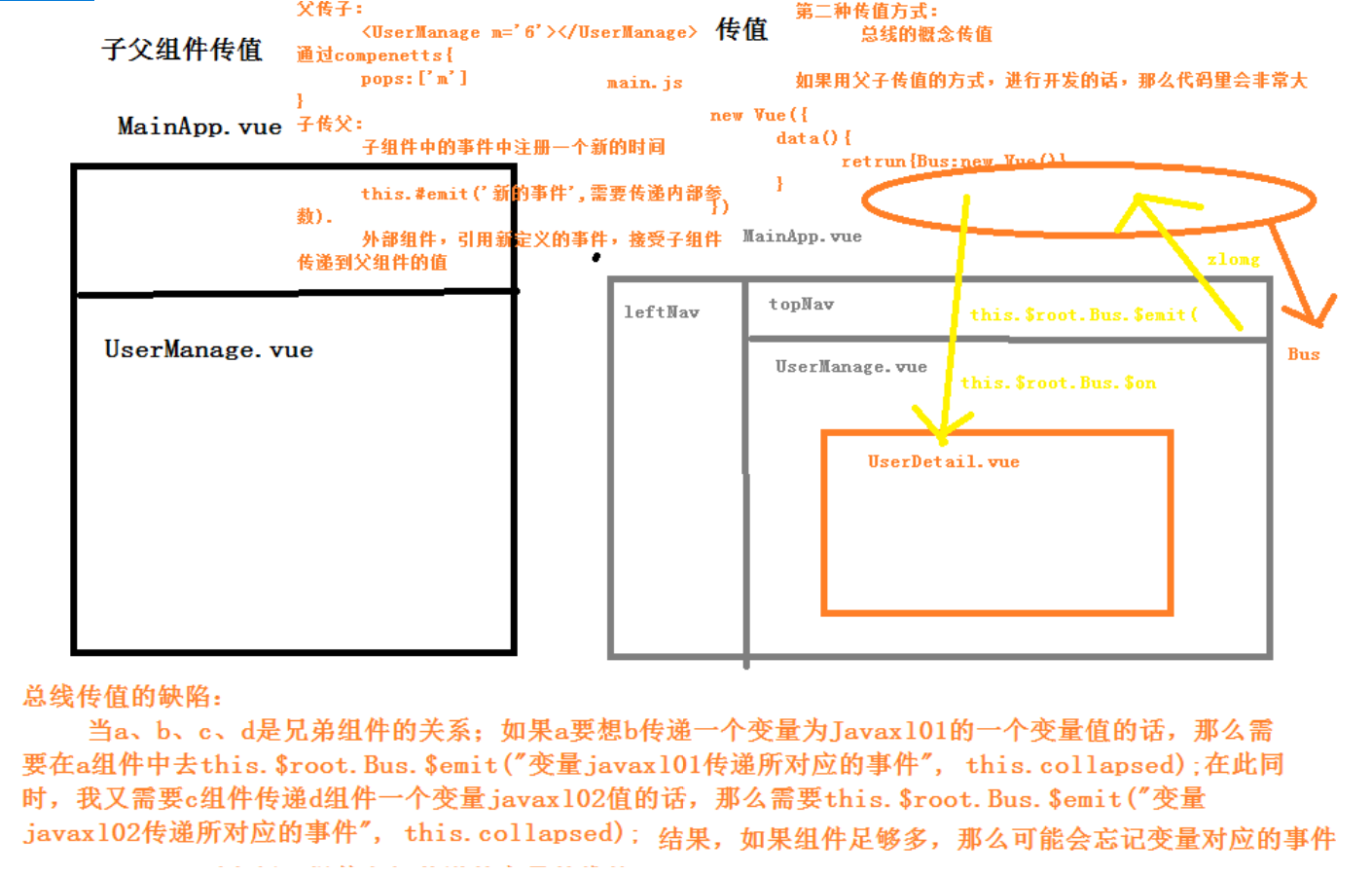
1. vue中各个组件之间传值
1.父子组件
父组件-->子组件,通过子组件的自定义属性:props
子组件-->父组件,通过自定义事件:this.$emit('事件名',参数1,参数2,...);
2.非父子组件或父子组件
通过数据总数Bus,this.$root.$emit('事件名',参数1,参数2,...)
3.非父子组件或父子组件
更好的方式是在vue中使用vuex
方法1: 用组件之间通讯。这样写很麻烦,并且写着写着,估计自己都不知道这是啥了,很容易写晕。
方法2: 我们定义全局变量。模块a的数据赋值给全局变量x。然后模块b获取x。这样我们就很容易获取到数据
2. Vuex
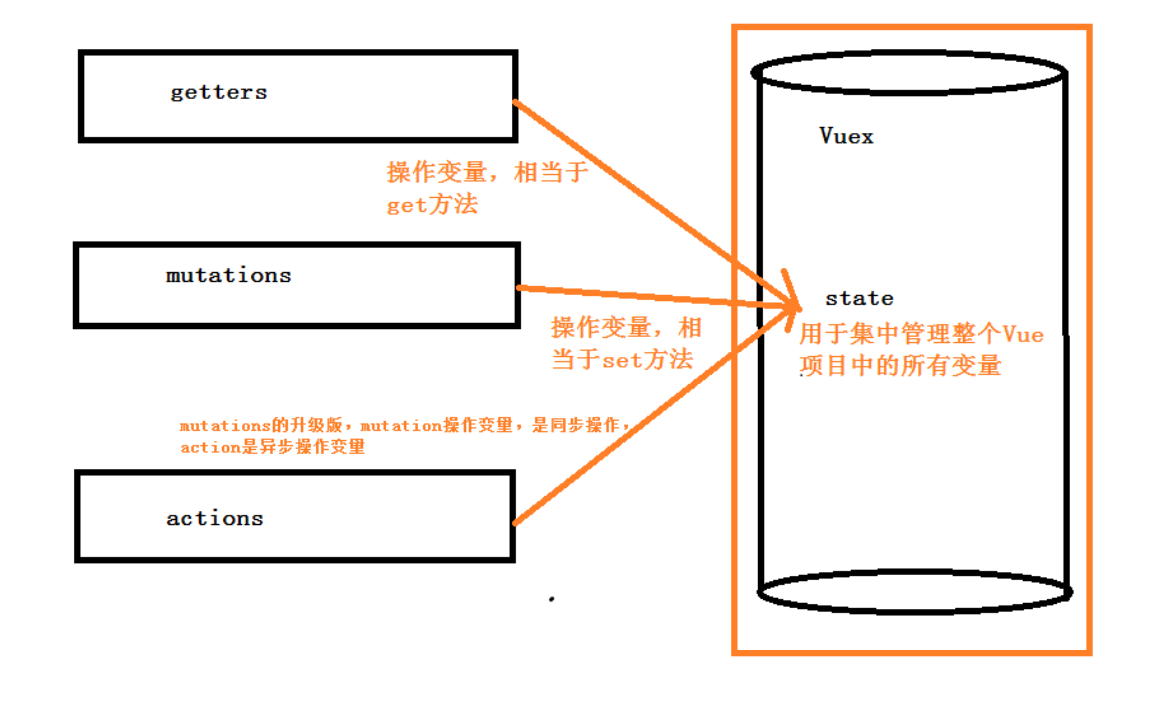
官方解释:Vuex 是一个专为 Vue.js 应用程序开发的状态管理模式。可以想象为一个“前端数据库”(数据仓库),
让其在各个页面上实现数据的共享包括状态,并且可操作
Vuex分成五个部分:
1.State:单一状态树
2.Getters:状态获取
3.Mutations:触发同步事件
4.Actions:提交mutation,可以包含异步操作
5.Module:将vuex进行分模块
3. vuex使用步骤
3.1 安装
npm install vuex -S
安装完成后 package.json中会有
"vuex": "^3.1.1"
3.2 创建store模块,分别维护state/actions/mutations/getters
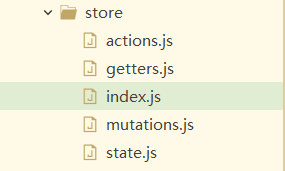
3.3 在store/index.js文件中新建vuex的store实例,并注册上面引入的各大模块
import Vue from 'vue'

import Vuex from 'vuex'

import state from './state'

import getters from './getters'

import actions from './actions'

import mutations from './mutations'

Vue.use(Vuex)

const store = new Vuex.Store({

     state,

     getters,

     actions,

     mutations

 })

 export default store
3.4 在main.js中导入并使用store实例
import store from './store'

new Vue({

  el: '#app',

  data() {

    return {

      /* 总线*/

      Bus:new Vue({

      })

    }

  },

  router,

  store,

  components: {

    App

  },

  template: '<App/>'

})
4. vuex的核心概念:store、state、getters、mutations、actions
4.0 store
每一个Vuex应用的核心就是store(仓库),store基本上就是一个容器,它包含着你的应用中大部分的状态 (state)。
const store = new Vuex.Store({
state, // 共同维护的一个状态,state里面可以是很多个全局状态
getters, // 获取数据并渲染
actions, // 数据的异步操作
mutations // 处理数据的唯一途径,state的改变或赋值只能在这里
})
4.1 state.js(保存数据的容器)
export default {

    resturantName: '飞歌餐馆'

}
4.2 getters.js(getXxx)
export default {

  getResturantName: (state) => {

    return state.resturantName;

  }

}
注1:getters将state中定义的值暴露在this.$store.getters对象中,我们可以通过如下代码访问
this.$store.getters.resturantName
注2:state状态存储是响应式的,从store实例中读取状态最简单的方法就是在计算属性中返回某个状态,如下:
computed: {
resturantName: function() {
return this.$store.getters.resturantName;
}
}
4.3 mutations(setXxx)
export default {

  // type(事件类型): 其值为setResturantName

  // payload:官方给它还取了一个高大上的名字:载荷,其实就是一个保存要传递参数的容器

  setResturantName: (state, payload) => {

    state.resturantName = payload.resturantName;

  }

}
4.4 actions.js
export default {

  setResturantNameAsync: (context, payload) => {

    console.log('xxx')

    setTimeout(() => {

      console.log('yyy')

      context.commit('setResturantName', payload); //Action提交的是mutation

    }, 3000);

    console.log('zzz')

  },

  doAjax: (context, payload) => {

    //在vuex里面是不能使用vue实例的

    let _this =payload._this;

    let url = _this.axios.urls.SYSTEM_USER_DOLOGIN;

    _this.axios.post(url, {}).then((response) => {

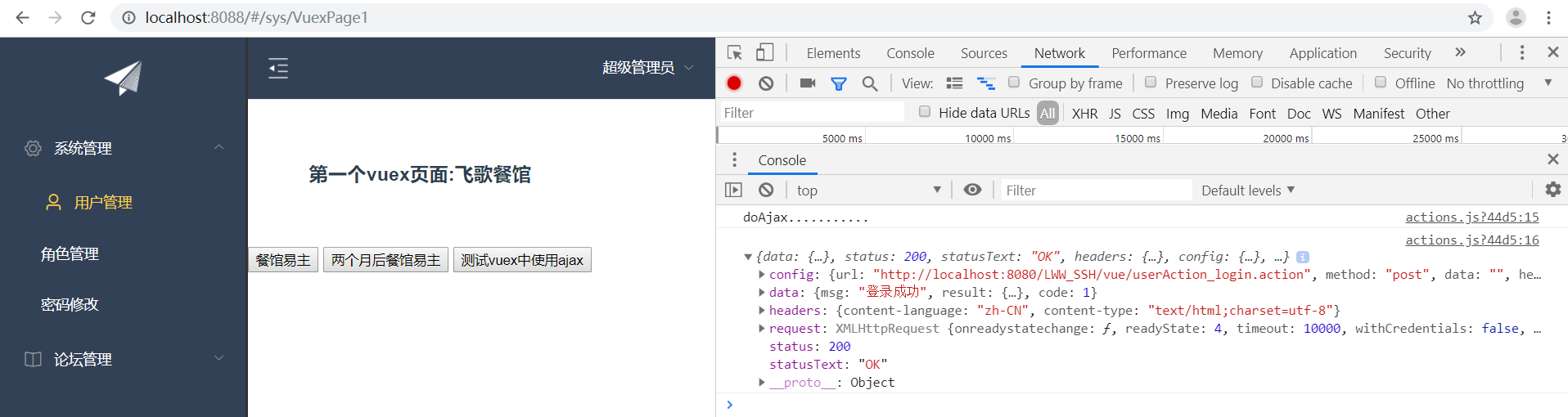
      console.log('doAjax...........');

      console.log(response);

    }).catch(function(error) {

      console.log(error);

    });

  }

}
Action类似于 mutation,不同在于:
1.Action提交的是mutation,而不是直接变更状态
2.Action可以包含任意异步操作
3.Action的回调函数接收一个 context 上下文参数,注意,这个参数可不一般,它与 store 实例有着相同的方法和属性
但是他们并不是同一个实例,context 包含:
1. state、2. rootState、3. getters、4. mutations、5. actions 五个属性
所以在这里可以使用 context.commit 来提交一个 mutation,或者通过 context.state 和 context.getters 来获取 state 和 getters。
实例 VuexPage1.vue
<template>

    <div>

      <h3 style="margin: 60px;">第一个vuex页面:{{title}}</h3>

      <button @click="changeTitle">餐馆易主</button>

      <button @click="changeTitleAsync">两个月后餐馆易主</button>

      <button @click="doAjax">测试vuex中使用ajax</button>

    </div>

</template>

<script>

    export default{

      data() {

        return {

        };

      },

      methods:{

        changeTitle(){

          this.$store.commit('setResturantName',{

            resturantName:'小猪砍刀羊肉馆'

          });

        },

        changeTitleAsync(){

          /* 异步*/

          this.$store.dispatch('setResturantNameAsync',{

            resturantName:'小猪砍刀蛇肉馆'

          });

        },

        doAjax(){

          this.$store.dispatch('doAjax',{

            _this:this

          });

        }

      },

      /* 计算属性*/

      computed:{

        title(){

          // return this.$store.state.resturantName;

          return this.$store.getters.getResturantName

        }

      }

    }

</script>

<style>

</style>
VuexPage2.vue
<template>

    <div>

      <h3 style="margin: 60px;">第二个vuex页面:{{title}}</h3>

    </div>

</template>

<script>

    export default{

      data() {

        return {

          title:''

        };

      },

      /* 钩子函数*/

      created(){

        this.title = this.$store.state.resturantName;

      }

    }

</script>

<style>

</style>
将组件挂上
import VuexPage1 from '@/views/sys/VuexPage1'

import VuexPage2 from '@/views/sys/VuexPage2'

{

        path: '/sys/VuexPage1',

        name: 'VuexPage1',

        component: VuexPage1

      },

      {

        path: '/sys/VuexPage2',

        name: 'VuexPage2',

        component: VuexPage2

      }
效果:
Vuex的同步异步存值取值的更多相关文章
- Jmeter的JDBC Request,sql参数化及返回值取值
1.JDBC Request面板 Variable Name:数据库连接池的名字,需要与JDBC Connection Configuration的Variable Name Bound Pool名字 ...
- dedecms--自定义session存值取值
最近在用用dedecms开发项目,开发项目中遇到需要通过session存储信息在其他页面调取使用,但是对dedecms里面自带的session存储使用不好,我需要存储的是用户登录的时候信息,于是我就使 ...
- 【记录】【java】反射设值取值
1.设值 /** * 根据属性名设置属性值 * * @param fieldName * @param object * @return */ public boolean setFieldValue ...
- localStorage存值取值以及存取JSON,以及基于html5 localStorage的购物车
localStorage.setItem("key","value");//存储变量名为key,值为value的变量 localStorage.key = &q ...
- sessionStorage二种存值取值的方法
//方法一 sessionStorage.setItem('id1','这是一个测试id1'); //存入一个值key:value console.log(sessionStorage.getItem ...
- Wrapped的返回值取值
Bared Wrapped using Newtonsoft.Json; using Newtonsoft.Json.Linq; string str = JsonConvert.Serial ...
- 关联实现下-jsonpath取值(有难度!!耗时长)
re的使用参考:正则表达式基础及re模块:https://www.cnblogs.com/dream66/p/12953729.html import restr1 = '{"access_ ...
- 用JQUERY为INPUT的TXT类型赋值及取值操作
注意和纯JS操作的区别,一个是对象,一个是字串,如下说明: 在Jquery中,用$("#id")来获得页面的input元素,其相当于document.getElementById( ...
- Bs4 BeautifulSoup取值
原文网址:https://blog.csdn.net/u010244522/article/details/79627073 从网页获取HTML数据后,获取对应标签.属性的值 取值方法主要有以下几种: ...
随机推荐
- Xshell 打开时,初始运行卡慢优化方法
我使用的是Xshell 6免费版,有需要的同学可以去这个地址下载:https://www.netsarang.com/download/down_form.html?code=622 一开始安装完Xs ...
- 使用Magicodes.IE快速导出Excel
前言 总是有很多朋友咨询Magicodes.IE如何基于ASP.NET Core导出Excel,出于从框架的体验和易用性的角度,决定对Excel的导出进行独立封装,以便于大家更易于使用,开箱即用. 注 ...
- 蓝凌OA前台任意文件读取漏洞利用
近期CNVD爆出漏洞编号:CNVD-2021-28277,首次公开日期为2021-04-15,蓝凌oa存在多个漏洞,攻击者可利用该漏洞获取服务器控制权.今天挑选一个蓝凌OA前台任意文件读取漏洞进行分析 ...
- MSF使用OpenSSL流量加密
MSF使用OpenSSL流量加密 前言 之前在博客里使用了Openssl对流量进行加密,这次我们来复现暗月师傅红队指南中的一篇文章,尝试用OpenSSL对Metasploit的流量进行加密,以此来躲避 ...
- Windows影子用户创建与3389连接
#当获得一条shell后,可以创建一个影子用户,通过影子用户可以行驶正常用户的所有权限与功能,并且只可在注册表中被检测出来---(应急响应注册表很重要) 1.首先需要拥有权限创建一个Administr ...
- jmeter永久调为中文
将jmeter调为中文有两种方法,一是在软件设置中切换,二是修改配置文件. 第一种方式是临时的,下次重新打开会变回为英文 第二种方式是永久的,每次打开都会显示自己配置好的语言 第一种方式: 第二种方式 ...
- java 注释,关键字和标识符
注释 注释是为了防止当写代码的时间过久了之后,忘记了这行代码的意思或者是在一个大型的项目里面,不可能每一个模块的功能你都记得,所以需要一个注释来帮助记忆. 注释不会被执行 平时写代码一定要养成写注释的 ...
- Spring Security项目的搭建以及Spring Security的BCrypt加密
.personSunflowerP { background: rgba(51, 153, 0, 0.66); border-bottom: 1px solid rgba(0, 102, 0, 1); ...
- Rancher v1.6.29 Docker单节点部署
前言: Docker镜像中心,有两个版本的rancher(1.X),镜像名称为:rancher/server,而rancher(2.X)的镜像名称是rancher/rancher 去daocloud官 ...
- Go连接到Linux服务器进行操作-执行shell命令&&上传文件
Go连接到Linux服务器进行操作 使用密码连接Linux服务器 package main import ( "fmt" "golang.org/x/crypto/ssh ...