
JUnit5编写基本测试
JUnit5的测试不是通过名称,而是通过注解来标识的。
测试类与方法
Test Class:测试类,必须包含至少一个test方法,包括:
- 最外层的class
staticmember class@Nestedclass
Test Method:测试方法,包括:
@Test@RepeatedTest@ParameterizedTest@TestFactory@TestTemplate
Lifecycle Method:生命周期方法,包括:
@BeforeAll@AfterAll@BeforeEach@AfterEach
注意:
- Test Method和Lifecycle Method不能是
abstract,也不能return。它们可以在当前测试类中声明,也可以继承自父类或接口。 - Test class、Test Method和Lifecycle Method都不能是private。
示例代码:
import static org.junit.jupiter.api.Assertions.fail;

import static org.junit.jupiter.api.Assumptions.assumeTrue;

import org.junit.jupiter.api.AfterAll;

import org.junit.jupiter.api.AfterEach;

import org.junit.jupiter.api.BeforeAll;

import org.junit.jupiter.api.BeforeEach;

import org.junit.jupiter.api.Disabled;

import org.junit.jupiter.api.Test;

class StandardTests {

    @BeforeAll

    static void initAll() {

    }

    @BeforeEach

    void init() {

    }

    @Test

    void succeedingTest() {

    }

    @Test

    void failingTest() {

        fail("a failing test");

    }

    @Test

    @Disabled("for demonstration purposes")

    void skippedTest() {

        // not executed

    }

    @Test

    void abortedTest() {

        assumeTrue("abc".contains("Z"));

        fail("test should have been aborted");

    }

    @AfterEach

    void tearDown() {

    }

    @AfterAll

    static void tearDownAll() {

    }

}
自定义显示名字
Test class和test method可以使用@DisplayName自定义在测试报告中的显示名字,支持空格、特殊字符和emoji表情符号。
示例:
import org.junit.jupiter.api.DisplayName;

import org.junit.jupiter.api.Test;

@DisplayName("A special test case")

class DisplayNameDemo {

    @Test

    @DisplayName("Custom test name containing spaces")

    void testWithDisplayNameContainingSpaces() {

    }

    @Test

    @DisplayName("╯°□°)╯")

    void testWithDisplayNameContainingSpecialCharacters() {

    }

    @Test

    @DisplayName("")

    void testWithDisplayNameContainingEmoji() {

    }

}
除了@DisplayName,@DisplayNameGeneration 注解能用来对显示名字做统一处理,JUnit Jupiter自带了一些生成器:
- Standard 匹配标准行为
- Simple 删除没有参数的方法后面的括号
- ReplaceUnderscores 用空格替换下划线
- IndicativeSentences 把test class和test method名字连接起来
示例代码:
import org.junit.jupiter.api.DisplayName;

import org.junit.jupiter.api.DisplayNameGeneration;

import org.junit.jupiter.api.DisplayNameGenerator;

import org.junit.jupiter.api.IndicativeSentencesGeneration;

import org.junit.jupiter.api.Nested;

import org.junit.jupiter.api.Test;

import org.junit.jupiter.params.ParameterizedTest;

import org.junit.jupiter.params.provider.ValueSource;

class DisplayNameGeneratorDemo {

    @Nested

    @DisplayNameGeneration(DisplayNameGenerator.ReplaceUnderscores.class)

    class A_year_is_not_supported {

        @Test

        void if_it_is_zero() {

        }

        @DisplayName("A negative value for year is not supported by the leap year computation.")

        @ParameterizedTest(name = "For example, year {0} is not supported.")

        @ValueSource(ints = { -1, -4 })

        void if_it_is_negative(int year) {

        }

    }

    @Nested

    @IndicativeSentencesGeneration(separator = " -> ", generator = DisplayNameGenerator.ReplaceUnderscores.class)

    class A_year_is_a_leap_year {

        @Test

        void if_it_is_divisible_by_4_but_not_by_100() {

        }

        @ParameterizedTest(name = "Year {0} is a leap year.")

        @ValueSource(ints = { 2016, 2020, 2048 })

        void if_it_is_one_of_the_following_years(int year) {

        }

    }

}
@IndicativeSentencesGeneration可以自定义separator和generator。
结果:
+-- DisplayNameGeneratorDemo [OK]

  +-- A year is not supported [OK]

  | +-- A negative value for year is not supported by the leap year computation. [OK]

  | | +-- For example, year -1 is not supported. [OK]

  | | '-- For example, year -4 is not supported. [OK]

  | '-- if it is zero() [OK]

  '-- A year is a leap year [OK]

    +-- A year is a leap year -> if it is divisible by 4 but not by 100. [OK]

    '-- A year is a leap year -> if it is one of the following years. [OK]

      +-- Year 2016 is a leap year. [OK]

      +-- Year 2020 is a leap year. [OK]

      '-- Year 2048 is a leap year. [OK]
除了注解,也能通过配置设定全局的默认Generator,比如在 src/test/resources/junit-platform.properties文件中:
junit.jupiter.displayname.generator.default = \

    org.junit.jupiter.api.DisplayNameGenerator$ReplaceUnderscores
既可以指定现有Generator,也可以指定实现了DisplayNameGenerator接口的类。
自定义显示名字的优先级是:
@DisplayName@DisplayNameGenerationjunit.jupiter.displayname.generator.defaultorg.junit.jupiter.api.DisplayNameGenerator.Standard
断言(Assertions)
JUnit5的断言是包含在org.junit.jupiter.api.Assertions中的静态方法,比如assertTrue、assertEquals、assertNotNull、assertAll、assertThrows、assertTimeout、assertTimeoutPreemptively等。
示例代码如下:
import static java.time.Duration.ofMillis;

import static java.time.Duration.ofMinutes;

import static org.junit.jupiter.api.Assertions.assertAll;

import static org.junit.jupiter.api.Assertions.assertEquals;

import static org.junit.jupiter.api.Assertions.assertNotNull;

import static org.junit.jupiter.api.Assertions.assertThrows;

import static org.junit.jupiter.api.Assertions.assertTimeout;

import static org.junit.jupiter.api.Assertions.assertTimeoutPreemptively;

import static org.junit.jupiter.api.Assertions.assertTrue;

import java.util.concurrent.CountDownLatch;

import example.domain.Person;

import example.util.Calculator;

import org.junit.jupiter.api.Test;

class AssertionsDemo {

    private final Calculator calculator = new Calculator();

    private final Person person = new Person("Jane", "Doe");

    @Test

    void standardAssertions() {

        assertEquals(2, calculator.add(1, 1));

        assertEquals(4, calculator.multiply(2, 2),

                "The optional failure message is now the last parameter");

        assertTrue('a' < 'b', () -> "Assertion messages can be lazily evaluated -- "

                + "to avoid constructing complex messages unnecessarily.");

    }

    @Test

    void groupedAssertions() {

        // In a grouped assertion all assertions are executed, and all

        // failures will be reported together.

        assertAll("person",

            () -> assertEquals("Jane", person.getFirstName()),

            () -> assertEquals("Doe", person.getLastName())

        );

    }

    @Test

    void dependentAssertions() {

        // Within a code block, if an assertion fails the

        // subsequent code in the same block will be skipped.

        assertAll("properties",

            () -> {

                String firstName = person.getFirstName();

                assertNotNull(firstName);

                // Executed only if the previous assertion is valid.

                assertAll("first name",

                    () -> assertTrue(firstName.startsWith("J")),

                    () -> assertTrue(firstName.endsWith("e"))

                );

            },

            () -> {

                // Grouped assertion, so processed independently

                // of results of first name assertions.

                String lastName = person.getLastName();

                assertNotNull(lastName);

                // Executed only if the previous assertion is valid.

                assertAll("last name",

                    () -> assertTrue(lastName.startsWith("D")),

                    () -> assertTrue(lastName.endsWith("e"))

                );

            }

        );

    }

    @Test

    void exceptionTesting() {

        Exception exception = assertThrows(ArithmeticException.class, () ->

            calculator.divide(1, 0));

        assertEquals("/ by zero", exception.getMessage());

    }

    @Test

    void timeoutNotExceeded() {

        // The following assertion succeeds.

        assertTimeout(ofMinutes(2), () -> {

            // Perform task that takes less than 2 minutes.

        });

    }

    @Test

    void timeoutNotExceededWithResult() {

        // The following assertion succeeds, and returns the supplied object.

        String actualResult = assertTimeout(ofMinutes(2), () -> {

            return "a result";

        });

        assertEquals("a result", actualResult);

    }

    @Test

    void timeoutNotExceededWithMethod() {

        // The following assertion invokes a method reference and returns an object.

        String actualGreeting = assertTimeout(ofMinutes(2), AssertionsDemo::greeting);

        assertEquals("Hello, World!", actualGreeting);

    }

    @Test

    void timeoutExceeded() {

        // The following assertion fails with an error message similar to:

        // execution exceeded timeout of 10 ms by 91 ms

        assertTimeout(ofMillis(10), () -> {

            // Simulate task that takes more than 10 ms.

            Thread.sleep(100);

        });

    }

    @Test

    void timeoutExceededWithPreemptiveTermination() {

        // The following assertion fails with an error message similar to:

        // execution timed out after 10 ms

        assertTimeoutPreemptively(ofMillis(10), () -> {

            // Simulate task that takes more than 10 ms.

            new CountDownLatch(1).await();

        });

    }

    private static String greeting() {

        return "Hello, World!";

    }

}
假设(Assumptions)
JUnit5的断言是包含在org.junit.jupiter.api.Assumptions中的静态方法,比如assumeTrue、assumingThat等。
示例代码:
import static org.junit.jupiter.api.Assertions.assertEquals;

import static org.junit.jupiter.api.Assumptions.assumeTrue;

import static org.junit.jupiter.api.Assumptions.assumingThat;

import example.util.Calculator;

import org.junit.jupiter.api.Test;

class AssumptionsDemo {

    private final Calculator calculator = new Calculator();

    @Test

    void testOnlyOnCiServer() {

        assumeTrue("CI".equals(System.getenv("ENV")));

        // remainder of test

    }

    @Test

    void testOnlyOnDeveloperWorkstation() {

        assumeTrue("DEV".equals(System.getenv("ENV")),

            () -> "Aborting test: not on developer workstation");

        // remainder of test

    }

    @Test

    void testInAllEnvironments() {

        assumingThat("CI".equals(System.getenv("ENV")),

            () -> {

                // perform these assertions only on the CI server

                assertEquals(2, calculator.divide(4, 2));

            });

        // perform these assertions in all environments

        assertEquals(42, calculator.multiply(6, 7));

    }

}
Assertions与Assumptions区别
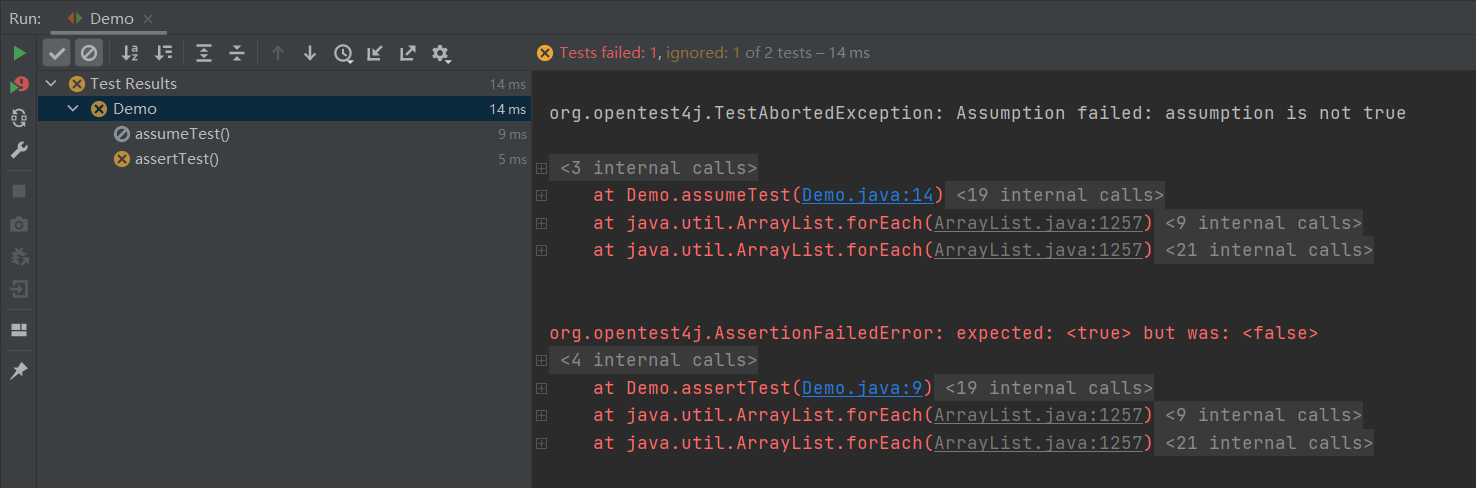
Assertions如果失败,test会被标记为failed。Assumptions如果失败,test会被标记为ignored,测试不会执行。
示例:
import org.junit.jupiter.api.Test;

import static org.junit.jupiter.api.Assertions.assertTrue;

import static org.junit.jupiter.api.Assumptions.assumeTrue;

public class Demo {

    @Test

    void assertTest() {

        assertTrue(false);

    }

    @Test

    void assumeTest() {

        assumeTrue(false);

    }

}
结果:
禁用测试
@Disabled能用来禁用test class或test method,建议在括号内填写上禁用理由。
示例:
import org.junit.jupiter.api.Disabled;

import org.junit.jupiter.api.Test;

@Disabled("Disabled until bug #99 has been fixed")

class DisabledClassDemo {

    @Test

    void testWillBeSkipped() {

    }

}
import org.junit.jupiter.api.Disabled;

import org.junit.jupiter.api.Test;

class DisabledTestsDemo {

    @Disabled("Disabled until bug #42 has been resolved")

    @Test

    void testWillBeSkipped() {

    }

    @Test

    void testWillBeExecuted() {

    }

}
小结
本文首先介绍了如何使用测试类与方法,来编写一个JUnit5的基本测试,然后介绍了如何自定义测试报告中的显示名字。使用断言(Assertions)可以把test标记为failed,使用假设(Assumptions)可以把test标记为ignored。最后介绍了如何禁用测试。除了基本测试,JUnit5还能编写带条件的测试。
参考资料:
https://junit.org/junit5/docs/current/user-guide/#writing-tests
https://stackoverflow.com/questions/44628483/assume-vs-assert-in-junit-tests
JUnit5编写基本测试的更多相关文章
- 新书《编写可测试的JavaScript代码 》出版,感谢支持
本书介绍 JavaScript专业开发人员必须具备的一个技能是能够编写可测试的代码.不管是创建新应用程序,还是重写遗留代码,本书都将向你展示如何为客户端和服务器编写和维护可测试的JavaScript代 ...
- 编写可测试的JavaScript代码
<编写可测试的JavaScript代码>基本信息作者: [美] Mark Ethan Trostler 托斯勒 著 译者: 徐涛出版社:人民邮电出版社ISBN:9787115373373上 ...
- 使用FsCheck编写Property-based测试
使用FsCheck编写Property-based的测试 在编写基于Property-based的单元测试一文中,我们介绍了什么是Property-based测试.同时我们也总结了Property-b ...
- 编写Avocado测试
编写Avocado测试 现在我们开始使用python编写Avocado测试,测试继承于avocado.Test. 基本例子 创建一个时间测试,sleeptest,测试非常简单,只是sleep一会: i ...
- springboot快速入门02--Controller编写和测试
02springboot快速入门--Controller编写和测试 1.新建一个HelloController import org.springframework.boot.SpringApplic ...
- Shell脚本的编写及测试
Shell脚本的编写及测试 1.1问题 本例要求两个简单的Shell脚本程序,任务目标如下: 编写一 ...
- 098 01 Android 零基础入门 02 Java面向对象 03 综合案例(学生信息管理) 02 案例分析及实现 02 编写并测试Subject类
098 01 Android 零基础入门 02 Java面向对象 03 综合案例(学生信息管理) 02 案例分析及实现 02 编写并测试Subject类 本文知识点:编写并测试Subject类 说明: ...
- 099 01 Android 零基础入门 02 Java面向对象 03 综合案例(学生信息管理) 02 案例分析及实现 03 编写并测试Student类
099 01 Android 零基础入门 02 Java面向对象 03 综合案例(学生信息管理) 02 案例分析及实现 03 编写并测试Student类 本文知识点:编写并测试Subject类 说明: ...
- JUnit5的条件测试、嵌套测试、重复测试
条件测试 JUnit5支持条件注解,根据布尔值判断是否执行测试. 自定义条件 @EnabledIf和@DisabledIf注解用来设置自定义条件,示例: @Test @EnabledIf(" ...
随机推荐
- 【CentOS_7】使用tcpdump抓明文包
tcpdump port 12345 -X -X:以十六进制与ASCII方式输出,用于抓取http等明文传输协议 tcpdump功能强大,更多参数可以参考 https://www.cnblogs.c ...
- echo -n -e "请输入重启间隔的时间(分钟):\t"
echo -n -e "请输入重启间隔的时间(分钟):\t"read interval##echo -n "Your choice is " # 加上 -n 可 ...
- Linux进阶之Git分布式版本控制系统篇
一.Git介绍 Git(读音为/gɪt/.)是一个开源的分布式版本控制系统,可以有效.高速的处理从很小到非常大的项目版本管理. Git 是 Linus Torvalds 为了帮助管理 Linux 内核 ...
- 串口1配合DMA接收不定长数据(空闲中断+DMA接收)
1.空闲中断和别的接收完成(一个字节)中断,发送完成(发送寄存器控)中断的一样是串口中断: 2.空闲中断是接收到一个数据以后,接收停顿超过一字节时间 认为桢收完,总线空闲中断是在检测到在接收数据后, ...
- mysql数据库-简介
目录 1 MySQL 的三大主要分支 1.1 官方文档 1.2 版本演变 1.3 MySQL 安装方式 1.3.1 RPM包安装Mysql 1.3.2 二进制安装MySQL 1.4 mysql组成 1 ...
- Java中Map<Key, Value>存储结构根据值排序(sort by values)
需求:Map<key, value>中可以根据key, value 进行排序,由于 key 都是唯一的,可以很方便的进行比较操作,但是每个key 对应的value不是唯一的,有可能出现多个 ...
- NVIDIA Nsight Systems CUDA 跟踪
NVIDIA Nsight Systems CUDA 跟踪 CUDA跟踪 NVIDIA Nsight Systems能够捕获有关在概要过程中执行CUDA的信息. 可以在报告的时间轴上收集和呈现以下信息 ...
- JS设置GridView中的RadioButton只能选中一个
//JS&JQuery $(document).ready(function () { //点击跳转链接返回浏览器历史的上一个页面 $("#btnBack").click( ...
- wrk(1)- 详细使用
介绍 wrk 是一个类似 ab(apache bench).jmeter 的压力测试工具,官方称它为:现代的 HTTP 基准测试工具 用 C 编写的 HTTP 协议压测工具 底层基于 epoll 和 ...
- springboot实现自定义拦截器
为了更容易理解,我们通过一个代码例子来演示. 例子: 我们现在要访问http://localhost:8080/main.html页面,这个页面需要登录之后才能够浏览,没登录不能浏览. 那么现在问题来 ...