
qt 简单登录界面(一)
widget.h
#ifndef WIDGET_H

#define WIDGET_H

#include <QWidget>

#include<QLineEdit>

class Widget : public QWidget

{

    Q_OBJECT

public slots:

    void foo();

public:

    Widget(QWidget *parent = 0);

    ~Widget();

    QLineEdit *userEdit;

    QLineEdit * passwdEdit;

};

#endif // WIDGET_H
widget.cpp
#include "widget.h"

#include<QBoxLayout>

#include<QGridLayout>

#include<QPushButton>

#include<QLabel>

#include<QLineEdit>

#include<QDebug>

#include <QApplication>

Widget::Widget(QWidget *parent)

    : QWidget(parent)

{

        QGridLayout* grid=new  QGridLayout(this);

        QHBoxLayout* hbox=new QHBoxLayout(this);

        QPushButton *ok=new QPushButton("确认");

        QPushButton *cancel=new QPushButton("取消");

        QLabel *userLabel= new QLabel("用户:");

        userEdit=new QLineEdit;

        QLabel* passwdLabel=new QLabel("密码:");

        passwdEdit=new QLineEdit;

        passwdEdit->setEchoMode(QLineEdit::Password);

        grid->addWidget(userLabel,0,0,1,1);

        grid->addWidget(userEdit,0,1,1,1);

        grid->addWidget(passwdLabel,1,0,1,1);

        grid->addWidget(passwdEdit,1,1,1,1);

        hbox->addWidget(ok);

        hbox->addWidget(cancel);

        grid->addLayout(hbox,2,0,1,2);

        this->setLayout(grid);

        connect(cancel,SIGNAL(clicked()),this,SLOT(close()));

        connect(ok,SIGNAL(clicked()),this,SLOT(foo()));

}

void Widget::foo()

{

    if(userEdit->text()=="admin")

    {

        if(passwdEdit->text()=="123456")

        {

            qDebug()<<"登录成功"<<endl;

        }

        else

        {

          qDebug()<<"密码错误"<<endl;

        }

    }

    else {

        qDebug()<<"用户名不存在"<<endl;

    }

}

Widget::~Widget()

{

}
main.cpp:
#include "widget.h"

#include <QApplication>

int main(int argc, char *argv[])

{

    QApplication a(argc, argv);

    Widget w;

    w.resize(500,300);

    w.show();

    return a.exec();

}
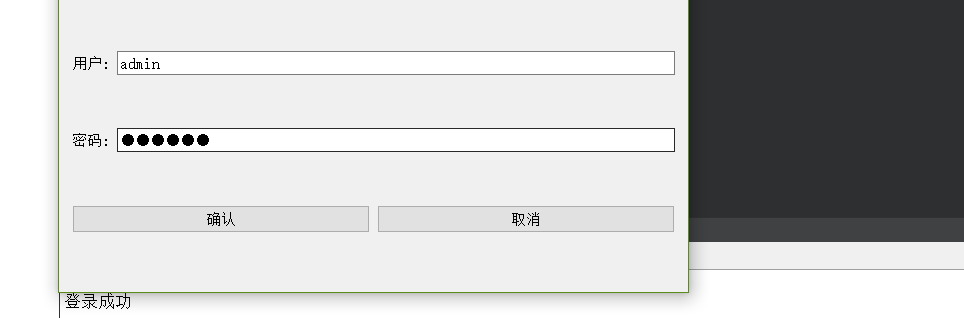
输出:
qt 简单登录界面(一)的更多相关文章
- Cookie案例:简单登录界面中的应用
ServletDemo1.java package ztq.servlet.study; import java.io.IOException; import java.io.PrintWriter; ...
- 以java实现的一个简单登录界面(带验证码)
本文参考于:https://blog.csdn.net/wyf2017/article/details/78831744 https://blog.csdn.net/MengKun822/articl ...
- Qt 用户登录界面
使用QT创建自己的登录窗口: 主要步骤: 1.窗口界面的绘制 2.沟通数据库进行密码验证 void MainWindow::on_pushButton_clicked() { // 连 ...
- 一个基于QT简单登录对话框
1. 登录对话框式样 2. QLoginDialog.h #ifndef DIALOG_H #define DIALOG_H #include <QtGui/QDialog> #inclu ...
- JSP内置对象的cookie和session实现简单登录界面
创建一个index.jsp页面 <%@ page language="java" contentType="text/html; charset=utf-8&quo ...
- 一个基于QT简单登录对话框(带验证码功能)
1. 对话框样式 2. 源代码 ①. main.cpp #include <QtGui/QApplication> #include "QLoginDialog.h" ...
- JAVA语言实现简单登录界面
程序设计思想: 使用Math.random()方法循环生成6个97~122之间的随机整数(对应ASCII码值‘a’~‘z’),将其转化为char型变量,连接成为一个6位字符串作为验证码输出,提示用户输 ...
- 设计简单登录界面(Java web)
程序设计思想: 在Input.jsp中创建一个表格里边分别是课程名称,任课老师,教学地点,并分别用三个文本框来接受输入的三个属性, 并传到另外的Jsp页面中,又来接受三个数据,并判断传来的教师,与教室 ...
- Java简单登录图形界面
本文参考与:https://blog.csdn.net/wyf2017/article/details/78831744 https://blog.csdn.net/MengKun822/articl ...
随机推荐
- git clone 报错:SSL certificate prob lem: self signed certificate
先执行: git config --global http.sslVerify false 然后重新执行git clone 命令即可
- IDEA微服务项目SpringBoot一键(批量)顺序启动
找到 搜索 RunDashboard <option name="configurationTypes"> <set> <option value=& ...
- Centos7使用Docker启动elasticsearch服务秒退
首先查看docker启动日志 docker logs -f 容器id 查看报错信息 OpenJDK 64-Bit Server VM warning: Option UseConcMarkSweepG ...
- cmake以源码的方式引入第三方项目
最前 本文将介绍一种以源码的方式引入第三方库的方法 准备 主项目,需要引用第三方库的某些函数 第三方库,以源码的形式提供给主项目使用 注意: 本文的背景:已经将第三方源码下载好. 一个例子 我这里准备 ...
- 【LeetCode】989. Add to Array-Form of Integer 解题报告(C++)
作者: 负雪明烛 id: fuxuemingzhu 个人博客: http://fuxuemingzhu.cn/ 目录 题目描述 题目大意 解题方法 数组转整数再转数组 模拟加法 日期 题目地址:htt ...
- 【LeetCode】904. Fruit Into Baskets 解题报告(Python)
作者: 负雪明烛 id: fuxuemingzhu 个人博客: http://fuxuemingzhu.cn/ 题目地址: https://leetcode.com/problems/fruit-in ...
- 【LeetCode】40. Combination Sum II 解题报告(Python & C++)
作者: 负雪明烛 id: fuxuemingzhu 个人博客: http://fuxuemingzhu.cn/ 目录 题目描述 题目大意 解题方法 方法一:DFS 方法二:回溯法 日期 题目地址:ht ...
- 小小明系列故事——游戏的烦恼(hdu 4517)
小小明系列故事--游戏的烦恼 Time Limit: 3000/1000 MS (Java/Others) Memory Limit: 65535/32768 K (Java/Others)To ...
- 跨域The 'Access-Control-Allow-Origin' header contains multiple values '*, *', but only one is allowed.解决方案
使用Ajax跨域请求资源,Nginx作为代理,出现:The 'Access-Control-Allow-Origin' header contains multiple values '*, *', ...
- [opencv]利用minAreaRect计算平面矩形的旋转角度
#include "opencv2/core/core.hpp" #include "opencv2/highgui/highgui.hpp" #include ...