
开发指导—利用CSS动画实现HarmonyOS动效(一)
一. CSS语法参考
CSS是描述HML页面结构的样式语言。所有组件均存在系统默认样式,也可在页面CSS样式文件中对组件、页面自定义不同的样式。请参考通用样式了解兼容JS的类Web开发范式支持的组件样式。
尺寸单位
● 逻辑像素px(文档中以<length>表示):
○ 默认屏幕具有的逻辑宽度为720px(配置见配置文件中的window小节),实际显示时会将页面布局缩放至屏幕实际宽度,如100px在实际宽度为1440物理像素的屏幕上,实际渲染为200物理像素(从720px向1440物理像素,所有尺寸放大2倍)。
○ 额外配置autoDesignWidth为true时(配置见配置文件中的window小节),逻辑像素px将按照屏幕密度进行缩放,如100px在屏幕密度为3的设备上,实际渲染为300物理像素。应用需要适配多种设备时,建议采用此方法。
● 百分比(文档中以<percentage>表示):表示该组件占父组件尺寸的百分比,如组件的width设置为50%,代表其宽度为父组件的50%。
样式导入
为了模块化管理和代码复用,CSS样式文件支持 @import 语句,导入css文件。
声明样式
每个页面目录下存在一个与布局hml文件同名的css文件,用来描述该hml页面中组件的样式,决定组件应该如何显示。
1. 内部样式,支持使用style、class属性来控制组件的样式。例如:
<!-- index.hml -->

<div class="container">

  <text style="color: red">Hello World</text>

</div>
/* index.css */

.container {

  justify-content: center;

}
2. 文件导入,合并外部样式文件。例如,在common目录中定义样式文件style.css,并在index.css文件首行中进行导入:
/* style.css */

.title {

  font-size: 50px;

}
/* index.css */

@import '../../common/style.css';

.container {

  justify-content: center;

}
选择器
css选择器用于选择需要添加样式的元素,支持的选择器如下表所示:
|
选择器 |
样例 |
样例描述 |
|
.class |
.container |
用于选择class="container"的组件。 |
|
#id |
#titleId |
用于选择id="titleId"的组件。 |
|
tag |
text |
用于选择text组件。 |
|
, |
.title, .content |
用于选择class="title"和class="content"的组件。 |
|
#id .class tag |
#containerId .content text |
非严格父子关系的后代选择器,选择具有id="containerId"作为祖先元素,class="content"作为次级祖先元素的所有text组件。如需使用严格的父子关系,可以使用“>”代替空格,如:#containerId>.content。 |
示例:
<!-- 页面布局xxx.hml -->

<div id="containerId" class="container">

  <text id="titleId" class="title">标题</text>

  <div class="content">

    <text id="contentId">内容</text>

  </div>

</div>
/* 页面样式xxx.css */

/* 对所有div组件设置样式 */

div {

  flex-direction: column;

}

/* 对class="title"的组件设置样式 */

.title {

  font-size: 30px;

}

/* 对id="contentId"的组件设置样式 */

#contentId {

  font-size: 20px;

}

/* 对所有class="title"以及class="content"的组件都设置padding为5px */

.title, .content {

  padding: 5px;

}

/* 对class="container"的组件下的所有text设置样式 */

.container text {

  color: #007dff;

}

/* 对class="container"的组件下的直接后代text设置样式 */

.container > text {

  color: #fa2a2d;

}
以上样式运行效果如下:

其中“.container text”将“标题”和“内容”设置为蓝色,而“.container > text”直接后代选择器将“标题”设置为红色。2者优先级相同,但直接后代选择器声明顺序靠后,将前者样式覆盖(优先级计算见选择器优先级)。
选择器优先级
选择器的优先级计算规则与w3c规则保持一致(只支持:内联样式,id,class,tag,后代和直接后代),其中内联样式为在元素style属性中声明的样式。
当多条选择器声明匹配到同一元素时,各类选择器优先级由高到低顺序为:内联样式 > id > class > tag。
伪类
css伪类是选择器中的关键字,用于指定要选择元素的特殊状态。例如,:disabled状态可以用来设置元素的disabled属性变为true时的样式。
除了单个伪类之外,还支持伪类的组合,例如,:focus:checked状态可以用来设置元素的focus属性和checked属性同时为true时的样式。支持的单个伪类如下表所示,按照优先级降序排列:
|
名称 |
支持组件 |
描述 |
|
:disabled |
支持disabled属性的组件 |
表示disabled属性变为true时的元素(不支持动画样式的设置)。 |
|
:active |
支持click事件的组件 |
表示被用户激活的元素,如:被用户按下的按钮、被激活的tab-bar页签(不支持动画样式的设置)。 |
|
:waiting |
button |
表示waiting属性为true的元素(不支持动画样式的设置)。 |
|
:checked |
input[type="checkbox"、type="radio"]、 switch |
表示checked属性为true的元素(不支持动画样式的设置)。 |
伪类示例如下,设置按钮的:active伪类可以控制被用户按下时的样式:
<!-- index.hml -->

<div class="container">

  <input type="button" class="button" value="Button"></input>

</div>
/* index.css */

.button:active {

  #888888;/*按钮被激活时,背景颜色变为#888888 */

}
说明
针对弹窗类组件及其子元素不支持伪类效果,包括popup、dialog、menu、option、picker
样式预编译
预编译提供了利用特有语法生成css的程序,可以提供变量、运算等功能,令开发者更便捷地定义组件样式,目前支持less、sass和scss的预编译。使用样式预编译时,需要将原css文件后缀改为less、sass或scss,如index.css改为index.less、index.sass或index.scss。
● 当前文件使用样式预编译,例如将原index.css改为index.less:
/* index.less */

/* 定义变量 */

@colorBackground: #000000;

.container {

  background-color: @colorBackground; /* 使用当前less文件中定义的变量 */

}
● 引用预编译文件,例如common中存在style.scss文件,将原index.css改为index.scss,并引入style.scss:
/* style.scss */

/* 定义变量 */

$colorBackground: #000000;
在index.scss中引用:
/* index.scss */

/* 引入外部scss文件 */

@import '../../common/style.scss';

.container {

  $colorBackground; /* 使用style.scss中定义的变量 */

}
说明
引用的预编译文件建议放在common目录进行管理。
CSS样式继承6+
css样式继承提供了子节点继承父节点样式的能力,继承下来的样式在多选择器样式匹配的场景下,优先级排最低,当前支持以下样式的继承:
● font-family
● font-weight
● font-size
● font-style
● text-align
● line-height
● letter-spacing
● color
● visibility
二. CSS动画
1.属性样式动画
在关键帧(Keyframes)中动态设置父组件的width和height,实现组件变大缩小。子组件设置scale属性使父子组件同时缩放,再设置opacity实现父子组件的显示与隐藏。
<!-- xxx.hml -->

<div class="container">

  <div class="fade">

    <text>fading away</text>

  </div>

  <div class="bigger">

    <text>getting bigger</text>

  </div>

</div>
/* xxx.css */

.container {

  background-color:#F1F3F5;

  display: flex;

  justify-content: center;

  align-items: center;

  flex-direction: column;

  width: 100%;

  height: 100%;

}

.fade {

  width: 30%;

  height: 200px;

  left: 35%;

  top: 25%;

  position: absolute;

  animation: 2s change infinite friction;

}

.bigger {

  width: 20%;

  height: 100px;

  background-color: blue;

  animation: 2s change1 infinite linear-out-slow-in;

}

text {

  width: 100%;

  height: 100%;

  text-align: center;

  color: white;

  font-size: 35px;

  animation: 2s change2 infinite linear-out-slow-in;

}

/* 颜色变化 */

@keyframes change{

  from {

    background-color: #f76160;

    opacity: 1;

  }

  to {

    background-color: #09ba07;

    opacity: 0;

  }

}

/* 父组件大小变化 */

@keyframes change1 {

  0% {

    width: 20%;

    height: 100px;

  }

  100% {

    width: 80%;

    height: 200px;

  }

}

/* 子组件文字缩放 */

@keyframes change2 {

  0% {

    transform: scale(0);

  }

  100% {

    transform: scale(1.5);

  }

}

说明
● animation取值不区分先后,duration (动画执行时间)/ delay (动画延迟执行时间)按照出现的先后顺序解析。
● 必须设置animation-duration样式,否则时长为0则不会有动画效果。当设置animation-fill-mode属性为forwards时,组件直接展示最后一帧的样式。
2. transform样式动画
设置transform属性对组件进行旋转、缩放、移动和倾斜。
设置静态动画
创建一个正方形并旋转90°变成菱形,并用下方的长方形把菱形下半部分遮盖形成屋顶,设置长方形translate属性值为(150px,-150px)确定坐标位置形成门,再使用position属性使横纵线跟随父组件(正方形)移动到指定坐标位置,接着设置scale属性使父子组件一起变大形成窗户大小,最后使用skewX属性使组件倾斜后设置坐标translate(200px,-710px)得到烟囱。
<!-- xxx.hml -->

<div class="container">

  <div class="top"></div>

  <div class="content"></div>

  <div class="door"></div>

  <!-- 窗户 -->

  <div class="window">

    <div class="horizontal"></div>

    <div class="vertical"></div>

  </div>

  <div class="chimney"></div>

</div>
/* xxx.css */

.container {

  width:100%;

  height:100%;

  background-color:#F1F3F5;

  align-items: center;

  flex-direction: column;

}

.top{

  z-index: -1;

  position: absolute;

  width: 428px;

  height: 428px;

  background-color: #860303;

  transform: rotate(45deg);

  margin-top: 284px;

  margin-left: 148px;

}

.content{

  margin-top: 500px;

  width: 600px;

  height: 400px;

  background-color: white;

  border:  1px solid black;

}

.door{

  width: 100px;

  height: 135px;

  background-color: #1033d9;

  transform: translate(150px,-137px);

}

.window{

  z-index: 1;

  position: relative;

  width: 100px;

  height: 100px;

  background-color: white;

  border: 1px solid black;

  transform: translate(-150px,-400px) scale(1.5);

}

/* 窗户的横轴 */

.horizontal{

  position: absolute;

  top: 50%;

  width: 100px;

  height: 5px;

  background-color: black;

}

/* 窗户的纵轴 */

.vertical{

  position: absolute;

  left: 50%;

  width: 5px;

  height: 100px;

  background-color: black;

}

.chimney{

  z-index: -2;

  width: 40px;

  height: 100px;

  border-radius: 15px;

  background-color: #9a7404;

  transform: translate(200px,-710px) skewX(-5deg);

}

设置平移动画
小球下降动画,改变小球的Y轴坐标实现小球下落,在下一段是时间内减小Y轴坐标实现小球回弹,让每次回弹的高度逐次减小直至回弹高度为0,就模拟出了小球下降的动画。
<!-- xxx.hml -->

<div class="container">

  <div class="circle"></div>

  <div class="flower"></div>

</div>
/* xxx.css */

.container {

  width:100%;

  height:100%;

  background-color:#F1F3F5;

  display: flex;

  justify-content: center;

}

.circle{

  width: 100px;

  height: 100px;

  border-radius: 50px;

  background-color: red;

  /* forwards停在动画的最后一帧 */

  animation: down 3s fast-out-linear-in forwards;

}

.flower{

  position: fixed;

  width: 80%;

  margin-left: 10%;

  height: 5px;

  background-color: black;

  top: 1000px;

}

@keyframes down {

  0%{

    transform: translate(0px,0px);

  }

  /* 下落 */

  15%{

    transform: translate(10px,900px);

  }

  /* 开始回弹 */

  25%{

    transform: translate(20px,500px);

  }

  /* 下落 */

  35%{

    transform: translate(30px,900px);

  }

  /* 回弹 */

  45%{

    transform: translate(40px,700px);

  }

  55%{

    transform: translate(50px,900px);

  }

  65%{

    transform: translate(60px,800px);

  }

  80%{

    transform: translate(70px,900px);

  }

  90%{

    transform: translate(80px,850px);

  }

  /* 停止 */

  100%{

    transform: translate(90px,900px);

  }

}

设置旋转动画
设置不同的原点位置(transform-origin)改变元素所围绕的旋转中心。rotate3d属性前三个参数值分别为X轴、Y轴、Z轴的旋转向量,第四个值为旋转角度,旋转向角度可为负值,负值则代表旋转方向为逆时针方向。
<!-- xxx.hml -->

<div class="container">

  <div class="rotate">

    <div class="rect rect1"></div>

    <div class="rect rect2"></div>

    <div class="rect rect3"></div>

  </div>

  <!-- 3d属性 -->

  <div class="rotate3d">

    <div class="content">

        <div class="rect4"></div>

        <div class="rect5"> </div>

    </div>

    <div class="mouse"></div>

  </div>

</div>
/* xxx.css */

.container {

    flex-direction: column;

    background-color:#F1F3F5;

    display: flex;

    align-items: center;

    justify-content: center;

    width: 100%;

    height: 100%;

}

.rect {

    width: 100px;

    height: 100px;

    animation: rotate 3s infinite;

    margin-left: 30px;

}

.rect1 {

    background-color: #f76160;

}

.rect2 {

    background-color: #60f76f;

/* 改变原点位置*/

    transform-origin: 10% 10px;

}

.rect3 {

    background-color: #6081f7;

/*  改变原点位置*/

    transform-origin: right bottom;

}

@keyframes rotate {

    from {

        transform: rotate(0deg)

    }

    to {

        transform: rotate(360deg);

    }

}

/* 3d示例样式 */

.rotate3d {

    margin-top: 150px;

    flex-direction: column;

    background-color:#F1F3F5;

    display: flex;

    align-items: center;

    width: 80%;

    height: 600px;

    border-radius: 300px;

    border: 1px solid #ec0808;

}

.content {

    padding-top: 150px;

    display: flex;

    align-items: center;

    justify-content: center;

}

/* react4 react5 翻转形成眼睛 */

.rect4 {

    width: 100px;

    height: 100px;

    animation: rotate3d1 1000ms infinite;

    background-color: darkmagenta;

}

.rect5 {

    width: 100px;

    height: 100px;

    animation: rotate3d1 1000ms infinite;

    margin-left: 100px;

    background-color: darkmagenta;

}

.mouse {

    margin-top: 150px;

    width: 200px;

    height: 100px;

    border-radius: 50px;

    border: 1px solid #e70303;

    animation: rotate3d2 1000ms infinite;

}

/* 眼睛的动效 */

@keyframes rotate3d1 {

    0% {

        transform:rotate3d(0,0,0,0deg)

    }

    50% {

        transform:rotate3d(20,20,20,360deg);

    }

    100% {

        transform:rotate3d(0,0,0,0deg);

    }

}

/* 嘴的动效 */

@keyframes rotate3d2 {

    0% {

        transform:rotate3d(0,0,0,0deg)

    }

    33% {

        transform:rotate3d(0,0,10,30deg);

}

66%{

transform:rotate3d(0,0,10,-30deg);

}

100%{

transform:rotate3d(0,0,0,0deg);

}

}

说明
transform-origin变换对象的原点位置,如果仅设置一个值,另一个值为50%,若设置两个值第一个值表示X轴的位置,第二个值表示Y轴的位置。
设置缩放动画
设置scale样式属性实现涟漪动画,先使用定位确定元素的位置,确定坐标后创建多个组件实现重合效果,再设置opacity属性改变组件不透明度实现组件隐藏与显示,同时设置scale值使组件可以一边放大一边隐藏,最后设置两个组件不同的动画执行时间,实现扩散的效果。
设置sacle3d中X轴、Y轴、Z轴的缩放参数实现动画。
<!-- xxx.hml -->

<div class="container">

  <div class="circle">

    <text>ripple</text>

  </div>

  <div class="ripple"></div>

  <div class="ripple ripple2"></div>

  <!-- 3d -->

  <div class="content">

    <text>spring</text>

  </div>

</div>
/* xxx.css */

.container {

    flex-direction: column;

    background-color:#F1F3F5;

    width: 100%;

    position: relative;

}

.circle{

    margin-top: 400px;

    margin-left: 40%;

    width: 100px;

    height: 100px;

    border-radius: 50px;

    background-color: mediumpurple;

    z-index: 1;  position: absolute;

}

.ripple{

    margin-top: 400px;

    margin-left: 40%;

    position: absolute;  z-index: 0;

    width: 100px;

    height: 100px;

    border-radius: 50px;

    background-color: blueviolet;

    animation: ripple 5s infinite;

}

/* 设置不同的动画时间 */

.ripple2{

    animation-duration: 2.5s;

}

@keyframes ripple{

    0%{

        transform: scale(1);

        opacity: 0.5;

    }

    50%{

        transform: scale(3);

        opacity: 0;

    }

    100%{

        transform: scale(1);

        opacity: 0.5;

    }

}

text{

    color: white;

    text-align: center;

    height: 100%;

    width: 100%;

}

.content {

    margin-top: 700px;

    margin-left: 33%;

    width: 200px;

    height: 100px;

    animation:rubberBand 1s infinite;

    background-color: darkmagenta;

    position: absolute;

}

@keyframes rubberBand {

    0% {

        transform: scale3d(1, 1, 1);

    }

    30% {

        transform: scale3d(1.25, 0.75, 1.1);

    }

    40% {

        transform: scale3d(0.75, 1.25, 1.2);

    }

    50% {

        transform: scale3d(1.15, 0.85, 1.3);

    }

    65% {

        transform: scale3d(.95, 1.05, 1.2);

    }

    75% {

        transform: scale3d(1.05, .95, 1.1);

    }

    100%{

        transform: scale3d(1, 1, 1);

    }

}

说明
设置transform属性值后,子元素会跟着父元素一起改变,若只改变父元素其他属性值时(如:height,width),子元素不会改变。
设置matrix属性
matrix是一个入参为六个值的矩阵,6个值分别代表:scaleX, skewY, skewX, scaleY, translateX, translateY。下面示例中设置 了matrix属性为matrix(1,0,0,1,0,200)使组件移动和倾斜。
<!-- xxx.hml -->

<div class="container">

  <div class="rect"> </div>

</div>
/* xxx.css */

.container{

  display: flex;

  justify-content: center;

  width: 100%;

  height: 100%;

}

.rect{

  width: 100px;

  height: 100px;

  red;

  animation: down 3s infinite forwards;

}

@keyframes down{

  0%{

    transform: matrix(1,0,0,1,0,0);

  }

  10%{

    transform: matrix(1,0,0,1,0,200);

  }

  60%{

    transform: matrix(2,1.5,1.5,2,0,700);

  }

  100%{

    transform: matrix(1,0,0,1,0,0);

  }

}

整合transform属性
transform可以设置多个值并且多个值可同时设置,下面案例中展示同时设置缩放(scale),平移(translate),旋转(rotate)属性时的动画效果。
<!-- xxx.hml -->

<div class="container">

  <div class="rect1"></div>

  <div class="rect2"></div>

  <div class="rect3"></div>

  <div class="rect4"></div>

  <div class="rect5"></div>

</div>
/* xxx.css */

.container{

    width: 100%;

    height: 100%;

    flex-direction:column;

    background-color:#F1F3F5;

    padding:50px;

}

.rect1{

    width: 100px;

    height: 100px;

    background-color: red;

    animation: change1 3s infinite forwards;

}

.rect2{

    margin-top: 50px;

    width: 100px;

    height: 100px;

    background-color: darkblue;

    animation: change2 3s infinite forwards;

}

.rect3{

    margin-top: 50px;

    width: 100px;

    height: 100px;

    background-color: darkblue;

    animation: change3 3s infinite;

}

.rect4{

    align-self: center;

    margin-left: 50px;

    margin-top: 200px;

    width: 100px;

    height: 100px;

    background-color: darkmagenta;

    animation: change4 3s infinite;

}

.rect5{

    margin-top: 300px;

    width: 100px;

    height: 100px;

   background-color: cadetblue;

    animation: change5 3s infinite;

}

/* change1 change2 对比 */

@keyframes change1{

    0%{

        transform: translate(0,0);    transform: rotate(0deg)

    }

    100%{

        transform: translate(0,500px);

        transform: rotate(360deg)

    }

}

/* change2 change3 对比属性顺序不同的动画效果 */

@keyframes change2{

    0%{

        transform:translate(0,0) rotate(0deg) ;

    }

    100%{

        transform: translate(300px,0) rotate(360deg);

    }

}

@keyframes change3{

    0%{

        transform:rotate(0deg) translate(0,0);

    }

    100%{

        transform:rotate(360deg)  translate(300px,0);

    }

}

/* 属性值不对应的情况 */

@keyframes change4{

    0%{

        transform: scale(0.5);

    }

    100%{

        transform:scale(2) rotate(45deg);

    }

}

/* 多属性的写法 */

@keyframes change5{

    0%{

        transform:scale(0) translate(0,0) rotate(0);

    }

    100%{

        transform: scale(1.5) rotate(360deg) translate(200px,0);

    }

}
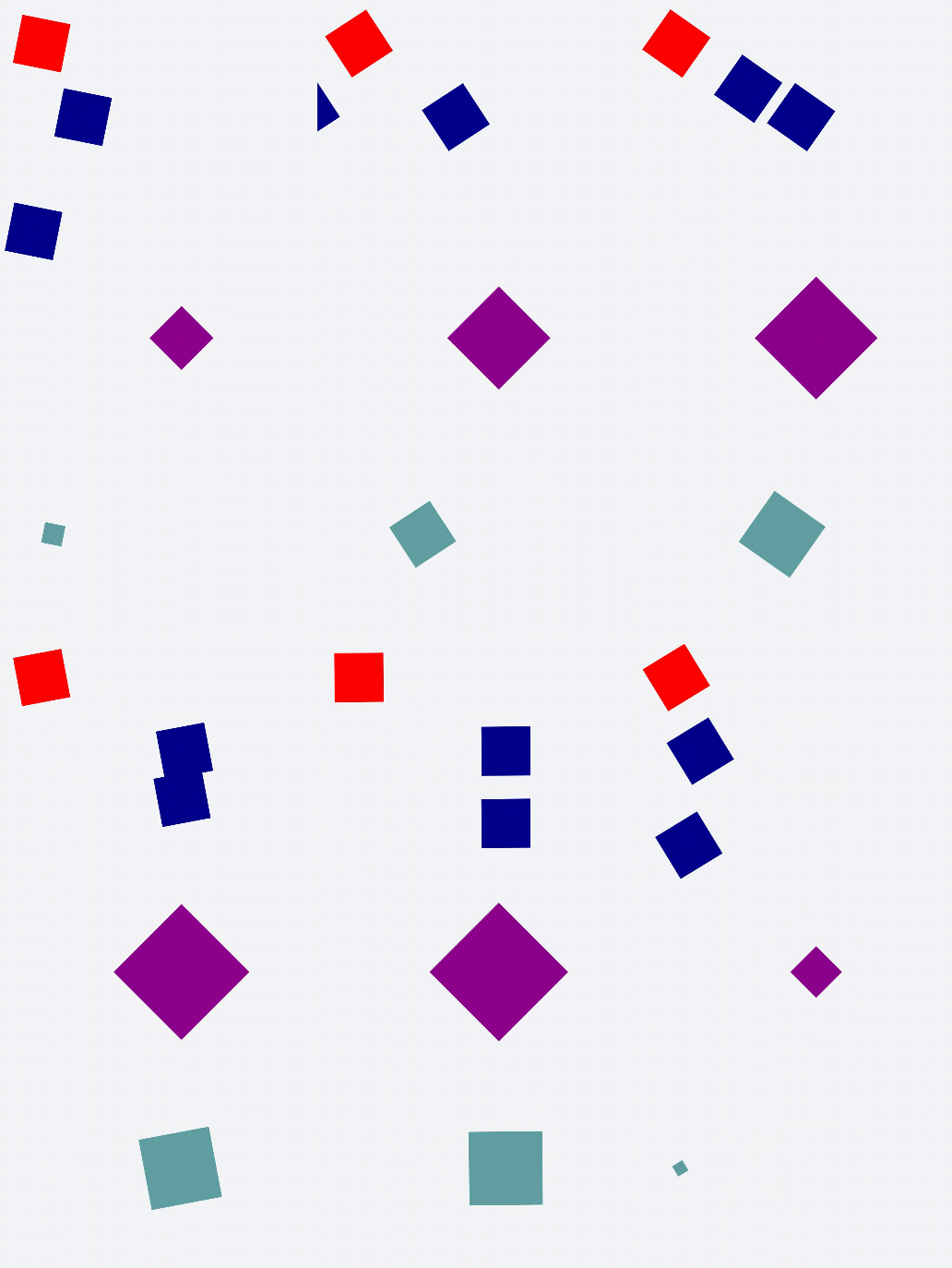
说明
● 当设置多个transform时,后续的transform值会把前面的覆盖掉。若想同时使用多个动画样式可用复合写法,例:transform: scale(1) rotate(0) translate(0,0)。
● transform进行复合写法时,变化样式内多个样式值顺序的不同会呈现不一样的动画效果。
● transform属性设置的样式值要一一对应,若前后不对应,则该动画不生效。若设置多个样式值则只会呈现出已对应值的动画效果。
开发指导—利用CSS动画实现HarmonyOS动效(一)的更多相关文章
- Web前端开发如何利用css样式来控制Html中的h1/h2/h3标签不换行
H1/H2/H3/H4标题标签常常使用在一个网页中唯一标题.重要栏目.重要标题等情形下. H1在一个网页中最好只使用一次,如对一个网页唯一标题使用.H2.H3.H4标签则可以在一个网页中多次出现, ...
- CSS动画--让div动起来
CSS动画 今天在写代码时候,遇到了css动画效果如何实现的问题,经过查阅和实践,总结出一下结论. transition transition 指定动画变化的对应属性 以及动画的执行时间. 例如:tr ...
- 高阶 CSS 技巧在复杂动效中的应用
最近我在 CodePen 上看到了这样一个有意思的动画: 整个动画效果是在一个标签内,借助了 SVG PATH 实现.其核心在于对渐变(Gradient)的究极利用. 完整的代码你可以看看这里 -- ...
- 如何利用 CSS 动画原理,在页面上表现日蚀现象
效果预览 在线演示 按下右侧的"点击预览"按钮可以在当前页面预览,点击链接可以全屏预览. https://codepen.io/comehope/pen/OELvrK 可交互视频教 ...
- 前端每日实战:36# 视频演示如何利用 CSS 动画原理,在页面上表现日蚀现象
效果预览 按下右侧的"点击预览"按钮可以在当前页面预览,点击链接可以全屏预览. https://codepen.io/comehope/pen/OELvrK 可交互视频教程 此视频 ...
- 网页开发中利用CSS以图换字的多中实现方法总汇
在h1标签中,新增span标签来保存标题内容,然后将其样式设置为display:none <style> h1 { width: 64px; height: 64px; backgroun ...
- js抛物线动画——加入购物车动效
参考文章:http://www.zhangxinxu.com/wordpress/2013/12/javascript-js-元素-抛物线-运动-动画/ parapola.js /*! * by zh ...
- css3动画简介以及动画库animate.css的使用
在这个年代,你要是不懂一点点css3的知识,你都不好意思说你是个美工.美你妹啊,请叫我前端工程师好不好.呃..好吧,攻城尸...呵呵,作为一个攻城尸,没有点高端大气上档次的东西怎么能行呢,那么css3 ...
- 利用CSS实现带相同间隔地无缝滚动动画
说明:因为在移动上主要利用CSS来做动画,所以没有考虑其他浏览器的兼容性,只有-webkit这个前缀,如果需要其他浏览器,请自行补齐. 首先解释一下什么是无缝滚动动画, 例如下面的例子 See the ...
- 转: css3动画简介以及动画库animate.css的使用
~~~ transition animation 和 animate.css 在这个年代,你要是不懂一点点css3的知识,你都不好意思说你是个美工.美你妹啊,请叫我前端工程师好不好.呃..好吧,攻城 ...
随机推荐
- 【Azure API 管理】APIM的容量指标(Capacity)数据异常高的情况记录
问题描述 APIM从标准版降级到基础版,在没有用户使用的情况,Capacity的指标平均显示在80%以上. 这是什么异常情况呢? 问题分析 APIM的容量指标(Capacity)是 API 管理实例中 ...
- 【Azure 应用服务】App Service / Function App 修改系统时区为中国时区的办法(Azure中所有服务的默认时间都为UTC时间,转换为北京时间需要+8小时)
问题描述 在Azure的 App Service / Function App 服务中,如果是在Windows系统中,可以通过添加Application Setting来转换为中国时间(WEBSITE ...
- RocketMQ(8) 消费幂等
1 什么是消费幂等 当出现消费者对某条消息重复消费的情况时,重复消费的结果与消费一次的结果是相同的,并且多次消 费并未对业务系统产生任何负面影响,那么这个消费过程就是消费幂等的. 幂等:若某操作执行多 ...
- Windows10 windows installer卸载或安装不了软件怎么办?
先说我的方法: 1.把安装出现问题的软件或者想要卸载的软件的安装目录下的所有文件都删除. 2.用清理软件清理一下垃圾,包括注册表,这里我自己使用的是火绒->安全工具- ...
- Leetcode 招商银行-03. 点燃木棒
用广度优先,暴力搜索.代码如下 import java.util.*; class Solution { public static void main(String[] args) { Soluti ...
- NJUPT自控第一次积分赛的小总结(一)题目感受
快开学了事情真的好多啊 -_- 忙完积分赛就赶紧要去复习期末了...线代还是依托答辩啥都不懂 先看题目吧,RT,我们队(我)选择的是第一题(仅仅是因为很简单罢啦) 一开始看题目,心想不就调调pid吗, ...
- 记录--一个好用的轮子 turn.js 实现仿真翻书的效果
这里给大家分享我在网上总结出来的一些知识,希望对大家有所帮助 国际惯例,官网链接 官网传送门 Github地址 github上有几个demos例子,介绍了基础用法. 我参考官网的例子,写了一个demo ...
- 记录--JavaScript 中有趣的 9 个常用编码套路
这里给大家分享我在网上总结出来的一些知识,希望对大家有所帮助 1️⃣ set对象:数组快速去重 常规情况下,我们想要筛选唯一值,一般会想到遍历数组然后逐个对比,或者使用成熟的库比如lodash之类的. ...
- 利用kali自带的msfvenom工具生成远程控制软件
一.首先还是得打开postgresql service postgresql start 然后让我们看看它有哪些功能 部分参数 -p 选择一个载荷,或者说一个模块吧. -i 载荷列表 -f 生成的文件 ...
- archlinux xfce 修改用户主目录名称
操作有风险,修改用户主目录名称后一些链接了旧主目录的的链接可能仍未修改.导致链接用不了,需要手动指定链接 1.删除指定用户保存的会话,未删除应该会导致修改用户主目录名称后进不去会话 2.切换到其它用户 ...