
renren-fast-vue@1.2.2 项目编译报错: build `gulp`
问题呈现:
PS D:\Code\Java\ideaWorkspace\renren-fast-vue> npm run build

> renren-fast-vue@1.2.2 build D:\Code\Java\ideaWorkspace\renren-fast-vue

> gulp

fs.js:36

} = primordials;

    ^

ReferenceError: primordials is not defined

    at fs.js:36:5

    at req_ (D:\Code\Java\ideaWorkspace\renren-fast-vue\node_modules\natives\index.js:143:24)

    at Object.req [as require] (D:\Code\Java\ideaWorkspace\renren-fast-vue\node_modules\natives\index.js:55:10)

    at Object.<anonymous> (D:\Code\Java\ideaWorkspace\renren-fast-vue\node_modules\graceful-fs\fs.js:1:37)

    at Module._compile (internal/modules/cjs/loader.js:1137:30)

    at Object.Module._extensions..js (internal/modules/cjs/loader.js:1157:10)

    at Module.load (internal/modules/cjs/loader.js:985:32)

    at Function.Module._load (internal/modules/cjs/loader.js:878:14)

    at Module.require (internal/modules/cjs/loader.js:1025:19)

npm ERR! errno 1

npm ERR! renren-fast-vue@1.2.2 build: `gulp`

npm ERR! Exit status 1

npm ERR!

npm ERR! Failed at the renren-fast-vue@1.2.2 build script.

npm ERR! This is probably not a problem with npm. There is likely additional logging output above.

npm ERR! A complete log of this run can be found in:
解决办法:
1.升级gulp到4.0
npm install -g gulp-cli

npm install --save-dev gulp@4
查看gulp 版本:
gulp -v

2.修改gulpfile.js文件
该文件在renren-fast-vue 项目的根目录

修改的原因时:gulp 4.0的语法跟以往版本不同。
修改前的gulpfile.js
var gulp = require('gulp');

var $    = require('gulp-load-plugins')();

var path = require('path');

var del  = require('del');

var distPath    = path.resolve('./dist');

var version     = ''; // 版本号

var versionPath = ''; // 版本号路径

var env         = ''; // 运行环境

// 创建版本号(年月日时分)

(function () {

  var d = new Date();

  var yy = d.getFullYear().toString().slice(2);

  var MM = d.getMonth() + 1 >= 10 ? (d.getMonth() + 1) : '0' + (d.getMonth() + 1);

  var DD = d.getDate() >= 10 ? d.getDate() : '0' + d.getDate();

  var h  = d.getHours() >= 10 ? d.getHours() : '0' + d.getHours();

  var mm = d.getMinutes() >= 10 ? d.getMinutes() : '0' + d.getMinutes();

  version = yy + MM + DD + h + mm;

  versionPath = distPath + '/' + version;

})();

// 编译

gulp.task('build', $.shell.task([ 'node build/build.js' ]));

// 创建版本号目录

gulp.task('create:versionCatalog', ['build'], function () {

  return gulp.src(`${distPath}/static/**/*`)

    .pipe(gulp.dest(`${versionPath}/static/`))

});

// 替换${versionPath}/static/js/manifest.js window.SITE_CONFIG.cdnUrl占位变量

gulp.task('replace:cdnUrl', ['create:versionCatalog'], function () {

  return gulp.src(`${versionPath}/static/js/manifest.js`)

    .pipe($.replace(new RegExp(`"${require('./config').build.assetsPublicPath}"`, 'g'), 'window.SITE_CONFIG.cdnUrl + "/"'))

    .pipe(gulp.dest(`${versionPath}/static/js/`))

});

// 替换${versionPath}/static/config/index-${env}.js window.SITE_CONFIG['version']配置变量

gulp.task('replace:version', ['create:versionCatalog'], function () {

  return gulp.src(`${versionPath}/static/config/index-${env}.js`)

    .pipe($.replace(/window.SITE_CONFIG\['version'\] = '.*'/g, `window.SITE_CONFIG['version'] = '${version}'`))

    .pipe(gulp.dest(`${versionPath}/static/config/`))

});

// 合并${versionPath}/static/config/[index-${env}, init].js 至 ${distPath}/config/index.js

gulp.task('concat:config', ['replace:version'], function () {

  return gulp.src([`${versionPath}/static/config/index-${env}.js`, `${versionPath}/static/config/init.js`])

    .pipe($.concat('index.js'))

    .pipe(gulp.dest(`${distPath}/config/`))

});

// 清空

gulp.task('clean', function () {

  return del([versionPath])

});

gulp.task('default', ['clean'], function () {

  // 获取环境配置

  env = process.env.npm_config_qa ? 'qa' : process.env.npm_config_uat ? 'uat' : 'prod'

  // 开始打包编译

  gulp.start(['build', 'create:versionCatalog', 'replace:cdnUrl', 'replace:version', 'concat:config'], function () {

    // 清除, 编译 / 处理项目中产生的文件

    del([`${distPath}/static`, `${versionPath}/static/config`])

  })

});
修改后的gulpfile.js
var gulp = require('gulp');

var $    = require('gulp-load-plugins')();

var path = require('path');

var del  = require('del');

var distPath    = path.resolve('./dist');

var version     = ''; // 版本号

var versionPath = ''; // 版本号路径

var env         = process.env.npm_config_qa ? 'qa' : process.env.npm_config_uat ? 'uat' : 'prod'; // 运行环境

// 创建版本号(年月日时分)

(function () {

  var d = new Date();

  var yy = d.getFullYear();

  var MM = d.getMonth() + 1 >= 10 ? (d.getMonth() + 1) : '0' + (d.getMonth() + 1);

  var DD = d.getDate() >= 10 ? d.getDate() : '0' + d.getDate();

  var h  = d.getHours() >= 10 ? d.getHours() : '0' + d.getHours();

  var mm = d.getMinutes() >= 10 ? d.getMinutes() : '0' + d.getMinutes();

  version = yy + MM + DD + h + mm;

  versionPath = distPath + '/' + version;

})();

// 编译

gulp.task('build', $.shell.task([ 'node build/build.js' ]));

// 创建版本号目录

gulp.task('create:versionCatalog', function () {

  return gulp.src(`${distPath}/static/**/*`)

    .pipe(gulp.dest(`${versionPath}/static/`))

});

// 替换${versionPath}/static/js/manifest.js window.SITE_CONFIG.cdnUrl占位变量

gulp.task('replace:cdnUrl', function () {

  return gulp.src(`${versionPath}/static/js/manifest.js`)

    .pipe($.replace(new RegExp(`"${require('./config').build.assetsPublicPath}"`, 'g'), 'window.SITE_CONFIG.cdnUrl + "/"'))

    .pipe(gulp.dest(`${versionPath}/static/js/`))

});

// 替换${versionPath}/static/config/index-${env}.js window.SITE_CONFIG['version']配置变量

gulp.task('replace:version', function () {

  return gulp.src(`${versionPath}/static/config/index-${env}.js`)

    .pipe($.replace(/window.SITE_CONFIG\['version'\] = '.*'/g, `window.SITE_CONFIG['version'] = '${version}'`))

    .pipe(gulp.dest(`${versionPath}/static/config/`))

});

// 合并${versionPath}/static/config/[index-${env}, init].js 至 ${distPath}/config/index.js

gulp.task('concat:config', function () {

  return gulp.src([`${versionPath}/static/config/index-${env}.js`, `${versionPath}/static/config/init.js`])

    .pipe($.concat('index.js'))

    .pipe(gulp.dest(`${distPath}/config/`))

});

//清除, 编译 / 处理项目中产生的文件

gulp.task('cleanBuild', function () {

  return del([`${distPath}/static`, `${versionPath}/static/config`])

});

// 清空

gulp.task('clean', function () {

  return del([versionPath])

});

//gulp.series|4.0 依赖

//gulp.parallel|4.0 多个依赖嵌套

gulp.task('default',gulp.series(gulp.series('build','create:versionCatalog','replace:cdnUrl','replace:version','concat:config','cleanBuild')));
3.最后编译打包
1. npm run build

2. npm install -g serve

3. serve dist

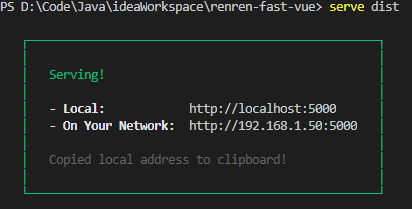
到目前为止 编译打包成功!
win10遇到的一些问题
如果gulp -v显示报错

删除文件gulp.ps1文件:C:\Users\D\AppData\Roaming\npm\gulp.ps1
或用管理员身份打开:Windows Powershell ;
然后输入:
set-ExecutionPolicy RemoteSigned
策略选择:选择Y 或者A
转载指明出处:https://www.cnblogs.com/dennyLee2025/p/13686140.html
renren-fast-vue@1.2.2 项目编译报错: build `gulp`的更多相关文章
- 【vue】项目编译报错 Error: No PostCSS Config found in...
问题描述: 项目在本地运行不报错,上传到 GitHub 之后,再 clone 到本地,执行: npm install 安装完成之后再执行: npm run dev 这时报错 Error: No Pos ...
- 安装asp.net mvc4后mvc3项目编译报错
安装asp.net mvc4之后,之前的mvc3项目编译时报这个错“The type System.Web.Mvc.ModelClientValidationRule exists in both c ...
- maven项目编译报错处理
1.问题一: [ERROR] Failed to execute goal on project data-common: Could not resolve dependencies for pro ...
- 【vue】项目编译报错‘npm ERR! **@**dev: `webpack-dev-server --inline --progress --config ’’
关于npm ERR! **@**dev: `webpack-dev-server --inline --progress --config‘ 原因:这是新版webpack存在的BUG,卸载现有的新版本 ...
- maven项目编译报错:Type Dynamic Web Module 3.0 requires Java 1.6 or newer.
在maven的pom.xml文件中增加: <build> <plugins> <plugin> <groupId>org.a ...
- idea 编译报错 Build completed with 1 error and 0 warnings in 2 s 113 ms
settings里java compiler改成正确版本 project structure里同样如此
- VUE编译报错 Component template should contain exactly one root element. If you are using v-if on multiple elements, use v-else-if to chain them instead
背景: 在使用VUE添加标签的时候编译报错,报错如下: Component template should contain exactly one root element. If you are u ...
- nuxtjs在vue组件中使用window对象编译报错的解决方法
我们知道nuxtjs是做服务端渲染的,他有很多声明周期是运行在服务端的,以及正常的vue声明周期mounted之前均是在服务端运行的,那么服务端是没有比如window对象的location.navag ...
- maven项目检出后报错(包括编译报错和运行报错)的常见检查处理方式
maven项目检出后报错(包括编译报错和运行报错)的常见检查处理方式: 1.更改项目的jdk为我们安装的jdk2.更改build配置里的 output folder 目录为 xxx项目名/target ...
- 【maven】【IDEA】idea中使用maven编译项目,报错java: 错误: 找不到符号 【2】
=================================================================================== idea中使用maven编译项目 ...
随机推荐
- 【VSCode】秒下vscode
有时从vscode官网下载速度奇慢甚至失败,介绍一种方法可以秒下 进入官网选择要下载的版本 像我的电脑,下载网址根本打不开 修改下载网址,替换下载地址中红框字符串:vscode.cdn.azure.c ...
- java - 数组降序输出
package array; import java.util.Arrays; /** * 降序 */ public class Reverse { public static void main(S ...
- mysql-数值函数-取整-保留小数位-求余数
- [转帖]JVM 输出 GC 日志导致 JVM 卡住,我 TM 人傻了
https://www.jianshu.com/p/51380e04eab1 最近,我们升级了 Java 17.后来,我们的 k8s 运维团队为了优化我们的应用日志采集, 将我们所有 pod (你可以 ...
- [转帖]Shell三剑客之sed
目录 Shell三剑客 sed工具 sed 流编辑器的工作过程 sed命令格式与选项操作符 sed命令的常用选项 sed命令的打印功能 默认打印方式 sed命令的寻址打印 文本模式过滤行内容 sed的 ...
- [转帖]长篇图解 etcd 核心应用场景及编码实战
https://xie.infoq.cn/article/3329de088beb60f5803855895 一.白话 etcd 与 zookeeper 二.etcd 的 4 个核心机制 三.Lead ...
- [转帖]Java和Scala的前世今生
第一部分:Java 计算机语言介绍 第一代语言:机器语言.指令以二进制代码形式存在 第二代语言:汇编语言.使用助记符表示一条机器指令 第三代语言:高级语言 C.Pascal.Fortran面向过程的语 ...
- [转帖]将nginx.conf文件的内容拆分成多个
nginx的如果有多个server模块都配置在同一个nginx.conf文件会显得比较臃肿,后续维护起来也会比较困难,所以可以将内容写入到多个配置文件中然后在nginx.conf文件中通过includ ...
- [转帖]新一代垃圾回收器ZGC的探索与实践
1. 引入 1.1 GC之痛 很多低延迟高可用Java服务的系统可用性经常受GC停顿的困扰. GC停顿指垃圾回收期间STW(Stop The World),当STW时,所有应用线程停止活动,等待GC停 ...
- runc网络与systemd管理runc应用
1. 创建网络命名空间 ip netns add <ns> # ns是自定义网络空间名 # 例如: ip netns add haproxy # 创建一个给 haproxy使用的网络命名空 ...